
Why embeds slow down your page
Third-party embeds let you delegate parts of your page to another provider — typically as an <iframe> that pulls in their markup, scripts, and stylesheets. While convenient, those embeds can quietly degrade performance in several ways:
- They can block rendering while their resources load.
- They compete with your own critical assets for bandwidth and network connections.
- They can shift the layout as they appear, hurting Cumulative Layout Shift (a Core Web Vitals metric).
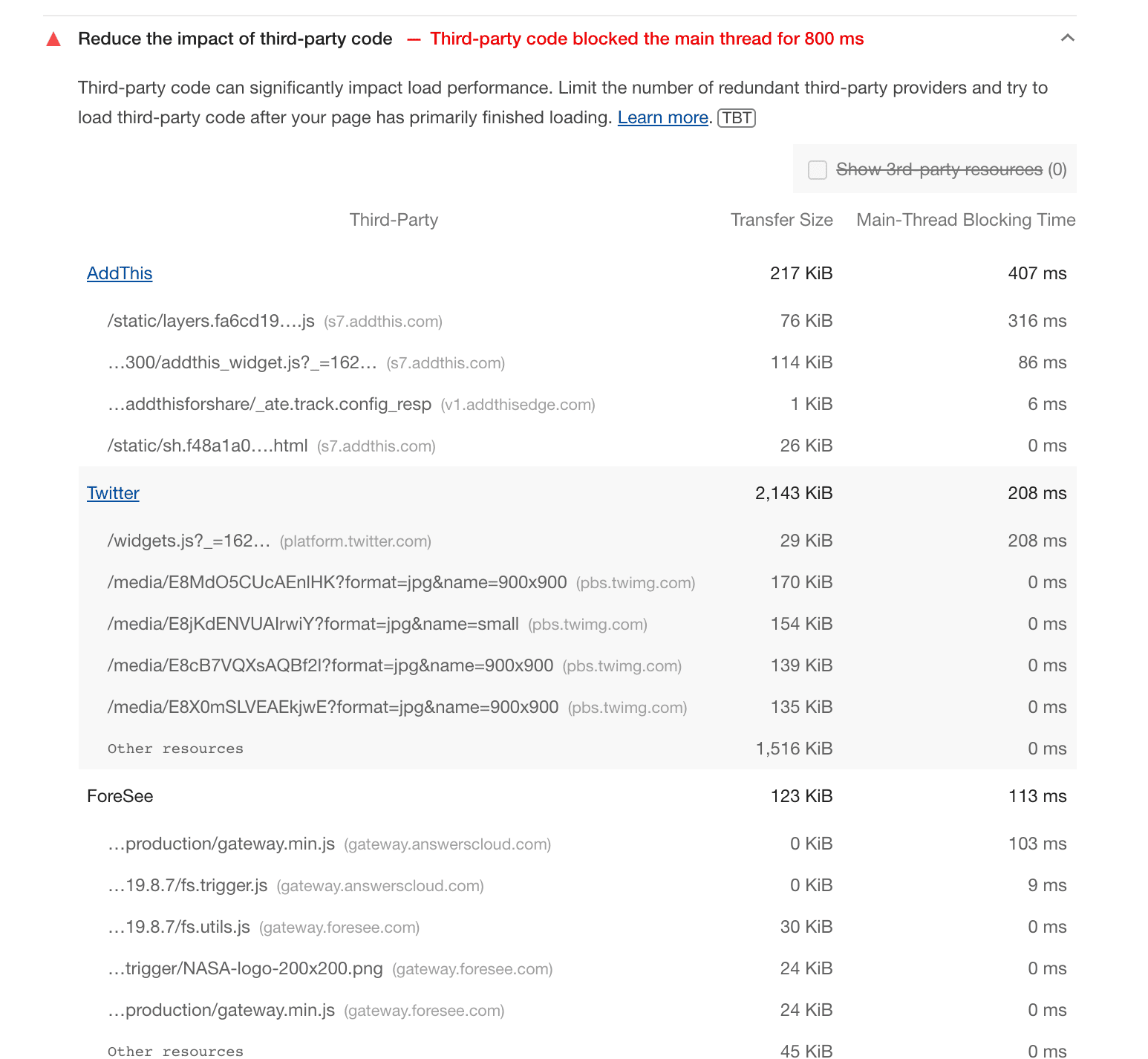
- Their JavaScript often runs into the hundreds of kilobytes — sometimes reaching 2 MB — and keeps the main thread occupied during execution.
Media-heavy news, sports, and entertainment sites often embed video players beside text. Brands with active social feeds embed those timelines to boost engagement. Venue, restaurant, and park pages drop in maps. In every case, the embed can delay first-party content and make the page feel slower than it should.
Measuring the cost of third-party code
Because embed source code changes over time, it is worth auditing periodically. Two built-in browser tools help:
- Lighthouse: The "Reduce the impact of third-party code" audit lists every third-party provider on the page, along with its payload size and main-thread blocking time.
- Chrome DevTools: You can run the same Lighthouse audit from the Lighthouse tab.
These audits also reveal any dead weight — scripts or embeds you no longer need can be dropped outright.
Loading embeds efficiently
What follows is a set of techniques to cut the performance tax of embeds without losing their functionality. Each addresses a different failure mode: render blocking, heavy initial scripts, or layout instability.
Lazy-load below-the-fold embeds
If an embed is not visible in the initial viewport, defer its load. The standard approach is native lazy loading with loading="lazy" on the <iframe>, but an interactive lazy-loading pattern like Facade gives fuller control — it swaps in a lightweight thumbnail or preview that only boots the real embed when a user clicks.
Reserve space to prevent layout shift
Embeds that load late without allocated space force layout shift. Keep the space open by:
- Setting fixed
aspect-ratioor explicit width/height dimensions - Matching the embed's typical aspect ratio (for example, 16:9 for video)
- Placing placeholder styling that holds the same dimensions until the iframe arrives
Defer script injection
Providers that dynamically inject an iframe via their script snippet should be loaded via async or deferred loading. If the script is genuinely optional for initial interaction, push it into the idle period with techniques like requestIdleCallback. Keep in mind that some third-party scripts reset these mechanisms, so re-check after any provider update.
Limit third-party connections
Each embed opens its own set of network connections. Reducing the number of unique origins keeps connection overhead low — combine related embeds from the same provider when possible. Dns-prefetch, preconnect, and other resource hints can speed up direct connections, but they are no substitute for fewer requests.
Use the Layout Shift Terminator tool
For popular embeds, consider the Layout Shift Terminator tool. It wraps the embed and holds the needed space, cutting down layout shifts for video and other common embed types. It stays maintained for key providers and can be dropped into place with minimal markup. This is an often-overlooked drop-in safeguard against one of the more user-visible side effects of third-party code.
Cutting the performance cost of third-party embeds
Third-party embeds ship valuable functionality, but they can weigh down page load. A few structural choices and loading tactics can keep that functionality without letting it dominate your performance budget.
Load order matters
On most pages the primary first-party content should arrive first, with embeds such as social feeds or ads appearing later or in sidebars. Third-party scripts can block that sequence, because the browser pauses DOM construction while it executes script. Position third-party <script> tags after the essential first-party tags and load them with async or defer so they don't hold up parsing.
<head>
   <title>Order of Things</title>
   <link rel="stylesheet" media="screen" href="https://web.dev/assets/application.css">
   <script src="index.js"></script>
   <script src="https://example.com/3p-library.js" async></script>
</head>
Delay what isn't visible yet
Because embeds tend to sit below the fold, you can defer their downloads until the user actually scrolls near them. This reduces initial load work and saves bytes for people on metered connections. Lazy-loading is the umbrella term for deferring resources until they are needed; the right approach depends on the embed type.
Native iframe lazy-loading
For embeds delivered through <iframe>, the loading attribute is supported in all modern browsers and works as a progressive enhancement.
<iframe src="https://example.com"

       width="600"
       height="400">
</iframe>
The attribute takes three values:
lazy: the browser defers the iframe until it approaches the viewport. Use when the iframe is a good lazy-loading candidate.eager: load immediately. This is the default when the attribute is absent, except in Chrome Lite mode.auto: let the browser decide.
Browsers can differ in the distance-from-viewport threshold at which they start fetching. Two common embed examples:
- YouTube: add
loadingto the embed iframe. This can save roughly 500 KB on initial load.
<iframe src="https://www.youtube.com/embed/aKydtOXW8mI"
   width="560" height="315"

   title="YouTube video player"
   frameborder="0"
   allow="accelerometer; autoplay; clipboard-write;
            encrypted-media; gyroscope; picture-in-picture"
   allowfullscreen>
</iframe>
- Google Maps: add
loadingto the Embed API iframe code.
<iframe src="https://www.google.com/maps/embed/v1/place?key=API_KEY&q=PLACE_ID"
   width="600" height="450"
   style="border:0;"
   allowfullscreen=""
  >
</iframe>
Consistent control with lazysizes
Native lazy-loading can be inconsistent, since the browser weighs viewport distance alongside signals such as effective connection type and Lite mode. If you need predictable thresholds across browsers, the lazysizes library uses the Intersection Observer API to detect element visibility.
<script src="lazysizes.min.js" async></script>

<iframe
   width="560" height="315"
   class="lazyload"
   title="YouTube video player"
   frameborder="0"
   allow="accelerometer; autoplay; clipboard-write;
        encrypted-media; gyroscope; picture-in-picture"
   allowfullscreen>
</iframe>
Provider-specific options
Facebook social plugins support a data-lazy setting. Setting it to true makes the plugin apply the browser's lazy-loading via the loading="lazy" iframe attribute.
Instagram embeds consist of markup plus a script that injects an iframe greater than 100 KB gzipped. WordPress plugins such as WPZoom and Elfsight expose lazy-loading options for the embed.
Facades when interaction isn't guaranteed
Not every visitor will play a video, open a map, or use a chat widget. A facade is a static stand-in that looks like the real embed but carries almost none of its weight. Facades give you a way to present value without paying the full cost for everyone.
Static image stand-ins
For map embeds that don't need interactivity, capture a static image. Use DevTools Capture node screenshot on the iframe, then serve the PNG — or convert it to WebP for better compression.

Generated image facades
Maps Static API: An HTTP request returns a map image that you place in an
<img>tag'ssrc. The URL requires a Google Maps API key; the Static map maker tool configures URL parameters and outputs the image code in real time. Wrapping the image in a link keeps the interactive map one click away.<a href="https://www.google.com/maps/place/Albany,+NY/"> <img src="https://maps.googleapis.com/maps/api/staticmap?center=Albany,+NY&zoom=13&scale=1&size=600x300&maptype=roadmap&format=png&visual_refresh=true" alt="Google Map of Albany, NY"> </a>Twitter screenshots: Tools like Tweetpik accept a tweet URL and return an image of its content, with parameters for background, colors, borders, and dimensions.
Click-to-load facades
Click-to-load starts with a facade, then swaps in the real embed on interaction — the import-on-interaction pattern. The implementation follows three steps:
- On page load: the page shows the static facade.
- On mouseover: the facade preconnects to the embed provider.
- On click: the facade is replaced by the actual third-party product.
This works for video players, chat widgets, authentication services, and social widgets. YouTube thumbnails with a play button are the familiar example: the video player loads only after the click.
A few open-source facades cover the common cases:
YouTube: The lite-youtube-embed component looks like the real player and is significantly faster to load. Add it through a
<lite-youtube>tag, and pass custom YouTube parameters through theparamsattribute. Alternatives include lite-youtube, lite-vimeo-embed, and lite-vimeo.<lite-youtube videoid="ogfYd705cRs" playlabel="Play: Keynote (Google I/O '18)"></lite-youtube>Chat widgets: React live chat loader renders a lightweight button in place of the widget. It works with providers such as Intercom, Help Scout, and Messenger. The look-alike loads quickly and can be replaced on hover, click, or page idle. The Postmark case study documents the performance gains.
When all else fails: drop the embed
If an embed still drags down performance and none of the above techniques fit, the most direct option is to remove it. Users can still reach the content through a link marked with target="_blank" so it opens in a new tab.
Reserving space and preventing layout shift
Dynamically loading embedded content can improve initial page load, but it introduces a new problem: layout shift. When content loads after the surrounding page has rendered, it can push existing content around, creating a jarring experience. Cumulative Layout Shift (CLS) is the metric that tracks how often these shifts occur and how severe they are.
The root cause of layout shift from embeds is the browser not knowing how much space to reserve before the third-party content arrives. You can solve this by declaring dimensions for the embed. For iframes, specify the width and height attributes; for other content, wrap the embed in a container with a fixed size.
Some providers, like YouTube, Google Maps, and Facebook, include correct dimensions in their generated embed code. Others do not. A provider may inject an iframe with only percentage-based dimensions, or no dimensions at all.
When a provider omits the expected size, you can inspect the rendered page using DevTools to find the actual dimensions of the injected iframe. Once you have those values, you can assign them to a containing element, ensuring the space is reserved from the start and no additional layout shift occurs on load.
Automating layout shift prevention
Manually inspecting embed dimensions across a range of viewport sizes is tedious and error-prone—especially since most embeds render responsively. The Layout Shift Terminator tool addresses this problem directly.
Layout Shift Terminator is an automated tool that helps reduce layout shifts for common embeds like those from Twitter and Facebook. It performs the following steps:
- Loads the embed in a client-side iframe.
- Resizes that iframe to match various popular viewport sizes.
- Records the embed's dimensions for each viewport.
- Generates appropriate media queries and container queries based on those captured dimensions.
- Wraps the embed markup in a container with a
min-heightset by those queries, and removes that style once the embed initializes. - Produces an optimized embed snippet you can use in place of the original code.
The generated snippet handles the full lifecycle: it reserves space during load and releases the constraint when the content is ready.
The tool is in beta, but it offers a practical path to significantly reducing CLS caused by popular embeds. Feedback is welcome on the Layout Shift Terminator GitHub project.
Third-party embeds deliver real value, but that value can be undermined if they degrade performance. Because embeds vary in their position, relevance, and size, each one warrants a deliberate loading strategy—focused on measuring the impact and choosing the right approach based on the role the embed plays on the page.



