
The Figma agent is now generally available, and teams at Uber, Granola, and Atlassian are using it to sustain high-quality, fast-moving work. Since the agent's launch, patterns have emerged in how teams put it to use: automating busywork, building and maintaining design systems, and expanding creative expression. Because the agent lives where the work already happens, teams avoid reinventing processes or toggling between tools.
What changed in the general release
The agent exits beta with improvements to output quality: it follows instructions more reliably and handles longer-running tasks. In human-graded evals with professional designers, it wins in ~60%+ of cases. New and improved capabilities include:
- Guidelines: markdown files that library owners upload to a Figma library to give the agent extra context on how to use their design system. A rule such as "Only use red for actions like
Delete, never just for decoration" is picked up automatically when a product builder asks the agent to design with that library. - Retrieving and inserting Figma context from across the platform—FigJam stickies, Figma Slides copy, Figma Design frames.
- Following collaborators' agents as they work on the canvas, for a multiplayer experience.
Uber: component documentation at scale
Uber's design systems team ships components across seven platforms. The hard part is communication: a single component may carry dozens of states, variants, slots, booleans, and enums, and misreading its scope means rework later. Staff Product Designer Ian Guisard and Senior Product Designer Niloo Bakhshi built a workflow in which the Figma agent documents and maintains the design system. Niloo describes her work as deeply visual and detail-obsessed, much of it spent in Figma prototyping the vision for new components. Turning that into actionable specs used to be slow and manual; Ian now partners with her on dev-ready documentation using the agent and a set of skills he wrote. /create-anatomy exposes component structure, while /create-color maps colors to tokens and flags hard-coded values—saving engineers from digging through layers and cutting back-and-forth across platforms.
Published in Figma Community, the skills can be run by anyone on their own components. A task is created, runs in the background, and the designer keeps working. Ian notes that the skills serve designers as well as engineers: when he accidentally modified a hard-coded color, the agent pointed out the problem clearly—useful as a reference point in handoff. The efficiency gains are substantial: documentation that took multiple people months is now published by a single designer in an afternoon. "It's made us a lot more efficient, and allows us to ship higher-quality components in a fraction of the time," Ian says. Skills also run where the work already lives—the component and its context are in the file—so there's no need to move work elsewhere or learn a separate workflow.
Granola: staying present in the feedback loop
Pro tip: connect the agent to tools you already use, including Amplitude, Asana, Atlassian, Granola, Notion, and Slack.
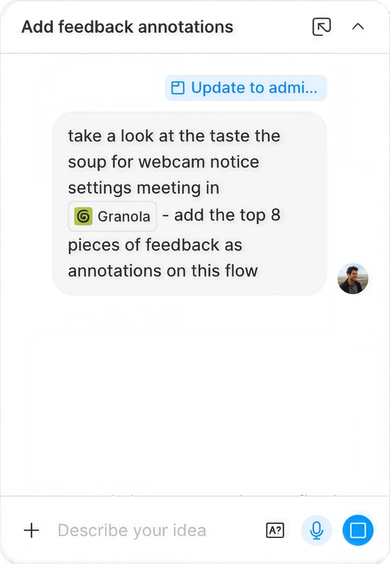
Granola, the AI notetaking app, keeps a small team with an experimentation culture. Product Designer Paavan Buddhdev finds it useful to spread 10 versions of a design across the canvas while exploring, and credits the agent with speeding up iteration and feedback absorption so he can focus on big-picture work—"a massive time saver." Via the Granola connector, he has the agent annotate the canvas with feedback pulled from meeting notes and transcripts, helpful in routine crits and in the team's "Taste the Soup" prototyping sessions alike. Previously he typed notes frantically during meetings to keep a to-do list; now he can be present and respond, confident he won't miss anything important.
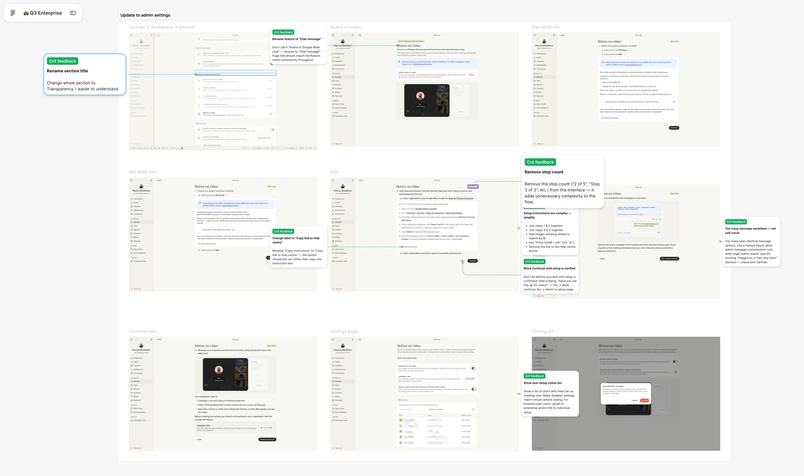
Automation keeps momentum going elsewhere too. Paavan brings existing Granola screens onto the canvas with the Figma Chrome extension, then has the agent clean up connections to Oats, the team's component library. He also requests copy variations, such as "Give me 30 ways to phrase this button text." "It helps you do the things that you don't really want to do," he says. With tactical friction reduced, more time goes to exploring solutions, talking to users, and pressure-testing the work. "The quicker you can get a design in front of a user, the better," he says. "So everything I do with the agent is in service of that."
It's been a massive time saver.“It's been a massive time saver.”
Skills to start with
For design-system work: /create-color maps fills, strokes, shadows, and gradients to tokens; /create-anatomy diagrams component and subcomponent structure; /create-api gives an API overview with configuration examples; /component-handoff builds a documentation frame for selected components; /analyze-components audits every component on a screen for issues.
For busywork: /do-try-consider sorts page comments into a prioritized framework, and /ui-state-expander expands a screen, component, or flow into a full set of states.
For expression: /shader-starter builds a shader fill or effect through guided prompts, /ease-like-miggi swaps every easing for a matching "Mig" curve, and /find-animation-opportunities scans designs for places to add motion with exact values.
Atlassian: motion as a system, not a handoff
Atlassian treats motion as part of its brand expression and user experience, yet animated work often fails to ship. The company's response was to package motion assets as reusable components in Figma, letting a small motion design team extend its reach. The Figma agent works as part of that system. Senior Product Designer Alexandra Pereira describes it as turning animated illustrations "from a specialist handoff into a system capability," while keeping the craft of motion intact.
In practice, a designer building an onboarding modal can drop an animated illustration from a library into a component slot. When the context demands something bespoke, the agent supports iteration on easing and duration to hit the intended feel, and the output is constrained to Atlassian Design System variables. Pereira frames the guardrails as the point: "Being able to generate within guardrails really matters for enterprise systems," she says, citing consistency, accessibility and implementation quality alongside speed.
Designers with less motion fluency can therefore ship expressive, on-brand animation. Product Designer Davy Fung asked the agent to animate a Slack communication banner, then solicited its feedback on what worked and what didn't. "I wouldn't normally be able to do this at all," he says, adding that for designers working with static designs, "our skillsets have increased."
Because motion tooling now sits on the canvas the wider team already uses, reaching a solid starting point is less of a hurdle. Lead Motion Designer Maxwell Hathaway expects many people to sharpen their motion taste there, refining it in the same place they are accustomed to making design decisions.
For designers working with static designs, our skillsets have increased.“For designers working with static designs, our skillsets have increased.”
Extending the same approach
The system doesn't stop at asset libraries. The agent can also be used to build and share generative plugins and shaders, giving teams custom, reusable effects and styles; Figma Education Designer Jamie Haberman's kinetic type plugin, built with the agent, is one demonstration.
Availability
Full seat users on Professional, Organization and Enterprise plans, plus some Education plans, have access to the Figma agent, with limited availability on the Starter plan. Collab, Dev and View seats can use it inside their drafts.