
A playground for DNS experiments
DNS is one of those systems that’s easy to use but hard to truly understand, largely because so much of what happens is invisible. A new tool called Mess With DNS aims to fix that by giving you a real subdomain, a real authoritative DNS server, and a live view of every query hitting your records. It’s a sandbox where you can break things on purpose, watch what happens, and learn from the results.
Why DNS is hard to experiment with
There are a few practical barriers to hands-on DNS experimentation. You might not have a domain to play with, or you might not want to risk breaking production records. Even if you do make changes, the queries happening behind the scenes are invisible to you, making it hard to connect cause and effect. And without a clear idea of what to try, you might not know which experiments would produce interesting results.
Mess With DNS addresses each of these:
- It gives you a free, disposable subdomain (like
ocean7.messwithdns.com) that you control entirely. - It streams all incoming DNS queries for your subdomain to your browser, so you can watch what different resolvers actually do.
- It includes a curated list of experiments, ranging from basic tutorials to intentionally “weird” scenarios.
Three flavors of experiments
The “weird” experiments are the ones that break things on purpose, modeled after real-world DNS frustrations. Negative caching, for example, can make you wait an hour for a website to appear just because you visited it once by accident. Different resolvers can hold different cached records, meaning two people query the same name and get different answers. Rather than avoiding these headaches, the tool encourages you to cause them intentionally under safe conditions.
The “tutorial” experiments walk you through setting basic records, useful if you’re new to DNS or just want to see how the site works. The “useful” experiments let you perform realistic tasks like setting up a website or email. More of the “useful” variety may be added later.
One important caveat that emerged during playtesting: the “weird” experiments don’t produce identical results for everyone, because different people use different DNS resolvers. A negative caching experiment that works as documented for one person behaved completely differently for another using Cloudflare’s 1.1.1.1. That inconsistency is a fundamental fact about DNS, and the tool, rather than hiding it, simply lets it be visible.
Explaining what’s behind the scenes
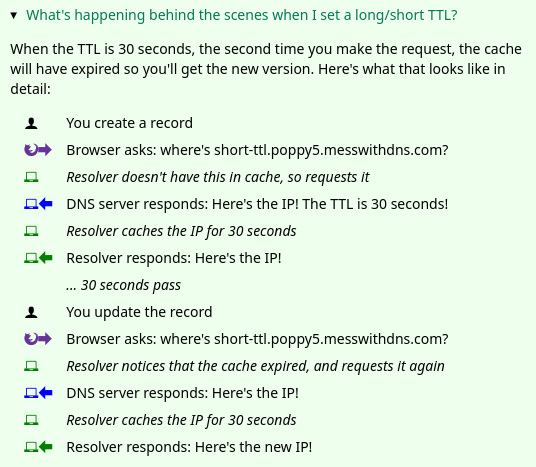
Some experiments are not self-explanatory, so the site includes short diagrams at the end of each one showing the interaction between your computer, your resolver, and the authoritative server. Icons represent each actor, replacing the usual comic-style explanation with something easier to edit.
Design through user testing
The site was built in collaboration with game designer Marie Claire LeBlanc Flanagan, and the design process leaned heavily on observing real users. In five testing sessions, participants narrated their thoughts as they worked through the site. Each session produced roughly 50 bullet points of notes, which were distilled into concrete changes. Three improvements stand out:
The sidebar. Originally, the list of experiments lived in a sidebar that users found confusing. It was replaced with a design that isolates information about each experiment. The change is implemented entirely in pure CSS using the <details> tag.
The terminology. Users frequently stumbled over DNS terms like “A record” and “resolver,” so the site now includes a short DNS dictionary for quick reference.
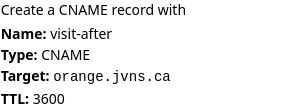
The instructions. An instruction like “Create a CNAME record that points visit-after.fox3.messwithdns.com at orange.jvns.ca with a TTL of 3600” took users too long to parse. Rewriting it to visually map each value to its form field made it dramatically clearer.
Frontend tests that go deep
A project of this size required more frontend rigor than the usual “write code, test by hand, hope” approach. The solution was Playwright, used for integration tests that exercise the full stack. One representative test sends a DNS request to the backend and verifies that it appears on the frontend. These tests have caught backend bugs during refactoring, even though they are nominally frontend tests. They remain occasionally flaky for unclear reasons, but are easy to write and broadly useful.
test('empty dns request gets streamed', async ({ page }) => {
    await page.goto('http://localhost:8080')
    await page.click('#start-experimenting');
    const subdomain = await getSubdomain(page);
    const fullName = 'asdf.' + subdomain + '.messwithdns.com.'
    await getIp(fullName);
    await expect(page.locator('.request-name')).toHaveText(fullName);
    await expect(page.locator('.request-host')).toHaveText('localhost.lan.');
    await expect(page.locator('.request-response')).toContainText('Code: NXDOMAIN');
});
A hand-rolled authoritative DNS server
The backend includes an authoritative DNS server built on the miekg/dns library, with an implementation strategy that starts by copying a minimal example and then fixing what breaks. The resulting ServeDNS function follows a simplified algorithm rather than the full DNS RFCs:
- Return
NXDOMAINwhen no records exist for a name; otherwise returnNOERROR. - Return
REFUSEDfor names that do not end with.messwithdns.com.. - Return
SERVFAILon internal errors like database connection problems. - If a
CNAMErecord exists for a name, return it regardless of the query type. - For
HTTPSqueries, return any A/AAAA records on file, mirroring what Cloudflare appears to do. - Otherwise, return any records matching the requested type.
Some RFC rules are skipped, like preventing a CNAME from coexisting with an A record for the same name. So far this laxity has not caused major problems.
func (handle *handler) ServeDNS(w dns.ResponseWriter, request *dns.Msg) {
    // look up records in the database
	msg := dnsResponse(handle.db, request)
	w.WriteMsg(msg)

    // Save the request to the database and send it to any clients who have a websocket open
	remote_addr := w.RemoteAddr().(*net.UDPAddr).IP
	LogRequest(handle.db, r, msg, remote_addr, lookupHost(handle.ipRanges, remote_addr))
}
Streaming queries with Go channels
Live query streaming was originally envisioned with pub/sub systems like Redis or Google Pub/Sub. The implementation instead uses roughly 60 lines of Go channels. Each open websocket creates a Go channel stored in a map; every incoming DNS request is pushed to all channels waiting for it. This avoids managing a separate streaming service and works reliably than an earlier approach with server-sent events that failed on one friend’s machine.
The tradeoff is that the DNS server and HTTP server must live in a single process, meaning there is exactly one DNS server, located in Virginia. Users in distant regions see slower response times, an acceptable cost for an educational tool that avoids the complexity of distributed systems. Static frontend files are served through a CDN.
Identifying who’s querying
Each incoming DNS query comes from an IP address, and the site identifies the owner of that address so users can see whether it is Google, Cloudflare, or an ISP. The lookup starts with a reverse DNS query and falls back to a free IP-to-ASN database. A binary search over that database, implemented mostly by GitHub Copilot, resolves ownership quickly without an external API dependency.
Storage and security decisions
The application is write-heavy, logging every DNS request. That ruled out an initial choice of PlanetScale, whose free tier allows 10 million writes per month. After accumulating 100,000 queries during solo testing, the decision was made to move to a small Postgres instance with a 10 GB volume. Old requests are unnecessary and could be purged hourly without consequence, since the data is not valuable for long.
Security concerns shaped the design. Initially, anyone could set any record on any messwithdns.com subdomain, and no login was required. Adding GitHub OAuth reduced friction but excluded users without GitHub accounts. The final design assigns a random, never-before-used subdomain (like ocean8) to each user, stores it in a table so nobody else can take it, and sends a secure cookie via gorilla/securecookie. This prevents accidental collisions and phishing subdomains while keeping domains short and easy to type.
As an extra layer, the website is hosted on messwithdns.net, separate from the messwithdns.com domain where users can set records. Even if someone creates a malicious record on messwithdns.com, it cannot take down the main site.
Static test targets
For experiments requiring web destinations, two static IPv4 addresses were set up: orange.jvns.ca, which shows an orange, and purple.jvns.ca, which shows grapes. Each has a dedicated IP because it may be accessed through many different hostnames, making domain-based routing impossible.
The backend code is available on GitHub, and the site itself is live at https://messwithdns.net.



