
Getting Your Content Ready for HTTP/3
For most websites, the shift to HTTP/3 should not require major changes to the content itself. The protocol was designed to be as compatible as possible with its predecessor, and the same resources that work over HTTP/2 will work over HTTP/3 without modification. Because HTTP/3 is layered on top of QUIC instead of TCP, it behaves differently under the hood, but the semantics of how requests and responses are handled remain largely the same, this includes things like methods, status codes, and headers.
That said, there is one key difference that applies to some sites: HTTP/3 does not support the HTTP/2-specific compression scheme HPACK and instead uses QPACK. This does not require changes to your web resources, only to the server and client implementations that negotiate the protocol. Your content will be compressed the same way at the application layer. In short, the impact on your existing content strategy is minimal.
Deploying HTTP/3 on Your Server
The more significant challenge lies in enabling HTTP/3 on the server side. While most major browsers have supported HTTP/3 for a while, many have it enabled by default now, off-the-shelf web server software has been slower to catch up. At this stage, you will likely need to rely on a CDN that offers HTTP/3 support, or you will need to compile and configure a custom build of your web server with the necessary modules. For a production environment, the CDN route is often the most practical option because it avoids the complexity of maintaining a custom server build.
If you prefer to set up your own infrastructure, this typically involves compiling a server like nginx or Apache with a QUIC-enabled TLS library. Be prepared to spend significant time on configuration. You will need to handle the new UDP listener ports and ensure your firewall policies keep the QUIC traffic flowing. Testing also gets more complex because many debugging tools and load balancers have yet to fully support the protocol.
One of the biggest stumbling blocks as you deploy is knowing whether your changes and configurations are actually working. Packet captures are a good starting point, but a robust testing strategy will need more than that. One of the key advantages of HTTP/3 is that the protocol is designed with observability in mind.
Tools for Testing and Evaluation
Evaluating the performance impact of HTTP/3 is tricky, primarily because the tools that we use for HTTP/2 performance testing are not yet mature for the new protocols. For core debugging and functionality checks, you can often use the browser’s built-in developer tools to see if requests are served over HTTP/3. For more detailed performance checks, you will likely need a suite of specialized open-source tools that have been developed for HTTP/3. Many of them focus on checking specific protocol mechanics, such as connection migration or loss recovery, and can give you insight into how the optimization features of QUIC are impacting your traffic.
The most practical advice for the immediate future is to enable HTTP/3 where possible — ideally via a CDN — and rely on your existing HTTP/2 and HTTP/1.1 setups as a fallback. You can test with the available tools, but do not feel the need to overhaul your testing infrastructure overnight. As the ecosystem matures over the coming months, expect tooling to catch up with the protocol.
The Takeaway: Adopt Early, But Pragmatically
The important part is to start experimenting with HTTP/3 now. The protocol is close to its final form, and the client ecosystem is already there. Even if your server setup is not fully ready, you can profile performance using cloud-based testing services and start getting a feel for how your content behaves over QUIC. Once you have an understanding of the differences, you will be ahead of the curve and ready to take full advantage of HTTP/3 as soon as your infrastructure allows. Whether that is by switching to an HTTP/3-enabled CDN or by upgrading your own servers, starting today will make the eventual transition much smoother. The groundwork involves checking your resources, your server needs, and your testing practices — and it does not require a complete overhaul of any of them.
Why HTTP/3 Shouldn’t Change Your Front-End Optimizations
If your site already runs on HTTP/2, the move to HTTP/3 should be nearly transparent. The high-level features and semantics of the two protocols are aligned — HTTP/3 is essentially HTTP/2 transported over QUIC. Any optimizations you made for HTTP/2 will carry over, and most best practices apply in both directions.
The real friction comes for teams still on HTTP/1.1, or those whose HTTP/2 migration was superficial. Early guidance about HTTP/2 was often overly optimistic, and some of it was simply wrong. That misinformation persists, which makes it harder to separate useful advice from folklore. The most reliable single reference on HTTP/2 is Barry Pollard’s book HTTP/2 in Action, but the key points relevant to HTTP/3 are summarized below.
From Many Connections to One
The fundamental shift in HTTP/2 was moving from 6 to 30 parallel TCP connections per hostname to a single underlying connection. HTTP/3 keeps that model, swapping TCP for QUIC. On its own, the transport change mostly reduces server-side overhead. But everything else — how you structure requests, bundle files, and manage priorities — derives from this single-connection reality.
Sharding, Coalescing, and the Right Number of Connections
HTTP/1.1 pages were often spread across multiple hostnames (img1.example.com, img2.example.com) to bypass the six-connection browser limit. HTTP/2 introduced connection coalescing, which lets browsers reuse one connection across hostnames that resolve to the same IP and share a TLS certificate. That sounds clean, but it’s fiddly in practice, particularly with CORS and credential handling. You can easily end up with multiple connections anyway — which is not always a bad result.
Poorly implemented prioritization and multiplexing can make a single connection slower than two or three. On high-speed networks, a little sharding (two to four connections) can balance congestion control against raw throughput. Many modern HTTP/2 setups perform well precisely because they still have a few extra connections in the critical path. The same logic holds for HTTP/3.
Bundling and Inlining Are Still Useful
Under HTTP/1.1, each connection handled one active resource at a time, so bundling smaller files into larger ones was essential. HTTP/2’s multiplexing made that seem unnecessary: request many files over one connection, and cache each individually. That reasoning is only partly correct.
Compression works better with more data, and each individual request carries browser and server overhead. Early tests showed diminishing returns at roughly 40 files per page, and that threshold has likely risen, but file requests are still not as cheap as originally predicted. Skipping inlining also adds latency — a critical CSS file requested separately will arrive later than one embedded in the HTML. Even today, inlining some critical CSS is often the better call. The Resource Bundles proposal may eventually change this calculation, but it’s not ready.
None of this changes with HTTP/3. There is speculation that many small files would benefit more from HTTP/3 because more concurrent streams mean less head-of-line blocking. That may hold in narrow cases, but the other costs — compression efficiency, request overhead, latency — do not go away. This area needs more research, not premature rewrites of your bundling strategy.
Prioritization: Complex Internals, Same External Rules
Multiplexing on a single connection requires a prioritization system. HTTP/2’s was complex and frequently misimplemented in both browsers and servers, which undercut the benefits of reduced bundling and sharding. As an average developer, you cannot fix that from your side. What you can do is limit the number of individual files (fewer competing priorities) and use browser features like lazy loading, async and defer on scripts, and resource hints such as preload. These mechanisms adjust the priority of resources, shifting when they are sent.
They are not magic. Bugs exist in their implementations, and overusing them backfires: if everything is high priority, nothing is. It is easy to delay truly critical resources by sprinkling preload around liberally. HTTP/3 reworks the internal priority signaling, which should reduce implementation bugs. But few servers and clients fully support the new system yet, and the core principle stands: you still need to understand what these hints do before applying them.
Server Push and 0-RTT: Micro-Optimizations Only
Server push — sending response data before the client asks for it — was meant to replace inlining. In practice, it is hard to use correctly due to congestion control, caching, prioritization, and buffering issues. For general page loading, it is best avoided unless you genuinely know what you are doing, and even then it is likely a micro-optimization. A more plausible use case is (REST) APIs, where you can push linked subresources on an already-warmed connection. That holds for both HTTP/2 and HTTP/3.
The same thinking applies to TLS session resumption and 0-RTT. Both aim to accelerate the very first phase of a page load, but they are equally constrained in what they can deliver at that point — QUIC’s 0-RTT even more so, due to security limits. Expect to fine-tune at a low level to see real gains. Combining server push with 0-RTT was once an exciting prospect; reality has tempered that enthusiasm.
Practical Rules of Thumb
The overarching guideline is straightforward: follow typical HTTP/2 recommendations, but do not push them to extremes. Concretely:
- Keep sharding modest — roughly one to three connections on the critical path — unless your users are mostly on low-bandwidth networks. Use
preconnectanddns-prefetchwhere appropriate. - Bundle logically by path, feature, or change frequency. Five to ten JavaScript files and five to ten CSS files per page is a reasonable range. Inlining critical CSS can still pay off.
- Use advanced hints like
preloadsparingly. - Choose a server with solid HTTP/2 prioritization support. H2O is a strong pick; Apache and NGINX are acceptable, though not perfect; Node.js should be avoided for HTTP/2. For HTTP/3, the landscape is still immature, so evaluate carefully.
- Ensure TLS 1.3 is enabled on your HTTP/2 server.
Optimizing pages for HTTP/3 is not fundamentally harder than for HTTP/2. The harder part is the operational side: correctly deploying HTTP/3 servers, clients, and tooling.
Deploying HTTP/3: Server Support and Network Gotchas
QUIC and HTTP/3 are substantial protocols — implementing them from scratch means working through hundreds of pages spread across more than seven RFC documents. Fortunately, open-source implementations have been maturing for over five years, giving you several stable options to build on.
| Language | Implementation |
|---|---|
| Python | aioquic |
| Go | quic-go |
| Rust | quiche (Cloudflare), Quinn, Neqo (Mozilla) |
| C and C++ | mvfst (Facebook), MsQuic, (Microsoft), (Google), ngtcp2, LSQUIC (Litespeed), picoquic, quicly (Fastly) |
Most of those libraries, however, handle the QUIC and HTTP/3 protocol mechanics rather than acting as full web servers. Integration into mainstream servers like NGINX, Apache, and Node.js has been slower. One significant hurdle is TLS. QUIC uses TLS 1.3 in ways that differ sharply from TCP-based TLS, so TLS libraries need dedicated QUIC APIs. OpenSSL, the library many servers depend on, has been slow to provide them. That bottleneck became severe enough that Akamai forked OpenSSL into a QUIC-enabled version called quictls. While other workarounds exist, TLS 1.3 support for QUIC remains a blocker for several major servers.
Here is a rundown of full web servers with some level of HTTP/3 readiness:
- Apache — No announcement yet; unclear support. It likely depends on OpenSSL progress. (Apache Traffic Server has a separate implementation.)
- NGINX — A custom, experimental implementation is available at
quic.nginx.org, expected to merge into mainline by the end of 2021. A patch exists to run Cloudflare's quiche library on NGINX, which is probably more stable for now. - Node.js — Uses the ngtcp2 library internally but is currently blocked by OpenSSL. The project plans to switch to the QUIC-TLS fork to get something working sooner.
- IIS — No announcement. It will likely use the MsQuic library internally.
- Hypercorn — Integrates aioquic with experimental support.
- Caddy — Uses quic-go with full support.
- H2O — Uses quicly with full support.
- Litespeed — Uses LSQUIC with full support.
Several caveats apply. First, "full support" does not yet mean production-ready; many implementations still lack complete connection migration, 0-RTT, server push, or HTTP/3 prioritization. Second, several servers not listed, such as Tomcat, have made no announcements. Finally, among those listed, only Litespeed, Cloudflare's NGINX patch, and H2O come from teams deeply involved in the QUIC and HTTP/3 standardization effort, which makes them the most likely to work well early on.
Network Configuration Realities
Choosing a server is only the first step. QUIC runs over UDP to ease deployment, but UDP is frequently blocked on corporate networks because it is often used for attacks and isn't critical beyond DNS. You will likely need to explicitly allow UDP traffic to and from your HTTP/3 servers. QUIC can run on any UDP port, though port 443 is the expected standard.
Network administrators may not want to allow all UDP traffic, preferring to allow only QUIC. The complication is that QUIC is almost entirely encrypted, including connection-level metadata like packet numbers and connection close signals. Firewalls that actively track this metadata for TCP — verifying handshakes, patterns, and open connections — can do far less inspection with QUIC. The few bits they can examine are relatively complex.
Many firewall vendors currently recommend blocking QUIC until they ship updates, and even then, their QUIC support will likely be less capable than what you get with TCP. Connection migration makes this worse: when a QUIC connection continues from a new IP address with a new connection ID (CID), it looks like new traffic without a handshake to a firewall — indistinguishable from an attacker's first packets. Since CIDs also change to protect user privacy, firewalls cannot simply track them. Some mechanism for servers to communicate expected CIDs to firewalls will be needed, but nothing like that exists yet.
Load balancers face the same issue. They must route all packets for one connection to the same back-end server, which was easy with TCP because the 4-tuple never changed. With QUIC connection migration, that approach no longer works, so load balancers and servers need some agreement on CID selection for deterministic routing. A proposal for this exists, though it is far from widely implemented.
Higher-Level Security Concerns
Beyond routing, edge infrastructure has a security role. QUIC's 0-RTT feature already includes mitigations against replay attacks, but proxy or edge servers might further block certain 0-RTT requests before they reach back ends. Against DDoS reflection attacks or handshake floods (the QUIC equivalent of TCP SYN floods), QUIC provides a retry feature that lets servers validate clients without keeping state — essentially QUIC's SYN cookies. This retry process is best done at a load balancer or similar intermediary, but that too requires additional configuration and communication to get right.
There are more issues beyond these, discussed in two companion documents for the QUIC RFCs. Network and system administrators should expect configuration to be non-trivial, especially at larger scale.
Practical Implications
HTTP/3 and QUIC are not fully production-ready across the board. You do have some deployment options today, but major servers and foundational libraries like OpenSSL will likely need months — perhaps years — to catch up. Even with updated software, correctly configuring servers and network intermediaries for secure, optimal operation will require experienced development and operations staff.
In the near term, the most pragmatic approach is to rely on a large hosting company or CDN to handle the setup and tuning. That is where QUIC's benefits are most likely to materialize anyway, and a CDN remains one of the strongest performance optimizations available. Organizations closely involved in the protocol's standardization, such as Cloudflare and Fastly, are best positioned to offer advanced, well-tuned implementations.
The Client-Side Reality Check
Server configuration is only half the battle. Even with a perfectly tuned HTTP/3 deployment, you still need to contend with how clients discover and connect to QUIC endpoints — and whether they'll use it consistently at all.
The good news: modern browsers have largely embraced HTTP/3. Chrome 91+, Firefox 89+, Edge 90+, and Opera 77+ all support it by default; Safari 14 requires a manual flag, though version 15 (in technology preview) enables it by default. Rollouts are gradual, however, so a chunk of users on even recent browser versions may not receive HTTP/3 automatically and will need to enable it manually. Moreover, default support doesn't mean full feature parity — 0-RTT, connection migration, dynamic QPACK compression, and HTTP/3 prioritization may still be missing or poorly configured.
Outside the browser, you'll need to integrate a QUIC library directly or use curl with its HTTP/3 support. Apple plans native HTTP/3 and QUIC support in its networking libraries on macOS and iOS, and Microsoft is adding QUIC to the Windows kernel and .NET environment, but no such native support has been announced for other platforms like Android.
Discovering QUIC: Why Alt-Svc Matters
A browser's first visit to a server speaks only HTTP/2 or HTTP/1.1 over TCP. It can't blindly attempt QUIC first: the server might not support it, or an intermediate firewall might silently drop UDP packets entirely. In all failure cases, the browser waits for a handshake reply that never arrives — and only after a timeout does it fall back to TCP.
Opening both QUIC and TCP connections simultaneously (connection racing, or "happy eyeballs") is technically possible, but it imposes real overhead on both sides. Even a promptly abandoned connection consumes memory and CPU, particularly during TLS handshakes. There are also complications around IPv4 versus IPv6 and the replay-attack risks of 0-RTT that make this approach less attractive than it sounds.
Instead, browsers play it safe and only attempt QUIC after learning a server supports it. The server communicates this via the Alt-Svc HTTP header on responses sent over HTTP/2 or HTTP/1.1. The browser caches this information and attempts QUIC on subsequent connections — meaning no browser will ever use HTTP/3 on a server it hasn't contacted before over TCP.
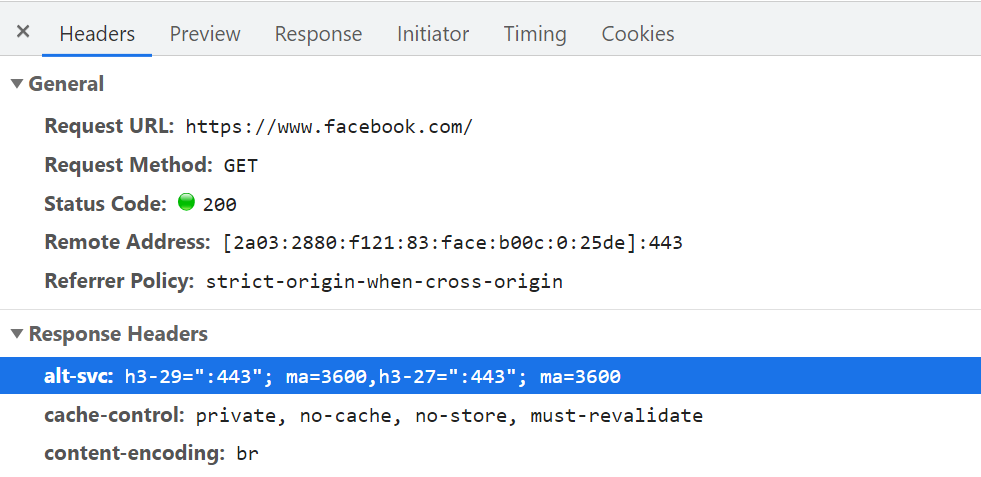
Alt-Svc header, notifying the browser that it can also be reached via HTTP/3 on UDP port 443 (this is valid for 3600 seconds). For now, the protocol name is still h3-29 or h3-27 (the 29th and 27th draft versions of HTTP/3), but this will eventually become just h3 (some servers, like google.com, already use h3 today). (Large preview)Even after the first successful HTTP/2 connection, HTTP/3 usage is not guaranteed. Intermediate networks can still block or delay QUIC handshakes, prompting the browser to fall back to HTTP/2. Repeated failures will cause some browsers to denylist the Alt-Svc entry temporarily, which is why clearing the browser cache can sometimes resolve stuck HTTP/2 fallback behavior. There are also security concerns with Alt-Svc: Chrome, for instance, restricts which ports it will honor, requiring HTTP/2 and HTTP/3 endpoints to be both below port 1024 or both at or above it, otherwise the header is ignored entirely.
Ongoing work with DNS records called SVCB and HTTPS aims to collapse this two-step discovery process. These records would carry the same information as Alt-Svc, but during the DNS resolution step itself, allowing the client to try QUIC from the very first connection attempt.
This two-step discovery affects your deployment planning in practical ways. You will always need an HTTP/2 and/or HTTP/1.1 server running alongside the HTTP/3 one, and the older server must be configured to emit correct Alt-Svc headers. That's straightforward for production environments where a single Apache or NGINX instance can speak all protocol versions simultaneously. Local test setups, however, become considerably more fussy — especially given the current lack of browser DevTools indicators for diagnosing why HTTP/3 isn't being used.
Testing, Certificates, and Chrome's Strict Stance
Local testing of HTTP/3 hits an additional obstacle: Chrome substantially restricts QUIC usage with self-signed TLS certificates. The reasoning is deliberate — such certificates are frequently used by corporate middleboxes to decrypt employee traffic, and protocol-handling assumptions baked into those middlebox implementations could easily break QUIC's evolution. Chrome's position is therefore hard-edged: QUIC works only with officially trusted certificates (issued by recognized authorities, such as Let's Encrypt). Self-signed certificates, even for local development, will not fly.
Workarounds exist but are cumbersome. The usual --ignore-certificate-errors flag does not apply to QUIC, although there are ad-hoc command-line flags documented in Chrome's GitHub and Chromium repository that help. Alternatives include issuing per-developer certificates (tedious to manage) or sharing a single real private key across the whole team (rarely acceptable). Installing a custom root certificate can work too, but you'll also need to pass both --origin-to-force-quic-on and --ignore-certificate-errors-spki-list flags when starting Chrome.
Only Chrome is being this strict for now, and its developers may loosen this position over time. In the meantime, if browser-side QUIC proves problematic, it's wise to validate your server configuration first with curl, which offers full HTTP/3 support (with a choice between two underlying libraries) and provides clearer visibility into the Alt-Svc caching process.
Expect Mixed-Protocol Deployments to Persist
A few practical conclusions emerge from the client-side picture. HTTP/3 will never fully replace HTTP/2: first-time visitors and users on UDP-blocking networks will always rely on the older protocol. A well-tuned HTTP/2 stack remains an essential piece of the serving infrastructure, and because the page-level differences between the protocols are minor, this dual-stack burden is tolerable.
The harder challenge is verification. Testing whether a browser actually uses HTTP/3 and troubleshooting why it doesn't is difficult with today's tooling, and the certificate hurdles compound this further. The reality for most teams: they'll develop and test locally over HTTP/2 (or HTTP/1.1) and switch to HTTP/3 only at a later stage in the deployment pipeline. Even then, performance validation will need careful treatment with the current generation of network diagnostics.
Testing HTTP/3: Tools, Limits, and What to Trust
Most performance testing tools have been slow to add dedicated HTTP/3 support. As of July 2021, very few can reliably measure the new protocol, and the ones that can often obscure the details you actually need.
Lighthouse and WebPageTest
Google Lighthouse has limitations when it comes to protocol-level performance testing. Its network throttling simulates slow connections inside the browser rather than over the wire, which means it only emulates delay and bandwidth — not packet loss, a key area where HTTP/3 can differ from HTTP/2. The more advanced simulation model Lighthouse uses to estimate impact has not been updated for IETF QUIC or HTTP/3. While pages can load over HTTP/3 in theory, comparing HTTP/2 and HTTP/3 with Lighthouse today will likely produce misleading results.
WebPageTest is conceptually better positioned. It runs loads over real networks and supports packet-level emulation, including packet loss. However, HTTP/3 integration is still incomplete: there are no easy ways to force a QUIC load, view how Alt-Svc was used, or inspect QUIC handshake details. Even determining whether a response used HTTP/3 or HTTP/2 can be difficult.
Loading facebook.com in Firefox 89 shows the protocol switching mid-page. As expected, the first request goes over HTTP/2 and includes the Alt-Svc header — but Firefox opens a QUIC connection as soon as it sees that header, and switches to HTTP/3 starting around the 20th resource. The connection view also appears to show two separate QUIC connections, one for credentialed CORS requests and one for no-CORS requests, consistent with browsers opening multiple connections for security reasons. WebPageTest’s limited view makes confirmation hard without deeper digging.
Chrome behaves similarly but switches earlier, around the 10th resource. The repeat view is more surprising: Chrome starts with HTTP/2 again before switching to HTTP/3 after a few requests. It’s unclear whether this is Chrome’s policy, a race between TCP and QUIC that TCP initially wins, or an unused Alt-Svc cache. There is currently no way to determine the root cause.
"Another interesting thing I noticed here is the apparent connection coalescing behavior. Both HTTP/2 and HTTP/3 can reuse connections even if they go to other hostnames, to prevent downsides from hostname sharding. However, WebPageTest reports that connection coalescing is used over HTTP/3 forfacebook.comandfbcdn.net, but not over HTTP/2. I suspect this is a bug in WebPageTest, however, becausefacebook.comandfbcnd.netresolve to different IPs and, as such, can’t really be coalesced."
Key QUIC handshake information is also missing from WebPageTest’s current visualizations.
There is one workaround for Chrome. By passing command-line flags on the Chromium tab, you can force QUIC from the very start:
--enable-quic --quic-version=h3-29 --origin-to-force-quic-on=www.facebook.com:443,static.xx.fbcdn.net:443
This bypasses the Alt-Svc flow entirely. One gotcha: you must pass all origins to --origin-to-force-quic-on. Without listing both facebook.com and fbcdn.net, Chrome still opens an HTTP/2 connection to the second domain, even on repeat views.
These examples show that browser behavior around HTTP/3 is far from uniform. Browsers may abandon HTTP/2 as soon as possible or only when a new connection is warranted. Getting a pure HTTP/2 load on a server that supports both protocols can be just as hard as getting a full HTTP/3 one. Since WebPageTest exposes little QUIC metadata yet, you cannot trust its visualizations at face value — double-checking which protocol was actually used is essential.
At this point, comparing HTTP/2 and HTTP/3 performance is premature. Not all servers and clients have implemented all protocol features. HTTP/3 prioritization, a potentially major performance factor, is not properly supported in all browsers and many servers, which makes any comparison unfair unless you verify it works for both protocols. Given the large differences between QUIC implementations, always confirm what is actually happening on the wire before drawing conclusions. The same caveats apply to higher-level tooling and data sets built on WebPageTest or Lighthouse. Some tools are even further behind: PageSpeed Insights only added HTTP/2 support this year, so don’t expect HTTP/3 there anytime soon.
Wireshark, qlog, and qvis
For lower-level analysis, Wireshark has advanced QUIC support and can experimentally dissect HTTP/3. To see the actual packets, you need TLS decryption keys, which Chrome and Firefox can export via the SSLKEYLOGFILE environment variable. This works, but analyzing longer connections can require substantial manual effort and deep protocol knowledge.
A more practical option is qlog, the JSON-based logging format for QUIC and HTTP/3 supported by most QUIC implementations. It captures information directly on client and server, including details like congestion control. Set the QLOGDIR environment variable to trigger output. Firefox requires a special preference (network.http.http3.enable_qlog), Apple devices use QUIC_LOG_DIRECTORY, and Chrome does not support qlog at all.
Upload the resulting qlog files to qvis.quictools.info for interactive visualizations that make interpreting QUIC and HTTP/3 traffic far easier. qvis also accepts Wireshark .pcap captures and has experimental support for Chrome’s netlog files. While these tools require a fairly advanced understanding of the protocols, they are strongly recommended if you want to test HTTP/3 performance seriously — without them, you risk attributing results to protocol internals when other factors are at play.
For now, Validate, Don’t Measure
Between browser quirks, missing features, and tooling gaps, assessing HTTP/3’s potential benefit for a specific website is currently very difficult. High-level metrics can easily be skewed by unrealistic network emulation, partial HTTP/3 usage, or feature gaps on either end. And as part 2 showed, even in ideal conditions the differences between HTTP/2 and HTTP/3 are likely to be small, making precise measurement all the more important.
The pragmatic path is to hold off on HTTP/2 versus HTTP/3 benchmarks for a few more months. Instead, verify that your server-side setup works as expected. The most consistent approach today: WebPageTest with Chrome’s command-line parameters, falling back to curl to investigate issues.
Where HTTP/3 Stands: Summary And Recommendations
What The Three Parts Established
The motivation for HTTP/3 comes almost entirely from its transport layer, QUIC. TCP has become too difficult to evolve because of its deep integration into middleboxes, so QUIC runs over UDP, encrypts nearly everything, and incorporates TLS 1.3. That makes future protocol changes a matter of updating endpoints. QUIC also brings a faster combined transport and cryptographic handshake with 0-RTT support, understands that it carries multiple independent byte streams so it can avoid head-of-line blocking, survives network changes through connection IDs, and uses a flexible frame-based packet structure.
Looking at performance critically, QUIC does not magically outperform TCP. Its congestion control is similar, the handshake gains are roughly one round trip versus optimized TCP+TLS, and true 0-RTT is constrained by security trade-offs. Connection migration requires resetting congestion windows on the new network. Whether head-of-line blocking removal helps depends heavily on how streams are multiplexed and prioritized: approaches that favor loss recovery tend to hurt general page-load performance and vice versa. Sending packets can even be slower because UDP APIs are less mature and QUIC encrypts packets individually, though this can be mitigated over time. HTTP/3 itself mostly reworks HTTP/2 internals rather than introducing major new performance features, and the more exciting possibilities such as multipath, unreliable data, WebTransport, and forward error correction are extensions still under development.
For deployment, the practical picture is mixed. Most HTTP/2 lessons transfer directly: avoid server push, be careful with preload, and keep existing bundling and inlining practices. Broader HTTP/3 support in off-the-shelf web servers is slow to arrive partly due to TLS library issues. Major browsers have basic HTTP/3 enabled by default but differ in how they use it. And popular testing tools like Lighthouse and WebPageTest lack explicit HTTP/3 support, making comparative measurement difficult.
The bottom line: QUIC is the clear next-generation transport and will be extended for years, but it will mainly help users on slow or unstable networks. High-speed users may see little change. And HTTP/3 is not quite ready for primetime everywhere, but it soon will be.
Why You Should Still Start Now
These caveats are not arguments against adoption. The “average” user on a good connection may not see dramatic gains, but a meaningful share of any audience will: a single round trip saved by 0-RTT can be hundreds of milliseconds for some, connection migration keeps a download alive on a moving train, and lossy wireless links benefit more from QUIC’s stream isolation. These are precisely the users experiencing the worst performance today.
QUIC and HTTP/3 are also only going to improve. Version 1 focused on a solid core and deferred advanced features. Investing in the protocols now means being ready to exploit those features when they land. Deployment complexity is real, so it is worth building familiarity early. For those who would rather not operate servers themselves, Cloudflare and Fastly both offer mature “flip-the-switch” HTTP/3 support, which is a low-risk way to start if you are already on a CDN.
The pragmatic stance: HTTP/3 does not demand immediate migration, but the benefits are already real and will grow over time.
Further Reading And Tools
For anyone looking to go deeper, the following resources are ordered roughly by increasing technical depth:
- “HTTP/3 Explained” by Daniel Stenberg — a solid overview from the creator of cURL.
- “HTTP/2 in Action” by Barry Pollard — covers HTTP/2 in depth and includes an HTTP/3 section.
- Your author, Robin Marx, posts QUIC and web performance news on Twitter (@programmingart) and has recorded over ten technical talks on YouTube.
- Cloudflare and Fastly both publish blogs with substantial technical and ecosystem context around QUIC.
- For the primary sources, see the QUIC working group’s RFCs and the IIJ Engineers Blog for deep feature-level explanations.
- Academic treatments include Robin Marx’s HTTP/3 and QUIC papers on stream multiplexing, prioritization, tooling, and implementation differences, plus papers from the QUIPS and EPIQ workshops on security, performance, and extensions.




