Dropbox’s HTTP/2 Migration: What Worked and What Didn’t
Dropbox’s traffic team recently completed a fleet-wide upgrade of its front-end Nginx servers to support HTTP/2. The migration itself was notably smooth, but the rollout surfaced a handful of implementation quirks worth understanding before you attempt the same move. Here’s what the team learned about the upgrade process, the performance gains, and the caveats that came with the new protocol.
Why the Switch Was Necessary
Dropbox’s edge infrastructure relies on open-source Nginx for SSL termination and layer-7 load balancing. Before this upgrade, those servers were running an Nginx 1.7-based build with SPDY support. The push to move came from Chrome’s announcement that it would drop SPDY support on May 15th, 2016—meaning clients would otherwise fall back to HTTP/1.1. With major browsers already supporting HTTP/2 per RFC 7540, the decision to switch was straightforward.
The Upgrade Process
Enabling HTTP/2 required only a small configuration change. Dropbox moved from Nginx 1.9.5—which introduced the HTTP/2 module and dropped SPDY by default—to Nginx 1.9.15, then the latest stable release. The key configuration change was swapping the spdy modifier for http2 in the listen directive:
- Before (SPDY):
listen A.B.C.D:443 ssl spdy; - After (HTTP/2):
listen A.B.C.D:443 ssl http2;
Dropbox staged the rollout carefully. HTTP/2 was first enabled on canary machines for roughly a week while production continued running SPDY. Once correctness was verified and performance reviewed, HTTP/2 was pushed out across the entire fleet for web services.
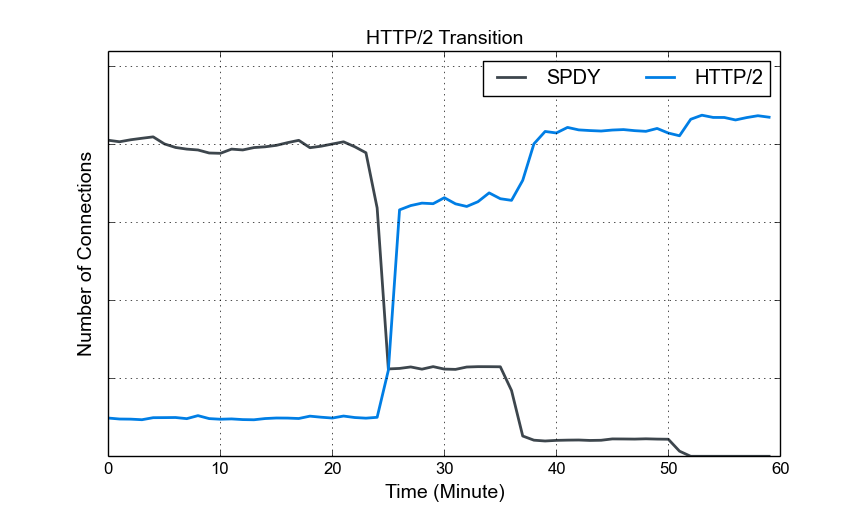
The transition from SPDY to HTTP/2 was gradual, with HTTP/2 enabled across front-end servers at three distinct points around minutes 23, 36, and 50. Before those changes, canary machines handled HTTP/2 traffic while production still used SPDY. Ultimately, nearly all SPDY clients migrated to HTTP/2.
Bandwidth Reduction via HPACK
HTTP/2’s HPACK header compression delivered a major win for ingress traffic. The chart below shows the ratio of canary-to-production traffic bandwidth, where HTTP/2 was only active on the canary machines. Even though all machines received roughly the same amount of traffic from load balancers, the canary machines saw ingress bandwidth drop by close to 50%.
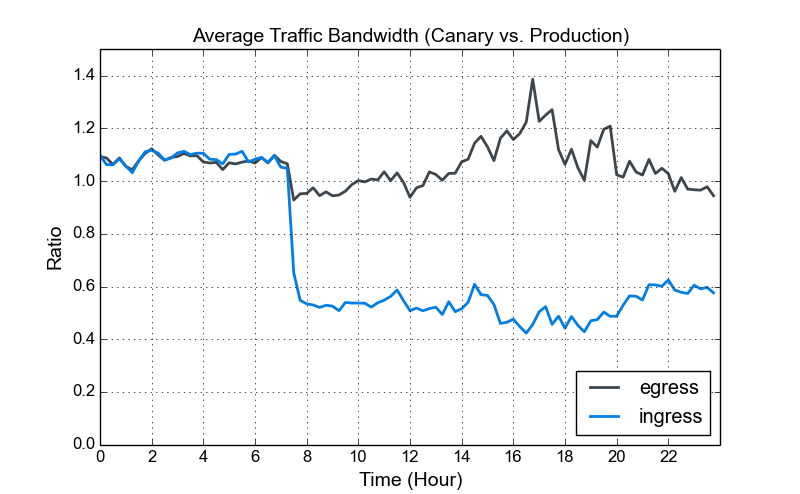
Notably, Dropbox had disabled SPDY header compression due to the CRIME attack (CVE-2012-4929), so this reduction was a direct benefit of HTTP/2’s compression design. Egress traffic remained largely unchanged since response headers make up a smaller portion of outbound data.
Latency and Compatibility Caveats
Despite the bandwidth gains, the canary deployment surfaced a few issues tied to the Nginx 1.9.15 implementation. Dropbox noted that the increased POST request latency and refused stream errors were later resolved in Nginx 1.11.0, so evaluate these findings against your own Nginx version.
POST Request Latency
After enabling HTTP/2, the team measured an increase in median request latency. Digging into the numbers, that latency was almost entirely from POST requests. The figure below shows the P50 latency ratio between canary and production machines during this window.
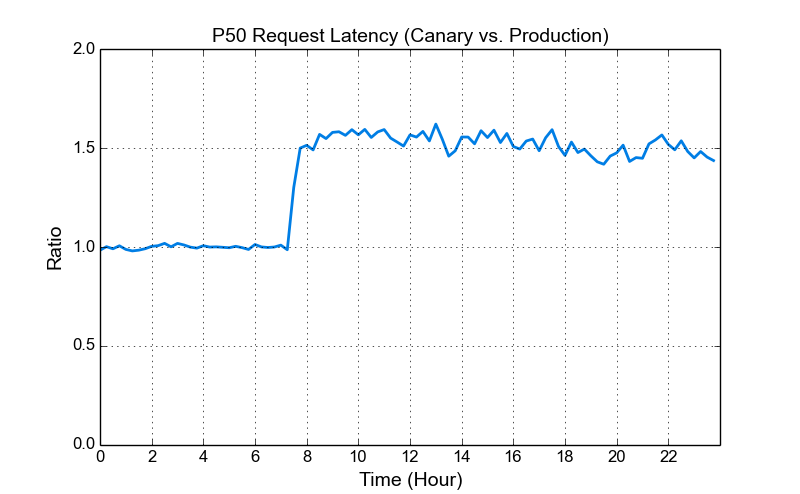
The higher latency ratio, around 1.5x, is workload-dependent. For Dropbox, the overhead generally cost about one additional round trip per request, which didn’t trigger major performance concerns. Still, if your service handles a high volume of small, latency-sensitive POST requests, this is an important factor to weigh before upgrading to Nginx 1.9.15. Related discussion can be found in the Nginx mailing list thread from May 2016.
Client and Server Interoperability
Because HTTP/2 is still maturing, not every client or server implementation plays nicely together. Dropbox identified three specific compatibility problems:
- Nginx 1.9.15 returned refused stream errors for POST requests when clients sent DATA frames before acknowledging the connection SETTING frame. This affected the Swift SDK and required increasing Nginx’s error log severity to INFO to see the error messages.
- Chrome mishandled RST_STREAM with NO_ERROR, causing issues with Nginx 1.9.14. A workaround shipped with Nginx 1.9.15.
- Nghttp2 failed to send END_STREAM when window space was unavailable, a topic also discussed in the Nginx mailing list thread.
The team stressed caution when enabling HTTP/2 universally, particularly when you don’t control client behavior. Since Dropbox’s API users rely on a mix of third-party HTTP libraries, broader testing was required before enabling HTTP/2 support across their APIs.
Debugging HTTP/2 with Net-Internals
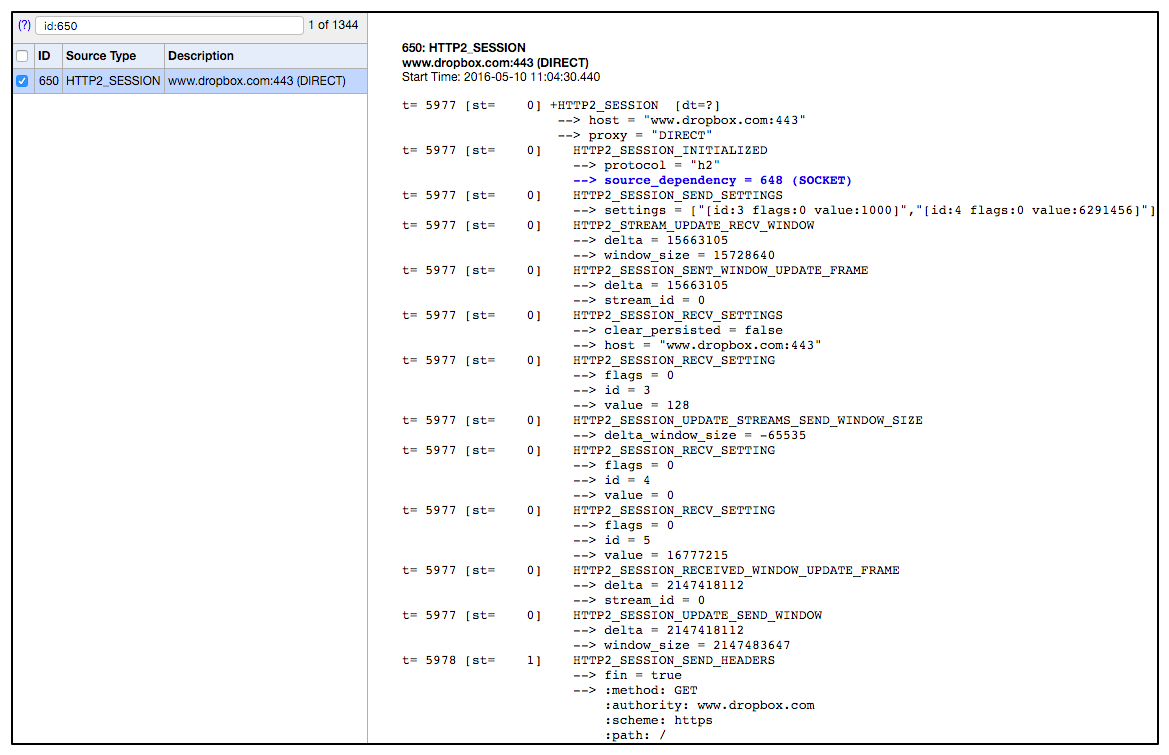
For diagnosing issues, Chrome’s net-internals tool (chrome://net-internals/#http2) proved helpful. The screenshot below shows frame exchanges captured when opening a new HTTP/2 session to www.dropbox.com.
Post-Upgrade Latency Validation
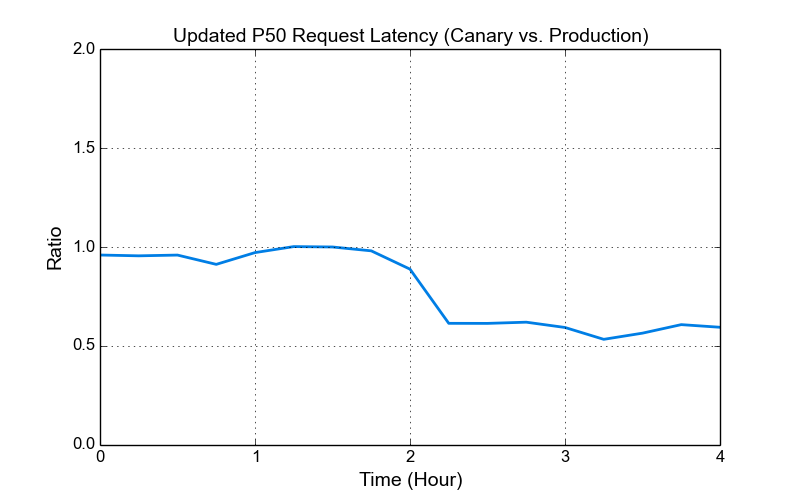
After applying the changes from Nginx 1.11.0, the P50 request latency ratio between canary and production decreased. This improvement is visible in the figure below, which accounts for production’s earlier latency increase after the initial Nginx 1.9.15 upgrade.
Key Takeaways
- Enabling HTTP/2 in Nginx was a simple configuration change.
- HPACK header compression delivered a significant reduction in ingress bandwidth.
- Nginx 1.9.15 introduced increased POST request latency tied to its HTTP/2 implementation.
- Universal HTTP/2 enablement is risky while client and server implementations remain inconsistent.
- Canary deployments and close inspection of Nginx error logs helped catch problems early.
For teams considering a similar migration, Dropbox’s experience suggests the move is worth it—just budget time for compatibility testing and monitor latency metrics closely during the rollout.



