
One Year of Whitecastle
Just under a year ago, we introduced the Whitecastle network redesign to address the growing pains in Slack's AWS infrastructure. The core changes were building new VPCs across our global regions, interconnecting them via the AWS Transit Gateway, and adding a management VPC for centralized services like Chef. We also linked the legacy infrastructure to this new setup so teams could migrate incrementally instead of through a single disruptive cutover.

The architecture supported a gradual adoption model. As teams moved services, we captured a lot of operational insight. Here’s what stood out, what we’ve refined, and where the design still needs work.
The Proxy Problem
Within the Whitecastle VPCs, we run two subnet types. Public subnets have a default route to an AWS Internet Gateway and host auto-scaling Squid proxy stacks behind network load balancers. We built our own instance-based NAT to satisfy internal logging compliance. Private subnets have no direct internet route; services there must traverse a Squid proxy stack in the public subnets. Teams default to a shared stack or can request a dedicated one if they produce heavy traffic.

Historically, most instances held public IPs, so internet access was unmanaged. In the new network, services need explicit proxy configuration. To ease this, we export http_proxy, https_proxy, and no_proxy environment variables on all Whitecastle instances. The no_proxy list includes internal endpoints and AWS VPC endpoints to avoid egress charges and latency from routing AWS API calls through the public internet.
no_proxy=127.0.0.1,$internal_addresses,s3.ap-southeast-2.amazonaws.com,ec2.ap-southeast-2.amazonaws.com,$other_aws_vpc_endpoints
http_proxy=http://whitecastle-proxy-server-01:3000
https_proxy=http://whitecastle-proxy-server-01:3000
HTTP_PROXY=http://whitecastle-proxy-server-01:3000
HTTPS_PROXY=http://whitecastle-proxy-server-01:3000
Some runtimes, like Go, natively respect these variables. Java and others do not, forcing service teams to manually wire the proxy settings. Worse, interpretation differs: Ruby and Go support CIDR blocks in no_proxy, while Python does not. This inconsistency has introduced real migration friction, as teams now manage proxy configuration in addition to their core application work. We haven't yet found a cleaner solution.
Visibility and Scaling on the Transit Gateway
With workloads split between legacy and Whitecastle VPCs during migration, traffic patterns have become unpredictable. A lot of traffic that used to stay within a single VPC now crosses attachment boundaries, which puts significant load on the Transit Gateway. We rely on CloudWatch metrics such as PacketsIn, PacketsOut, PacketDropCountBlackhole, and PacketDropCountNoRoute at the attachment level to monitor edge-case flows. These feed automated scripts that correlate and validate traffic across multiple VPCs.

The sheer volume of traffic pushed the boundaries of what we expected from the Transit Gateway. Because some services split their stacks across old and new VPCs, inter-VPC traffic surged. To handle our scale, we coordinated with the AWS Transit Gateway team and our technical account managers to scale several of our Transit Gateway deployments well beyond standard capacity limits.

Cutting Over from VPC Peering
As Transit Gateways became the central hub, we replaced legacy VPC peering connections to reduce architectural and Terraform complexity. The key was ensuring zero downtime during the swap. Our procedure had four stages:
- Attach each VPC to the region's Transit Gateway without altering route tables, so no routing changes occur.
- Add a default route of
10.0.0.0/8pointing at the Transit Gateway attachment. Traffic still preferred the specific peering routes over this generic one. - Remove the peering route from both VPCs to shift traffic onto the Transit Gateway path.
- After validating connectivity, delete the peering connection.
This approach removed the peering links without any service interruption and streamlined our routing management.
Tracking Migration with a Simple Metric
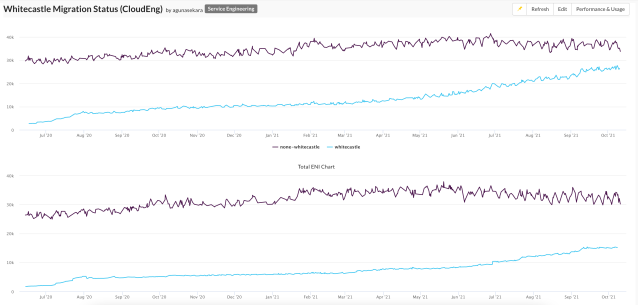
For reporting and executive visibility, we needed a concrete way to show migration progress. We decided to count the number of IP addresses and elastic network interfaces in the legacy VPCs versus the new Whitecastle VPCs. Daily, we scan each AWS account and tally these figures, giving a straightforward picture of where services currently reside and how the shift is trending.
Scaling past the single-VPC model
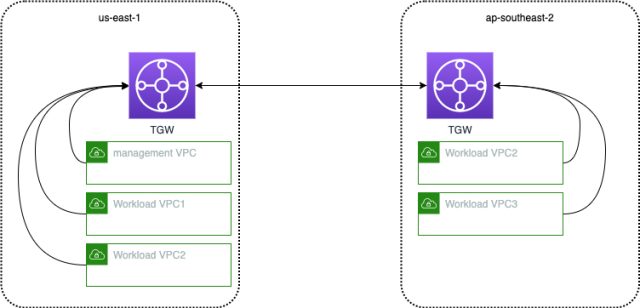
The original Whitecastle design used one workload VPC per region, shared across accounts via AWS Resource Access Manager and VPC Sharing. That removed connectivity overhead from service teams, letting Slack’s Cloud Engineering group own all VPCs, inter-VPC routing, and attached private Route53 zones. But some services on legacy VPCs carry special configurations like custom DHCP option sets, so workload-specific VPCs were added in certain regions and attached to the local Transit Gateway. Because VPCs are created from Terraform modules and Transit Gateway handles routing, adding VPCs is straightforward as long as CIDRs don’t overlap. Transit Gateway inter-region peering also simplified connectivity across AWS regions.

DNS gets its own split
Previously, one account held all private and public Route53 zones. The new build splits these into separate Sandbox, Dev, and Prod environments, with common private zones moved into the environment network account so access can be restricted to services that actually need it.
Teams that manage their own DNS records use Route53’s authorize-association feature. A private hosted zone can live in a service team’s account and still be associated with a VPC in the managed network account. The service team keeps full control over records, while the Whitecastle network team controls which zone-to-VPC associations are approved. That prevents random private zones from latching onto managed VPCs without oversight.

Smarter network path validation
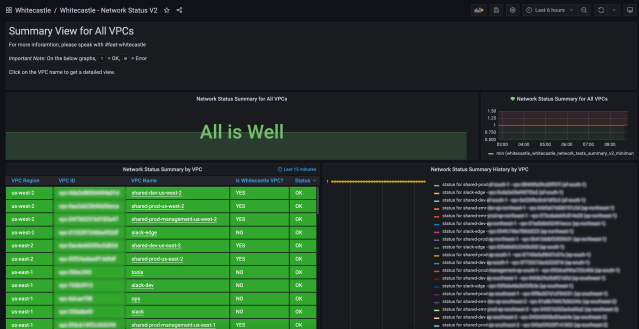
Whitecastle Network Tester validates routes between VPCs with two functions: it runs a simple web server answering /health with HTTP 200, and it reads a configuration file to determine which environments to probe. Some calls are expected to succeed; others are expected to fail, which verifies both that allowed paths work and that environments stay isolated — Dev traffic, for example, must never reach Prod.
The original per-VPC configuration stopped scaling as VPCs multiplied. Testers now register themselves in a DynamoDB table at startup and use that table for discovery. Each tester determines its own VPC and environment, then consults a minimal configuration that only lists which other environments it should and shouldn’t reach. New VPCs need no config updates — only new environments do.

The tester validates both direct network paths and paths through Nebula, Slack’s open-source overlay network. Nebula doesn’t yet support Lambda execution, though the tester would otherwise be a natural fit for Lambda functions running inside VPCs.
Network lookups through Slack
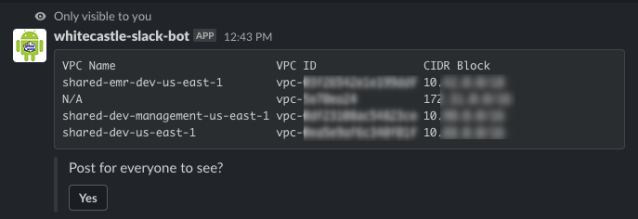
Finding VPC IDs, Subnet IDs, Transit Gateway IDs, or CIDR ranges meant digging through the AWS console across environment-specific accounts or hunting through Terraform code. Neither is practical during an incident, so Slack built a bot.
The bot assumes a read-only role in each networking account. A user query for a given environment triggers the bot to look up the right account, assume the role, retrieve the detail, and post the answer back in Slack — either privately or to a channel for broader visibility, which is useful when teams need shared access to network information quickly.

On the horizon
The migration surfaced real issues and incidents, but each one drove iteration on the design. Working closely with the AWS Transit Gateway team resolved the scaling challenges tied to Slack’s unusual migration workloads. Up next are a more user-friendly Squid proxy tier, integration with AWS Network Firewall for enforced security policies, and activity monitoring through Amazon CloudWatch metrics. As more services move onto the new network build, expect continued iteration and new infrastructure work.



