Terraform at Slack: From Single Account to Platform
Slack runs its infrastructure across AWS, DigitalOcean, NS1, and GCP, and Terraform is the single tool used to manage it all. Choosing Terraform over an AWS-native option like CloudFormation means the infrastructure-as-code syntax and deployment mechanism stay consistent no matter which provider is involved.
How state files grew with the company

Slack began with one AWS account holding all services. State was organized simply: one state file per region plus a separate file for global services like IAM and CloudFront. Development and production had identical setups.
├── aws-global
│   └── cloudfront
│       ├── services.tf
│       ├── terraform_state.tf
│       ├── variables.tf
│       └── versions.tf
├── us-east-1
│   ├── services.tf
│   ├── terraform.tfvars
│   ├── terraform_state.tf
│   ├── variables.tf
│   └── versions.tf
├── us-west-2
│   ├── services.tf
│   ├── terraform.tfvars
│   ├── terraform_state.tf
│   ├── variables.tf
│   └── versions.tf
├── ap-southest-2
│   ├── services.tf
│   ├── terraform.tfvars
│   ├── terraform_state.tf
│   ├── variables.tf
│   └── versions.tf
└── digitalocean-sfo1
    ├── services.tf
    ├── terraform.tfvars
    ├── terraform_state.tf
    ├── variables.tf
    └── versions.tf
That structure broke down as workloads expanded. Tens of thousands of EC2 instances pushed the account into AWS rate limits, the EC2 console in us-east-1 became unusable, and access control across many teams in one account proved unmanageable. The answer was dedicated child AWS accounts for specific teams and services.
Jenkins pipelines handled deploys. After a change merged to a state file, the corresponding pipeline ran a plan stage first to validate what an apply would do. State files were chained, so sandbox and development environments had to be applied before production.
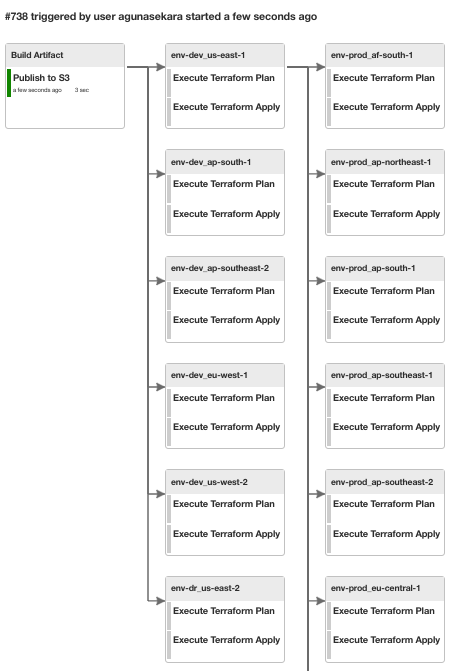
Early on, a centralized Ops team owned the Terraform codebase, state files, and underlying infrastructure. As child accounts multiplied, that model gave way: the Cloud Foundations team now runs the Terraform platform itself, while service owners manage their own states and pipelines. Today there are close to 1,400 state files owned by various teams. The central team controls Terraform and provider versions, supporting tools, and a set of base modules.
The current pattern is one state file per region in each child account, plus a separate one for global services. Larger services often get their own isolated state files to keep resource counts—and the blast radius of any change—small.
State lives in Terraform's AWS S3 backend, stored under different paths in a version-controlled bucket. DynamoDB provides state locking and consistency checks, and S3 object versioning allows easy rollback to earlier state.
Where Terraform runs

All Terraform pipelines execute on dedicated Jenkins workers with IAM roles granting enough access to child accounts to build resources. Engineers also need a safe place to test changes and prototype modules without that level of access. "Ops" boxes fill that need: engineers launch their own instances through a web interface.

Instance size, region, and disk capacity are selectable at launch. Idle boxes terminate automatically. Provisioning installs all Terraform binaries, providers, wrappers, and tools—the same environment Jenkins workers use—but the boxes have read-only access to AWS accounts. Engineers can run and validate plans but cannot apply changes directly.
Handling Terraform version upgrades

Originally, a single Terraform version was deployed across the fleet. Chef configuration management distributed the binary and plugins from an S3 bucket.
The 2019 upgrade from Terraform 0.11 to 0.12 was painful. Syntax changed between major versions, so modules were copied with a -v2 suffix, and a binary wrapper read each state file's version.tf to pick the right executable. The whole project took a full quarter. Afterward, the 0.11 binary and wrapper logic were cleaned up.
Terraform 0.12 stayed in place for nearly two years. When considering 0.13, the team decided to build proper tooling first. The timing complicated matters: the AWS provider 4.x line launched around then, with many breaking changes from the 3.74.1 version in use. The decision was to upgrade the Terraform binary and the AWS provider simultaneously.
Although newer Terraform versions existed (0.14 and 1.x), the recommended path ran through 0.13. Multiple Terraform binary and provider versions would need to coexist, selected per state file. A Terraform version config file was introduced on each box.
{
"terraform_versions":
  [
    "X.X.X",
    "X.X.X"
  ],
"package_plugins":
  [
    {
      "name": "aws",
      "namespace": "hashicorp",
      "versions" : [
        "X.X.X",
        "X.X.X"
      ],
      "registry_url": "registry.terraform.io/hashicorp/aws"
    },
    {
      "name": "azurerm",
      "namespace": "hashicorp",
      "versions" : [
        "X.X.X"
      ],
      "registry_url": "registry.terraform.io/hashicorp/azurerm"
    },
Multiple binary and provider versions were deployed. The wrapper was updated to read versions.tf in each state file and select the right Terraform binary. Since Terraform 0.13+ allows multiple provider versions in the plugin directory, all provider versions used by state files were deployed there.
└── bin
    ├── registry.terraform.io
    │   ├── hashicorp
    │   │   ├── archive
    │   │   │   └── X.X.X
    │   │   │       └── linux_amd64
    │   │   │           └── terraform-provider-archive
    │   │   ├── aws
    │   │   │   ├── X.X.X
    │   │   │   │   └── linux_amd64
    │   │   │   │       └── terraform-provider-aws
    │   │   │   └── X.X.X
    │   │   │       └── linux_amd64
    │   │   │           └── terraform-provider-aws
    │   │   ├── azuread
    │   │   │   └── X.X.X
    │   │   │       └── linux_amd64
    │   │   │           └── terraform-provider-azuread
    │   │   ├── azurerm
    │   │   │   └── X.X.X
    │   │   │       └── linux_amd64
    │   │   │           └── terraform-provider-azurerm
That arrangement let the Terraform binary and AWS provider versions upgrade at the same time. If a newer provider broke something, the provider could be pinned back to the previous version per state file, and that state file upgraded to the newest provider later. Once every state file was current, pinned versions were removed. Service teams were told to avoid pinning providers unless there was a strong reason. As new provider versions arrive, Cloud Foundations deploys them and removes outdated ones.
A dedicated tool was built to manage upgrades. Given a state file, it checks:
- the current version
- for unapplied changes
- for other state files doing remote-state lookups into this one (Terraform 0.12 cannot read 0.13+ state, so upgrades can break dependents)
- whether a plan can run after the upgrade
The first version was a Bash script. As checks multiplied, the script grew unwieldy—parsing Terraform syntax in Bash meant brittle string matching and grep calls. It was replaced with a Golang binary. The hclsyntax and gohcl libraries made reading Terraform configuration and loading it into Go structures straightforward. terraform-exec simplified running plans and checking for errors. State file analysis was added directly to the binary, including module dependency trees.
agunasekara@ops-box:service_dev (branch_name) >> terraform-upgrade-tool -show-deps
INFO[0000] welcome to Terraform upgrade tool
INFO[0000] dependency tree for this state file as follows
terraform/accnt-cloudeng-dev/us-east-1/service_dev
└── terraform/modules/aws/whitecastle-lookup
│   ├── terraform/modules/aws/aws_partition
└── terraform/modules/slack/service
    └── terraform/modules/aws/alb
    │   ├── terraform/modules/aws/aws_partition
    └── terraform/modules/aws/aws_partition
    └── terraform/modules/aws/ami
    │   ├── terraform/modules/aws/aws_partition
    └── terraform/modules/aws/autoscaling
That makes it easy to see which modules a state file upgrade touches. Confidence in the tool grew, and the ability to upgrade a percentage of state files in a single run followed. Building the tooling and performing the 0.13 upgrade took significant time, but the current version upgrade has gone smoothly as a result.
Module management

Terraform state files and modules share one repository. GitHub's CODEOWNERS assigns reviews for each state file to its owning team.
Originally, modules were referenced by relative directory path within the repository.
module "service_dev" {
  source                   = "../../../modules/slack/service"
  whitecastle              = true
  vpc_id                   = local.vpc_id
  subnets                  = local.public_subnets
  pvt_subnets              = local.private_subnets
Testing module changes that way was easy, but risky: any modification could break other state files using the same module.
A switch to a GitHub path approach let state files pin a specific module version.
module "network" {
  source                      = "git::[email protected]:slack/repo-name//module_path?ref=COMMIT_HASH"
  network_cidr_ranges         = var.network_cidr_ranges
  Private_subnets_cidr_blocks = var.private_subnets_cidr_blocks
  public_subnets_cidr_blocks  = var.public_subnets_cidr_blocks
Pinning worked, but each Terraform plan or apply had to clone the entire repository—which held all Terraform code—making runs slow. Git hashes were also hard to read and compare.
An internal module catalog

Better tooling meant building a module catalog. A pipeline now triggers on any merge to the Terraform repository. If it detects module changes, it packages a fresh Tarball of the module, versions it, and uploads it to an S3 bucket.
agunasekara@ops-box:~ >> aws s3 ls s3://terraform-registry-bucket-name/terraform/modules/aws/vpc/
2021-12-20 17:04:35       5777 0.0.1.tgz
2021-12-23 12:08:23       5778 0.0.2.tgz
2022-01-10 16:00:13       5754 0.0.3.tgz
2022-01-12 14:32:54       5756 0.0.4.tgz
2022-01-19 20:34:16       5755 0.0.5.tgz
2022-06-01 05:16:03       5756 0.0.6.tgz
2022-06-01 05:34:27       5756 0.0.7.tgz
2022-06-01 19:38:21       5756 0.0.8.tgz
2022-06-27 07:47:21       5756 0.0.9.tgz
2022-09-07 18:54:53       5754 0.1.0.tgz
2022-09-07 18:54:54       2348 versions.json
A versions.json file is also uploaded, recording version history for the module.
agunasekara@ops-box:~ >> jq < versions.json
{
  "name": "aws/vpc",
  "path": "terraform/modules/aws/vpc",
  "latest": "0.1.0",
  "history": [
    {
      "commithash": "xxxxxxxxxxxxxxxxxxxxxxxxx",
      "signature": {
        "Name": "Archie Gunasekara",
        "Email": "[email protected]",
        "When": "2021-12-21T12:04:08+11:00"
      },
      "version": "0.0.1"
    },
    {
      "commithash": "xxxxxxxxxxxxxxxxxxxxxxxxx",
      "signature": {
        "Name": "Archie Gunasekara",
        "Email": "[email protected]",
        "When": "2022-09-08T11:26:17+10:00"
      },
      "version": "0.1.0"
    }
  ]
}
A tool called tf-module-viewer lists module versions for teams.
agunasekara@ops-box:~ >> tf-module-viewer module-catalogue
Search: █
? Select a Module:
    aws/alb
    aws/ami
    aws/aurora
↓   aws/autoscaling
Modules are now pinned via a vendored_modules path. Terraform binary wrappers copy the requested modules from the S3 catalog during terraform init.
module "service_dev" {
  source                   = "../../../vendored_modules/slack/service"
  whitecastle              = true
  vpc_id                   = local.vpc_id
  subnets                  = []
  pvt_subnets              = local.private_subnets
The wrapper reads required module versions from a configuration file, downloads them into vendored_modules, and then runs init.
modules:
    aws/alb: 0.1.0
    aws/ami: 0.1.9
    aws/aurora: 0.0.6
    aws/eip: 0.0.7
Trade-offs in the module catalog approach

The module catalog pattern isn’t applied universally. Only state files with strict compliance requirements use it; the rest still point at modules directly via relative repository paths. The trade-off is that testing changes becomes slower, since a module edit must be committed and published to the catalog before any state file can consume it.
Modules can expose multiple outputs and conditional resources. After an update is uploaded, the Terraform Smart Planner (covered in more detail below) prompts users to unpin and test every affected state file — but this isn’t enforced. A module release can work for some state files and break others; those issues surface only when a consumer bumps the pinned version. Rolling back is just a matter of reverting to an earlier version, but the broken state files remain blocked until a patched module version is published.
Pipeline generation from YAML

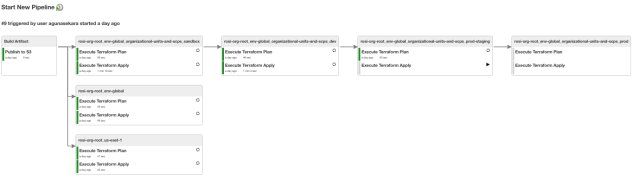
Jenkins is the workhorse for Terraform deployments, and with hundreds of state files comes hundreds of pipelines and stages. These are built with an in-house Groovy library on top of the Jenkins Job DSL plugin. Teams historically wrote a DSL script to create a new pipeline or add a stage to an existing one, with Jenkins scanning a directory on a schedule to regenerate everything. The catch: writing Groovy just to stand up a pipeline is slow and error-prone.
Engineer Andrew Martin spent an innovation day fixing that. He wrote a small utility that reads a simple YAML description and produces the complex DSL scripts Jenkins needs. That turned pipeline creation into a lightweight affair.
pipelinename: Terraform-Deployment-rosi-org-root
steps:
- path: accnt-rosi-org-root/env-global
- path: accnt-rosi-org-root/us-east-1
- path: accnt-rosi-org-root/env-global/organizational-units-and-scps/sandbox
  next:
  - path: accnt-rosi-org-root/env-global/organizational-units-and-scps/dev
    next:
    - path: accnt-rosi-org-root/env-global/organizational-units-and-scps/prod-staging
      next:
      - path: accnt-rosi-org-root/env-global/organizational-units-and-scps/prod
That configuration yields a Jenkins pipeline like the one below.
Pre-merge planning with Terraform Smart Planner

Every state file has a plan stage that must pass before the apply stage can run. The weakness in the old flow is that plans only ran after a change was merged to the master branch of the Terraform repo; a bad merge immediately breaks and blocks the affected pipelines, and a bad module change can take out several state files at once.
Terraform Smart Planner shifts that check earlier. Run it against a change in the repository, and it identifies every impacted state file, runs plans against each, and posts the output directly onto the pull request. For module changes, it follows the same pattern, prompting users to unpin catalog-pinned modules that were touched.
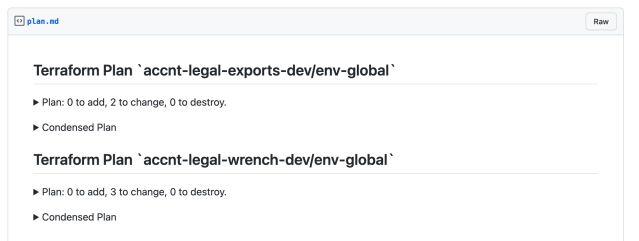
The plan output on the PR body is a boon for reviewers, who can see exactly which resources a change touches, including indirectly impacted state files that might otherwise be missed. That visibility is what lets engineers approve a change with confidence — or ask for fixes up front. A matching CI check runs on every pull request and blocks merges that produce broken Terraform plans.
Where things stand

This setup has clear room for improvement, and the Cloud Foundations team is iterating on it with service teams across Slack, gathering feedback and refining the tooling and workflows. The team also maintains custom Terraform providers for Slack-specific services while contributing to the open-source providers. That work is ongoing, and the infrastructure tooling space at Slack is active — anyone interested should watch the careers page.


