Desktop Messaging: Bringing Instagram’s Core Feature to the Browser
Instagram’s desktop web experience has long served as a companion to its mobile apps, and in 2020 it gained one of its most requested features: Instagram Messaging. The launch was the culmination of user research, a successful mobile web prototype, and a careful experimentation process. Here’s a look at the engineering decisions and product insights that made it possible.
Why Desktop Matters
Instagram started as a mobile-only service, but as its user base and use cases have expanded, so has the importance of alternative interfaces. The desktop web now serves as the primary complement to native apps, and the usage patterns reflect a genuine need. Data shows desktop usage peaks during weekdays and daytime hours (6am–2pm), while native app usage climbs in the evenings (5pm–7pm) and on weekends. This aligns with user interviews, which consistently show that people want to take short breaks during school or work hours to check Instagram. Desktop web is also critical for business accounts, whose owners often spend their workdays at personal computers.
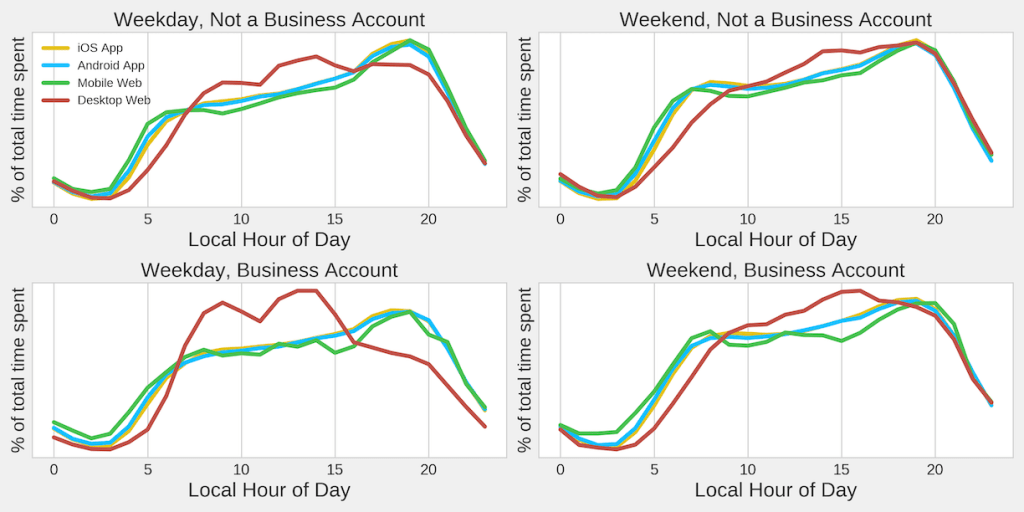
Importantly, the desktop experience does not cannibalize engagement from native apps. In fact, users who access Instagram through both interfaces spend more time on each than users who stick to just one. This finding drove the decision to build out desktop-specific products, with Messaging emerging as a top priority based on user research. It supports both casual scenarios—messaging while working on other tasks—and power-user workflows, such as using a full keyboard and large screen to respond to hundreds of messages.
From Mobile Web to Desktop: A Reusable Architecture
Messaging on desktop did not start from scratch. It evolved from Instagram Messaging on mobile web, which was itself an engineering milestone. That initial implementation introduced several technical firsts for the website:
- The first part of the site written in purely functional components with React hooks.
- A shift from GraphQL to RESTful endpoints, aligning the web app with Instagram’s other applications.
- The first primary use of MQTT for real-time communication.
- Encrypted push notifications and a major expansion of the existing ServiceWorker framework.
These decisions were paired with an architectural separation of Messaging data from the rest of the web application, which had relied on a combined GraphQL and Redux setup. The result was an isolated Redux store that could function independently, a client-side caching architecture that allowed the mobile web messaging experience to boot quickly from cache, and code that separated models from views, making it highly reusable across surfaces. Messaging launched on mobile web in the first half of 2019, and its success was immediate—users even resorted to browser tricks and third-party tools to access it on desktop. A 2019 Hackathon project took the existing mobile web experience and wrapped it in a container to present it as a seamless desktop experience, validating product-market fit through further user research.
Adapting the experience to desktop required more than just resizing a viewport. Key changes included:
- Desktop-centric UX improvements, including drag-and-drop image support, badging, and refined message flows.
- Adding missing features like presence indicators, voice messages, permanent camera messages, and gallery views.
- Support for creator and business accounts, including multiple inboxes.
- Revised caching strategy, since desktop users expect a more up-to-date experience.
Testing and the Decision to Ship
The team initially launched the feature to 2% of the Instagram desktop web population. The primary success metrics were daily messaging usage—the number of users sending at least one message per day—and the total volume of messages sent across native apps and desktop web. Both metrics increased beyond expectations. Guardrail metrics tracked whether desktop availability had any negative impact on native app usage, and none was observed.
The only regression was in messaging usage on mobile web. Some of that decline was organic, as users simply gained another option when they could not access their native app. But part of it was attributed to an artificial shift: many users who previously disguised their desktop browser as mobile to access messaging on mobile web no longer needed to, since the feature was now officially available on desktop.
Desktop’s Growing Role
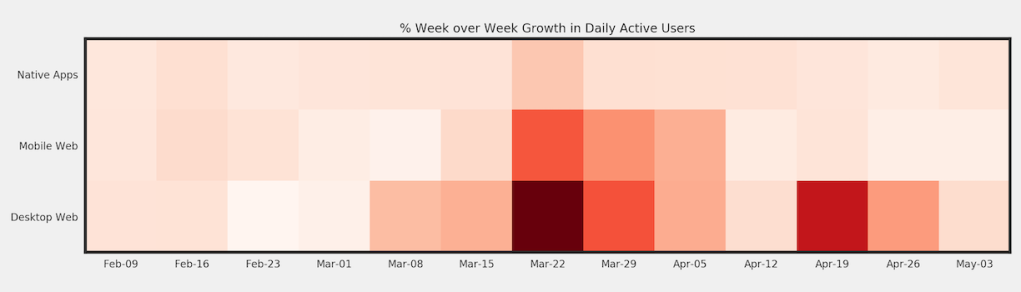
In 2020, remote work and social distancing accelerated the importance of web interfaces. Among Instagram’s three main surfaces—native apps, mobile web, and desktop web—desktop experienced the highest percentage growth during the pandemic. Products like Messaging and Instagram Live became essential for staying connected, and ensuring users could access them from a desktop browser was a crucial part of that effort. The launch allowed more people to stay close to the people and things they care about at a time when connection mattered most.


