Why HelloSign’s Editor Needed a New Foundation
HelloSign is a Dropbox company offering a web-based eSignature platform. You upload a document, then use an editor to place fields—signatures, dates, initials, and more—to build a form. The recipient completes it, and everything is reassembled into a legally-binding PDF. Maintaining pixel-perfect layouts across the Editor, the Signer app, and the final overlay is critical, but supporting a wide range of file types and screen resolutions makes it complicated. Inconsistencies across these three views can undermine trust in what must be an unambiguous, legally-binding process.
The Root Cause: Three Separate Viewers
Browsers can’t render all supported file types natively. So HelloSign converts uploaded documents into a set of page images. In both the Editor and Signer, those images are displayed with signing fields drawn on top via an overlay—fields sit over a transparent background rather than the page image itself. The overlay is then merged with the original file for presentation. Regardless of screen resolution, every field needs an address, width, height, type, and unique identifier.
In October 2018, a meeting focused on three goals:
- Improve fidelity between the Editor, Signer page, and final signed document
- Speed up component placement and changes in the Editor
- Improve the Editor’s overall usability
Fidelity issues were real and damaging. A checkbox placed perfectly in the Editor might misalign in the Signer, but then look fine in the final PDF. With legally binding documents, that’s unacceptable.
The core problem was the existence of three distinct implementations of a document viewer:
- Editor: a single 12,000-line jQuery file
- Signer: a React app
- Overlay: PHP scripts building the final PDF via Cairo
The debate centered on which viewer to fix and align with the others. The better path was to unify them. Pushing hard to rewrite the Editor first was met with resistance, partly because a prior attempt to rewrite a different jQuery page—one less complex than the Editor—had failed.
To prove the concept, a React rewrite was needed. This wasn’t unfamiliar territory. At a previous company, a web-based ebook reader had a similar architecture: content converted to PNGs, with comments and annotations drawn on top. It evolved from jQuery to Backbone and then to React, which offers a simpler mental model—each component specifies its HTML, and React handles DOM changes rather than relying on imperative DOM manipulation.
Deliberately Skipping a UI Redesign
With any rewrite or refactor, a natural question is whether to also redesign the UI. The decision was not to, for practical reasons:
- Engineering work could start immediately; a redesign would require more research, specs, user testing, and design time.
- There was plenty of low-hanging fruit—features, usability, and fidelity improvements—that could be retrofitted into the existing design without a full redesign process.
- Keeping user-facing changes small allowed improvements to ship to customers sooner. They could gain new capabilities like keyboard shortcuts without being forced to learn an entirely new interface.
Architecture: Layers, not spaghetti
We split the editor into four distinct layers: transport, <EditorPage>, <EditorContext>, and the UI itself. The transport layer is a single object whose methods represent every backend interaction. Instead of scattering fetch('/editor/saveData', …) calls across components, a component just invokes saveData(data) and receives a promise. It never deals with URLs, HTTP methods, CSRF tokens, or any of that plumbing. This also makes testing far simpler: a test can do jest.spyOn(backend, 'saveData') rather than matching raw fetch calls against a URL.
With a mocked backend, our Jest tests can boot the entire editor. The main limitation we hit was JSDOM not computing layouts, so element.getBoundingClientRect() returned zeros. The old editor had no Jest tests whatsoever, relying on nightly Selenium runs and manual QA. Our mock-backend approach needs no web server, so tests can run on every pull request or commit—catching regressions long before the nightly batch would.
State as the single source of truth
A line from a post about Om—a ClojureScript UI framework—has guided my React work since 2015: “UI is a functional representation of state.” Before that, in Backbone apps, templates handled the initial render but updates meant hand-mutating the DOM. You had to make sure both the template and your manual DOM code could handle every possible state transition. React's model—re-render a virtual DOM and let the framework apply diffs—is far preferable.
If the whole editor is that functional representation, state management needs to be isolated from the UI. That's why <EditorContext> sits near the top of the component tree but produces no DOM. It holds the state, provides mutations, and publishes through React.Context. Critically, it doesn't talk to the server at all. It just receives an onSave prop, much like an <input receives onChange. The component above it—<EditorPage>—handles transport and passes down the values and callbacks. To <EditorPage>, <Editor> is a black box.
Faster feedback with Storybook
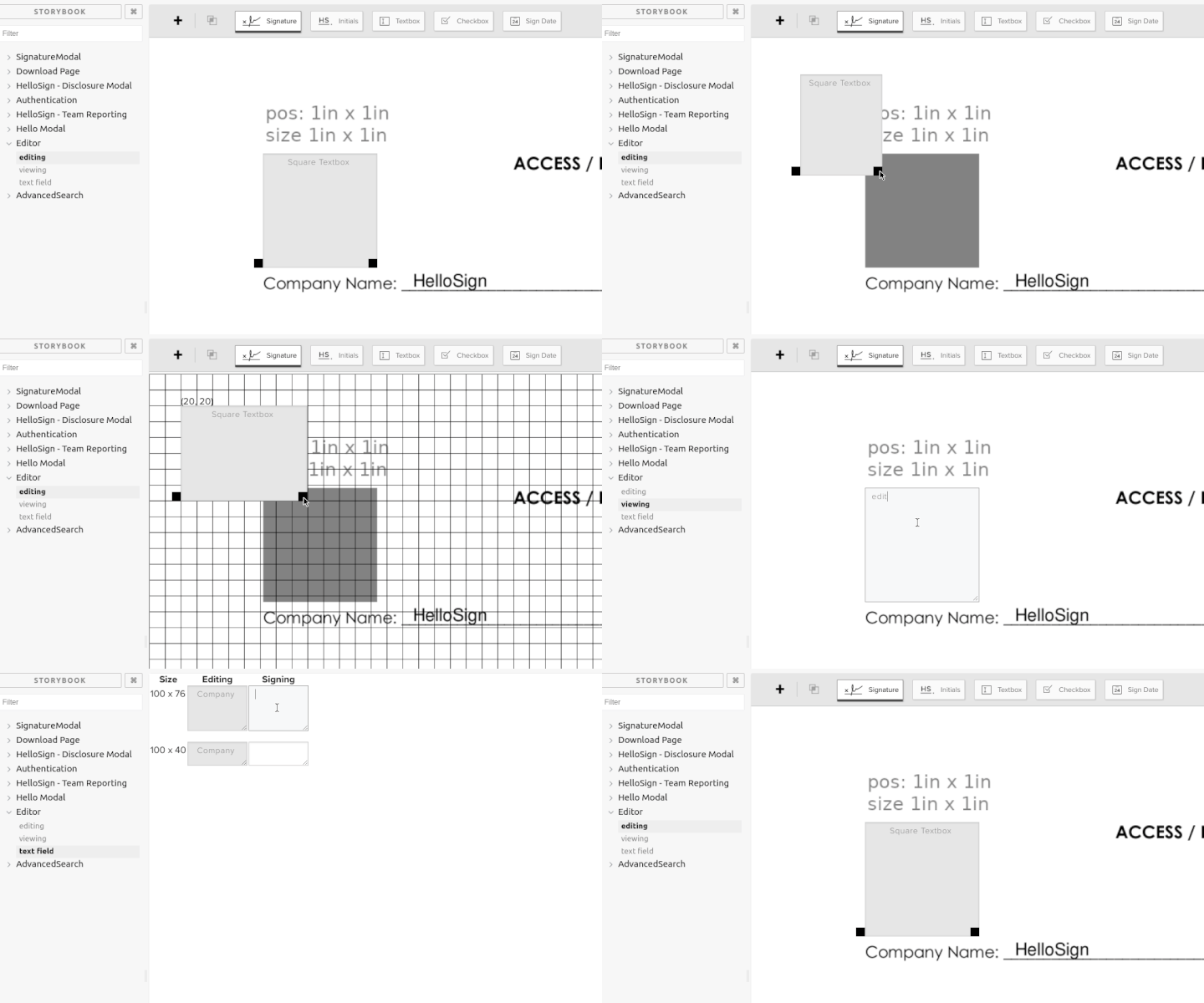
Storybook turned out to be an essential tool, but not for its usual purpose of building component libraries. The killer feature is that you don't need a real backend. In the actual app, the editor loads inside an iframe in a modal, requiring a file upload, signer setup, and a launch sequence—any change meant starting over. In Storybook, I could set up a signature request and test immediately.
Storybook's hot reload regenerates the whole component tree without a page refresh. Using @sambego/storybook-state, I wired onSave to persist editor data, so a reload would rebuild everything without losing my current state—a full refresh resets the demo. Publishing the story internally let Product, QA, and Design poke at the UI early.
Since the UI wasn't a redesign, I needed pixel fidelity with the old editor. My approach: run the legacy editor, copy the rendered HTML via dev tools into a React component, and use a screenshot alongside to ensure the styles stayed intact as I sliced chunks into subcomponents. Two weeks in, I posted a demonstration to Slack: a 1-inch square placed 1 inch into a PNG to verify positioning, text overlaid precisely, and a dragging handle that showed a 10x10 snap grid while holding Shift. The same handle component drove the viewing mode for perfect edit/sign fidelity—any drift between modes would be immediately visible on a page that renders every variant of each field component.
Consolidating state and moving toward a single page
HelloSign's original stack was server-rendered PHP with per-page JavaScript. Even after React arrived, a custom PHP function render_react_component() would render a placeholder div and mount a component into it as the page was generated. That was a fine stepping stone, but it only allowed setting props once at page generation time.
The signer app already had bigger React components but still relied on Backbone-style models, which conflict with React's one-way data flow. The editor became one of the first major pieces to deliberately land in the new single-page app codebase, which uses React Router and code-splitting. The goal: PHP serves an empty page and hellospa.js does everything else, moving all user-facing logic out of the PHP repository.
There was no standard state library in use, so I opted for component state plus React.Context. That worked, but I'd now recommend Redux or similar over DIY context handling. Context compares values by reference, so any newly allocated object on each render will trigger re-renders everywhere the context is consumed. I worked around that with a small cache helper—call it a poor man's useMemo—that shallow-compares candidate objects and returns the cached value when nothing changed.
const contextValue = this.contextCacher({ fields, pages })
// The code above works the same as this hook.
// const contextValue = React.useMemo(() => ({ fields, pages }), [fields, pages])

return <Provider value={contextValue}>{this.props.children}</Provider>
Coordinate spaces: converting carefully
A predictable pitfall was translating between two coordinate spaces: our document address space (a US Letter page is always 680x880 units) and the actual screen pixels (where that page might be 1020px wide). The obvious solution would be SVG: define a viewBox="0 0 680 880" and let the browser scale everything. That breaks on one hard constraint—you cannot place an <input> inside an <svg>, and form fields are precisely our core business.
I handled it with explicit conversion functions. Since both spaces share a top-left origin (0,0), conversion is a fixed scale factor: if the 680x880 page renders at 1020x1320px, toScreenCoords() multiplies by 1.5 and fromScreenCoords() divides. That covers page rendering (using ORIGIN_PAGE) but drag and drop is another matter—the live preview of a dragged toolbar button floats in a transparent, full-viewport div. The conversions needed to know which origin the incoming coordinates referenced.
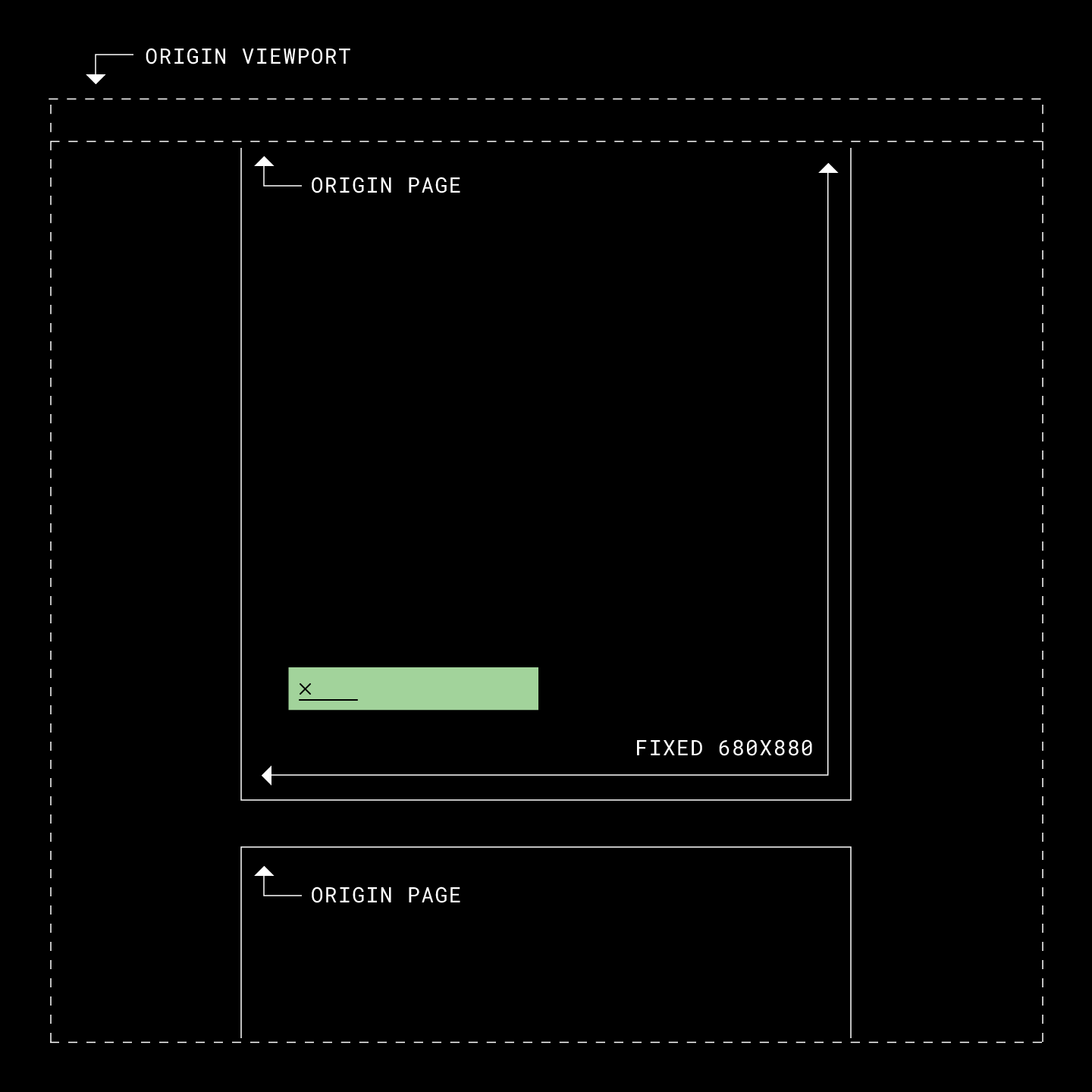
This strategy relied on measuring the DOM for available space and recalculating everything from that, which felt fragile. Resizing a window doesn't trigger React renders, so fields could drift out of sync with the document; interacting with the page snapped them back, but that perceptible glitch erodes user trust. The fix was converting field placement from absolute pixels to percentages of the page dimensions. Now, when <PageContainer> resizes, CSS repositions the fields itself—no recalculation required.
Shipping a Codebase Split Alongside a UI Redesign
The new Editor was developed behind a codebase split, letting HelloSign activate it for selected accounts without touching the rest of the customer base. That split served a second purpose: the team could ship the React rewrite while the UI redesign, deliberately kept out of the migration scope, was still in progress. Shipping the code first meant the eventual new interface rested on an engine that already had production mileage, with bugs found and fixed before the visual refresh landed.
The separation between the UI layer and the business logic layer made this possible. UI components connect exclusively to functions exposed by <EditorContext, so rearranging or replacing them doesn't ripple through the rest of the system. The old Editor used a popover for field editing; the redesign moved that into a sidebar. Since both the popover and the sidebar pull from the same set of context functions, mounting one instead of the other is inconsequential. With the UI functionally detached from the application core, a fresh interface could launch without another rewrite of the underlying logic.
const EditorLayout = React.lazy(() => import(/* webpackChunkName: "hellospa-editor2" */'./editor-layout'));
const EditorV1 = React.lazy(() => import(/* webpackChunkName: "hellospa-editor1" */'./editor-v1'));

function Editor(props) {
  return (
    <EditorContext {...props}>
      <Suspense fallback="">
        {isSplitEnabled(EDITOR_REDESIGN)
          ? <EditorLayout />
          : <EditorV1 />
        }
      </Suspense>
    </EditorContext>
  );
}
Reusing the Editor Engine in the Signer App
The Signer app never got a full rewrite, but its document-rendering code was replaced. The architecture now follows four layers:
- Legacy Signer app powered by Models
<SignerSignatureRequest: Model compatibility<SignerContext: Business Logic<SignatureRequest: UI
Initially, the plan was to reuse the Editor through feature flags that disabled editing controls. That approach failed. The team needed to extract all document viewing code, restructuring so that <Editor is built around <SignatureRequest. This new component set carries its own context, publishing fields, pages, zoom and zoom controls.
The legacy Signer app relied on Backbone-style models: classes that hold data and let any reference subscribe to changes while managing their own backend communication. That conflicts with the one-way data flow powering <Editor and <SignatureRequest. The reconciliation came via <SignerSignatureRequest, an adapter component producing no DOM. The fields in <SignatureRequest/<Editor don't match the model shape, so the adapter fetches them in the format the newer components expect, relaying field-fill changes back to the models. It holds no business logic, keeping it the only new code aware of models; a future full Signer rewrite could simply drop the adapter and render <SignerContext directly.
Bringing the Overlay to the Server
The Overlay is the last consumer to move onto the shared <SignatureRequest code. Layers:
- HTML file with all data embedded
<OverlayPage<SignatureRequest: UI
Unlike Editor and Signer, which run in the browser, the Overlay must render server-side inside a mostly PHP environment. It isn't in production yet. The Overlay renders fields the same way as the other apps, but over a transparent background. A locked-down headless Chrome prints the page to PDF, which is then merged into the original PDF to form the final document.
Headless Chrome was not as simple as pointing it at a URL and printing. The security model demands an extremely restricted browser with no network access, limited to specific files. Each generated PDF requires a dedicated folder holding all HTML, JS, CSS and font assets, with the request payload embedded directly in the HTML file. That data layer replaces the component that otherwise manages backend communication, ensuring no document can reach out beyond its sandbox.
Fix the Business Logic, Not the Button
Engineers solve problems and write code when solving requires it. Bug reports and feature requests arrive from a user's perspective with a very specific scenario, and it is tempting to open the UI layer and fix it there. Often, though, the correct fix lives in the business logic layer, and addressing it there produces less code and a healthier system.
If a bug is purely a styling issue, the UI is where to start. For behavior, remember that the UI is a functional representation of state. Jumping into the interface code to patch a functional defect treats the symptom; tracing the issue back to the state transformation behind it solves the problem itself.


