What cascade layers actually change
Cascade layers let authors define explicit, ordered groups of specificity so that conflicts between style sources are resolved by layer priority rather than by selector weight or !important. The @layer at-rule and layered @imports establish an ordered stack — low-priority resets and defaults at the bottom, then themes, frameworks and design systems, up to components, utilities and overrides. Specificity still settles conflicts within a layer; between layers, the higher-priority layer simply wins.
Unlike specificity, layers are not cumulative: more layers do not mean more importance. They are not binary like !important and not numbered like z-index. By default, layered styles rank below un-layered styles.
/* establish a layer order up-front, from lowest to highest priority */
@layer reset, defaults, patterns, components, utilities, overrides;

/* import stylesheets into a layer (dot syntax represents nesting) */
@import url('framework.css') layer(components.framework);

/* add styles to layers */
@layer utilities {
  /* high layer priority, despite low specificity */
  [data-color='brand'] {
    color: var(--brand, rebeccapurple);
  }
}

@layer defaults {
  /* higher specificity, but lower layer priority */
  a:any-link { color: maroon; }
}

/* un-layered styles have the highest priority */
a {
  color: mediumvioletred;
}
Why the cascade needed a new tool
Selector specificity merges two separate jobs: choosing elements and prioritizing rule-sets. It assumes narrowly targeted selectors (IDs used once) matter more than reusable ones (classes, attributes) — a reasonable guess, but not a reliable rule. The usual remedy for a conflict is escalation: extra selectors, or !important. Authors have long worked around this with methodologies such as using a single class for every selector, which avoid the cascade rather than use it.
Layers give direct control instead, so systems can cascade intentionally, building upward from resets through themes and frameworks to components and overrides.
@layer framework {
  .overly#powerful .framework.widget {
    color: maroon;
  }
}

@layer site {
  .my-single_class {
    color: rebeccapurple;
  }
}
Where layers sit in the cascade — and how importance inverts
The cascade is an algorithm of ordered steps for resolving conflicts. Selector specificity is a small part of it, though the part authors touch most; people often use "specificity" loosely to mean overall cascade priority. Layers sit directly above specificity, so one can think of them as a step more powerful than ID selectors.
html { --button: teal; }
button { background: rebeccapurple !important; }
.warning { background: maroon; }
Understanding layers also requires understanding !important. Its purpose is not raw power but balance among competing concerns: browser defaults, user preferences and author styles. Browsers rank lowest, user preferences override them, and authors override both — but the creators of CSS intended users to have the last word when it matters:
If conflicts arise the user should have the last word, but one should also allow the author to attach style hints.
— Håkon Lie (emphasis added)
Adding the flag creates a reversed set of three important layers: important browser styles are most powerful, then important user preferences, then important author styles, followed by normal author, normal user and normal browser styles. Author styles therefore gain little from the flag, but it lets browsers and users reclaim control; browser stylesheets include important declarations authors cannot override.
iframe:fullscreen {
  /* iframes in full-screen mode don't show a border. */
  border: none !important;
  padding: unset !important;
}
Most browsers no longer accept user stylesheet uploads, but they do expose user preferences, where a checkbox determines whether a site may override them — equivalent to !important in a user stylesheet.

Context follows the same logic in reverse. Normally the host document (light DOM) beats an embedded shadow context; with !important, important shadow styles beat important host styles. In the example below, both color declarations are normal, so the host's mediumvioletred wins, while the !important font-family declarations hand fantasy from the shadow context the advantage.
Layers behave identically, with important layers reversed — only more visibly. Given three layers ordered utilities, components, defaults, important declarations produce the reverse ordering: important defaults first, then important components, important utilities, normal utilities, normal components, normal defaults. In the example, all three normal layers set the color and utilities wins with maroon, but text-decoration is !important in both defaults and components, so important defaults wins the underline.
Once layers are in use, !important must be applied deliberately: it no longer jumps to the top but lets a lower layer insist that specific declarations are essential.
Ordering rules
Layers stack in the order they first appear: the first encountered is weakest, the last strongest. Un-layered styles sit above all of them.
@layer layer-1 { a { color: red; } }
@layer layer-2 { a { color: orange; } }
@layer layer-3 { a { color: yellow; } }
/* un-layered */ a { color: green; }
Important styles reverse that entire order:
!importantlayer-1 (most powerful)!importantlayer-2!importantlayer-3!importantun-layered styles- normal un-layered styles
- normal layer-3
- normal layer-2
- normal layer-1 (least powerful)
Grouped layers stay together in the final order — the sub-layers of layer-3 are adjacent — but otherwise the result is the same as a flattened six-item list, and reversal flattens the list entirely.
@layer layer-1 { a { color: red; } }
@layer layer-2 { a { color: orange; } }
@layer layer-3 {
  @layer sub-layer-1 { a { color: yellow; } }
  @layer sub-layer-2 { a { color: green; } }
  /* un-nested */ a { color: blue; }
}
/* un-layered */ a { color: indigo; }
Names let a layer be declared in one place to fix the order, then appended to from anywhere:
/* describe the layer in one place */
@layer my-layer;

/* append styles to it from anywhere */
@layer my-layer { a { color: red; } }
An entire ordered list can also be declared at once:
@layer one, two, three, four, five, etc;Defining the order up-front, before importing third-party code, gives the site author final say and keeps all ordering in one editable place.
Syntax
Order-setting statements
An @layer statement declares names without styles:
@layer <layer-name>#;The hash marks a comma-separated list of any length:
@layer reset, defaults, framework, components, utilities;That establishes the order un-layered styles, utilities, components, framework, defaults, reset (weakest). Statements may be repeated, but only first appearances matter: in a second statement, names already established are ignored, and no later statement can move an existing layer. These statements are allowed at the top of a stylesheet, before the @import rule but not between imports; establishing every layer up-front in one place is the recommended practice.
Block rules
The block form takes a single name and holds styles:
@layer <layer-name> {
  /* styles added to the layer */
}
Most content is allowed inside — media queries, selectors and styles, support queries — but not charset, imports or namespaces. If the name is new, it is appended to the order; if it already exists, styles are added to it without changing priority. With the order fixed up-front, block order in the file no longer matters:
/* establish the order up-front */
@layer defaults, components, utilities;

/* add styles to layers in any order */
@layer utilities {
  [hidden] { display: none; }
}

/* utilities will override defaults, based on established order */
@layer defaults {
  * { box-sizing: border-box; }
  img { display: block; }
}
Nested groups
Layer rules can be nested, producing grouped layers addressable as parent and child joined by a period, so sub-layers are reachable from outside the group:
@layer one {
  /* sorting the sub-layers */
  @layer two, three;

  /* styles ... */
  @layer three { /* styles ... */ }
  @layer two { /* styles ... */ }
}
/* sorting nested layers directly */
@layer one.two, one.three;
/* adding to nested layers directly */
@layer one.three { /* ... */ }
@layer one.two { /* ... */ }Ordering rules apply at every level: styles directly in a group count as un-layered in that context and outrank its nested layers.
@layer defaults {
  /* un-layered defaults (higher priority) */
  :any-link { color: rebeccapurple; }

  /* layered defaults (lower priority) */
  @layer reset {
    a[href] { color: blue; }
  }
}
Groups are self-contained, so ordering never intermixes across them — top-level layers sort first, then layers within each group:
@layer reset.type, default.type, reset.media, default.media;- un-layered (most powerful)
- default group
- default un-layered
- default.media
- default.type
- reset group
- reset un-layered
- reset.media
- reset.type
Layer names are scoped, so both groups can keep a distinct media sub-layer. Grouping matters most when layering whole stylesheets: a tool such as Bootstrap could layer internally, and its layers can be nested into a shared bootstrap group on import to avoid naming conflicts.
Importing into layers, and anonymous layers
Whole stylesheets enter a layer through the layer() function in @import rules:
/* styles imported into to the <layer-name> layer */
@import url('example.css') layer(<layer-name>);
A layer attribute for the HTML <link> element is proposed but still under development and unsupported anywhere.
Named layers are convenient but optional. Anonymous layers come from the block rule, or from an import using the bare layer keyword instead of layer():
@layer { /* ... */ }
@layer { /* ... */ }
/* styles imported into to a new anonymous layer */
@import url('../example.css') layer;Each anonymous layer is unique and appended wherever encountered; it cannot be referenced later. Use them sparingly — for example, to force all styles of a layer into one location, or to hide a third-party tool's internal layering from its public API.
Rolling back with global keywords and revert-layer
Existing global keywords undo the cascade in different ways:
initialsets the specified value before any styles, including browser defaults — the initialdisplayisinlineregardless of element.inherittakes the parent's value; it is the default for inherited properties but also removes earlier values.unsetbehaves as if all prior values were removed, so inherited propertiesinheritand others return toinitial.revertdiscards only author-origin values, leaving browser and user styles intact — usually what is wanted.
The new global revert-layer works like revert but discards only values set in the current layer, falling back to the previous layer. In the example, a no-theme class removes everything in the theme layer, so a link with that class uses the default layer's value. In un-layered styles it behaves like revert.
@layer default {
  a { color: maroon; }
}

@layer theme {
  a { color: var(--brand-primary, purple); }

  .no-theme {
    color: revert-layer;
  }
}
Adding !important to revert-layer changes which layers are reverted, because every layer has both a normal and an important position. Flattening a three-layer stack with un-layered styles and animations gives, from most to least powerful: !important defaults, !important components, !important utilities, !important un-layered styles, CSS animations, normal un-layered styles, normal utilities, normal components, normal defaults. Used normally in utilities, it reverts only that layer while everything else still applies. Moved into the important position, it reverts the normal and important versions and everything between them: important utilities, important un-layered styles, animations, normal un-layered styles and normal utilities all drop out, while important defaults and components and normal components and defaults remain.
Practical applications
Low-priority defaults
Resets that wrap each selector in :where() already lower priority, but the pseudo-class must be applied selector by selector and internal reset conflicts must be resolved without specificity. A layer wraps the whole reset instead — via a block rule, an @import, or both, since nesting layers does not change priority. Layering a third-party reset guarantees it lands in the intended layer whether or not it layers itself internally. Because layered styles sit below un-layered ones, this is an easy first adoption step: reset selectors keep their specificity for internal conflicts while the stylesheet becomes simple to override.
/* reset.css */
@layer reset {
  /* all reset styles in here */
}
/* reset.css */
@import url(reset.css) layer(reset);Architecting larger codebases
Bigger projects need boundaries between themes, component libraries and utilities, and those boundaries can reflect priority. Harry Robert's Inverted Triangle CSS visualizes such a stack; the original pitch for layers used ITCSS as its primary example and development guide. Restricting a project to a fixed set of top-level layers, extended with nested layers where useful, is likely to help. One example ordering: low-level reset and normalization, element defaults for typography, themes such as light and dark, reusable patterns, layouts and page structures, individual components, overrides and utilities.

That stack can be declared at the very start of the CSS in a single statement:
@layer
  reset,
  default,
  themes,
  patterns,
  layouts,
  components,
  utilities;
Each component can then break down further — defaults, structures, themes, utilities — without touching the top-level structure:
@layer components {
  @layer defaults, structures, themes, utilities;
}
Third-party resets, utilities, design systems
Third-party CSS — a shared reset like Normalizer or CSS Remedy, a design system like Material Design, Bootstrap, Tailwind, or an internal library — is where cascade conflicts most often arise, because its selector weights cannot be controlled. Layers slot that code exactly where it belongs regardless of how its selectors are written. Begin with a layer stack from resets up to utilities:
@layer reset, type, theme, components, utilities;A reset such as CSS Remedy can go into a sub-layer of reset:
@import url('remedy.css') layer(reset.remedy);Local reset styles then live directly in reset, overriding the nested styles, so local rules keep priority over Remedy's across releases; the whole reset layer stays at the bottom, below the rest of the system:
@import url('remedy.css') layer(reset.remedy);

@layer reset {
  :is(ol, ul)[role='list'] {
    list-style: none;
    padding-inline-start: 0;
  }
}
Utilities illustrate the opposite end. They break the specificity heuristic: defined broadly, they have low specificity but must win conflicts, which a utilities layer at the top of the stack provides. External utilities load into a sub-layer, local ones go alongside:
@import url('tailwind.css') layer(utilities.tailwind);

@layer utilities {
  /* from https://kittygiraudel.com/snippets/sr-only-class/ */
  /* but with !important removed from the properties */
  .sr-only {
    border: 0;
    clip: rect(1px, 1px, 1px, 1px);
    -webkit-clip-path: inset(50%);
    clip-path: inset(50%);
    height: 1px;
    overflow: hidden;
    margin: -1px;
    padding: 0;
    position: absolute;
    width: 1px;
    white-space: nowrap;
  }
}
Tools in the middle of the stack — combining typography defaults, themes and components — might warrant a top-level layer of their own:
@layer reset, bootstrap, utilities;
@import url('bootstrap.css') layer(bootstrap);
If such tools expose layers as a public API, the library can be broken into parts so local code interleaves with it:
@import url('bootstrap/reset.css') layer(reset.bootstrap);
@import url('bootstrap/theme.css') layer(theme.bootstrap);
@import url('bootstrap/components.css') layer(components.bootstrap);

@layer theme.local {
  /* styles here will override theme.bootstrap */
  /* but not interfere with styles from components.bootstrap */
}
Un-layered, !important-heavy frameworks
Adoption will not happen everywhere at once, and frameworks may keep using !important for some time, which reversed important layers make awkward. Layers still help: you decide the project's layers, so you can place layers both above and below the framework. A lower layer overrides the framework's !important styles, a higher one overrides its normal styles:
@layer framework.important, framework.bootstrap, framework.local;
@import url('bootstrap.css') layer(framework.bootstrap);

@layer framework.local {
  /* most of our normal framework overrides can live here */
}

@layer framework.important {
  /* add !important styles in a lower layer */
  /* to override any !important framework styles */
}
It reads as something of a hack, but it moves toward a more structured cascade and should be temporary.
Designing a layerable library
For library authors, named internal layers serve organization and can become developer API. Bootstrap, for instance, could expose reboot, grid and utilities layers in that order, letting users load them into different local layers:
@import url(bootstrap/reboot.css) layer(reset); /* reboot » reset.reboot */
@import url(bootstrap/grid.css) layer(layout); /* grid » layout.grid */
@import url(bootstrap/utils.css) layer(override); /* utils » override.utils */
Or into a Bootstrap layer with local layers interspersed:
@layer bs.reboot, bs.grid, bs.grid-overrides, bs.utils, bs.util-overrides;
@import url('bootstrap-all.css') layer(bs);
Private layering can be hidden inside anonymous layers, added to the order where encountered but never exposed for rearrangement or appending.
What layers are not for
Layers do not make it easy to escalate a single style. If most styles are un-layered, any new layer is de-prioritized. Per-block layering quickly becomes untrackable; layers work best as consistent project-wide patterns, where the right result comes from moving a style into its predefined layer. In a well-layered project it is still possible to add a highest-power layer atop a stack, or to use un-layered styles to override layers, and a debug layer at the top can hold exploratory work kept out of production. But adding layers ad hoc defeats the organizational purpose. Ask why a style should override another: if it is because one type of style always wins, layers fit (move the utility into utilities, for instance); if it is because a targeted style should beat a general one, the selectors should express that specificity. Occasionally styles genuinely are important — display: none for [hidden] belongs in a low-priority reset yet must be hard to override — and then !important is the right tool:
@layer reset {
  [hidden] { display: none !important; }
}
Layers are also not a scoping or name-spacing mechanism. Creating one layer per component in the hope that, say, .post-title only applies inside a .post does not work: layers constrain cascading, not selectivity, so they help only if component X always overrides component Y. The proposed @scope spec targets that need. It is better to think of layers and scopes as overlapping concerns:
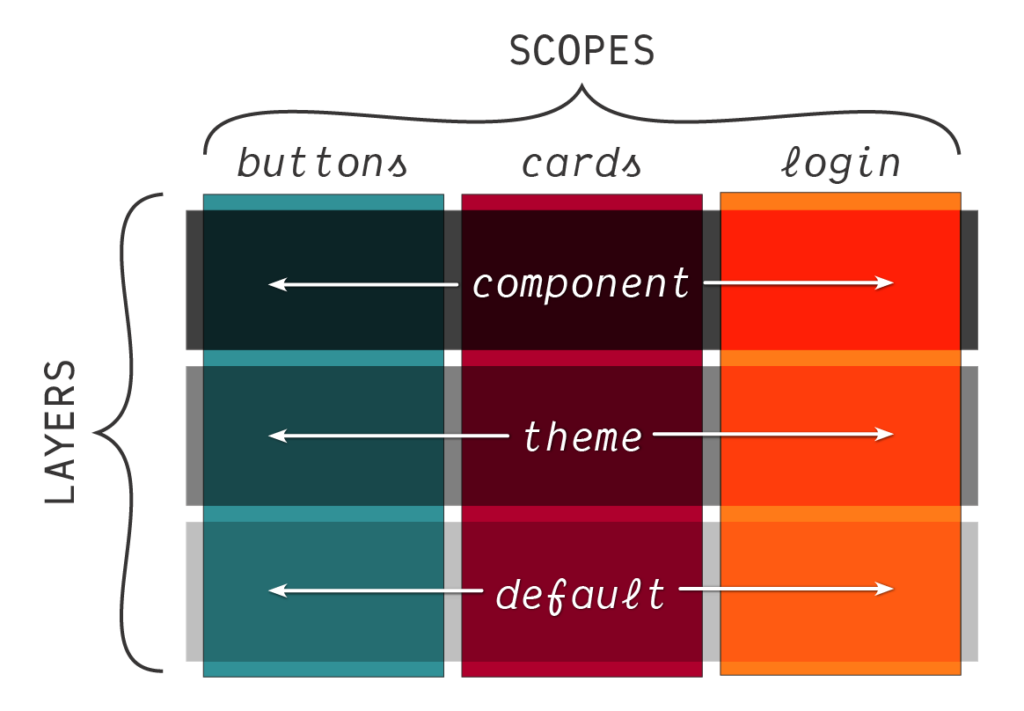
Scopes describe what is styled; layers describe why — or, alternatively, layers say where the style comes from, scopes say what it will attach to.
Working out which style wins
Take a paragraph, then:
<p id="intro">Hello, World!</p>- Layered versus un-layered.
Despite the layer's important-sounding name, un-layered styles have higher priority, so the paragraph is@layer ultra-high-priority { #intro { color: red; } } p { color: green; }green. - Mixed importance.
The normal order is@layer ren, stimpy; @layer ren { p { color: red !important; } } p { color: green; } @layer stimpy { p { color: blue !important; } }renbelowstimpybelow un-layered styles, but some declarations are important, so filter to those first — origin and importance is the cascade's first step, before layering. Two important styles remain, one per layer; important layers are reversed, puttingrenon top. The paragraph isred. - Sub-layers versus specific selectors.
All styles share one origin and context, none are important or inline. Selector range is broad — an ID@layer Montagues, Capulets, Verona; @layer Montagues.Romeo { #intro { color: red; } } @layer Montagues.Benvolio { p { color: orange; } } @layer Capulets.Juliet { p { color: yellow; } } @layer Verona { * { color: blue; } } @layer Capulets.Tybalt { #intro { color: green; } }#introto a zero-specificity*— but layers resolve before specificity, so ignore selectors. The parent layer order puts allMontagueslowest, then allCapulets, thenVerona, since sub-layers sort with their parent. Filtering toVerona, even the zero-specificity*wins. Beware universal selectors in powerful layers.
DevTools and browser support
Chrome, Safari, Firefox and Edge dev tools list applied selectors in the styles panel sorted by cascade priority, with non-applied styles grayed or struck out and sometimes explained — the first place to look when debugging layers. Safari Technology Preview and Firefox Nightly already show and sort cascade layers, listing each selector's layer directly above it; this tooling is expected to reach stable releases when layers do:


Chrome and Edge are building similar tools, expected in Canary releases once layers ship in stable.
| Chrome | Firefox | IE | Edge | Safari |
|---|---|---|---|---|
| 99 | 97 | No | 99 | 15.4 |
| Android Chrome | Android Firefox | Android | iOS Safari |
|---|---|---|---|
| 157 | 160 | 157 | 15.4 |
Because layers underpin a whole architecture, manual fallbacks are hard to imagine: they would mean duplicating large code sections with different selectors, or shipping a simpler fallback stylesheet.
An @supports test for @layer and other at-rules is possible in CSS, though it is unclear when browsers will support that query itself:
@supports at-rule(@layer) {
  /* code applied for browsers with layer support */
}

@supports not at-rule(@layer) {
  /* fallback applied for browsers without layer support */
}
A layer attribute for the HTML <link> element exists only as a proposal in the HTML repository:
<!-- styles imported into to the <layer-name> layer -->
<link rel="stylesheet" href="example.css" layer="<layer-name>">

<!-- styles imported into to a new anonymous layer -->
<link rel="stylesheet" href="example.css" layer>
Older browsers would ignore the attribute and load the stylesheet unlayered, with unexpected results, so the proposal extends media with a support() feature query to make layered links conditional:
<link rel="stylesheet" layer="bootstrap" media="supports(at-rule(@layer))" href="bootstrap.css">Polyfills and workarounds are being explored, with no clear timeline. Since all major browsers follow an evergreen model on short release cycles, support should ramp up quickly and layers may be usable in a few months for many teams. Others can keep managing the cascade with selectors, custom properties and other tools until they are comfortable with native support.
Primary references are the Cascading & Inheritance Level 5 specification and MDN's @layer documentation. Further reading includes Bramus Van Damme's "The Future of CSS: Cascade Layers (CSS @layer)", Stephanie Eckles' "Getting Started With CSS Cascade Layers" in Smashing Magazine, and Una Kravets' "Cascade layers are coming to your browser" on Chrome Developers. Una Kravets also narrates videos on !important, the @layer and layer() primitives, and the revert keywords, and there is a Layers CodePen collection of demos.




