Interop as the forcing function
Google, Apple, Microsoft and Mozilla, together with Igalia and Bocoup, have spent the past few years collaborating on Interop, an effort to bring universal browser support to web technologies. Its track record is strong: once a focus area joins Interop, it often lands at near-100% support across the major browsers within a year.
CSS Subgrid shows how this plays out. Firefox shipped it back in 2019, but the other engines stayed quiet for years. After Subgrid was added to Interop 2023, it was broadly available across modern browsers by the end of that year.
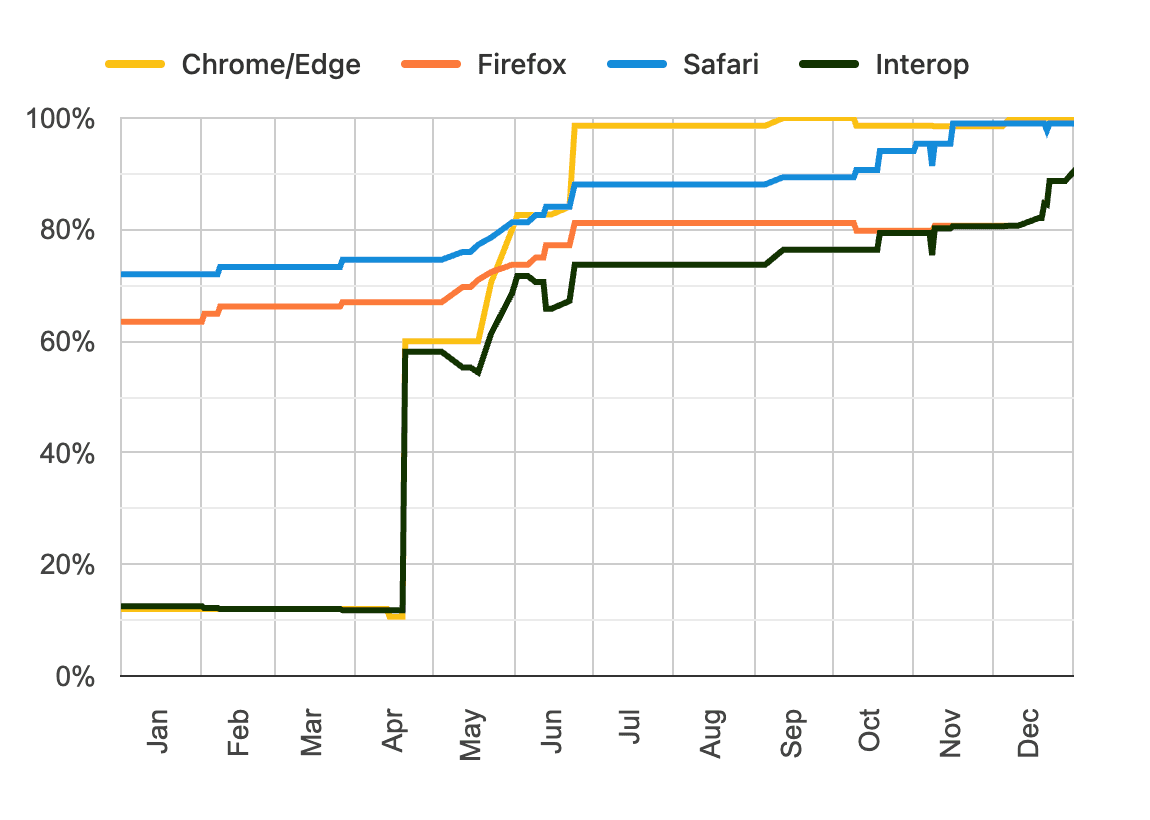
With 2026 winding down, planning for Interop 2027 is underway. Mozilla has built a ranking system where developers can upvote the features they most want, and that ranking data is meant to shape what goes into next year's Interop.
What follows is a look at ten of the highest-priority features, along with some techniques that work in browsers today.
Functions written in CSS
Current Browser Support

 Supported in Chrome 155 and Edge 154
 Not supported in Firefox 157
 Not supported in Safari 27
Current as of October 2026.
More info on caniuse
Among the more ambitious proposals is the ability to define functions in CSS:
/* Define a function: */
@function --gradient-to-transparent(--color, --direction: bottom) {
  result: linear-gradient(
    to var(--direction),
    var(--color),
    transparent;
  );
}

/* Invoke it: */
.elem {
  background: --gradient-to-transparent(red);
}

/* …which produces: */
.elem {
  background: linear-gradient(
    to bottom,
    red,
    transparent;
  );
}
The syntax borrows from JavaScript: @function declares a function, and result specifies the value it returns. One compelling use case is converting between polar and cartesian coordinates, a recurring need in animation work:
@function --translate-polar(--angle, --distance) {
  result: translate(
    calc(cos(var(--angle)) * var(--distance)),
    calc(sin(var(--angle)) * var(--distance))
  );
}

/* Move this element 100px at a 45° angle: */
.particle {
  transform: --translate-polar(45deg, 100px);
}
It may sound far-fetched, but Chromium browsers already implement it. Should it make Interop 2027, broad availability could arrive sooner than expected.
Rethinking corners: corner-shape and border-shape
Current Browser Support
Supported in Chrome 155 and Edge 154Not supported in Firefox 157Not supported in Safari 27Current as of October 2026.
More info on caniuse
The border-radius property rounds a DOM node's edges by attaching a quarter-circle to each corner and joining the four straight sides. corner-shape explores alternative ways of joining those sides and offers several options:
Result
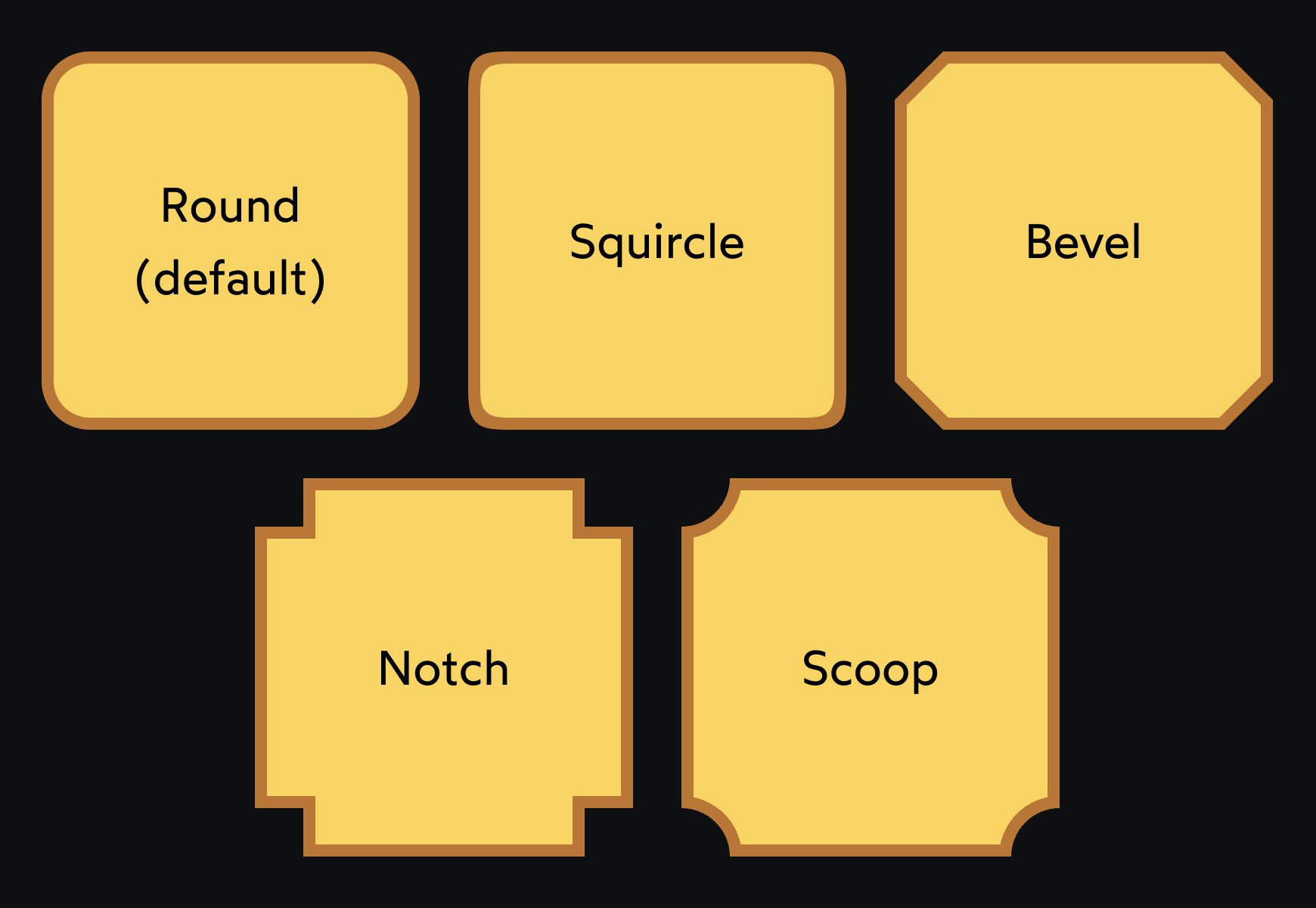
The squircle value is a common entry point: squircles generate rounded corners from superellipses, an approach Apple has used for years because the edges come out smoother and gentler. In practice, though, corner-shape: bevel tends to get the most mileage, particularly for video-game and sci-fi interfaces.
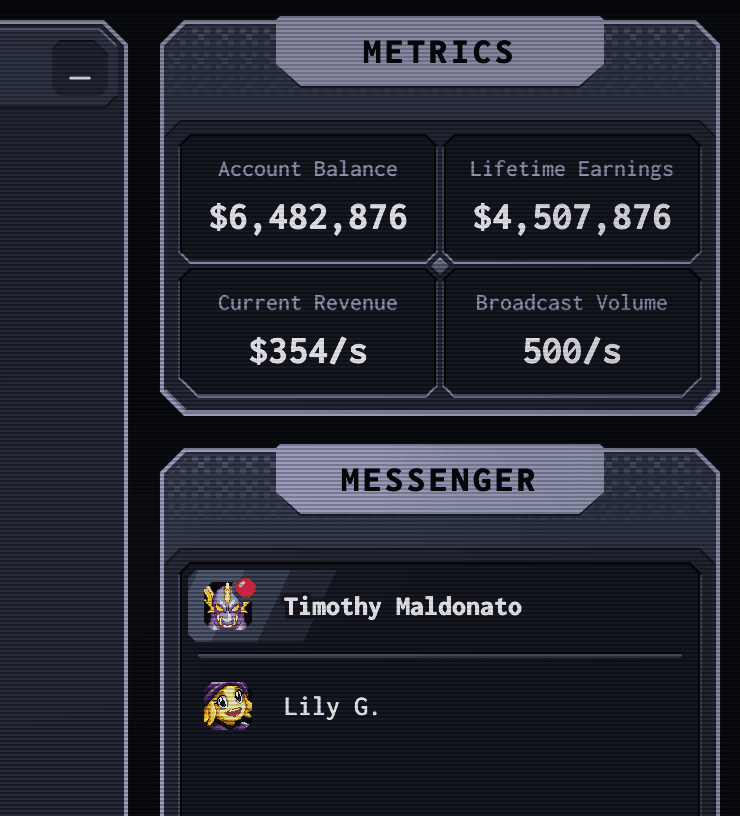
Similar results were technically achievable before with clip-path or masks, but those tools leave the border box untouched. corner-shape changes the shape of the border-box, so borders, outlines and box-shadows follow the altered corners correctly. Even without Firefox or Safari support as of October 2026, it works well as a progressive enhancement.
Drawing borders directly
Current Browser Support
Supported in Chrome 155 and Edge 154Not supported in Firefox 157Not supported in Safari 27Current as of October 2026.
More info on caniuse
A separate proposal, border-shape, operates at a lower level: it lets you draw the border yourself out of straight lines, arcs and Bézier curves.
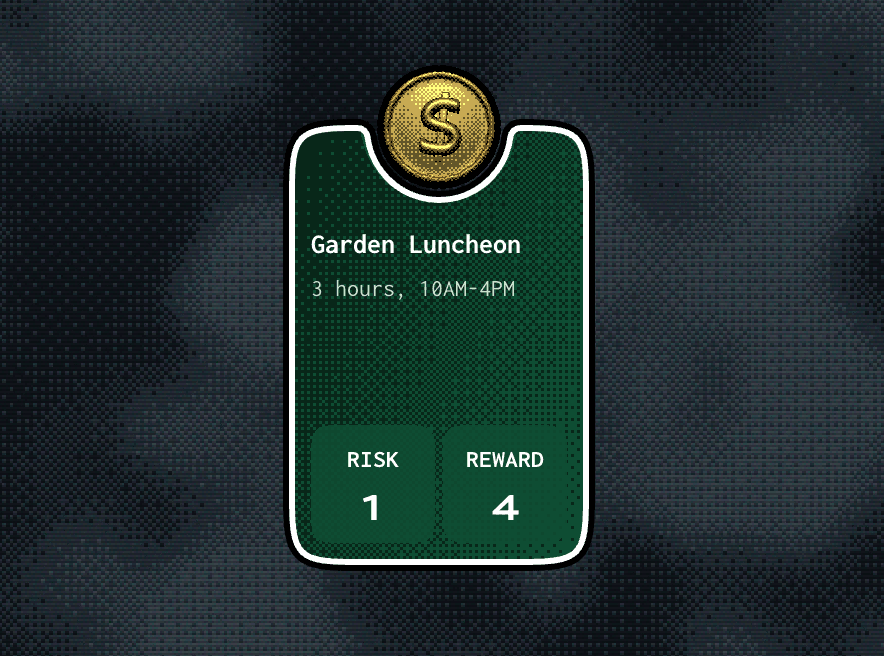
As with corner-shape, the element's actual border box changes, so borders, outlines and shadows trace the new outline. The card above, for instance, was drawn as a custom shape and then given a white border and a black outline. Different border shapes can even be animated between.
Anchored container queries
Current Browser Support
Supported in Chrome 155 and Edge 154Not supported in Firefox 157Not supported in Safari 27Current as of October 2026.
More info on caniuse
Anchor Positioning, prioritized in Interop 2026 and now widely available, lets one element be anchored to another — a floating tooltip tied to its trigger, for example, so it stays connected wherever the trigger sits on the page. Positioning like this is trickier than it looks. A tooltip may be meant to float above its anchor, but what happens when the anchor nears the top of the viewport?
The original API already covered most of the problem by allowing fallback positions: if the target doesn't fit above the anchor, it can flip to the bottom automatically. What was missing was any way to tell whether the target had flipped. CSS offered no means of knowing whether the element currently sits above or below its anchor, or whether it is using the default or fallback position. For tooltips this matters, since they usually need a small protrusion pointing at the anchor.
The "Level 2" version of the API adds a new type of container query that reports whether the target is using a fallback position. Further detail lives in the Interop 2027 proposal.
An inherit() function
This proposal is not implemented in any browser and isn't listed on caniuse. The inherit keyword passes a value down from the parent even when the property isn't normally inherited:
Result
That trick is useful for reusing values, but it often falls short. Nested border radii are a classic case:
Result
For nested radii to look right, the inner radius needs less rounding than the outer one. The inherited value isn't quite what's wanted — it needs to be transformed. The proposed inherit() function would take the inherited value and let calc() modify it:
p {
  border-radius: calc(inherit() - 4px);
}
Given how preliminary the feature is, making the Interop 2027 cut seems unlikely — but it would be a welcome addition.
Scroll-triggered animations
Current Browser Support
Supported in Chrome 155 and Edge 154Not supported in Firefox 157Not supported in Safari 27Current as of October 2026.
More info on caniuse
Scroll-driven animations scrub a keyframe animation as the user scrolls — fading an element in as it crosses the viewport, for instance. They were part of Interop 2026 and are now implemented across all browsers. Scroll-triggered animations are a separate proposal, in which a keyframe animation fires only when the user reaches a specific scroll point, like a proximity sensor going off, and then runs normally over a set duration.
Today this can be done with IntersectionObserver in JavaScript, though it is awkward. Having CSS handle both scroll-driven and scroll-triggered animations would be a welcome improvement, since each serves its own use case.
Focus order that follows the layout
Responsive layouts often rearrange content between breakpoints, but tab order stays tied to DOM order, so assistive-technology navigation can end up out of step with what is actually on screen at a given viewport. The reading-flow property addresses this by letting authors state which visual order should drive tab order, offering separate values for CSS Grid and Flexbox. For finer control, reading-order defines a custom sequence in the spirit of HTML's tabIndex.
.grid {
  display: grid;
  reading-flow: grid-rows;
}
Chrome 155 and Edge 154 support the feature; Firefox 157 and Safari 27 do not. A proposal exists for Interop 2027.
Animating to and from keywords
Transitioning between keyword values such as auto has long been impossible, which is why collapsible interfaces built around height: 0 to height: auto needed workarounds. The interpolate-size property, together with the calc-size() function, closes that gap; interpolate-size: allow-keywords is what makes the transition possible, often in combination with transition-behavior.
Chrome has shipped the feature since 2024, though Chrome 155/Edge 154 remains the current support boundary and Firefox 157 and Safari 27 lack it. An Interop 2027 proposal is open. Progressive enhancement works today, but wrap the transition in an @supports query, since otherwise unsupported browsers incur a brief delay.
Borders between grid tracks
CSS Grid positions children along rows and columns defined purely in CSS, unlike table layout where each cell has its own <td> or <th> to carry a border. That makes drawing lines between cells awkward—an empty cell has no element to style.
Gap decorations introduce border-like properties that apply to the grid itself. The rule shorthand sets width, color and style (dashed, dotted, solid), while row-rule and column-rule draw lines in only one direction.
Support currently covers Chrome 155 and Edge 154; Firefox 157 and Safari 27 do not implement it. A proposal is filed for Interop 2027.
Querying scroll and sticky state
Sticky headers have always lacked a way to know whether they are currently stuck. Scroll state container queries add a container query type that matches when a position: sticky element shifts from its in-flow position to being anchored in the viewport, enabling effects such as a background change on the stuck header.
The same mechanism handles broader scroll state. A scroll container can be queried for whether it is scrolled to the top or bottom, which suits scroll-indicating gradients: scrollable: top matches while there is room to scroll upward, revealing a pseudo-element floating over the content, and stops matching once the container is fully scrolled up, hiding the gradient.
Chrome 155 and Edge 154 support it; Firefox 157 and Safari 27 do not. The Interop 2027 proposal is open.
Why the details still matter
Interop is entering its seventh year, and the author credits the project's continued momentum for much of this progress. The case for keeping current is not purely technical: much of the training data behind LLMs predates these features, so agents will not reach for them unprompted. Most of the capabilities above can ship today as progressive enhancements, and history suggests broad availability follows, which means guiding tooling toward modern CSS requires knowing it exists.
Readers can rank their own priorities among the proposals, which also include JavaScript APIs such as Temporal that fell outside this CSS-focused overview.