
A self-published ebook needed a print edition, and the HTML and CSS pipeline behind the ebook had no answer for one print-specific component: the table of contents. The goal was an automated TOC generated from HTML that would work as navigation in a webpage or PDF as well as on paper, with every line a link and dot leaders connecting titles to page numbers.
What a TOC Has to Do
Each line of a table of contents does three things: it names the chapter or section, draws leaders (dots, dashes, or lines) to visually join that title to its location, and states the page number. Word processors handle this easily, but the source content began as Markdown converted to HTML, so an HTML-based solution was required.
Prior Art and the Layout Problem
Two existing write-ups shaped the approach. Julie Blanc's "Build a Table of Contents from your HTML," written in the context of PagedJS (a polyfill for missing paged media features), started from a float-based layout. Christoph Grabo's "Responsive TOC leader lines with CSS" showed that CSS Grid makes alignment considerably easier. Neither fit exactly, but together they made the layout issues clear enough to build a combined approach with additional HTML and CSS.
Choosing the Markup
A TOC is fundamentally a mapping from title to page number — a key-value pair — which suggests either a <table> with a title column and a page column, or a <dl> definition list. Both are reasonable for a single-level TOC, but neither survives subsections well: table elements are a poor fit for hierarchical data, and nested definition lists don't carry correct semantics.
The alternative is a list — specifically an ordered list, since a TOC reflects chapters and subheadings in their order of appearance, and that order belongs in the markup. Choosing <ol> gives up the semantic title-to-page link, which can be restored inside each item by placing the word "page" before the number:
<ol class="toc-list">
  <li>
    <a href="#link_to_heading">
      <span class="title">Chapter or subsection title</span>
      <span class="page">Page 1</span>
    </a>

    <ol>
      <!-- subsection items -->
    </ol>
  </li>
</ol>
Styling the List
The first step was to drop the autogenerated numbers. Books commonly include unnumbered forewords and afterwords, so automatic numbering would be wrong; chapter numbers are written manually instead. The top-level list gets no padding so it aligns with paragraphs, and nested lists are indented with a 2ch padding value. The ch unit was chosen because the font wasn't settled yet — it scales with character width rather than relying on fixed pixels.
.toc-list, .toc-list ol {
  list-style-type: none;
}

.toc-list {
  padding: 0;
}

.toc-list ol {
  padding-inline-start: 2ch;
}
WebKit browsers strip list semantics when list-style-type is none, so Sara Soueidan's note on this required adding role="list" to preserve them:
<ol class="toc-list" role="list">
  <li>
    <a href="#link_to_heading">
      <span class="title">Chapter or subsection title</span>
      <span class="page">Page 1</span>
    </a>

    <ol role="list">
      <!-- subsection items -->
    </ol>
  </li>
</ol>
Aligning Title and Page Number
Within each item, the title must sit on the left and the page number flush right on the same line. Flexbox can produce that alignment, but it runs into trouble once leaders are added. Grid was chosen instead, largely because Grabo's approach also handles multiline titles cleanly:
.toc-list li > a {
  text-decoration: none;
  display: grid;
  grid-template-columns: auto max-content;
  align-items: end;
}

.toc-list li > a > .page {
  text-align: right;
}
The grid defines two columns: the first is auto-sized, filling the remaining space, and the second is max-content to hold the page number, which is right-aligned as is conventional. The word "page" is useful for screen readers but visually unwanted, so it is hidden with a standard visually-hidden class:
.visually-hidden {
  clip: rect(0 0 0 0);
  clip-path: inset(100%);
  height: 1px;
  overflow: hidden;
  position: absolute;
  width: 1px;
  white-space: nowrap;
}
<ol class="toc-list" role="list">
<li>
<a href="#link_to_heading">
<span class="title">Chapter or subsection title</span>
<span class="page"><span class="visually-hidden">Page</span> 1</span>
</a>
<ol role="list">
<!-- subsection items -->
</ol>
</li>
</ol>Leaders and the Accessibility Trap
CSS does, in principle, support leaders: the leader() function exists in the CSS Generated Content for Paged Media specification. No browser implements it, it isn't listed on caniuse.com, and there is no signal that will change. The practical alternative — used by both prior approaches — is a ::after pseudo-element whose content is a very long string of dots:
.toc-list li > a > .title {
  position: relative;
  overflow: hidden;
}

.toc-list li > a .title::after {
  position: absolute;
  padding-left: .25ch;
  content: " . . . . . . . . . . . . . . . . . . . "
      ". . . . . . . . . . . . . . . . . . . . . . . "
      ". . . . . . . . . . . . . . . . . . . . . . . "
      ". . . . . . . . . . . . . . . . . . . . . . . "
      ". . . . . . . . . . . . . . . . . . . . . . . "
      ". . . . . . . . . . . . . . . . . . . . . . . "
      ". . . . . . . . . . . . . . . . . . . . . . . ";
  text-align: right;
}
Absolute positioning takes the dots out of the page flow so they can't wrap onto another line, and right-aligned text keeps the dots flush against the number. A relatively positioned .title keeps the pseudo-element inside its box, and overflow: hidden hides the excess. The result is clean dot leaders.
The catch, again raised by Soueidan, is that those dots are text: a screen reader announces "Introduction dot dot dot dot…" through the entire string. The fix is to move the dots into a separate element marked aria-hidden="true", which screen readers skip:
<ol class="toc-list" role="list">
  <li>
    <a href="#link_to_heading">
      <span class="title">Chapter or subsection title<span class="leaders" aria-hidden="true"></span></span>
      <span class="page"><span class="visually-hidden">Page</span> 1</span>
    </a>

    <ol role="list">
      <!-- subsection items -->
    </ol>
  </li>
</ol>
.toc-list li > a > .title {
position: relative;
overflow: hidden;
}
.toc-list li > a .leaders::after {
position: absolute;
padding-left: .25ch;
content: " . . . . . . . . . . . . . . . . . . . "
". . . . . . . . . . . . . . . . . . . . . . . "
". . . . . . . . . . . . . . . . . . . . . . . "
". . . . . . . . . . . . . . . . . . . . . . . "
". . . . . . . . . . . . . . . . . . . . . . . "
". . . . . . . . . . . . . . . . . . . . . . . "
". . . . . . . . . . . . . . . . . . . . . . . ";
text-align: right;
}Detail Work
Chapter titles are set in bold and separated by margin from the subheadings beneath them, matching how most books distinguish the levels:
.toc-list > li > a {
  font-weight: bold;
  margin-block-start: 1em;
}
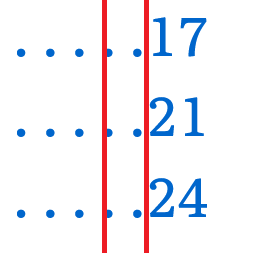
The remaining problem was page-number alignment with variable-width fonts: a number containing a 1 is narrower than others, so the leader dots can form a zigzag from line to line, as the fixed-width font had previously masked.
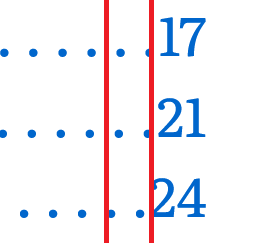
Setting font-variant-numeric to tabular-nums gives every digit the same width, and a minimum width of 2ch aligns all one- and two-digit numbers. For documents longer than 100 pages, use 3ch instead:
.toc-list li > a > .page {
  min-width: 2ch;
  font-variant-numeric: tabular-nums;
  text-align: right;
}
Result
The finished component handles chapters, subsections, and sub-subsections without any CSS changes, and works as linked navigation on web pages as well as in PDFs, where each line jumps to its page. It also holds up in print. Credit for the groundwork goes to Julie Blanc and Christoph Grabo, with Soueidan's accessibility review resolving the list-semantics and screen-reader issues.




