

Commits Are the Real Documentation
Every developer has hit the same wall: staring at a block of code and wondering what it does, why it exists, or whether the comment above it is still accurate. These moments are symptoms of a larger problem — collaboratively-developed source code is a poor communication medium on its own. Comments, style guides, and documentation requirements help, but they still leave developers spending hours just trying to understand what's in front of them.
The tools to fix this have been in front of us all along. Git commits aren't just checkpoints or logs of incremental progress. As GitHub's Git Guides put it, commits are "snapshots of your entire repository at specific times…based around logical units of change. Over time, commits should tell a story of the history of your repository and how it came to be the way that it currently is." A well-maintained commit history is a firsthand record of exactly how and why each line of code came to exist — with human-readable messages attached. A repository's commit history is the best tool a developer has for explaining and understanding code.
Structure the Story
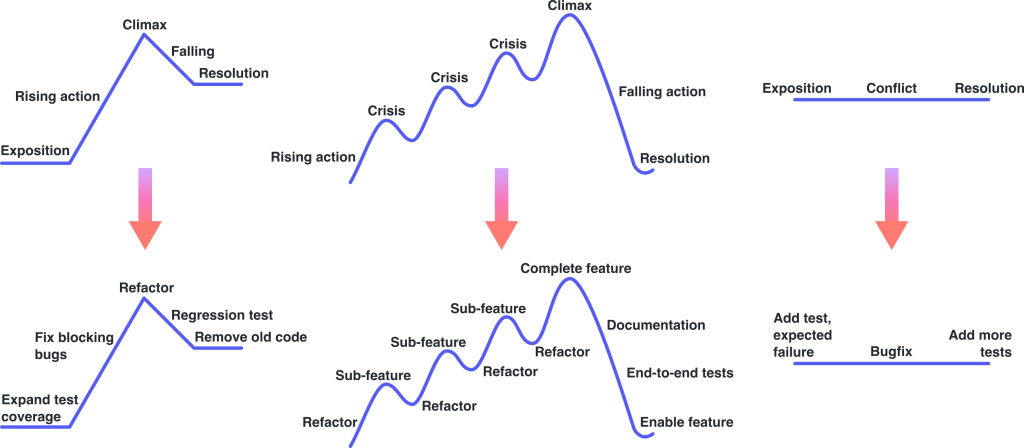
Like any good narrative, a branch's commit history has a structure that gives context to the code changes. Unpolished branches tend to reflect the messy, improvised reality of development: a commit working on one component, then another, then returning to finish the first; a multi-commit detour fighting CI syntax; a typo fix for an earlier commit; a mixed-bag commit of review feedback; a merge commit resolving conflicts with main.
That's an accurate retelling of how the work happened, but it's neither coherent nor memorable for anyone else trying to follow along.
Who Pays for a Scatterbrained History?
Two people feel the pain of disorganized commits: the reviewer and the author. Reviewing commit-by-commit is the most effective way to handle a large pull request without feeling overwhelmed. When those commits jump from topic to topic, the reviewer has to context-switch constantly, piecing together which earlier commit set up which later change. They either spend tedious effort clicking back and forth or make assumptions and miss potential issues.
The author suffers too. Jumping into a project without a narrative plan leads to inefficient hacking — flitting between the fun of building and the frustration of debugging. A planned approach is faster and produces better results.
Outline Before You Write
Outline your narrative, and reorganize your commits to match it.
The commit history on a branch is the vehicle for communicating what your changes mean. The narrative can take whatever form fits your work, but keeping it organized requires some editorial discipline.
| DO | DON’T |
|---|---|
| Write an outline and include it in the pull request description. | Wait until the end to form the outline – try using it to guide your work! |
| Stick to one high-level concept per branch. | Go down a tangentially-related “rabbit hole”. |
| Add your “implement feature” commit immediately after the refactoring that sets it up. | Jump back and forth between topics throughout your branch. |
| Treat commits as “building blocks” of different types: bugfix, refactor, stylistic change, feature, etc. | Mix multiple building block types in a single commit. |
Size Commits for Human Comprehension
A well-structured commit series tells a high-level story, but the code inside each commit is what actually builds software. Code can be complex, dense, and cryptic — and the cognitive burden of parsing it changes depending on how much is presented at once.
The Goldilocks Problem
Too much information in a single commit forces the reader to juggle multiple conceptually-distinct topics that can get jumbled or missed entirely. Too little information leaves the reader with an incomplete mental model of the change. A reviewer reading a massive commit may fail to flag a questionable architectural decision because unrelated changes mask it, or miss a bug sitting in a section that seems irrelevant to the feature being reviewed.
Reviewers benefit from commit-by-commit review the way students benefit from individual lectures paced across a semester. Ideally, each commit is a small, digestible change that builds their understanding gradually. But commits that are too small create their own problems — an incomplete change can't be evaluated on its own merits. When a later commit completes the change, the reviewer may struggle to connect it back to the earlier partial context. This gets worse when a later commit undoes part of an earlier one; the churn breaks down the reviewer's mental model just like an oversized commit does.
Poorly-sized commits also create practical problems beyond review. Rolling back to a specific commit while debugging often fails if that commit doesn't build. And when a bug is traced to a massive commit, teasing apart its intermixed changes becomes far harder than it was during initial review — especially once institutional knowledge has faded.
Small and Atomic
Make each commit both "small" and "atomic."
A small commit has minimal scope — it does one thing. This often correlates with fewer modified lines, but that's not a hard rule. Renaming a commonly-used function might touch hundreds of lines across the codebase, yet the change is trivial to explain and review because its scope is constrained.
A commit is atomic when it functions as a stable, independent unit of change. The repository should still build, pass tests, and work correctly at that exact commit — without requiring any other changes to follow. An atomic commit contains everything a reader needs to evaluate it on its own.
Write Messages That Explain Intent
Commit messages often get treated as an afterthought — or a punchline — but they're a direct opportunity to speak to your audience. A message explains your change in your own terms, supplementing the code itself.
Code Rarely Speaks for Itself
Even with clean structure and well-sized commits, a niche change can still baffle readers. This is especially true in larger or open-source projects where reviewers and future contributors lack the context you have about implementation details and nuances. What looks like a bug to someone else may actually be intentional behavior solving an unrelated problem. And what looks deliberate may have been a mistake from the start. A developer who misinterprets a change might inadvertently alter expected user-facing behavior — or cement a genuine bug into a "feature" that hurts users for years.
At minimum, unexplained changes slow everyone down as they try to reconstruct context that was obvious to you but invisible to them.
Answer Four Questions
Describe what you're doing and why you're doing it in the commit message.
The message should cover both high-level intent and low-level details. Framed as questions, each commit message should answer:
| What you’re doing | Why you’re doing it | |
|---|---|---|
| High-level (strategic) | Intent (what does this accomplish?) | Context (why does the code do what it does now?) |
| Low-level (tactical) | Implementation (what did you do to accomplish your goal?) | Justification (why is this change being made?) |
Making review manageable
Following the commit guidelines from the first part of this article turns code review into a structured, commit-by-commit exercise. Even large pull requests become digestible when you treat each commit as a discrete unit of change.
- Establish the narrative. Read the pull request description and the commit list first. If the commits jump between unrelated topics or clearly address multiple concerns, flag that in a comment before diving deeper.
- Scan for size and scope. Skim each commit's message and diff. Verify that it does one thing and contains no unfinished implementation. If commits are too large or too granular, suggest splitting or combining them.
- Read thoroughly. For each commit, check that the implementation matches the stated intent and that the code aligns with the implementation. Use the commit's context and justification to interpret the code correctly, and ask for clarification when that context is missing.
- Assess correctness. Only after you fully understand the commit's changes and its place in the overall narrative should you confirm that the code is efficient and bug-free.
Locating regressions with git bisect
When a deployment breaks and you don't know when the problem was introduced, git bisect is the right tool. It performs a binary search over the commits between a known-good commit (for instance, your last stable release) and a known-bad commit to identify the exact one that caused the error.
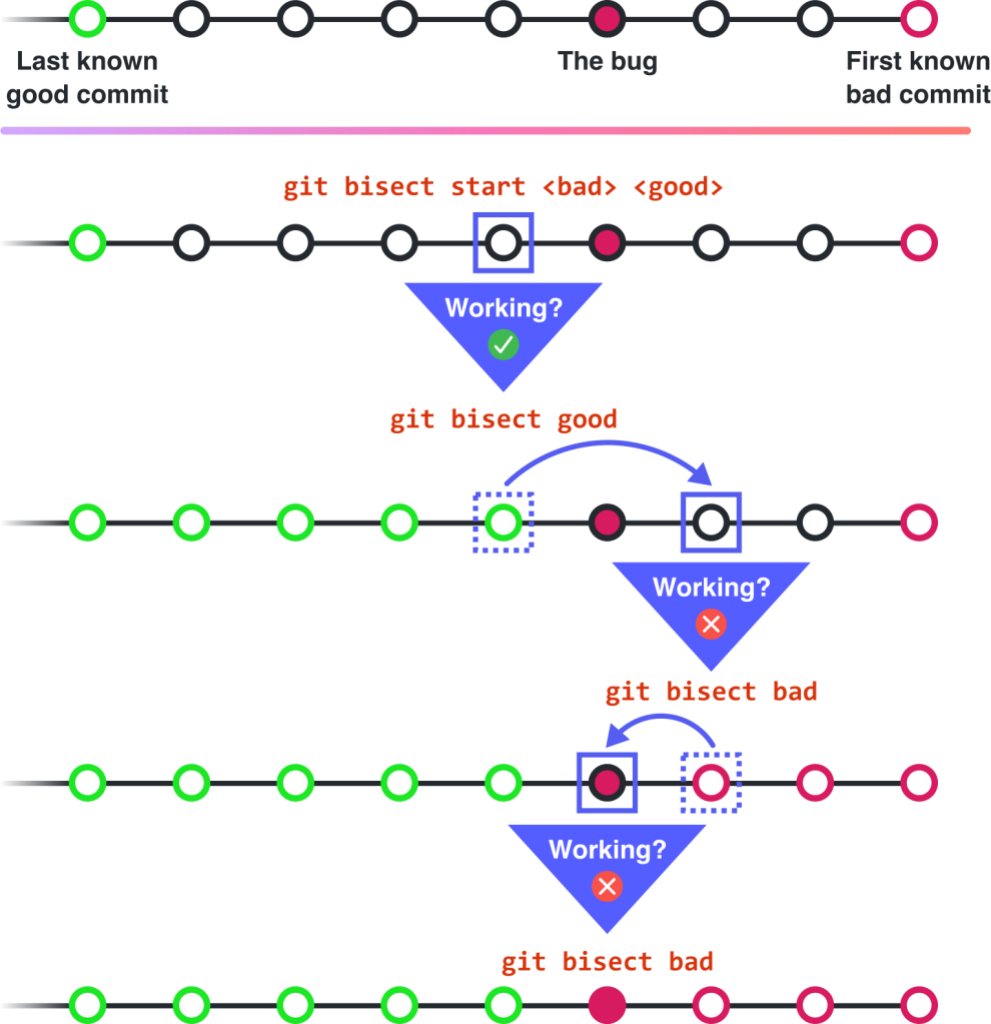
For git bisect to work, every commit in the range must be atomic and small. A non-atomic commit can't be tested cleanly for repository stability at each step, and a commit that is too large leaves you reading through lines of code manually to find the culprit anyway.
Investigating root causes
Isolating the offending commit is only half the battle. Often the buggy code is needed for another feature or doesn't obviously relate to the error you're seeing. You need to understand why that code was written in the first place, and the commit history holds that answer. Two commands are essential for this kind of investigation: git blame and git log.
git blame annotates each line of a file with the commit that last modified it:
$ git blame -s my-file.py
abd52642da46 my-file.py 1) import os
603ab927a0dd oldname.py 3) import re
603ab927a0dd oldname.py 4)
603ab927a0dd oldname.py 5) print(“Hello world”)
abd52642da46 my-file.py 5) print(os.stat(“README”))
This is useful for identifying which commits touch the same region of code, letting you read them side by side and judge whether they interact badly.
For a broader search, git log displays commits in reverse chronological order starting at HEAD:
$ git log --oneline
09823ba09de1 README.md: update project title
abd52642da46 my-file.py: add README stat printout
7392d7dbb9ae my-file.py: rename from oldname.py
5ad823d1bc48 test.py: commonize test setup
603ab927a0dd oldname.py: create printout script
...
The output can be filtered by file, by function name, by line range, or by commit message text. These filtered views help you assemble a complete picture of how a file or function evolved, guiding you toward the root cause of the bug.
Putting commit quality into practice
Commit quality is subjective and hard to quantify, but it has an outsized impact on developer experience across projects of every age, size, and license model. To build commit hygiene into your own workflow, three guidelines cover most of the ground:
- Organize your commits into a narrative.
- Make each commit both small and atomic.
- Explain the “what” and “why” of your change in the commit message.
These principles—and the concrete workflows they enable—show how much context commits can carry when they are written deliberately. Commit history will tell your project's story one way or another; these strategies help ensure it's a coherent one.
Further reading
- “Git Organized: A Better Git Flow,” an alternative methodology for revising commits
- “Fixing commits with git commit –fixup and git rebase –autosquash,” tips on using
fixup!commits and--autosquashto clean up a branch efficiently git-absorb, a tool that automatically splits miscellaneous fixes into assignedfixup!commits- “A Note About Git Commit Messages,” advice on formatting and phrasing in commit messages
- “My favourite Git commit,” an in-depth review of a really good commit message


