
The problem Workbox solves
Service Worker and Cache Storage are the two APIs that make reliable offline web apps possible. Using them correctly, though, is harder than it looks. Small mistakes in service worker code can lead to stale content, broken links, or caching behavior that's difficult to trace back to its cause. The underlying APIs give you a lot of power but leave the hard parts—cache invalidation, expiration, and cross-browser behavior—entirely up to you.
Workbox is a high-level toolkit built on top of those APIs. It provides production-ready libraries for adding offline support, structured into two groups: code that runs inside the service worker itself, and tooling that plugs into your build process.
Two halves of the toolkit
Runtime code inside your service worker
Workbox's runtime modules control how the service worker intercepts outgoing requests and interacts with the Cache Storage API. The toolkit includes around a dozen library modules for specialized use cases. The two most important concern whether to respond to a request (routing) and how to respond (caching strategy).
Build integration
Workbox ships three ways to integrate with your build pipeline: a command line tool, a Node.js module, and a webpack plugin. These tools handle two jobs:
- Generating a service worker script from configuration options, using Workbox's runtime libraries under the hood to implement the caching strategies you specify.
- Producing a list of URLs to precache, based on configurable patterns that select files from your build output.
Why adopt Workbox
Workbox is optional—you can hand-roll every service worker feature using the underlying APIs. But if you choose to use it, there are concrete benefits.
Cache management without the blind spots
The Cache Storage API has no built-in support for expiring cached entries. Workbox fills that gap with configurable size and age limits for runtime caching, and build-time integration for precaching so cached URLs are kept in sync with each new deployment.
Meaningful debugging output
When a service worker isn't caching what you expect—or is caching things it shouldn't—Figuring out why can consume hours. Workbox detects when you're running a development build on localhost and automatically enables debug logging in the browser console.
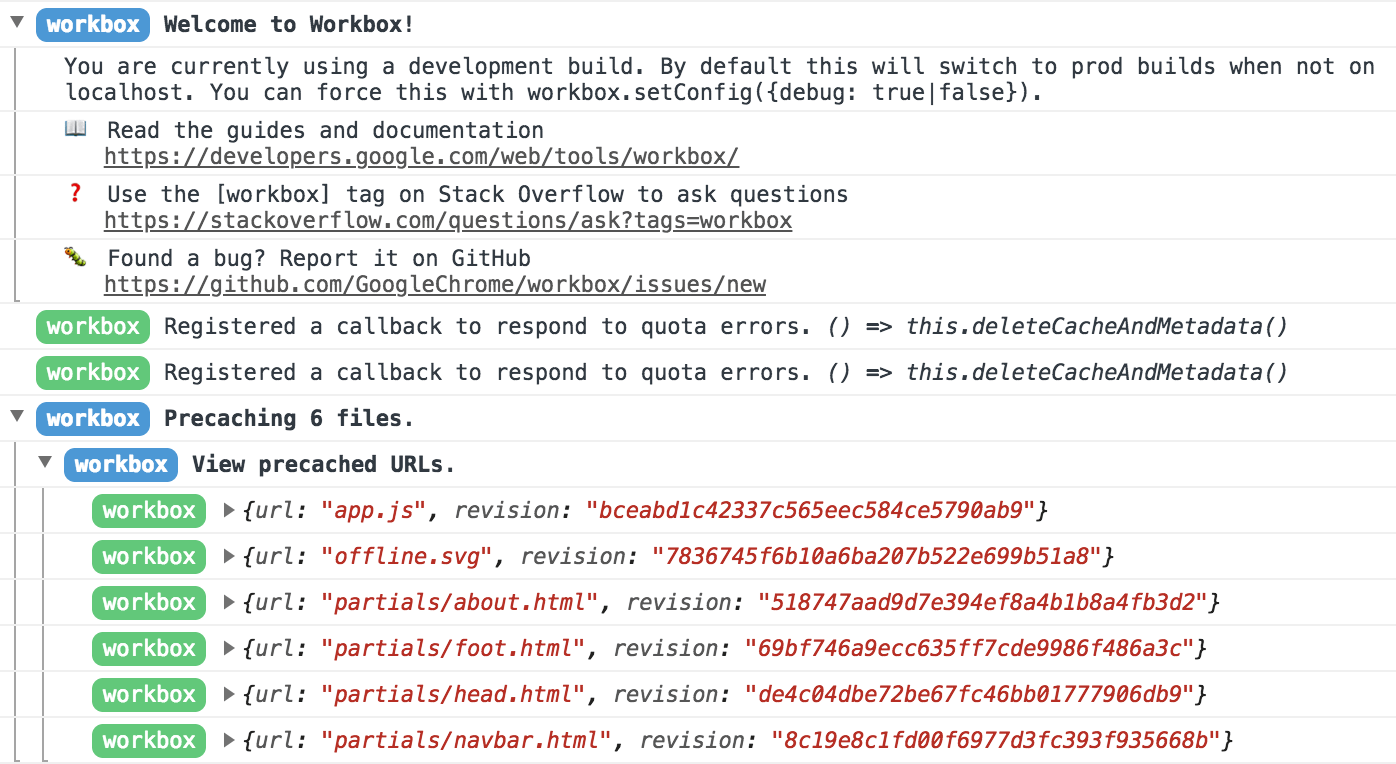
The log messages trace the service worker's decisions step by step, so configuration or invalidation problems surface quickly instead of requiring manual investigation.
Tested across browsers with fallbacks
Workbox runs against a cross-browser test suite and can automatically fall back to alternative implementations when a browser lacks a feature:
- The
workbox-broadcast-cache-updatemodule uses the Broadcast Channel API when available and falls back to apostMessage()-based implementation otherwise. - The workbox-background-sync module uses the Background Sync API where supported; when it isn't, queued events are retried on every service worker startup.
Three ways to get started
Integration with popular frameworks
If you're starting a new project, drop-in Workbox support is already wired up in several starter kits and build plugins:
- create-react-app
- vue-cli
- preact-cli
- Gatsby
- Next.js
Drop into an existing build
If you already have a build step, adding the Workbox CLI, Node module, or webpack plugin may be enough. The command line tool includes a wizard mode that inspects your local environment and suggests a reasonable default configuration:
workbox wizard
? What is the root of your web app (i.e. which directory do you deploy)? src/
? Which file types would you like to precache? css, js, html
? Where would you like your service worker file to be saved? build/sw.js
? Where would you like to save these configuration options? workbox-config.js
Run workbox generateSW workbox-config.js as part of your build to produce a service worker. You can customize behavior by editing workbox-config.js; the generateSW documentation lists the supported options.
Runtime-only use in an existing service worker
Have a working service worker and want to experiment? Import Workbox from its official CDN and use its runtime libraries immediately. This approach skips precaching, which requires build-time integration, but it's ideal for prototyping and comparing caching strategies on the fly.
// Replace 3.6.3 with the current version number of Workbox.
importScripts('https://storage.googleapis.com/workbox-cdn/releases/3.6.3/workbox-sw.js');

workbox.routing.registerRoute(
  new RegExp('\.png$'),
  workbox.strategies.cacheFirst({
    cacheName: 'images-cache',
  })
);


