
Rethinking Number Inputs for Better Forms
Reaching for <input type="number"> to collect numeric data in a form is common, but the element carries baggage. Some values look like numbers yet aren't truly numeric—a credit card number with spaces is really a string of digits. More critically, screen readers struggle with the element in several ways.
Hanna Laakso documented these problems for GOV.UK, and the team landed on a specific replacement approach:
<input type="text" inputmode="numeric" pattern="[0-9]*">The inputmode attribute proves particularly useful, and a deep dive on the topic is available.
Phil Nash reached nearly the same conclusion while blogging about improving two-factor authentication code inputs on the Twilio blog:
<input
  type="text"
  name="token"
  id="token"
  inputmode="numeric"
  pattern="[0-9]*"
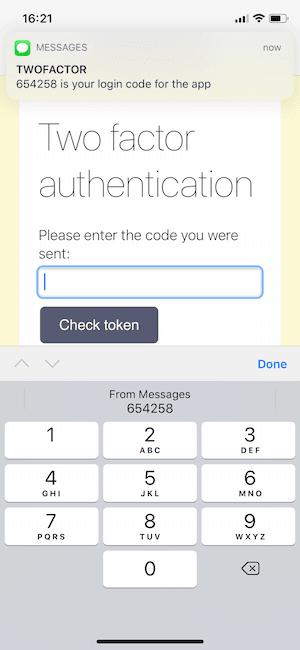
  autocomplete="one-time-code"
/>
That final attribute stands out as especially noteworthy. On supporting browsers it unlocks a notably enhanced user experience:
Phil also highlights the breadth of autocomplete values available:
There are many autocomplete values available, covering everything from names and addresses to credit cards and other account details. For sign up and login there are a few autocomplete values that stand out as useful hints:
username,new-password,current-password.Browsers and password managers have very good heuristics to find login forms on web pages, but using the
usernameandcurrent-passwordvalues make it very obvious.


