

A Developer’s Perspective on Craft CMS
With well over a hundred CMS options available, Craft CMS has managed to stand out since its launch in 2013. My team has spent the last two years building and maintaining sites on Craft, and the experience has been notably positive. This is not a comparison piece; it’s a look at what Craft brings to the table based on our own work.
Craft comes from Pixel & Tonic, an Oregon-based studio led by Brandon Kelly, who is known for premium ExpressionEngine add-ons. The project began in 2010 under the name “Blocks” before becoming Craft CMS. It has since gained solid adoption, with roughly 70,000 sites currently using the platform.

Craft is positioned for small-to-medium businesses with content staff who don’t need a fully bespoke solution. At its core, it functions like a traditional CMS, but with a distinct approach to content handling that sets it apart.
Server Requirements and Setup
Getting started with Craft isn’t a heavy lift. The infrastructure demands are standard:
- PHP 7.0+
- MySQL 5.5+ with InnoDB, MariaDB 5.5+, or PostgreSQL 9.5+
- At least 256MB of memory allocated to PHP
- At least 200MB of free disk space
That’s all. Installation is fast, and you don’t need a deep PHP or database background to get a site up. The barrier to entry, and the time from install to development, is impressively small.
Simple at First, Complex When Needed
Craft is unusual because it can be both a simple and a complex CMS. You can build a basic site without touching much code, but if your project requires heavy PHP, database tuning, and query optimization, Craft doesn’t get in your way. That flexibility is a major selling point; you never feel like you’re “hacking” the system to make it do something it wasn’t designed for.
Craft abstracts field creation and setup to the admin panel. You define fields, connect them to templates, and you’re done — no code required. Multi-site management and localization come built in, no plugins needed.

I care a lot about front- and back-end performance. Craft doesn’t force decisions on you that lead to bloat. It supports beginners out of the box yet doesn’t restrict professionals who need full control.
Templating With Twig
Craft requires Twig for templating; there’s no option to write raw PHP in templates. For my team, this is a good thing. Standardization means that pull requests don’t contain messy custom PHP, just template logic. Twig is robust enough for almost every use case and remains extensible for the rest.
But Twig isn’t the only path to your content. Since Craft 3.3, there’s a headless mode with GraphQL built into the Pro features. You can pair Craft with tools like Gatsby or Gridsome for static sites, bringing it on par with options like WordPress and its REST API.
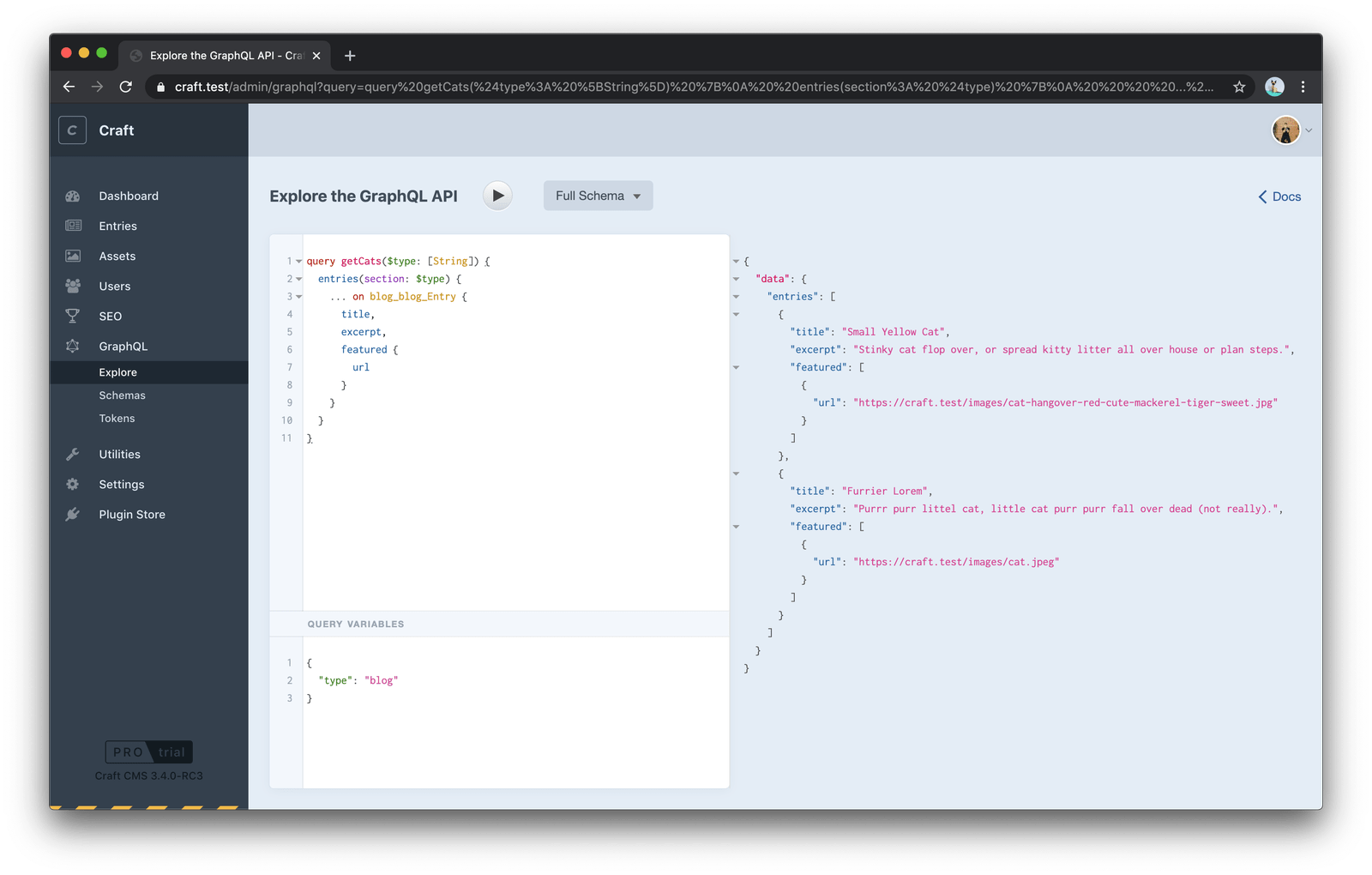
If GraphQL isn’t your preference, there’s a REST option too. The Element API plugin provides a read-only REST API, maintaining Craft’s philosophy of shipping with the minimum you need, extendable as you go.
Extending Craft
Craft is highly extensible, built on the Yii Framework. You can extend functionality through modules, passed down from Yii, or through Craft’s own plugin system which can be installed, disabled, and removed as needed. Both have full access to Craft’s and Yii’s APIs, which means you benefit from Yii’s community and documentation once you’re comfortable with it.
Writing plugins becomes easy once you understand the structure. My team has built several custom integrations — a Pardot form handler, Google reCAPTCHA integration, and custom search behavior, among others. The sky is essentially the limit.
That said, this is where Craft has room to grow. The official docs cover plugin development, but I’ve found that studying a well-known plugin on GitHub is far more instructive. The typical plugin is built like a small MVC app: models, views, and controllers. It’s not hard, but it requires a bit of ramp-up.
If you’d rather avoid PHP altogether, the plugin store has options from image handling to WYSIWYG editors. One of Craft’s better moves: you can try paid plugins in development mode freely without purchasing first.

Over two years of projects, a few plugins have become staples for us:
- ImageOptimize – Automatically creates responsive, compressed images converted to modern formats; a must for performance-sensitive work.
- Navigation – Craft doesn’t include built-in navigation management, but this plugin from Verbb handles it elegantly and is the first thing we add to any new project.
- Seomatic – The go-to SEO plugin, akin to what Yoast is for WordPress.
- Redactor – Adds a WYSIWYG editor, essential for content managers since Craft doesn’t ship with one.
- Super Table – Enables repeatable fields with built-in Craft field types, similar to ACF Repeater in WordPress.
The Author Experience
Where Craft genuinely excels is the author experience — perhaps more than any other aspect. A system can be technically brilliant, but if it isn’t pleasant to write in, it falls short. Craft is built around two simple concepts: Fields and Sections, giving content managers a clean workspace.

One standout feature is built-in version control for content. Authors can track every change and roll back to any point. This brings peace of mind — you can’t lose someone’s edits, much like how developers rely on Git. You might not think you need this until you’ve used it.

Localization, one of the hardest CMS problems, is handled well. You can host multiple sites in a single Craft 3 instance, each on its own domain, with distinct content versions and template sets. Whether that means same-language sub-sites or fully translated international versions is up to you.

These features are all core, which matters for authoring. Essential functionality shouldn’t require plugins — doing so tends to fragment the experience across different versions of the same CMS. Craft keeps the basics built-in, so the author workflow stays consistent everywhere.
Why Craft’s ecosystem stands out
One of Craft’s quiet strengths is the people around it. No CMS lives in a vacuum, and Craft benefits from a tight-knit, responsive community of developers who are genuinely willing to help. It’s still small compared to something like WordPress, and it doesn’t have decades of history behind it, but there’s a core of long-time users who migrated over from ExpressionEngine and have stuck with Craft since its early days.
A lot of the day-to-day Q&A happens on Discord rather than the Craft CMS Stack Exchange. Answers on the latter often lag behind, with many older posts still not updated for Craft 3. On Discord, however, you’ll find Pixel & Tonic’s founders and core team members answering questions directly, frequently alongside major plugin authors like Andrew from nystudio107, known for his performance-focused work. The 24/7 presence of these folks makes a real difference when you’re stuck.

Learning materials are still somewhat limited, but that’s less of a problem than it sounds. Craft combined with Twig is straightforward enough that you rarely need a full course just to build a blog. The ecosystem’s other key resource is Dot All, Craft’s own conference, with several talks made available to the public on Vimeo.
Craft also takes open source seriously, and it shows. Both the core platform and its plugins are open source, which is always a plus: exposing code to a wider set of developers tends to improve quality and encourages contributions.
The licensing question
Craft’s pricing has always drawn mixed opinions, largely because there are differing views on whether CMSs should cost money at all. In practice, however, the licensing model is simple and reasonably priced:
- Free for a single user account on a small website.
- $299 per project for the first year of updates, then $59 per year after that.
You’re never forced to keep paying. If you skip renewal, you can enable license updates again later at the same $59 rate whenever you decide to extend coverage. Against the cost of building and maintaining a mid-size business site, that’s negligible — and in many cases an agency will just absorb the initial expense so clients never see the bill. There’s also a free license option for small, personal sites, such as something you might build for a friend or family member. Likewise, both Craft Pro and all plugins are free to try on a local domain, which lowers the barrier to evaluating them before committing.

The bottom line
Craft feels less like a fixed product and more like a content management framework. Out of the box, it gives you a solid set of nuts and bolts — well-built core, clean templating, workable authoring experience — and then lets you assemble them to fit each project’s needs. That flexibility is what makes it feel purpose-built for each use case, and why the author experience and the developer experience both stay pleasant throughout the build. The licensing is fair, the community is helpful, and it earns its cost on professional projects without being prohibitive. Given that it’s free for a single user, it’s worth trying for yourself before deciding whether it fits the way you work.


