

Timeline and context
Google outlined its Page Experience plans in May 2020 and said in November 2020 that rollout would begin in May 2021. That schedule moved: the gradual rollout was pushed back to start in mid-June 2021, giving site owners time to handle conditions shifted by the COVID-19 pandemic.
The update is the culmination of an effort Google made explicit in April 2020 with core web vitals, an initiative meant to make an inherently subjective quality — user experience — testable and optimizable.
The three core web vitals
Core web vitals are Google's "user-centric performance metrics," and the Page Experience update uses them unchanged. A "good" overall CWV rating is required for a "good" page experience score.
- LCP (Largest Contentful Paint): how quickly the largest element above the fold loads. This is typically a hero image or header, and its timing drives how fast users perceive the whole page.
- FID (First Input Delay): the gap between a user's first interaction — a click, a tap, a link — and the moment the main thread is free to process it. It depends on real-world interactions, so it can only be collected in the field; enough traffic lets you pull it from a Page Experience Report in the Google Console. In lab tools, blocking resources show up via TTI and TBT.
- CLS (Cumulative Layout Shift): visual stability at load, computed from element sizes and how far they move relative to the viewport.
These replaced cruder metrics such as SI (Speed Index), FCP (First Contentful Paint) and TTI (Time-to-interactive). Images influence all three vitals: the LCP is usually an above-the-fold image or must compete with one, badly used images hurt CLS, and slow images add rendering delays that feed into FID. The stakes are higher still because of Google's mobile-first indexing — scores on mobile devices are the ones that matter.
What the ranking signal combines
- Core Web Vitals: unchanged, with Google's published guidelines and recommended thresholds.
- Mobile usability: a URL with any mobile usability errors cannot earn a "good" page experience score.
- Security issues: flagged issues disqualify a site.
- HTTPS: pages must be served over HTTPS.
- Ad experience: how much ads degrade the page — intrusiveness, distraction and similar factors.
Google also announced a visual badge for pages that pass its page experience criteria, in the style of its earlier AMP and mobile-friendly badges. Such recognition should lift click-through rates and organic traffic, particularly for sites that already rank well, and the badge could ship as early as May if it clears its trial phase. Separately, all pages — AMP or not — become eligible for Top Stories in the browser and the Google News app. Google says a page can qualify "irrespective of its Core Web Vitals score or page experience status."
Why images are the usual bottleneck
Google has reaffirmed that content remains king, but content includes the media on the page, and most of that is images. Attention to optimization is clearly rising: Google reported a 70% surge in usage of its Lighthouse and PageSpeed Insights tools, which raises the bar for everyone competing for rankings. Common image problems:
- Unoptimized images — uncompressed, wrongly sized — bloat page weight.
- Images must be responsive: smaller screens need smaller files to preserve visual quality.
- Browsers and operating systems render different formats optimally, yet most images ship as .JPG/.PNG.
- Best practices are often ignored, such as always specifying explicit width/height attributes.
Manual editing and hand-coded responsive syntax do not scale, are hard to update and slow the development pipeline. What's needed is lower image payloads, effective caching, faster delivery, next-gen formats, responsive output, and run-time logic that picks the right settings per context — precisely what an image CDN provides.
Measured test: before and after
A test page with many high-quality images plus buttons, links and text was audited with PageSpeed Insights on mobile, which is where responsiveness and image optimization are hardest and where an image CDN can show the largest gain.
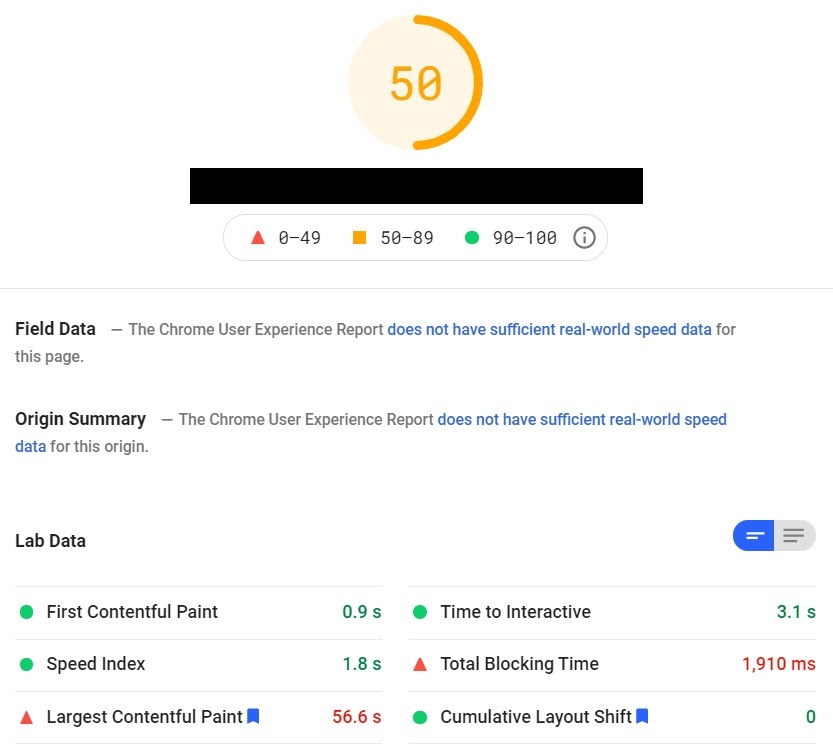
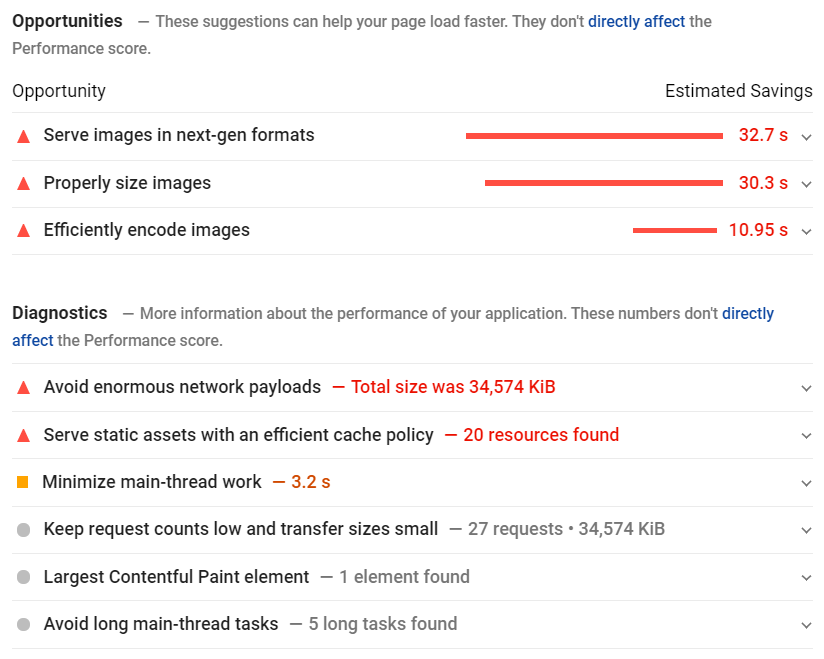
The page carried roughly 35 MB of images and posted an LCP of nearly one minute. Since width and height attributes were set on every image and the layout was simple, CLS was a perfect 0 — though slow images still erode perceived stability, so faster loading of large elements helps real users regardless. TTI and TBT were also poor: at least two seconds passed between the first element appearing and the page becoming interactive. The reported opportunities and diagnostics were almost entirely image-related.
Setup and result
Onboarding with ImageEngine took three steps: supply the site to optimize, name the location where images are stored, and copy the delivery address assigned. That address takes the form {random string}.cdn.imgeng.in and can be changed later in the ImageEngine dashboard. Serving through it means editing the src attributes of <img> tags in your markup.
From:
<img src=”mywebsite.com/images/header-image.jpg”/>To:
<img src=”myimages.cdn.imgeng.in/images/header-image.jpg”/>From there ImageEngine pulls the images and optimizes them dynamically. Official integration guides cover Magento, Shopify, Drupal and others, and there is a WordPress plugin.
The re-audit came back nearly flawless, every metric in the green, including Speed Index and LCP, with no remaining opportunities listed.
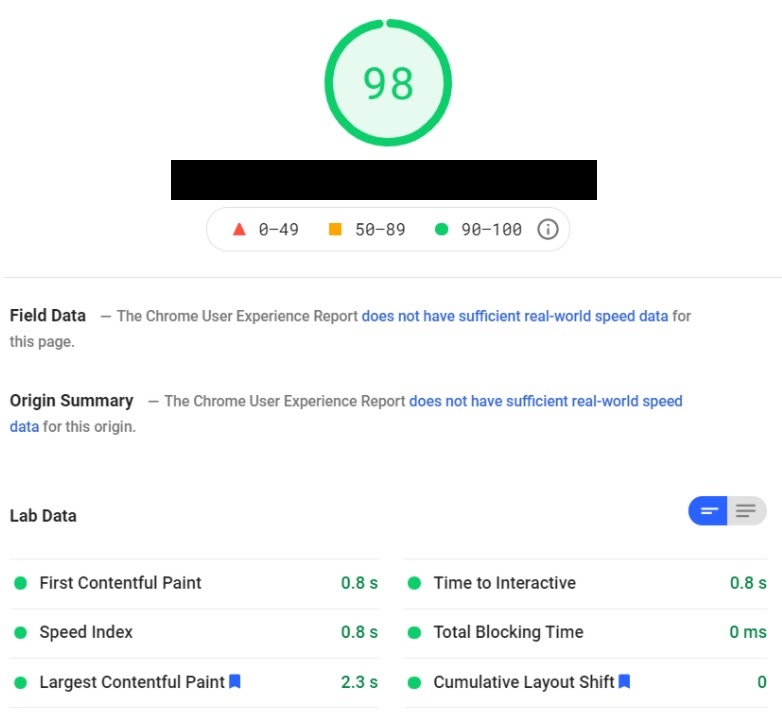
Total page payload fell to 968 kB — roughly a 90% cut in image content.

Under the hood, ImageEngine is a device-aware image CDN (GIFs included) that uses WURFL device detection to read each visitor's context — device, screen size, DPI, OS, browser — then resizes, reformats and compresses images accordingly, with the logic running on edge servers across more than 20 global PoPs. It runs automatically after setup. ImageEngine claims cache-hit ratios as high as 98%+ and payload reductions of 75%+.
Outlook
Google says it will keep testing and revising its signal list. Metrics already visible in its tooling — TTFB, TTI, FCP, TBT — or entirely new ones may carry more weight in future updates. Image optimization addresses only part of that picture, but for image-heavy sites it is the part with the largest effect, and an image CDN covers nearly all image-related issues with little ongoing effort.



