
A quiet standard that runs much of the web
At Google I/O 2019, Kevin Schaaf of the Polymer Project and Caridy Patiño of Salesforce took the stage to discuss the state of web components. Their central claim: the specifications are no longer an experimental idea but a quietly dominant force in page rendering. By their count, somewhere between 5% and 8% of all page loads today use one or more web components, making the standard one of the most successful new web platform features shipped in the last five years.
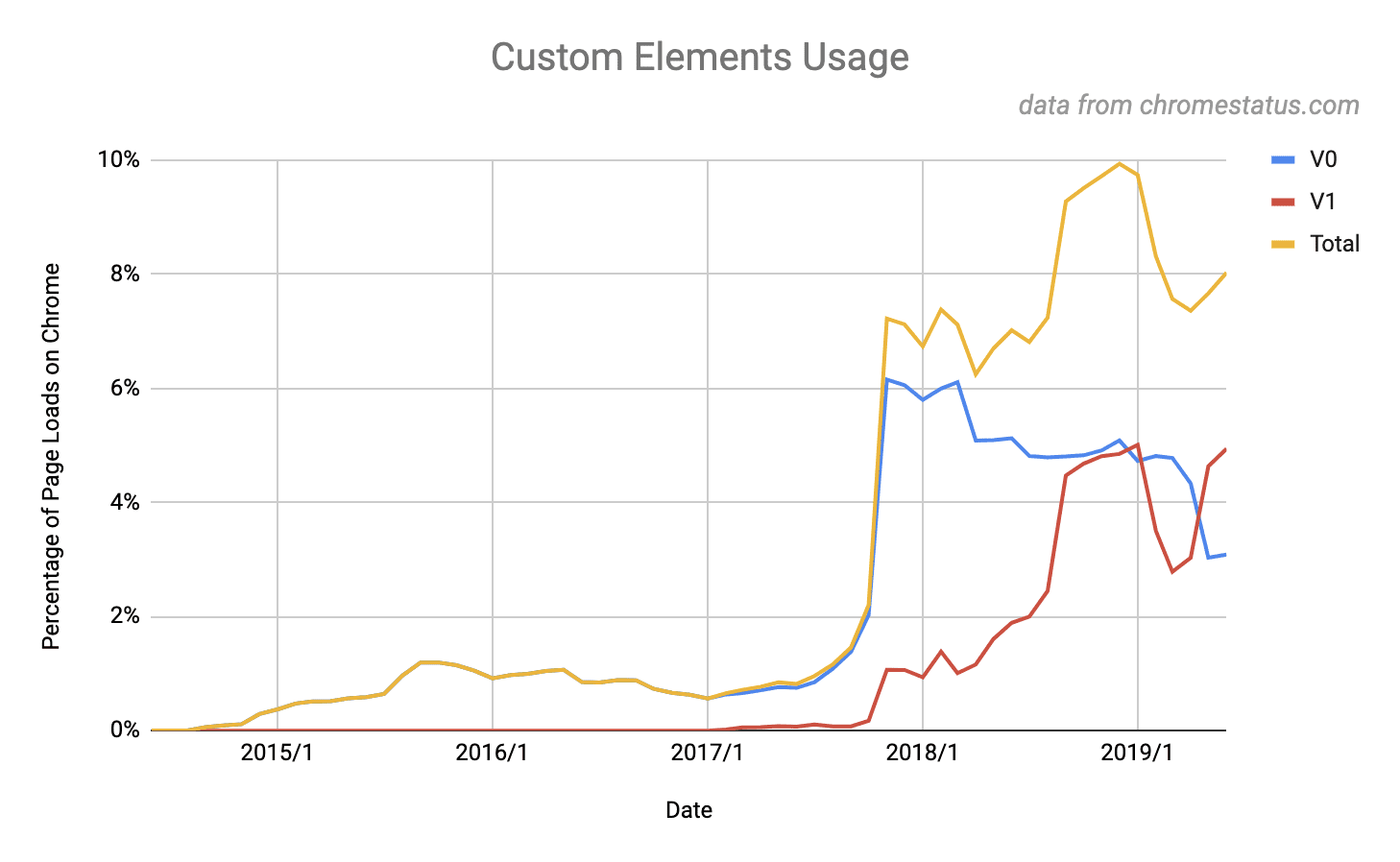
Those numbers show up on mainstream properties. Sites like YouTube and GitHub use web components, and AMP components—which power many news and publishing sites—are web components as well. A significant number of enterprises are also moving to the standard.
What the web components specs actually define
At their core, the web components specifications are a low-level set of APIs that let you extend the browser's built-in set of HTML tags. They define a standard interface for two things: a common method for creating a component using standard DOM APIs, and a common way of receiving and sending data via properties and events.
Beyond that, the standards deliberately say nothing about implementation. The specs do not dictate which rendering engine a component uses to create its DOM, nor how the component updates itself in response to changes to its properties or attributes. In short, web components tell the browser when and where to make a component—but not how.
That freedom is by design. An author can build a web component with functional rendering patterns like those in React, or use declarative templates reminiscent of Angular or Vue. The choice of internal technology is entirely up to the author, and interoperability is preserved regardless.
The case for a standard component boundary
The crucial difference between web components and proprietary component systems is interoperability. Because the interface is standardized, you can use a web component anywhere you'd use a built-in element like <input> or <video>.
That has two concrete consequences. First, components expressed as real HTML can be rendered by all of the popular frameworks, so they can be consumed across a broader range of applications without locking users into one stack. Second, components built with different libraries can share the same page. That fact supports incremental modernization: rather than replacing all components in a big-bang framework migration, teams can update their components one at a time.
Where the standard is thriving
Across the industry, three use cases have proven especially strong fits: content sites, design systems, and enterprise application platforms.
Content sites
Web components are well-suited for progressively enhancing content because they can be output as standard HTML by virtually any CMS. AMP offers a concrete case of how quickly the technology slotted into the publishing industry's existing infrastructure for serving content.
Design systems
Organizations are increasingly adopting design systems to unify their look and feel. The typical friction point: many teams end up building their own framework-specific versions of the design system components on top of React, Angular, and other libraries, instead of relying on a single canonical set.

Web components solve that duplication problem by offering a write-once, run-everywhere model that still gives individual app teams the freedom to choose their own framework. Companies including ING, EA, and Google are already implementing their design languages this way.
Enterprise platforms
Enterprises are adopting web components as a safe, future-proof base for standardizing technology. Salesforce architect Caridy Patiño explained why his company built its UI platform on web components. Salesforce is a collection of applications—many from acquisitions—each running on its own stack, which makes a consistent look and feel difficult. Customers also build custom applications on the platform, so components need to be usable by outside developers as well.
Salesforce identified what customers wanted: standard rather than proprietary solutions, which makes it easier to find experienced developers and faster to ramp up new ones, plus a common component model covering customization across all Salesforce applications. Customers also had clear aversions—to breaking changes, to being locked into old or stagnant technology, and to being trapped inside a walled garden. Building the new UI platform on web components met all of those constraints, and the result shipped as Lightning Web Components.
Paths into web components
Getting started can mean consuming existing components or authoring your own. For applications that just need ready-made pieces, Google offers its own Material Design system as web components (Material Web Components), the Wired Elements set provides components with a sketchy hand-drawn aesthetic, and special-purpose options like <model-viewer> can drop 3D content into any app.
If the goal is building a company design system or vending a library that works in any environment, the built-in browser APIs are the baseline, though fairly low-level.
Libraries and tooling to consider:
- LitElement—a web component base class from Google with a functional rendering experience similar to React.
- Stencil—a web-components-first framework with popular features like JSX and TypeScript.
- Angular Elements—a way to wrap Angular components as web components.
- Vue's web component wrapper—packs Vue components into web components.
For guidance, open-wc.org offers getting-started materials and build tooling defaults, Web Fundamentals has primers on the foundational APIs and design best practices, and MDN's reference docs cover the APIs with tutorials.


