Getting the Dropbox Sync API working in Android Studio
Dropbox’s standard setup instructions for the Android Sync API target Eclipse, but the SDK works fine with Android Studio once you account for one difference: Android Studio uses Gradle to manage the build, and Gradle needs a little help handling native libraries. The same approach works for the Datastore API.
Copy the SDK libraries into your project
Start the same way you would for Eclipse. Download the SDK and copy everything from its libs folder into your project’s libs folder. Your project structure should then look like this:
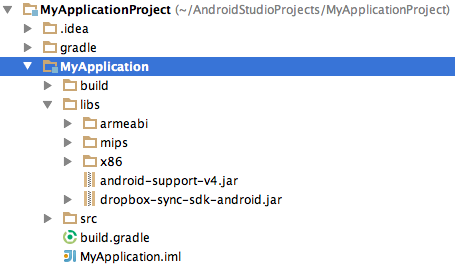
If your project already contains an android-support-v4.jar in libs, leave it—that file is not part of the Sync API.
Package the native libraries with Gradle
The Sync API ships with native .so libraries, and Gradle doesn’t pick those up automatically. A reliable fix is to add a task to your project’s build.gradle that zips all .so files into a JAR under the lib path. That JAR is then placed in the build directory at native-libs/native-libs.jar. Add the following to the end of build.gradle:
task nativeLibsToJar(type: Zip) {
    destinationDir file("$buildDir/native-libs")
    baseName 'native-libs'
    extension 'jar'
    from fileTree(dir: 'libs', include: '**/*.so')
    into 'lib/'
}

tasks.withType(Compile) {
    compileTask -> compileTask.dependsOn(nativeLibsToJar)
}
Be careful with the quoting here. In Groovy—the language Gradle uses—string interpolation only happens inside double quotes. If you write $buildDir/native-libs with single quotes, you’ll get a literal directory named $buildDir instead of the actual build directory.
Declare the dependencies
After the native libraries are packaged, tell Gradle to include both the Sync API’s Java JAR and the newly created native-libs JAR. Inside the dependencies block of build.gradle, add:
compile files('libs/dropbox-sync-sdk-android.jar')
compile files("$buildDir/native-libs/native-libs.jar")
Rebuild the project, running the build twice if needed so Gradle picks up the generated JAR. From there you can follow the remainder of Dropbox’s standard Sync API or Datastore API installation instructions.


