

Why Image Formats Matter More Than Ever
Images remain the most requested resource type on the web, and they frequently account for the largest share of page weight. For teams tracking Core Web Vitals, the stakes are even higher: images make up roughly 42% of Largest Contentful Paint (LCP) elements across websites. That means the format, compression level, and delivery strategy you choose for images directly influences how quickly your page becomes usable.
Modern formats such as AVIF and WebP can reduce file size by up to 50% compared with JPEG while maintaining comparable perceptual quality. That kind of savings has a direct impact on load times and bandwidth costs. But choosing the right format isn't just about picking the newest option — it requires understanding trade-offs around compression, quality, and processing overhead.
A quick summary of where things stand:
- AVIF is the strongest choice when lossy compression with lower fidelity is acceptable and bandwidth savings are the top priority, provided encode/decode performance aligns with your requirements.
- WebP has broader browser support and works well for standard images that don't need advanced features like wide color gamut or layered text overlays.
- AVIF may not compress non-photographic content as efficiently as PNG or lossless WebP. WebP's lossy compression can also underperform JPEG at very high fidelity settings.
- When neither AVIF nor WebP fits, alternatives like MozJPEG for photographic content, OxiPNG for graphics, and JPEG 2000 for lossy or lossless photos are worth evaluating.
- Progressive enhancement with the
Acceptheader for content negotiation can simplify this implementation.
What Separates One Format From Another
At the core, every image format differs by its codec — the algorithm that compresses and encodes image data into a file type and decodes it back for display. Comparing formats means evaluating them on several key dimensions.
Compression efficiency matters most because smaller files transfer faster over the network. Higher compression directly improves LCP when image resources load quicker. Quality is the counterbalance: lossy formats trade some image data for smaller sizes, and you must judge whether the trade-off is visually acceptable. Tools like DSSIM or ssimulacra can measure structural similarity between compressed and original images to make that judgment more objective. Encode and decode speed also varies significantly between codecs. Encoding might happen once at build time or dynamically on demand, but decoding always happens in the browser, so a heavy decode process can delay rendering.
Beyond the core metrics, some use cases will require features that not all formats support:
- Browser, CDN, and tooling support determines whether a format is practical to deploy.
- Animation support covers GIF replacement scenarios, though video is generally a better option.
- Alpha transparency allows for images with varying opacity levels.
- High dynamic range (HDR) and wide color gamut support enables richer color reproduction.
- Progressive decoding gives users a preview while the image continues loading.
- Depth maps and multilayer support enable effects applied to foreground or background elements, as well as text overlays and borders.
When evaluating compression and visual quality side by side, Squoosh.app is a practical tool. Its visual comparison feature lets you zoom in and inspect blockiness or edge artifacts to reason about perceptual trade-offs.
The Limits of JPEG and PNG
JPEG has dominated web imagery for 25 years, but its longevity doesn't mean it's optimal. Classic JPEG encoders produce relatively weak compression. Modern JPEG encoders like MozJPEG improve on that, but still lag behind newer formats. JPEG is lossy, decodes quickly, and works well for photographs, but it lacks transparency, animation, depth maps, and overlay support.
PNG serves as the lossless counterpart for non-photographic images. It supports alpha transparency but compresses poorly — especially for photographs. The two formats together cover basic needs, but both fall short on compression efficiency and feature breadth. That gap is what AVIF and WebP aim to close.
AVIF: Built on AV1 Video Tech
AVIF (AV1 Image File Format) is an open, royalty-free format released in February 2019 by the Alliance for Open Media. It's the still-image counterpart to the AV1 video codec, designed with state-of-the-art compression goals in mind.
AVIF supports both efficient lossy and lossless compression. In practice, AVIF images can be up to ten times smaller than JPEGs at similar visual quality, and testing has shown roughly 50% file-size savings over JPEG with comparable perceptual quality. One caveat: lossless WebP can occasionally outperform lossless AVIF, so manual evaluation is still necessary for specific cases.
The compression advantages come with additional capabilities:
- Animation and layered images, which support features like live photos through image sequences.
- Better handling of graphical content like logos and infographics compared with JPEG.
- Lossless compression that improves on JPEG's capabilities.
- Twelve-bit color depth supports HDR and wide color gamut with a broader range of luminosity and tone.
- Support for monochrome and multichannel images, including transparent images using alpha channels.
Seeing The Differences Between JPEG, WebP, And AVIF
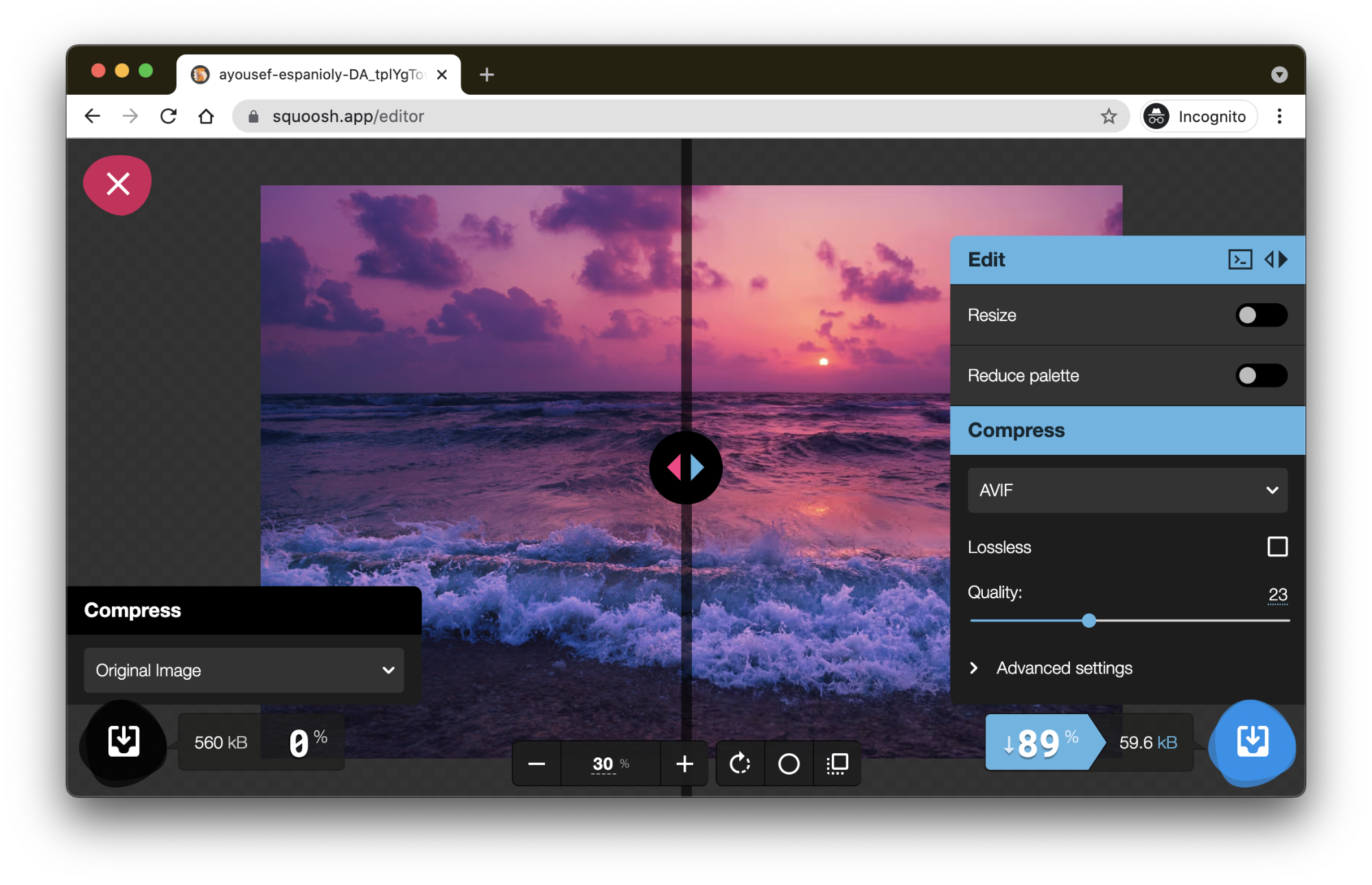
To understand the real-world performance of each codec, we can compare images compressed with the default high-quality settings in Squoosh. Because these presets are untuned, the output mirrors what a new user would see when first testing each format.
Consider this example with a 560KB photograph of a sunset, rich with textures. Each of the three formats produces images that look remarkably similar. Yet, the file sizes tell a different story: 289KB for JPEG (quality 75), 206KB for WebP (quality 75), and just 101KB for AVIF (quality 30). The AVIF file achieves up to 81% compression savings without a visual penalty.
However, default settings can waste bytes. Tools like DSSIM and simulacra estimate the quality settings needed for each codec to look perceptually equivalent to another format. When encoding to the comparable quality of a JPEG at 70%, the files grow to 323KB, 214KB, and 117KB for JPEG, WebP, and AVIF, respectively. While larger than the untuned defaults, the compression wins remain significant.
The advantage becomes more apparent at the low end.
See the Pen [Image format comparison 2](https://codepen.io/smashingmag/pen/WNOPpbd) by Addy Osmani.
Pushing To Extreme Compression
Testing at very low quality levels shows where WebP and AVIF pull ahead of JPEG.
- JPEG at quality 10: 35KB, with noticeable blocky artifacts.
- WebP at quality 1: 35KB, fewer blocky artifacts than JPEG.
- AVIF at quality 17: 36KB, both less blocky and sharper on key details.
See the Pen [Image format comparison 2a (quality)](https://codepen.io/smashingmag/pen/NWgopqw) by Addy Osmani.
See the Pen [Image format comparison 2d (quality)](https://codepen.io/smashingmag/pen/GREzWpN) by Addy Osmani.
The sunset image is a high-resolution photo (2400×1595), so quality can be significantly lower on 2× displays and still look sharp, depending on user interaction with the image.
A more extreme comparison from the Kodak dataset (evaluated by Netflix) shows a JPEG at 4:4:4 chroma subsampling weighing 20KB versus an AVIF file at 19.8KB. While the JPEG has clear blocky artifacts in the sky and roof, the AVIF looks much smoother, with fewer blocking effects overall.
See the Pen [Image format comparison 4a (netflix)](https://codepen.io/smashingmag/pen/abwXJvg) by Addy Osmani.
Looking at a large image full of fine textures and low-contrast cloud areas, the source file was 482KB.
See the Pen [Image format comparison 3a (size)](https://codepen.io/smashingmag/pen/rNwPyxP) by Addy Osmani.
When limited to a 45KB file size using Squoosh, the JPEG output exhibits severe blocking artifacts and color banding in the clouds and water, while the WebP (quality 54) and AVIF (quality 36) render these areas far more smoothly. Of these three, AVIF produces the highest-quality output.
A similar test on “The Witcher” Netflix poster at a 36KB target shows the same story:
See the Pen [Image format comparison 3a (crop)](https://codepen.io/smashingmag/pen/jOwdBqx) by Addy Osmani.
The JPEG shows noticeable blockiness in cloud gradients, while WebP is smooth but slightly blurs the red title text due to its 4:2:0 chroma subsampling. AVIF emerges as the strongest performer.
Poster images, which contain much more text than photos, push codecs in distinct ways. Squoosh at a tight file size of 25KB exposes halos and banding around JPEG text, with WebP performing incrementally better. AVIF holds the sharpest edges and offers the cleanest overall rendering.
See the Pen [Image format comparison 5a (size)](https://codepen.io/smashingmag/pen/dyRavXY) by Addy Osmani.
See the Pen [Image format comparison 4a (size)](https://codepen.io/smashingmag/pen/WNOPpxM) by Addy Osmani.
Working With AVIF Files
Since its release in 2019, AVIF support has expanded considerably.
Delivering AVIF Images
AVIF has been supported in desktop Chrome since version 85 (August 2020), plus Chrome for Android, Firefox, and Opera.
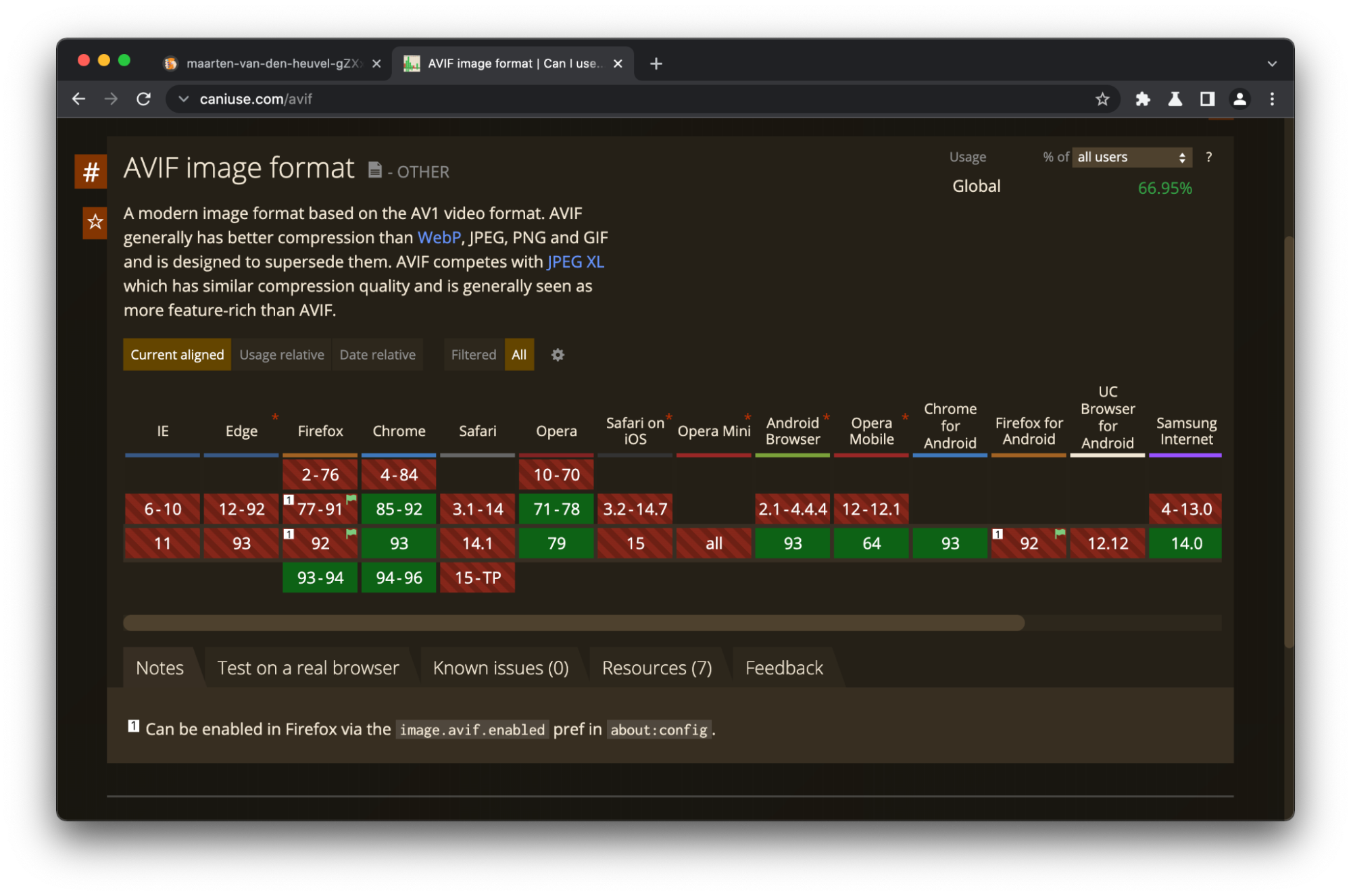
While you can place an AVIF file in a standard <img> tag, older browsers will fail to render it without a fallback. As a result, AVIF belongs as a progressive enhancement behind two primary delivery strategies:
- Using The
<picture>Element
Browsers only load the first source they recognize, allowing you to list options in order of preference. - Using Content Negotiation
Clients can declare support for modern formats in theAcceptrequest header. Chrome, for example, announcesAccept: image/avif,image/webp,image/apng,image/*,*/*;q=0.8. You can test it from a service worker or server-side code:
const hdrAccept = event.request.headers.get("accept");
const sendAVIF = /image\/avif/.test(hdrAccept);
<img src="https://www.smashingmagazine.com/images/sky.avif" width="360" height="240" alt="a beautiful sky">If you’re not using an image CDN, a tool like just-gimme-an-img can generate the <picture> markup plus each format and width variant entirely client-side using Squoosh.
<picture>
 <source type="image/avif">
 <source type="image/webp">
 <img src="img/photo.jpg" alt="Description" width="360" height="240">
</picture>
Image CDN servers are often located closer to users than origin servers, which cuts network round-trip times (RTT), though serving from another origin can add a trip and hurt performance. Measure, then experiment.
Encoding And Decoding Tools
- Libraries
Libaom is the reference open-source encoder and decoder maintained by AOMedia, the creators of AVIF. Libavif is the muxer/parser used by Chrome to decode AVIF files. You can pair libavif with libaom to transcode from other formats. Alternatives include Libheif and Cavif. libgd has also added AVIF support, which is being integrated into PHP. - Web And Desktop Apps
Squoosh supports AVIF exports directly from the browser. GIMP is capable of AVIF exporting, as are ImageMagick and Paint.net. Community plugins for Adobe Photoshop also exist. - JavaScript Libraries
- Utilities
MP4Box can create and decode AVIF files. - In Code
go-avifoffers an AVIF encoder for Go built onlibaom, plus theavifutility which encodes JPEG or PNG to AVIF.
For a how-to on AVIF creation through Squoosh or using the command-line avifenc tool, consult the Google codelab on serving AVIF files.
AVIF Impact On Performance
Faster downloads lead to measurable performance gains. Google’s Lighthouse best-practices audit now flags BMP, JPEG, and PNG images, and estimates potential AVIF file sizes to show potential byte savings in the “Serve images in next-gen formats” section.

One industry report documents converting 14 million images to AVIF, with 25% byte savings and positive effects on LCP metrics, tracked with Real User Monitoring (RUM).
Known Limitations And Trade-offs
The most outstanding drawback for AVIF is its lack of uniform browser support, though progressive enhancement handles this constraint.
- Chrome 94 and later support AVIF progressive rendering; older builds did not. While convenient tooling to produce interleaved AVIF files isn’t yet available, the ecosystem is expected to improve.
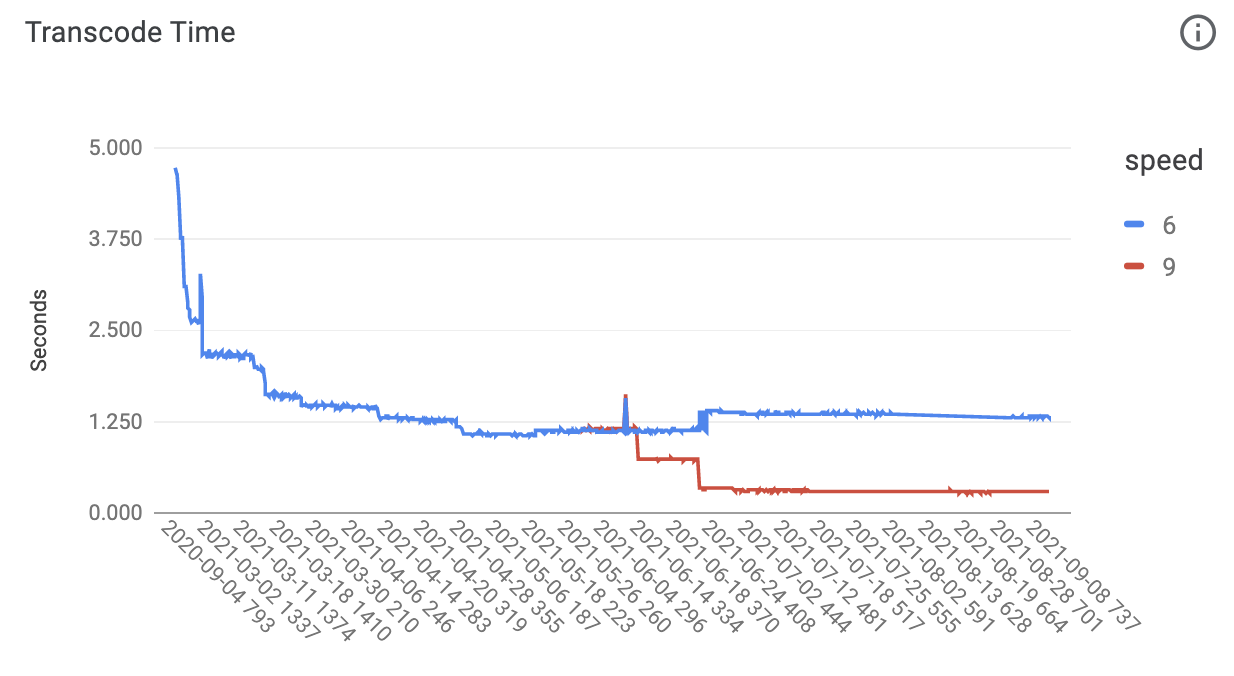
- The encoding process for AVIF remains computationally heavy. This can be a concern when generating images on the fly at runtime. That said, there was a ~47% improvement in transcode times at speed 6 (the current default for libavif) by mid-2021, and a 73% improvement across the entire year. Newer speed 9 settings show a fast 72% improvement in transcode time since July.

- Decoding AVIF can use more CPU power than other codecs, though significant size reductions can offset this load at the network level.
- Some CDNs do not yet serve AVIF in default automatic format modes due to slower first-request encoding times.
WebP: Compression and Adoption
WebP, introduced by Google in 2011, was designed to accelerate the web by offering superior compression relative to JPEG and PNG. It supports both lossless and lossy compression, alpha transparency, and animation. Lossy WebP compression is built on the VP8 video codec and employs predictive encoding: it predicts pixel block values from neighboring blocks and stores only the differences. Lossless WebP, meanwhile, applies multiple transformation techniques to reduce file size.
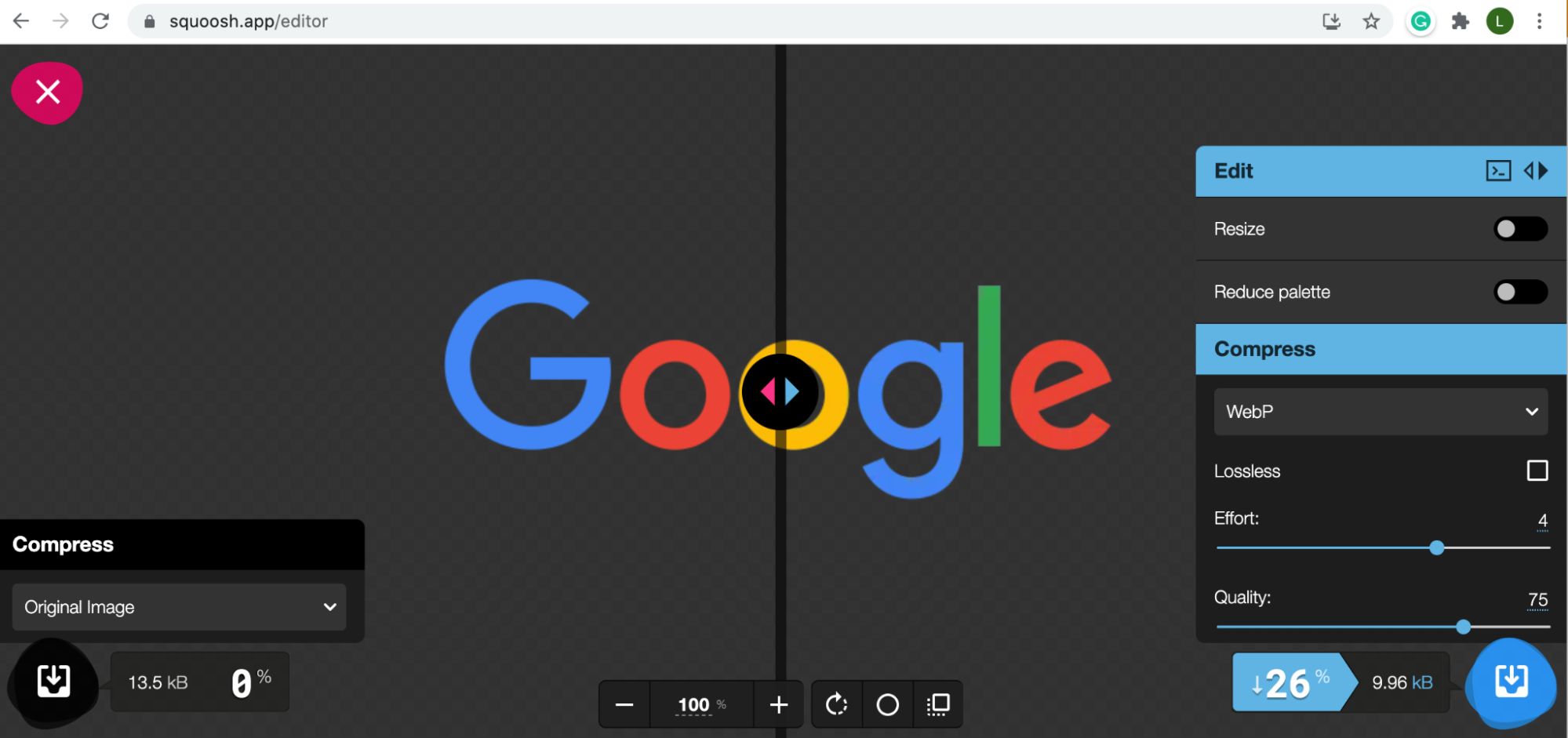
WebP's compression advantages are significant. Lossless WebP files run about 26% smaller than PNG equivalents, while lossy WebP is typically 25–34% smaller than comparable JPEGs. For transparency, WebP's lossless 8-bit alpha channel costs only about 22% more bytes than PNG, and it additionally supports lossy RGB transparency — a capability unique to the format. WebP also carries EXIF and XMP metadata, can include ICC color profiles, and supports true-color animation. Keep in mind, though, that for simple transparent vector-like graphics, an optimized SVG may well beat any raster format on both sharpness and file size.
Support and Tooling for WebP
Browser support for WebP is now near-universal in current versions of all major browsers. Delivery to older clients can still be handled with the <picture> element or request-header negotiation, and image CDNs commonly offer automatic format selection, serving WebP or AVIF as the browser allows. Plug-ins extend WebP support to mainstream CMS platforms such as WordPress (in core since version 5.8), Joomla, and Drupal.
Practical viewing on desktops is straightforward: any supporting browser displays WebP files, and the Quick Look plug-in qlImageSize adds preview support on macOS. The WebP team publishes precompiled codec libraries and utilities for Windows, macOS, and Linux; the Windows tools enable previews in File Explorer and Windows Photo Viewer.
Creating WebP Files
A broad set of tools can generate WebP. Online, Squoosh offers immediate conversion. For desktop work, XnConvert handles batch conversion alongside metadata editing, resizing, color-depth adjustments, and watermarking. Node.js developers can use the ImageMagick-based Imagemin module and its imagemin-webp add-on for lossy and lossless conversion. Creative apps including Sketch, GIMP, and ImageMagick support WebP natively, and Adobe Photoshop can handle it via a dedicated plug-in.
Production usage is substantial. Google reports 30–35% savings from WebP over other lossy compressors and serves tens of billions of WebP requests daily, a quarter of them lossless. Facebook also adopted WebP for Android users, citing data savings of 25–35% versus JPG and 80% versus PNG.
WebP Trade-Offs
Despite broad acceptance, some limitations persist:
- Color depth: WebP is confined to 8-bit precision, so it cannot store HDR or wide-gamut imagery.
- Chroma subsampling: Lossy encoding is locked to YCbCr 4:2:0 with 8-bit channels; lossless uses RGBA. This can blunt fine detail, chromatic textures, or colored text.
- Decoding: True progressive decoding is unsupported; incremental decoding exists but renders differently.

Always generate WebP from the best available source. Re-encoding already-lossy JPEGs compounds quality loss without worthwhile gains.
Summary: Choosing Between AVIF and WebP
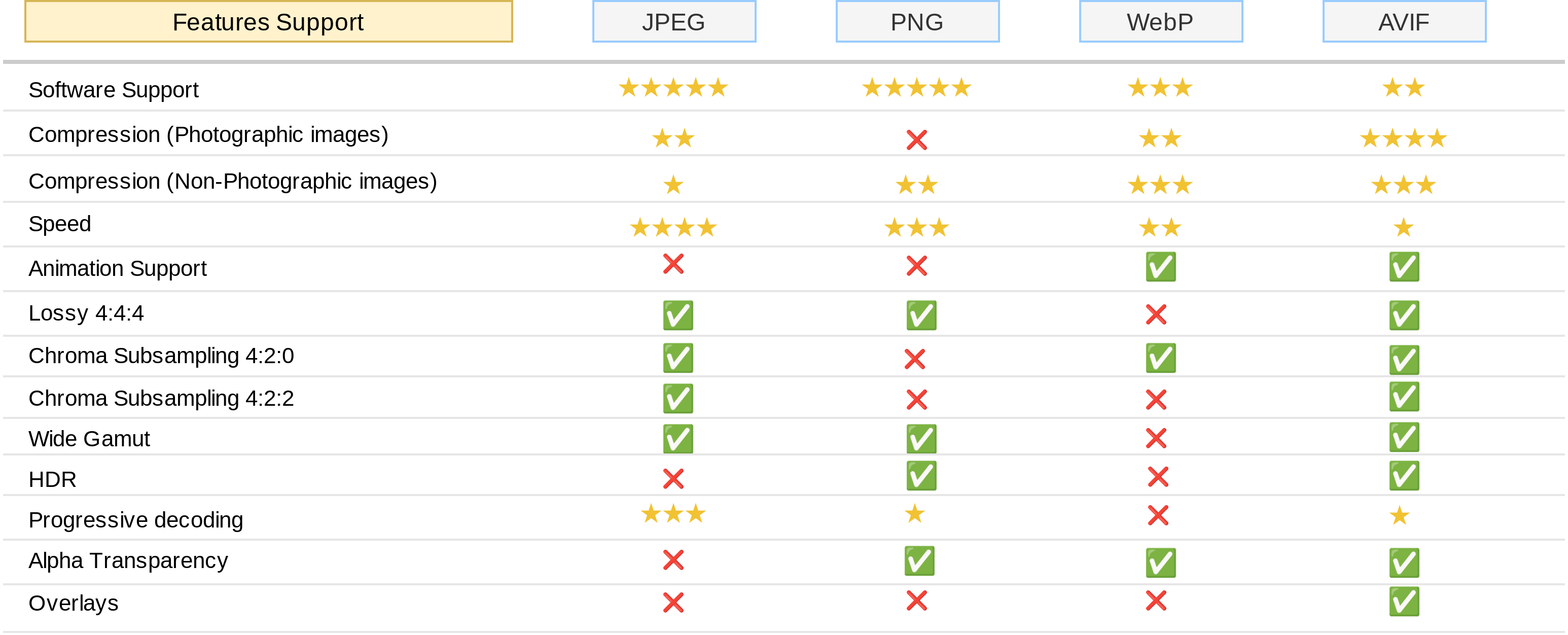
Several qualifications apply to that comparison table:
- Compression ratings reflect overall performance; fidelity settings shift results for photographic versus non-photographic content.
- Pick quality and chroma settings for the intended purpose. Low- or medium-fidelity works for news, social media, or e-commerce, whereas archival, movie, or photography sites demand high fidelity, so test compression savings at that high end before converting.
- Making both high-quality JPEG and AVIF/WebP versions of an image can be a sensible fallback strategy when AVIF's slower encoding is acceptable.
- Compare formats at equal structural similarity, not at nominal quality settings; a JPEG at quality 60 can visually match AVIF at 50 or WebP at 65.
- Real-world LCP impact still needs broader studies.
- JPEG XL and HEIC are omitted here: the former is young and the latter, aside from licensing complexity, lacks Safari support and is limited to Apple's ecosystem.
On balance, AVIF checks most boxes for compression and feature coverage, while WebP has the edge in maturity and compatibility. Given its dramatic improvements over JPEG and PNG, WebP deserves a place in any image optimization workflow. AVIF, treated as a progressive enhancement for browsers that support it, can add further savings as encoding tools improve and adoption spreads.


