
Markdown documentation in the WordPress block editor: Making it translatable
Documentation displayed inside the WordPress block editor needs to be maintainable and localizable. While React components and HTML work, they can become verbose and hard to maintain. Moving documentation into Markdown files simplifies authoring, but introduces a localization problem: Markdown content cannot use JavaScript’s __() translation function or POT files.
| Advantages | Disadvantages |
|---|---|
| ✅ Writing Markdown is easier and faster than HTML | ❌ The documentation cannot contain React components |
| ✅ The documentation can be kept separate from the block’s source code (even on a separate repo) | ❌ We cannot use the __ function (which helps localize the content through .po files) to output text |
| ✅ Copy editors can modify the documentation with no fear of breaking the code | |
| ✅ The documentation code isn’t added to the block’s JavaScript asset, which can then load faster |
Two challenges need solving: loading Markdown content into a React component, and translating that content per user language.
Loading Markdown into a block
If documentation lives in a file like /docs/cache-control.md, its content can be imported as rendered HTML and injected into a React component:
import CacheControlDocumentation from '../docs/cache-control.md';


const CacheControlDescription = () => {
  return (
    <div
      dangerouslySetInnerHTML={ { __html: CacheControlDocumentation } }
    />
  );
}
This depends on webpack, which the WordPress editor uses. Note that the editor currently runs webpack 4.42; the webpack site’s front page documents version 5 (still in beta). Version 4 docs are at a separate subsite.
Markdown is converted to HTML via webpack loaders. The block must customize its webpack config to add rules for markdown-loader and html-loader:
// This is the default webpack configuration from Gutenberg
const defaultConfig = require( '@wordpress/scripts/config/webpack.config' );


// Customize adding the required rules for the block
module.exports = {
  ...defaultConfig,
  module: {
    ...defaultConfig.module,
    rules: [
      ...defaultConfig.module.rules,
      {
        test: /\.md$/,
        use: [
          {
            loader: "html-loader"
          },
          {
            loader: "markdown-loader"
          }
        ]
      }
    ],
  },
};
The corresponding packages then need installing:
npm install --save-dev markdown-loader html-loaderA useful refinement is adding a webpack alias, @docs, pointing to the project’s /docs folder, so components anywhere in the project can import without calculating relative paths:
const path = require( 'path' );
config.resolve.alias[ '@docs' ] = path.resolve( process.cwd(), 'docs/' )
With that, imports become simpler:
import CacheControlDocumentation from '@docs/cache-control.md';Localizing Markdown content
Since .po translation files cannot handle Markdown, an alternative is to maintain separate Markdown files per language:
/docs/en/cache-control.md/docs/fr/cache-control.md/docs/zh/cache-control.md
Region-specific variants can be added too (e.g., en_US, en_GB), with fallback to the language-only version. For simplicity, language-only support is sufficient for the described functionality, and the same code pattern applies.
Determining user language and loading dynamically
WordPress exposes the user’s locale via get_locale(). That returns something like "en_US", so the language code must be extracted:
function get_locale_language(): string
{
  $localeParts = explode( '_', get_locale() );
  return $localeParts[0];
}
The language code is passed to the block through wp_localize_script(), exposed as the userLang property of a global variable:
// The block was registered as $blockScriptRegistrationName
wp_localize_script(
  $blockScriptRegistrationName,
  'graphqlApiCacheControl',
  [
    'userLang' => get_locale_language(),
  ]
);
From the block’s JavaScript, the value is then available:
const lang = window.graphqlApiCacheControl.userLang; Because the user’s language is only known at runtime, the static import statement cannot be used. Instead, webpack’s dynamic import() takes over. It splits each requested module into a lazy-loaded chunk, rather than including it in the main build/index.js.
Dynamic imports still need a pattern webpack can statically analyze to know where modules are located:
import( `@docs/${ lang }/cache-control.md` ).then( module => {
  // ...
});
Given a language code, the imported object’s default key provides the content:
const cacheControlContent = import( `@docs/${ lang }/cache-control.md` ).then( obj => obj.default )That logic generalizes into a function that takes the Markdown file name plus the language:
const getMarkdownContent = ( fileName, lang ) => {
  return import( `@docs/${ lang }/${ fileName }.md` )
    .then( obj => obj.default )
}
Managing chunks and their public path
Generated documentation chunks go into a build/docs/ subfolder with descriptive names. For two docs in three languages, chunk files look like:
build/docs/en-cache-control-md.jsbuild/docs/fr-cache-control-md.jsbuild/docs/zh-cache-control-md.jsbuild/docs/en-cache-purging-md.jsbuild/docs/fr-cache-purging-md.jsbuild/docs/zh-cache-purging-md.js
This naming is achieved via a magic comment before the import:
const getMarkdownContent = ( fileName, lang ) => {
  return import( /* webpackChunkName: "docs/[request]" */ `@docs/${ lang }/${ fileName }.md` )
    .then(obj => obj.default)
}
Chunk location also depends on publicPath. Without it, webpack attempts to load chunks from the editor’s current URL, /wp-admin/, causing 404s. The path can be hardcoded in webpack.config.js for self-hosted blocks, or provided at runtime. The block’s build/ URL is calculated on the PHP side:
$blockPublicPath = plugin_dir_url( __FILE__ ) . '/blocks/cache-control/build/';That value is localized for JavaScript use:
// The block was registered as $blockScriptRegistrationName
wp_localize_script(
    $blockScriptRegistrationName,
    'graphqlApiCacheControl',
    [
      //...
      'publicPath' => $blockPublicPath,
    ]
);
And assigned to webpack’s public path at runtime:
__webpack_public_path__ = window.graphqlApiCacheControl.publicPath;Fallback when no translation exists
If a requested language has no Markdown file, the dynamic import throws an error like this in the browser console:
Uncaught (in promise) Error: Cannot find module './de/cache-control.md'The fix is to catch the error and fall back to a default language:
const getMarkdownContentOrUseDefault = ( fileName, defaultLang, lang ) => {
  return getMarkdownContent( fileName, lang )
    .catch( err => getMarkdownContent( fileName, defaultLang ) )
}
Notably, the fallback behavior differs from HTML-based documentation. If a .po file has incomplete translations, mixed-language content appears in the React component. With per-language Markdown files, content is all-or-nothing — either fully translated or none.
Displaying content in a modal
To show the documentation, first wrap Gutenberg’s Modal to inject the HTML content:
import { Modal } from '@wordpress/components';


const ContentModal = ( props ) => {
  const { content } = props;
  return (
    <Modal
      { ...props }
    >
      <div
        dangerouslySetInnerHTML={ { __html: content } }
      />
    </Modal>
  );
};
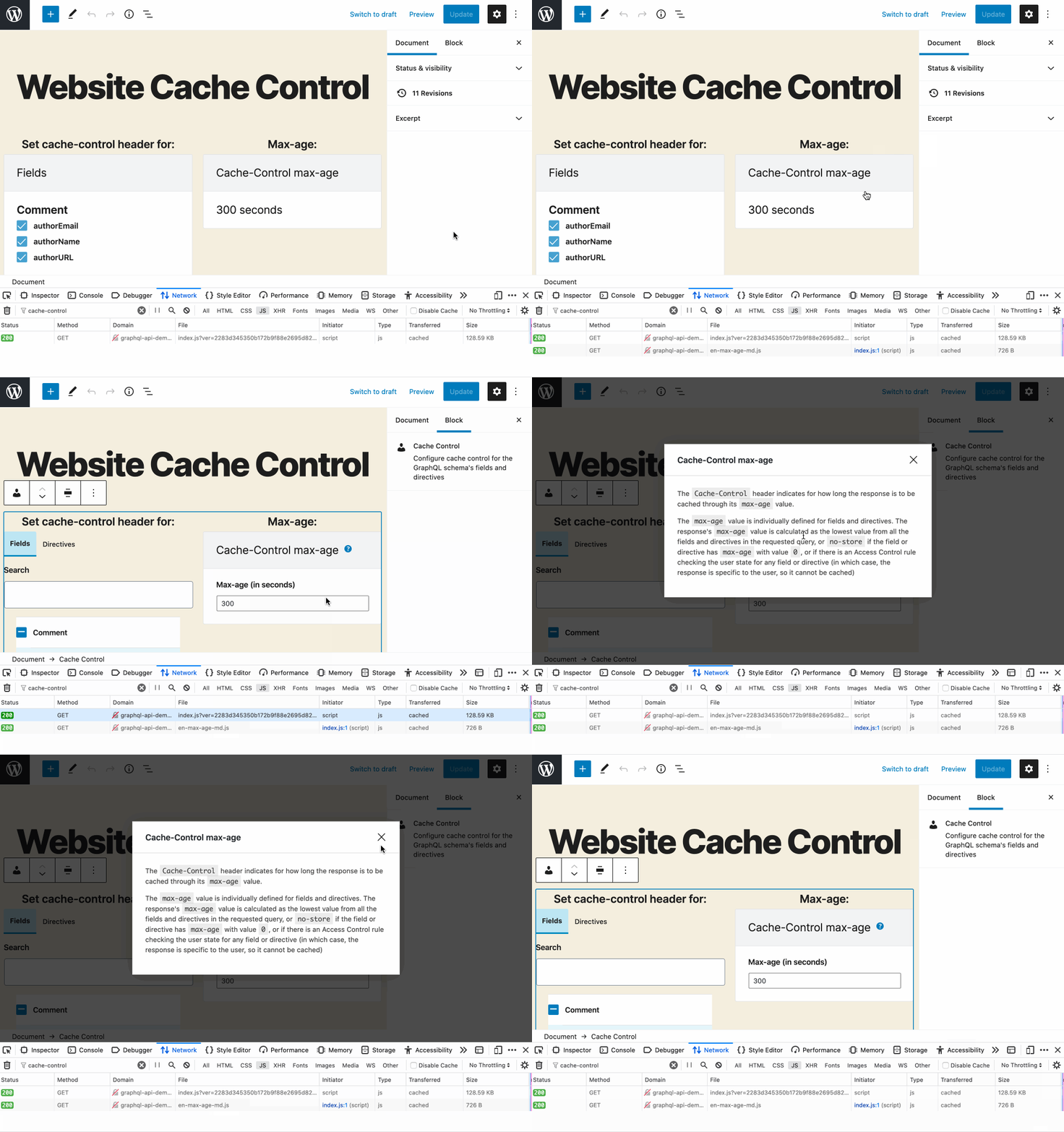
Content retrieval then happens inside a component, with a state hook holding the page content and using an effect hook to trigger the async read once—the effect’s second argument is an empty array so it doesn’t rerun after every render:
import { useState, useEffect } from '@wordpress/element';

const CacheControlContentModal = ( props ) => {
  const fileName = 'cache-control'
  const lang = window.graphqlApiCacheControl.userLang
  const defaultLang = 'en'


  const [ page, setPage ] = useState( [] );


  useEffect(() => {
    getMarkdownContentOrUseDefault( fileName, defaultLang, lang ).then( value => {
      setPage( value )
    });
  }, [] );


  return (
    <ContentModal
      { ...props }
      content={ page }
    />
  );
};
Markdown makes documentation easier to write and maintain. Combined with the dynamic loading and translation approach outlined here, it can keep block documentation user-friendly without adding heavy HTML maintenance overhead.


