

Why `&&` in JSX can backfire
Consider this common React pattern:
function ContactList({ contacts }) {
	return (
		<div>
			<ul>
				{contacts.length &&
					contacts.map((contact) => (
						<li key={contact.id}>
							{contact.firstName} {contact.lastName}
						</li>
					))}
			</ul>
		</div>
	)
}
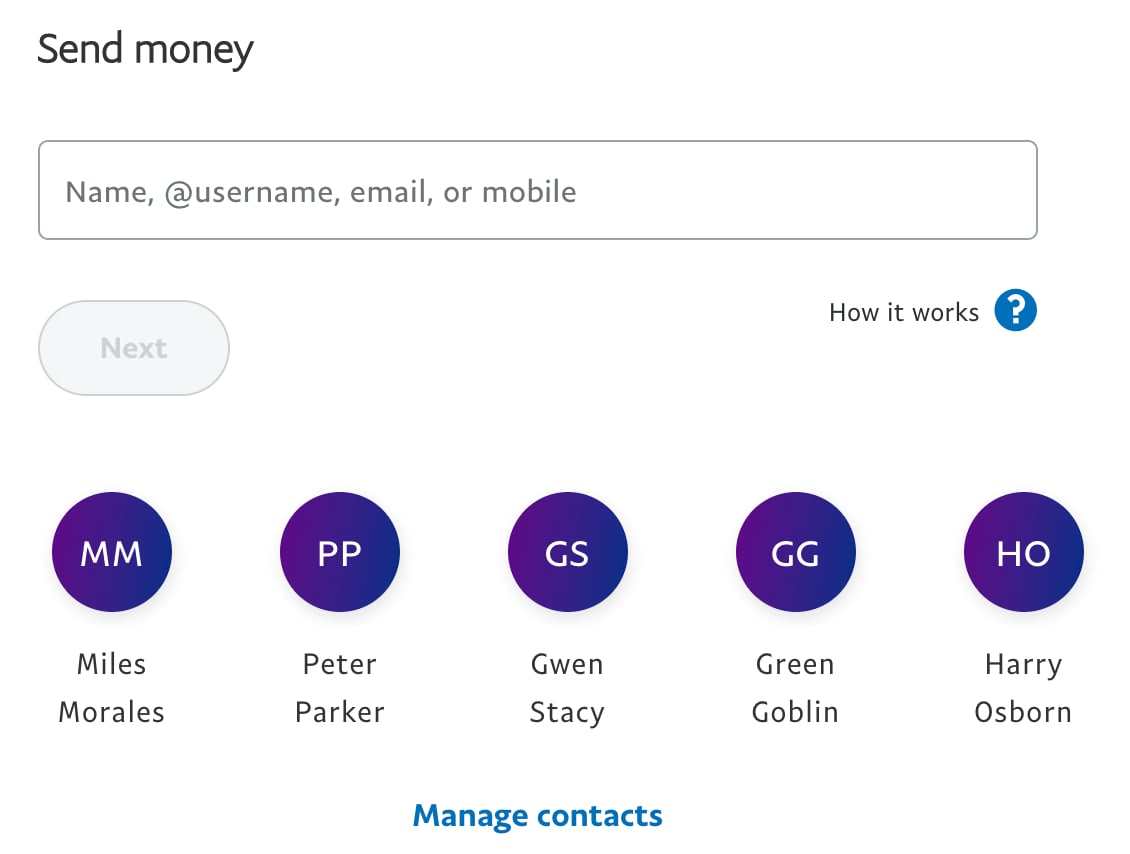
What happens when contacts is an empty array? You'd render 0 on the page. This isn't a theoretical edge case — it was shipped to production at PayPal on this page, leaving users who had no contacts staring at a stray zero:
The root cause is how JavaScript evaluates logical AND. When the left operand is falsy, && short-circuits and returns that operand's value without ever evaluating the right side. So 0 && anything always evaluates to 0, which React happily renders as text.
The fix is to be explicit about the falsy case with a ternary:
function ContactList({ contacts }) {
	return (
		<div>
			<ul>
				{contacts.length
					? contacts.map((contact) => (
							<li key={contact.id}>
								{contact.firstName} {contact.lastName}
							</li>
						))
					: null}
			</ul>
		</div>
	)
}
The same trap with `undefined`
Here's a subtler variant:
function Error({ error }) {
	return error && <div className="fancy-error">{error.message}</div>
}
If error happens to be undefined, you won't get a sensible fallback — you'll get an uncaught error:
Uncaught Error: Error(...): Nothing was returned from render. This usually means a return statement is missing. Or, to render nothing, return null.In production, the symptom might look like this:
react-dom.production.min.js:13 Uncaught Invariant Violation: Minified React error #152; visit https://reactjs.org/docs/error-decoder.html?invariant=152&args[]=f for the full message or use the non-minified dev environment for full errors and additional helpful warnings.This is the same underlying issue: undefined && anything returns undefined, which is not a valid React element. Remember that JSX is simply a syntactic sugar for React.createElement calls:
function throwTheCandy(candyNames) {
	for (const candyName of candyNames) {
		throwCandy(candyName)
	}
}

throwTheCandy(candies.length && candies.map((c) => c.name))
Trying to pass undefined where React expects a child or a component type doesn't make sense type-wise, yet React permits it because rendering 0 is technically valid.
Branching syntax over boolean coercion
The problem isn't that && is wrong — it's that it's designed to return a value, not to render conditionally. In an if statement, the result of && is discarded and only truthiness matters. In JSX, you're using the operator's return value directly, and when the left side is falsy, that return value is the falsy operand itself:
0 && true // 0
true && 0 // 0
false && true // false
true && '' // ''
That's why TypeScript can catch the undefined case, but not the 0 case — and why relying on !!contacts.length or contacts.length > 0 works but only masks the semantic confusion.
Instead, reach for actual branching constructs. A ternary or an explicit if statement makes both outcomes clear. For the contacts example, the if version would be:
function ContactList({ contacts }) {
	let contactsElements = null
	if (contacts.length) {
		contactsElements = contacts.map((contact) => (
			<li key={contact.id}>
				{contact.firstName} {contact.lastName}
			</li>
		))
	}

	return (
		<div>
			<ul>{contactsElements}</ul>
		</div>
	)
}
Ternaries are often the most readable in JSX, though readability is subjective. An extra payoff: coverage tools can report branches you haven't tested, which isn't possible when you use &&.
For extra protection, the eslint-plugin-react's jsx-no-leaked-render rule will flag && uses that could leak a falsy value into the output.
Writing it clearly today
Both problematic patterns have a straightforward fix. Here's how you'd render them now:
function ContactList({ contacts }) {
	return (
		<div>
			<ul>
				{contacts.length
					? contacts.map((contact) => (
							<li key={contact.id}>
								{contact.firstName} {contact.lastName}
							</li>
						))
					: null}
			</ul>
		</div>
	)
}
function Error({ error }) {
	return error ? <div className="fancy-error">{error.message}</div> : null
}
The rule of thumb: when you want conditional rendering, choose the syntax that names both outcomes. Logical operators return operands, not branches.


