
What Is a Task — and Why Does It Matter?
A task is simply something a person wants to accomplish on your website or app. For a technology site, that could mean finding pricing, getting installation help, or troubleshooting an issue. A university site might need to support tasks like researching courses, checking lecturer profiles, or exploring accommodation options. The specific tasks vary by context, but the principle is constant: focus on what users are trying to do, not on what you are trying to say.
Top Tasks methodology takes this idea further. Once you identify the critical tasks, you measure how successfully people complete them and how long it takes. The goal is always to improve completion rates and shorten completion times for those key tasks — shifting attention from inputs like content, code, and design to outcomes from the user's perspective.
When Top Tasks Makes Sense
Top Tasks is not a quick fix. It is a rigorous, systematic approach suited to organizations facing specific challenges:
- No consensus on priorities. When teams cannot agree on what matters most, Top Tasks provides a basis for unity of purpose.
- Need for consolidation. Too many websites, features, or content pieces can be streamlined into a single, coherent approach.
- Outdated or low-quality content. Low-value material clutters search and navigation; evidence helps justify removing it.
- Poor navigation. When navigation reflects organizational structure or vague terms like "Resources" instead of user needs, Top Tasks reorients it.
- Metrics chasing volume. If success is measured purely by traffic and activity rather than value, Top Tasks refocuses on what genuinely matters.
The Survey Process
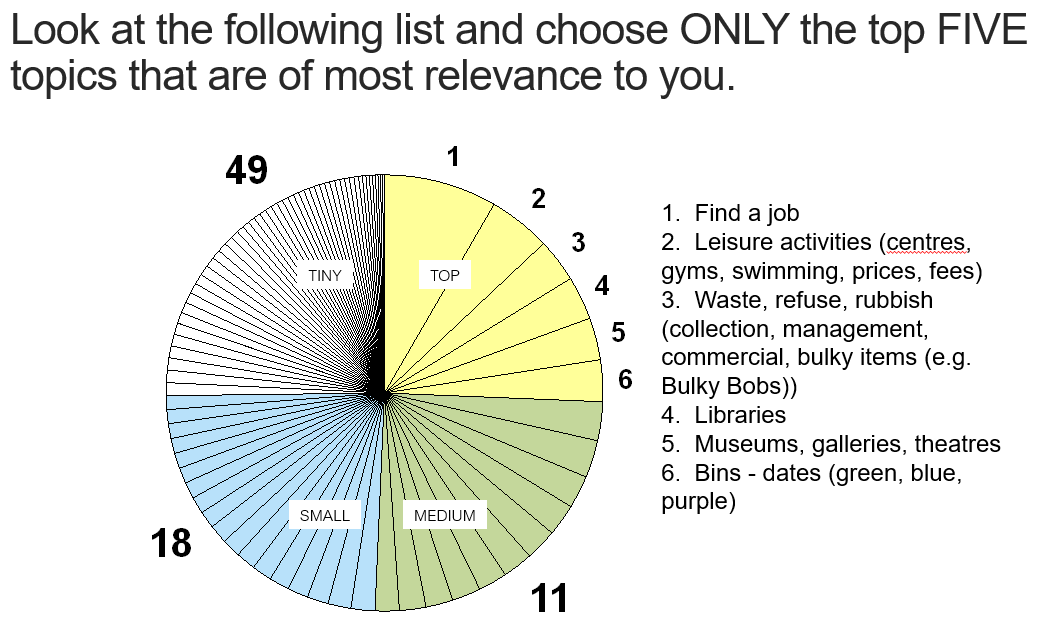
The heart of Top Tasks is a survey that produces a prioritized list of tasks, ranked from the most important (top tasks) down to the least important (tiny tasks). Survey results guide decisions on which features and content to prioritize, which to remove, how to structure classification and navigation, and how to build a metrics model around task success and completion time.
Designing for top tasks means designing for the long term. Core human needs persist. A tourism website project from around 2003 identified tasks like Special Offers, Accommodation, Things to Do & See, Planning a Trip, and Getting Here & Around. Those same desires remain relevant in 2020 — the tools have changed, but the fundamental task of finding a great deal has not.
Search behavior reveals something subtle: the words that bring users to a website are often not the words that guide them through it. People might search for "deals" but click on links labeled "special offers" once onsite. Searching for a "cheap hotel" is fine, but nobody wants to land on a homepage that screams "dirt cheap" — the underlying task stays the same, while presentation matters.
Why Analytics Isn't Enough
Organizations often assume search logs and web analytics reveal their top tasks. They do not. Analytics rarely expose tasks for which you have no content yet. In a university project focused on business master's degrees, a key task emerged: prospective students wanted to understand how the degree would "advance their career." Nobody was typing that phrase into search.
A telling example comes from the Microsoft Excel Web team. Users frequently searched for "remove conditional formatting," so the team created a dedicated page. Dissatisfaction remained high despite repeated edits. Eventually, research revealed the real task was understanding how to use conditional formatting correctly in the first place. Removing it was merely a symptom. Top Tasks digs down to these deeper, truer tasks — which demands substantial research, discussion, and thinking.
Scope and Commitment
Top Tasks examines the entire physical and digital environment from a 360-degree perspective. It is not about low-hanging fruit or quick wins. A typical project takes about 12 weeks:
- 3–4 weeks to gather an initial list of tasks (usually 200–400).
- 3–4 weeks of collaborative discussion to refine to a final list of 50–80 tasks.
- 2–4 weeks to run the survey; aim for 400+ responses for statistical reliability, with 100 as an absolute minimum.
- 2 weeks to analyze and present the results.
Building the Right Team
The success of a Top Tasks project hinges on assembling a diverse, cross-functional group. For an intranet, include representatives from Support, Marketing, Sales, Products, Web, IT, HR, and Communications. For a public website, draw from Support, Marketing, Sales, Products, Web, and Communications. The group should be between three and eight people, genuinely experienced, and user-facing, and should remain consistent throughout the entire process.
There is an important caveat: if you cannot get people to join this group, your organization may not be ready for Top Tasks. If departments won't participate, they are unlikely to take the results seriously. But when the effort is made, the benefits include a more comprehensive task list, deeper organizational understanding, fewer tiny tasks from any single department, cross-departmental bridge-building, identification of duplicate content and tools, and greater buy-in for change.
For example, when a COVID-19 Top Tasks study was conducted for WHO in May 2020, the top tasks that emerged included vaccine development and safety, latest news and research, transmission and spread, immunity and antibody testing, WHO guidelines, symptoms, research papers, the end date and new normal, and virus survival on surfaces and in air. Reaching such results requires methodical work.
The first step is gathering a potential task list from sources like your existing website or app, top annual searches (internal and external), the most visited pages or sections, customer surveys from the past few years, support and feedback logs, competitor websites, and social media or community discussions. For Microsoft Visual Studio, valuable tasks came from independent developer communities. The longlist typically ranges from 200 to 400 tasks, but in exceptional cases like the European Commission, it can reach into the thousands.
The early drafts are rough. Samples from a healthy environment project include tasks like "access to my journal," "advice on treatment or hospitals abroad," "aids (prostheses, wigs, etc.)," "alternative treatment," and "analysis of food safety (pesticide, dioxin…)." A great deal of work goes into refining this broad collection down to a focused list of 50–80 well-defined tasks.
The Editing Grind: From Longlist to Shortlist
The most intellectually demanding phase of the Top Tasks process is refining a long list of 200–400 potential tasks down to a manageable shortlist of around 150. This is not a clerical exercise; it is a profound exercise in organizational clarity. The act of stripping away verbs, conjunctions and redundant phrasing forces a team to agree on its core purpose and genuine utility.
Expect this shortlisting phase to take between two and four weeks, requiring five to eight 90-minute sessions with the group, each needing roughly equivalent preparation time. It is intense, sustained work, so keep the schedule to a maximum of three sessions per week to allow the list time to mature. The initial longlist must be cleaned up before the first group session since the group itself should never confront more than 150 entries at once.
The key principles of successful shortlisting are linguistic and structural discipline:
- Use nouns, not verbs. Drop the action words. You do not need "Find a job," only "Jobs." Avoid statements and questions entirely.
- Prune your phrasing. Remove conjunctions, so "Installation and configuration" becomes "Installation, configuration." Use brackets for clarification, like "Conservation (ecology, nature, woodlands)." Keep each task under 65 characters (roughly 8–10 words).
- Eliminate redundancy. Delete exact duplicates and remove overlapping or near-identical items, aiming for a list of unique, distinct tasks.
- Avoid clutter words. Do not include audiences (e.g., "Women’s health," "Training for developers") or specific departments, brands, products, subjects, diseases or geographic regions.
- Strip out formats and channels. Exclude formats such as reports, newsletters, videos, and templates, as well as channels like Twitter and YouTube. Also, do not include Web conventions like search or navigation.
- Beware "dirty magnets." Vague phrases like "Resources," "Knowledge Base," "Quick Links" and especially "Frequently Asked Questions" attract clicks because they sound useful, but mean different things to different people.
Beware of the trap of first-word repetition: a list starting with four or more entries labeled the same will confound users. For example, having "European Commission at work," "European Commission competition," and "European Commission directory" as distinct entries is a user interface failure.
The Survey: One List, No Exceptions
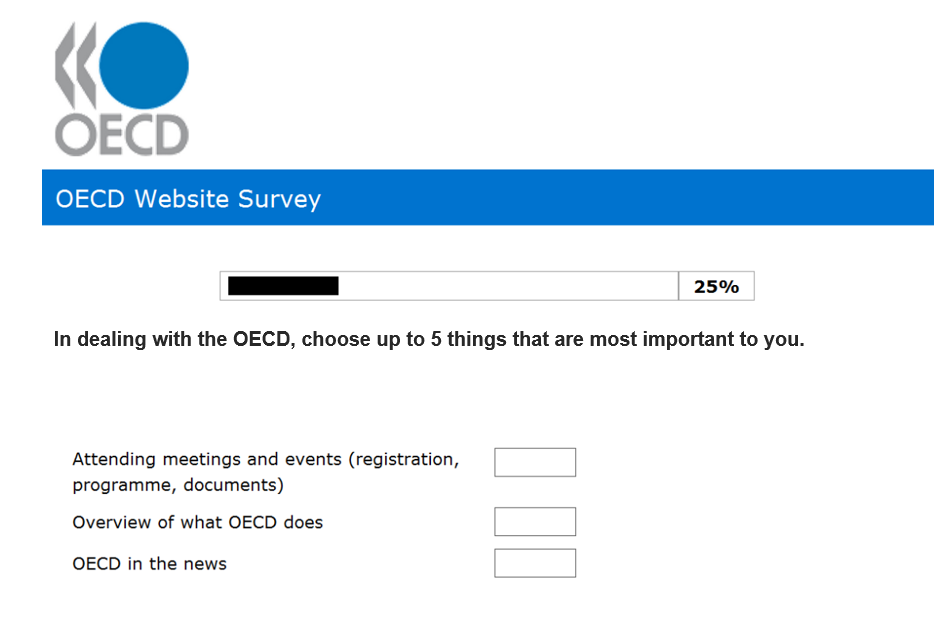
The Top Tasks survey will always fail if you try to "help" the participants by breaking the list into segments. The entire methodology depends on presenting a single, randomly presented list of tasks. Participants are asked to scan the list and select no more than five tasks. Any alteration to this structure—such as dividing by topic or audience—invalidates the exercise, which has succeeded over 600 times with more than half a million voters across 120 countries since 2003.
The framing statement introducing the list should focus on the human world, not the website. Intranet, public sector and corporate teams all make the same mistake of phrasing it as "What do you want to do on our site?" Instead, frame the question around the real-world outcome. For a COVID-19 vaccination survey, the prompt was:
"In relation to the COVID-19 vaccine, select up to 5 things that are MOST IMPORTANT to you."
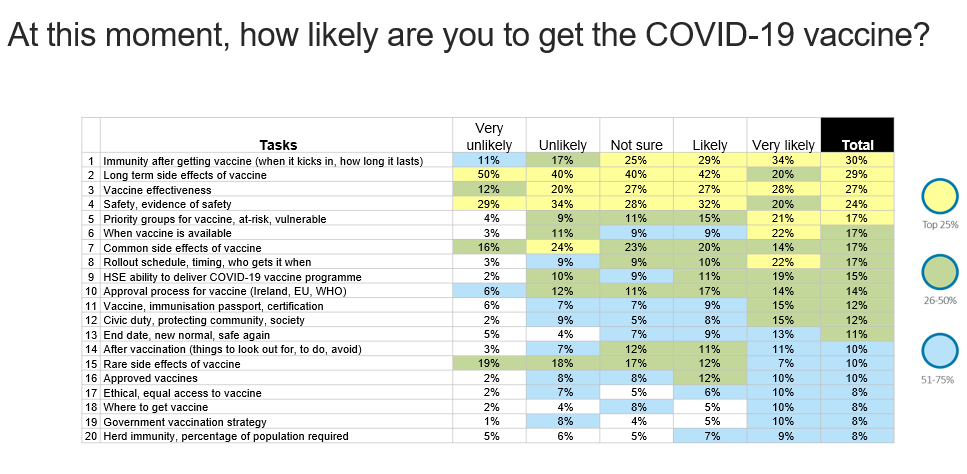
The survey itself has three distinct components:
- The Top Tasks voting itself.
- Segmentation and demographic questions (role, gender, location).
- Questions on the user experience of the website or app.
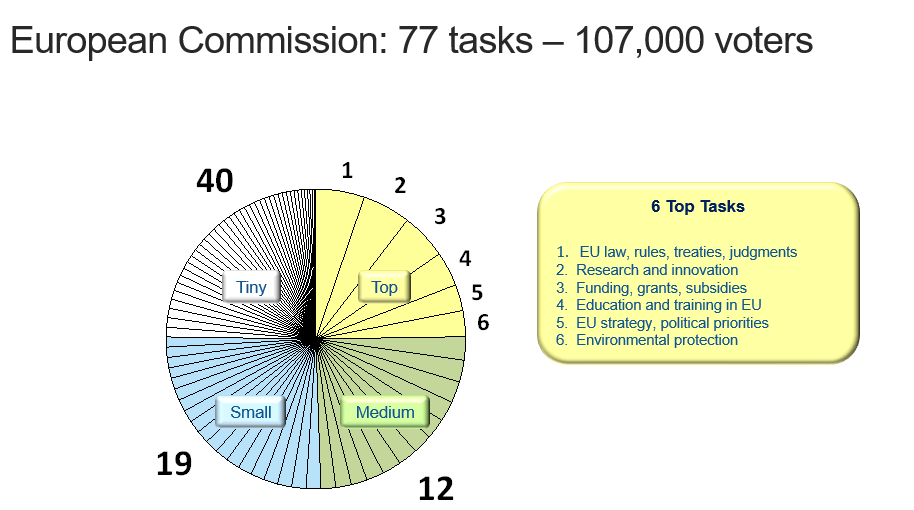
Do not wait for massive participation to see the signal. With even 30 voters, the top tasks start to emerge with remarkable reliability. In the largest-ever survey for the European Commission, over 107,000 voters consistently ranked the same three tasks at the top: EU law, rules, treaties, judgments; research and innovation; and funding, grants, subsidies. These same three were already emerging after the first 30 ballots were cast. While the ranking stabilizes with volume, roughly 400 votes yields consistently solid results. The most effective method of invitation is a popup on the very website or app being analyzed.
Invest in What Lasts, Not What Is Tiny
There is nothing trendy about Top Tasks research. It is a deliberate, somewhat unglamorous process designed to surface the frequent, deep needs of users rather than the varied, shallow interests of an organization. Often, the bottom of the final table is populated by the very subjects the organization allocates the most effort toward — the tiny tasks that flood both content management systems and app feature roadmaps.
Consider the case of Liverpool City Council in 2009. The elected top tasks were finds like "find a job," "leisure," "waste," "libraries," and "schools." An internal audit revealed an inverse relationship between a task's user importance and the volume of content published about it. The more critical a task was to a Liverpudlian, the less support it received on the site. The Web team's time was exhausted by covering an enormous volume of tiny-task pages.
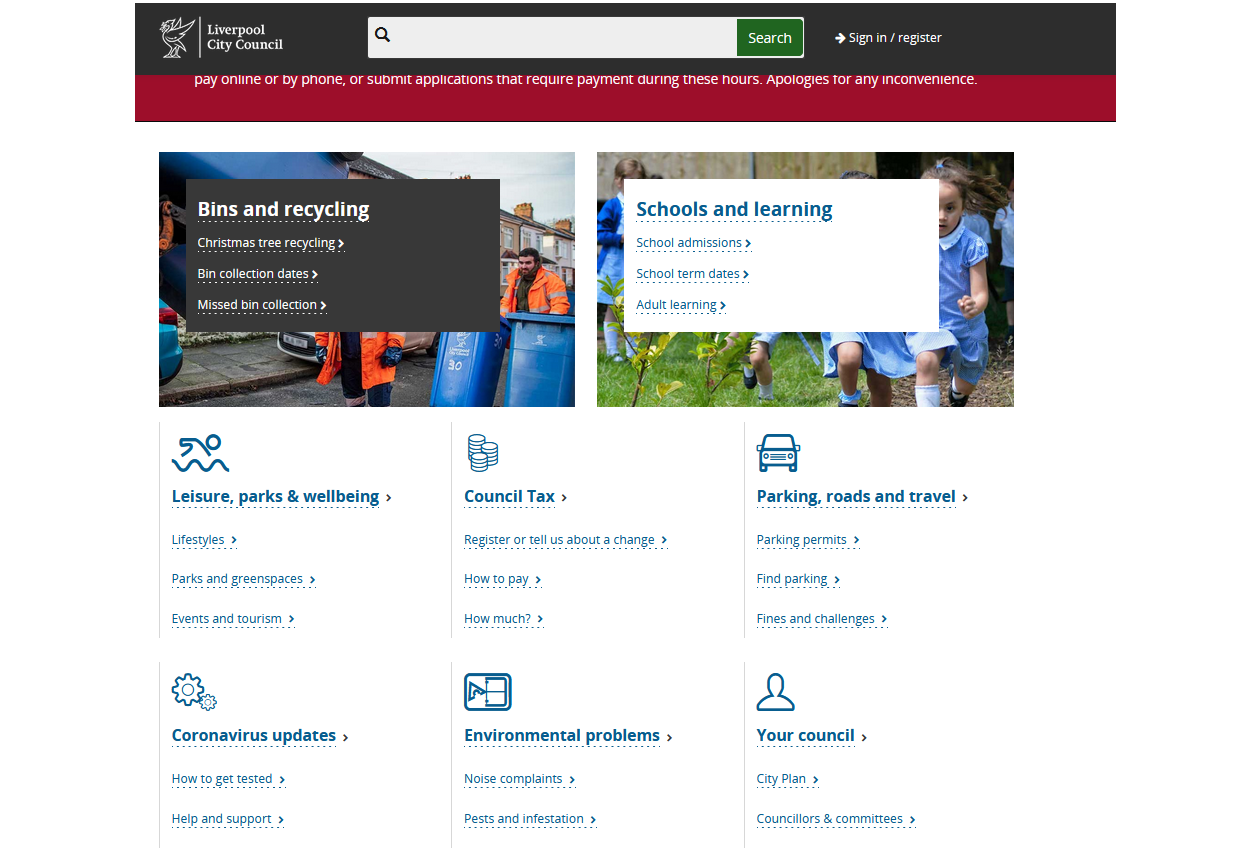
By gathering concrete evidence of user priorities, the council was able to delete over 80% of its website. Out of approximately 4,000 pages, only 200 drove 85% of traffic—and these core pages had been neglected. The top tasks provided the mandate to clear out the digital underbrush, demanding a severe reconsideration of which content deserved the team’s attention.
Top Tasks offers a strategy for sustainable, long-term digital design focused on terms that will endure. The same categories that surfaced in Liverpool in 2009—waste, leisure, schools—remain the anchors of the city’s homepage in 2022. The fundamental things people want to do tend not to change quickly in most industries, making this a robust method for establishing a content architecture, classification, and navigation that will endure without constant maintenance.
Essentially, the method offers a mechanism for decision-making based on evidence of user importance. Its value lies not just in identifying the critical tasks to magnify, but in making the case for what to ignore from the thousands of tiny tasks that otherwise consume far too much organizational energy.


