
Time to Interactive: Measuring Load Responsiveness
Time to Interactive (TTI) is a lab metric that measures a page's load responsiveness. It pinpoints situations where a page looks interactive but cannot actually respond to user input, helping developers ensure pages are truly usable once they appear on screen.
Defining TTI
TTI measures the time from when a page starts loading until its main sub-resources have loaded and it can reliably and quickly handle user input. The calculation is based on a performance trace and follows a specific process:
- Begin at the page's First Contentful Paint (FCP).
- Move forward in time to find a quiet window of at least five seconds. A quiet window is defined as a period with no long tasks and no more than two in-flight network GET requests.
- From the start of that quiet window, search backward for the last long task that occurred before it, stopping at FCP if no long tasks are found.
- TTI is the end time of that last long task. If no long tasks are found, TTI equals the FCP value.
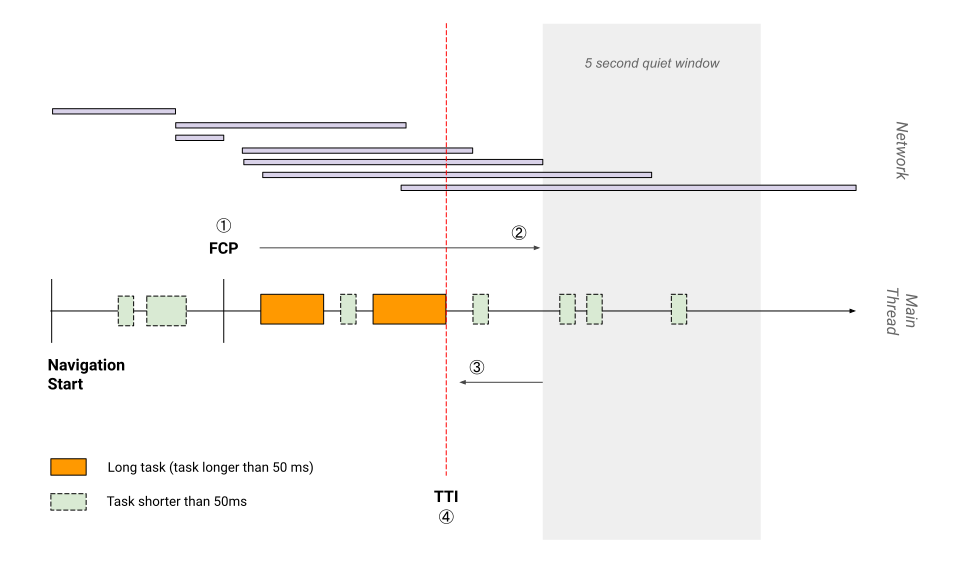
This definition matters because teams often optimize for fast rendering, sometimes sacrificing interactivity. Server-side rendering (SSR) is a common example: content and visual elements appear quickly, but buttons and links may not function until JavaScript finishes loading or the main thread clears. If the page appears ready but does not respond, users may get frustrated in the best case — or assume the site is broken and leave in the worst case.
The goal, then, is to keep the gap between FCP and TTI small. When a gap is unavoidable, use visual cues to signal that on-screen components are not yet interactive.
How to Measure TTI
TTI is designed for lab measurement. The most direct way is to run a Lighthouse performance audit, which reports TTI along with optimization opportunities. For manual or alternative checks, WebPageTest also provides TTI data.
Target TTI Score
For a good user experience on average mobile hardware, a page should reach Time to Interactive in under 5 seconds. Lighthouse uses this threshold when scoring performance; details on score calculation are available in the Lighthouse documentation.
Improving TTI
Running a Lighthouse audit on a specific site will reveal tailored recommendations. For general improvements applicable to any page, common techniques include:
- Minifying JavaScript to reduce parse and execution time.
- Preconnecting to required origins to speed up connection setup.
- Preloading key requests so critical assets load sooner.
- Reducing the impact of third-party code.
- Minimizing critical request depth by flattening dependency chains.
- Reducing JavaScript execution time overall.
- Minimizing main thread work.
- Keeping request counts low and transfer sizes small.
Applying these practices consistently helps close the gap between first render and true interactivity.


