

The failure surface
A rebuilt portfolio that executed cleanly on the developer's laptop stopped working entirely once uploaded to the server: dynamically generated stars were missing, a playable game mode rendered blank, and an animated street scene showed no cars. The console produced errors, but not coherent ones.
The central anomaly: JavaScript runs in the browser, so identical code served from two different servers should behave identically in the same browser.
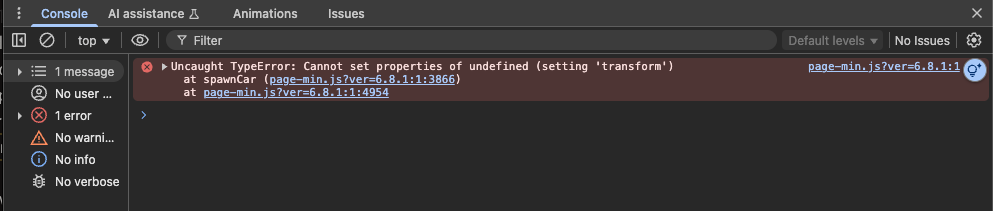
The first error: car.style undefined
A vanilla-JavaScript SVG element named car—created, inserted into the page, and animated along a gray strip standing in for a street—threw when the code set car.style.transform, because car.style was undefined. The same code ran flawlessly on the laptop.
Working around the error with setAttribute:
car.setAttribute('style', 'transform: translate(100px, 200px)');only moved the failure forward. Accessing data-* attributes via car.dataset.xspeed also returned undefined on the server. That API has been supported on SVG elements since 2015, and it worked locally.
Dead ends
Search engines were unhelpful, largely because the problem supposedly cannot occur. The hosting provider's support technician checked for server errors and simple misconfigurations and found nothing, but drew the line at custom code. ChatGPT produced a list of hypotheses, each of which turned out wrong:
- Inline SVG versus SVG loaded through an
imgelement—not the cause. - The page being served as plain text rather than HTML—the response was HTML with correct headers.
- The browser running in quirks mode—it wasn't.
- Incorrect SVG element creation—SVG uses a separate namespace, so
document.createElement('svg')won't work;document.createElementNS("http://www.w3.org/2000/svg", 'svg')is required. The code already usedcreateElementNSwith the correct namespace.
Given actual code as context, the model fixated on a suspected misconfiguration and repeatedly asked for console output to test whether car was an SVG element—locally it was, on the server it was not. It also proposed that injecting SVG children via innerHTML had broken car's identity, and rewrote part of the code accordingly; the rewrite worked locally and failed identically once uploaded.
The signal that mattered
The breakthrough came from logging the element's namespace. The expected SVG namespace is:
http://www.w3.org/2000/svgWhat the console actually printed was:
https://www.w3.org/2000/svgOne letter—the difference between http://www.w3.org/2000/svg and an https variant. Namespaces are not URLs to be secured; the deviation is effectively as fatal as passing a made-up string such as "Gimme-them-SVGzers". The local source contained the correct namespace, so what introduced the extra s?
Root cause: host-side link rewriting
The host's optimization plugin had a feature enabled to automatically fix insecure pages, rewriting insecure links to secure ones. In most cases that is the correct behavior—but the rewriting also covered namespace URLs embedded in JavaScript, silently converting http to https and invalidating every SVG element created by the code.
Disabling the feature restored the full site: planets to explore, cars moving along the pseudo-element street, and working game mode. No server configuration was at fault and no code typo was involved—an optimization layer transformed data it did not understand. The diagnostic approach that cracked it was narrow and cheap: print the namespace of the element that misbehaves, rather than trusting assumptions about how identical code behaves across environments.



