

GitHub Mobile Gets Faster Workflows for On-the-Go Development
Remote and hybrid work has made the mobile GitHub client more essential than ever. The latest updates to GitHub Mobile aim to reduce the friction of working away from a desktop by bringing more of the core development workflow into the palm of your hand. From project management to code edits and CI/CD oversight, here's what's new.
Project Tracking Rebuilt for Small Screens
Projects are now easier to navigate on mobile. You can jump straight to your recent projects from your organization, repositories, or profile. Project tables have been reformatted into a list layout so you can still see all the key planning data without squinting at a condensed spreadsheet view. From there, you can switch between views, edit fields, delete items, or preview content to keep everything current while you're out of the office.
The Projects experience is available now in the Google Play Beta and iOS TestFlight builds.
Editing Files and Managing Pull Requests Remotely
Two features previously reserved for the desktop are now live on iOS. You can edit files directly from the browse code view, making it possible to fix a typo or address review feedback without opening a laptop. In the same flow, you can create new branches and open pull requests to land those quick changes. Additionally, the pull request experience now includes full visibility into CI checks, with the ability to re-run or cancel jobs that look wrong—and merge right from the device when everything passes.
Both the file editing and Actions management capabilities are available on iOS, with Android support planned for the near future. More details are in the GitHub Changelog.
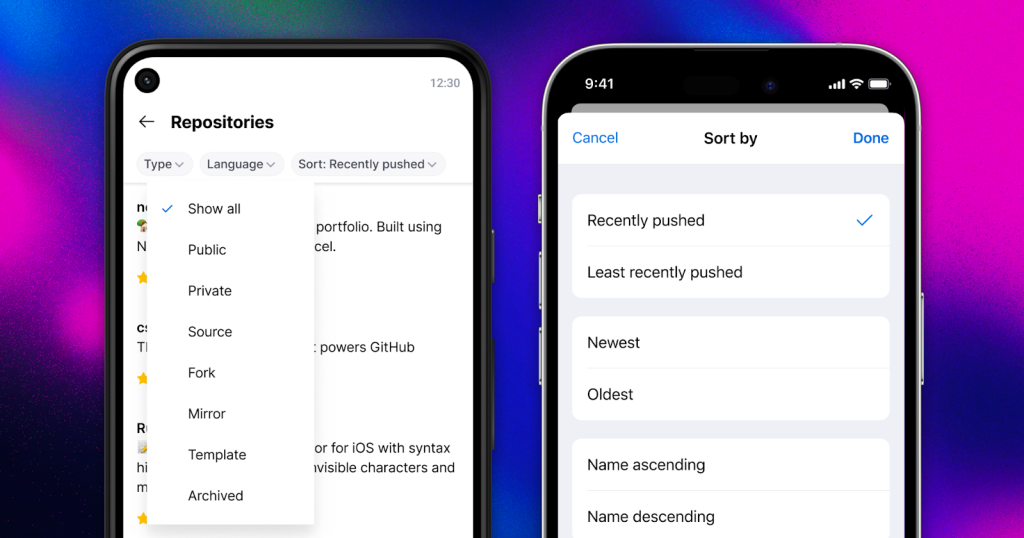
Repository Filtering and Sorting
Finding the repository you need has also improved. You can now filter and sort repositories directly from the mobile app. Options include sorting by your latest contributions or creation date, and filtering down the list by type, language, and name.
Where to Get It
To try out the latest features, download the app for iOS or Android, or visit github.com/mobile for more information.


