
The Hidden-Element Approach to Autogrowing Textareas
Making a <textarea> grow with its content sounds like it should be built into the platform by now, but there is still no clean native solution. Chris Coyier covered this problem earlier in the year, but the technique Stephen Shaw shared is the stand-out answer: replicate the textarea’s content in an element that can auto-expand, then sync the sizing between them.
The core constraint is that a <textarea> cannot automatically grow its height. A regular element, however, will happily expand to fit its content. The trick is to place the functional textarea and a visually hidden copy of its content inside a shared container:
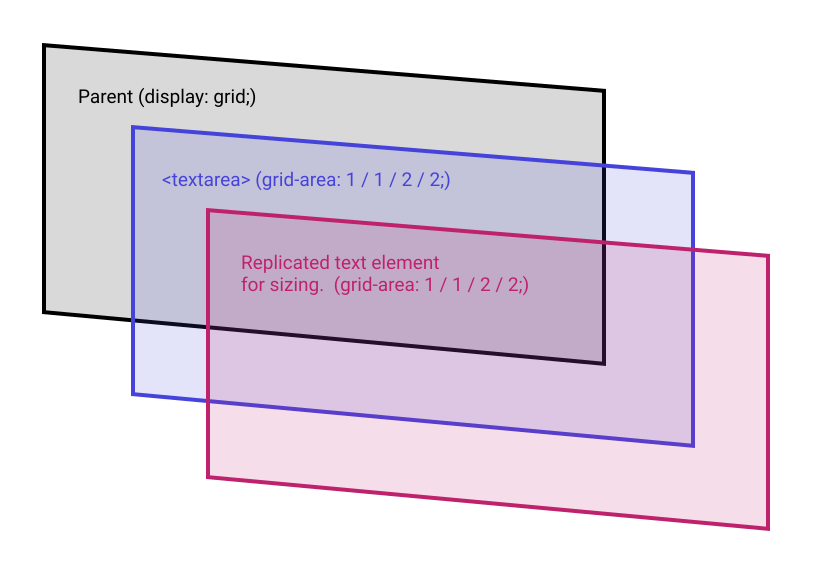
The parent’s height is determined by whichever child is taller. The visual replica is hidden, but it still takes up space, so when the replicated text wraps or grows, the container expands and the visible textarea follows. The textarea’s own minimum height still applies, but it is never the limiting factor once the content exceeds it.
Matching the Details: Font, Spacing, and Whitespace
For this to work smoothly, the hidden replica has to be a pixel-perfect match of the textarea’s measurements. That means identical font family, size, and line-height, plus matching padding, margin, border, and box-sizing. The only difference is the visibility: hidden; rule that makes the replica invisible without removing it from the layout flow.
Because textareas handle line wrapping in a specific way, the replica also needs white-space: pre-wrap; to mirror that behavior.
The Pseudo-Element Trick and the “Jumpy” Issue
In the working demo, the replica is rendered via an ::after pseudo-element rather than a dedicated markup element. The content comes from a data-* attribute on the same element as the textarea, and then gets injected into the pseudo-element’s content property.
content: attr(data-replicated-value) " ";The unusual part is that extra space appended to the value when writing the CSS content rule. Omitting that whitespace makes the expansion feel “jumpy,” likely related to how line-break behavior is handled across the two elements. Using a pseudo-element is not strictly required — a hidden <div> works too, and may be more straightforward for screen-reader accessibility than relying solely on visibility: hidden; — but if you take that route, watch for the same jumpiness.
This same approach can be adapted into frameworks that synchronize state between two elements, but the important part is understanding the mechanism: a textarea cannot size itself to its content, so a hidden twin that can do exactly that becomes the driver for the layout.


