
A second act for Store: repository-style data loading in Kotlin
When I created Store at the New York Times, the goal was straightforward: an effortless, reactive data-loading library built on RxJava and ideas from Guava’s cache implementation. Three years and 45 contributors later, the project has grown well beyond its origins. Dropbox is now taking over active development, and Store 4 arrives as a full Kotlin rewrite backed by Coroutines and Flow. This version reflects both what we learned from the original API and how the Android ecosystem has shifted since.
The architecture guidance from Android Jetpack now presents a clean separation of concerns:
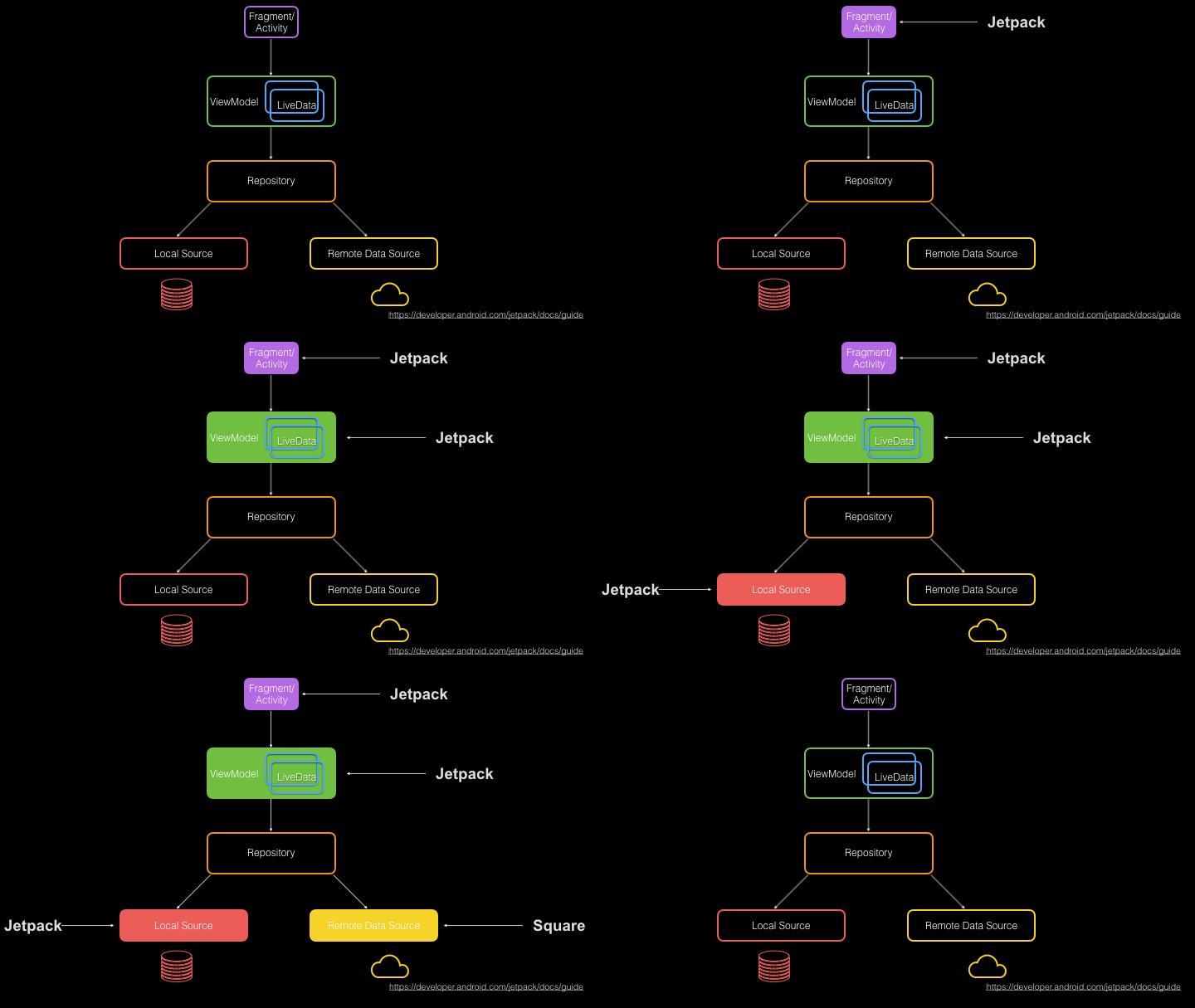
Jetpack also provides concrete implementations for most layers:
- Fragments and Activities: With AndroidX versions that include lifecycle and coroutine scopes, these build the view layer.
- ViewModel and LiveData: These pass repository data to the UI while handling rotation and lifecycle changes.
- Room: A full ORM for SQLite with RxJava and coroutines support.
- Remote data source: Retrofit and OkHttp solve network access at two levels of abstraction.
Notably absent from that list is the Repository layer. Jetpack offers code samples but no reusable abstraction that works across implementations. That gap is a primary reason Dropbox is investing in Store.
Microsoft defines repositories as:
“classes or components that encapsulate the logic required to access data sources. They centralize common data access functionality, providing better maintainability and decoupling the infrastructure or technology used to access databases from the domain model layer.”
Repositories let you work with data declaratively: define how to fetch it, how to cache it, and how to transmit it, and clients simply declare request objects for the data they need.
Why this exists: the problem with duplicate network calls
Four years ago, keeping mobile data usage low while maintaining always-on connectivity was a major engineering challenge. Apps commonly made duplicate requests for the same data, wasting both bandwidth and the user’s data plan.
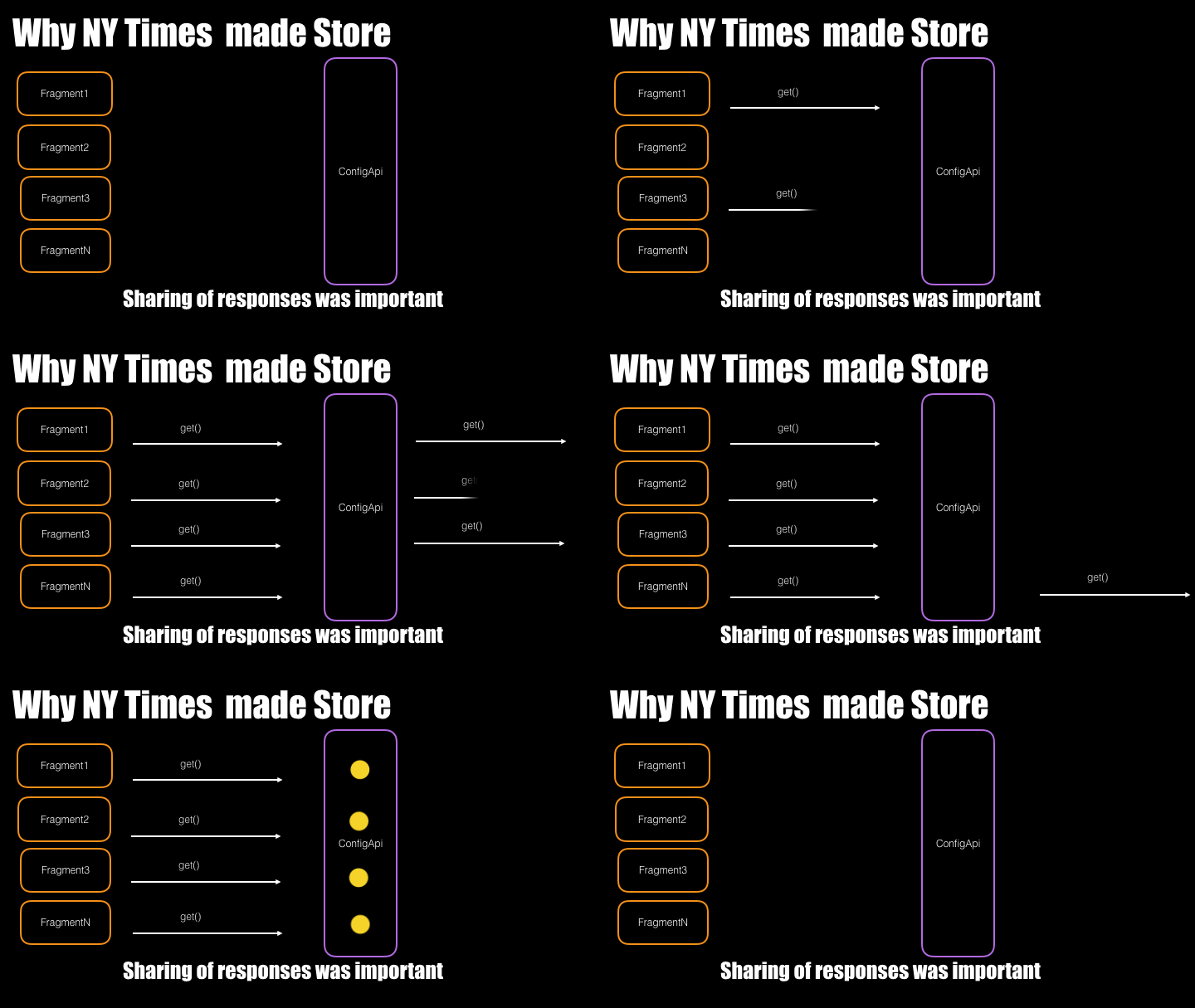
The original Store solved this by centralizing request and response management, multicasting loading, error, and data responses so the same work wasn’t repeated multiple times:
Since then, the Android landscape has changed rapidly. Databases like Room and SQLDelight now support subscribing to data changes, and live sources such as websockets and Firebase push are increasingly common. The original Store wasn’t built for observable data sources, so a rewrite was necessary. Store 4 — at github.com/dropbox/Store — addresses this directly.
Why Kotlin Flow instead of RxJava?
Store 4 is written entirely in Kotlin and replaces RxJava with Kotlin’s Flow for reactive streams. The most significant driver is structured concurrency. In structured concurrency, you define the scope or context for background operations before starting them. This guarantees resource cleanup when work is complete or no longer needed, directly reducing memory leaks.
RxJava takes a different approach to scoping. Its core API returns a Disposable as a handle for the subscription:
// Observable.java
@CheckReturnValue
public final Disposable subscribe(Consumer onNext) {}
The dispose() method detaches the consumer from the upstream observable. Scope is defined between subscription start and calling dispose. RxJava 2 added @CheckReturnValue to flag that flowable.subscribe returns a value you should retain, but that’s only a lint warning. The risk: engineers can forget to call dispose, causing memory leaks.
Kotlin Flow prevents that problem structurally:
suspend fun Flow.collect(...)Flow.collect is marked suspend, meaning it can only be called inside a coroutine. This forces every flow to have a well-defined scope at creation time, unlike RxJava where cancellation is an afterthought. On Android — an embedded system with limited memory — better contracts for async work mean fewer leaks, fewer crashes, and better performance. With coroutines, Jetpack’s viewModelScope automatically cancels running flows when the ViewModel is cleared.
Structured concurrency was the primary motivation, but aligning with the Android ecosystem also mattered. AndroidX libraries increasingly embrace Kotlin coroutines: ViewModel has coroutine scopes, Room has first-class Flow support, and even Paging is moving in that direction. Rewriting Store with coroutines positions it for the ecosystem’s future, not just its present.
There was also a practical portability consideration. While there are no current plans to use Store beyond Android, Kotlin multiplatform is a possible target. RxJava isn’t compatible with Kotlin/Native or Kotlin/JS and brings in more than 6,000 functions; keeping dependencies minimal makes that path easier should it come.
Anatomy of a Store instance
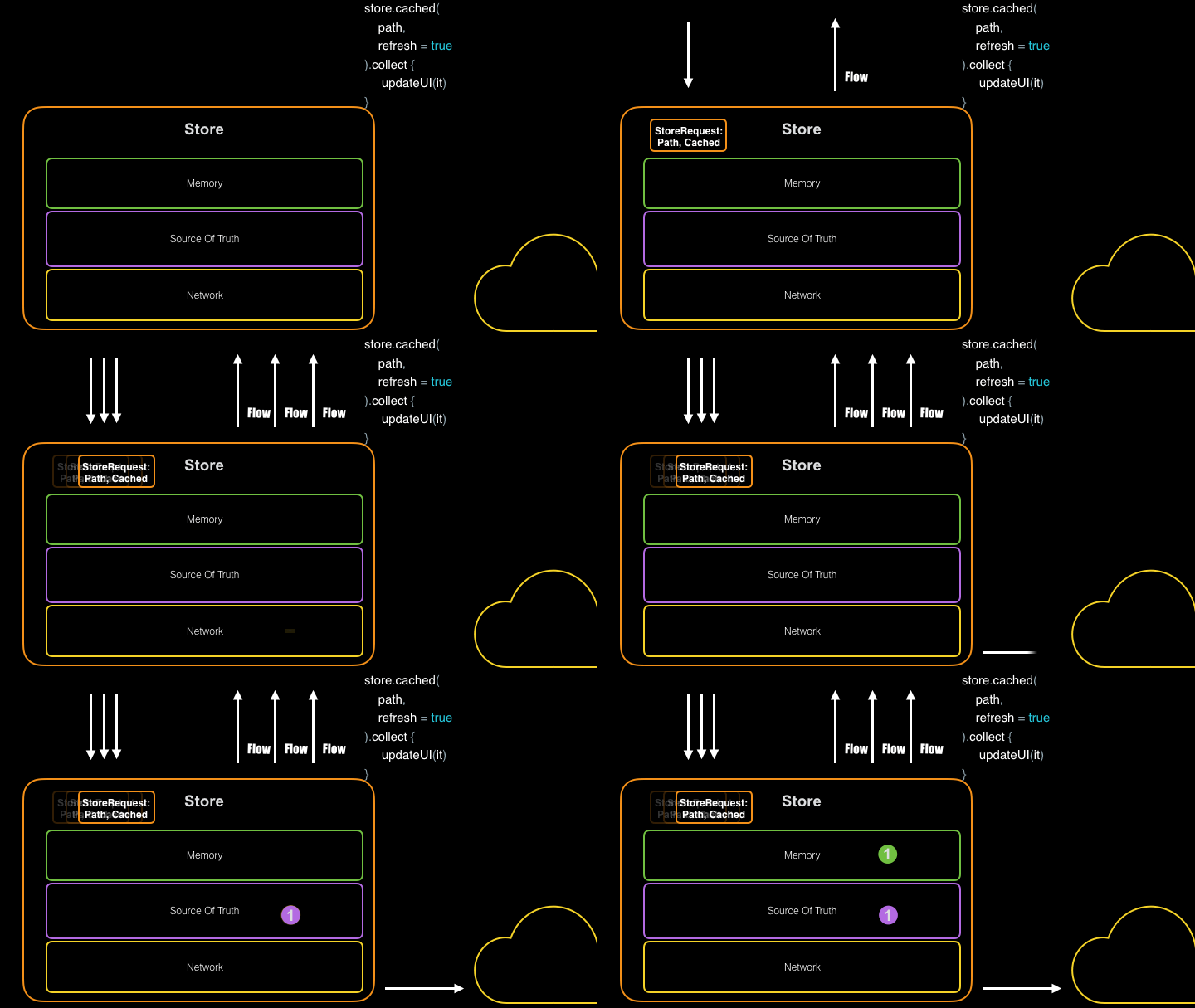
A Store instance manages one data request type. You supply a Fetcher — a function describing how data is fetched over the network — and optionally configure in-memory and disk caches. Because Store exposes data as a Flow, your view layer receives updates without writing threading code. Once built, the Store owns the logic for fetching, sharing, and caching your data, so views always read from the freshest available source and can keep working offline.
A fully configured Store builder declares three things: in-memory caching (useful across configuration changes like rotation), disk caching (so users have data offline), and a rich public API to request cached data, force a fresh fetch, or listen for continuous updates.
StoreBuilder.fromNonFlow { api.fetchSubreddit(it, "10")}
            .persister(
              reader = db.postDao()::loadPosts,
              writer = db.postDao()::insertPosts,
              delete = db.postDao()::clearFeed)
            .cachePolicy(MemoryPolicy)
            .build()
The disk-cache implementation is passed to the builder via persister(). Because the disk persistence layer is independent of the rest of the library, you can modify the disk store directly — even from outside Store. This works particularly well when the persister is backed by a database with observable sources, such as Jetpack Room, SQLDelight, or Realm.
Builder basics and keys
Creating a Store requires only a builder call and a function that returns a Flow or a suspend function returning your data type.
val store = StoreBuilder.from {
                articleId -> api.getArticle(articleId) //Flow<Article>
            }
            .build()
Store identifies data with generic keys. Any value object that correctly implements toString(), equals(), and hashCode() can serve as a key, which gets passed to your Fetcher and used as a primary identifier inside caches. Built-in types or Kotlin data classes are the recommended options for complex keys.
Working with StoreResponse and StoreRequest
The main public entrypoint is the stream() function. Its core contract is:
fun stream(request: StoreRequest<Key>): Flow<StoreResponse>Output>>Each call receives a StoreRequest describing which key to read and which data sources to honor. The return value is a Flow of StoreResponse objects. StoreResponse is a Kotlin sealed class with instances for Loading, Data, and Error; every response carries a ResponseOrigin field indicating the source of the event.
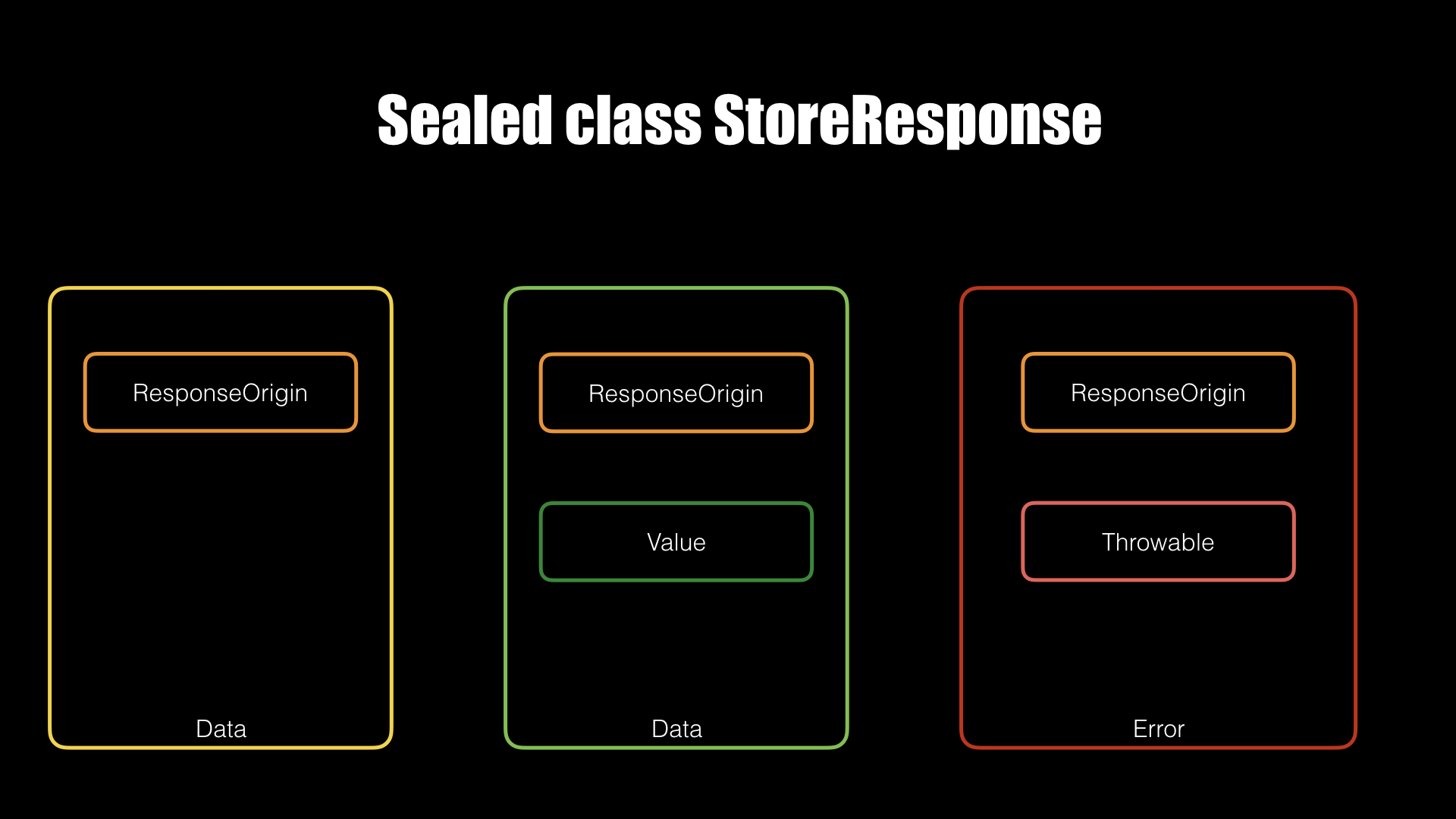
Loadingcarries only an origin. This is the signal to show a progress indicator in your UI.Datacontains avaluefield with an instance of the type returned by theStore.Errorwraps the thrown exception inside anerrorfield.
On failure, Store wraps the exception rather than throwing it. That keeps the Flow alive: UI code can still receive updates from subsequent fetch attempts or from local data source changes without restarting the flow. The fetch() and fresh() variants, in contrast, return single values and propagate errors as normal exceptions.
lifecycleScope.launchWhenStarted {
  store.stream(StoreRequest.cached(key = key, refresh=true)).collect { response ->
    when(response) {
        is StoreResponse.Loading -> showLoadingSpinner()
        is StoreResponse.Data -> {
            if (response.origin == ResponseOrigin.Fetcher) hideLoadingSpinner()
            updateUI(response.value)
        }
        is StoreResponse.Error -> {
            if (response.origin == ResponseOrigin.Fetcher) hideLoadingSpinner()
            showError(response.error)
        }
    }
  }
}
Convenience methods: get(), fetch(), stream()
Three extension functions cover most usage patterns:
suspend fun Store.get(key: Key): Value— returns one value for a key, preferring in-memory or disk cache when items are available.suspend fun Store.fresh(key: Key): Value— returns a value obtained from the fetcher, bypassing caches.suspend fun Store.stream(key: Key): Flow— yields a flow of values for the key across updates.
lifecycleScope.launchWhenStarted {
  val article = store.get(key)
  updateUI(article)
}
When you call get() after a fresh install, the network response is written to disk (when a persister is configured) and kept in the in-memory cache. Later calls with the same key read from cache rather than hitting the network, which saves bandwidth and battery. This fits well where views are recreated after rotation: they request cached data from the Store instead of retaining large data objects, and your UI only holds onto the keys. Because the cache contents follow key identity, views must declare whether a cached value is acceptable or only fresh data will do.
If you do need to ignore the cache, call fetch(). Two common scenarios are overnight background updates and pull-to-refresh gestures. While get() might return a cached value, fetch() always goes to network (or another external source) and emits exactly one value before completing.
lifecycleScope.launchWhenStarted {
  store.stream(StoreRequest.cached(3, refresh = false))
.collect{ }


store.stream(StoreRequest.get(3)) //skip cache, go directly to fetcher
    .collect{  }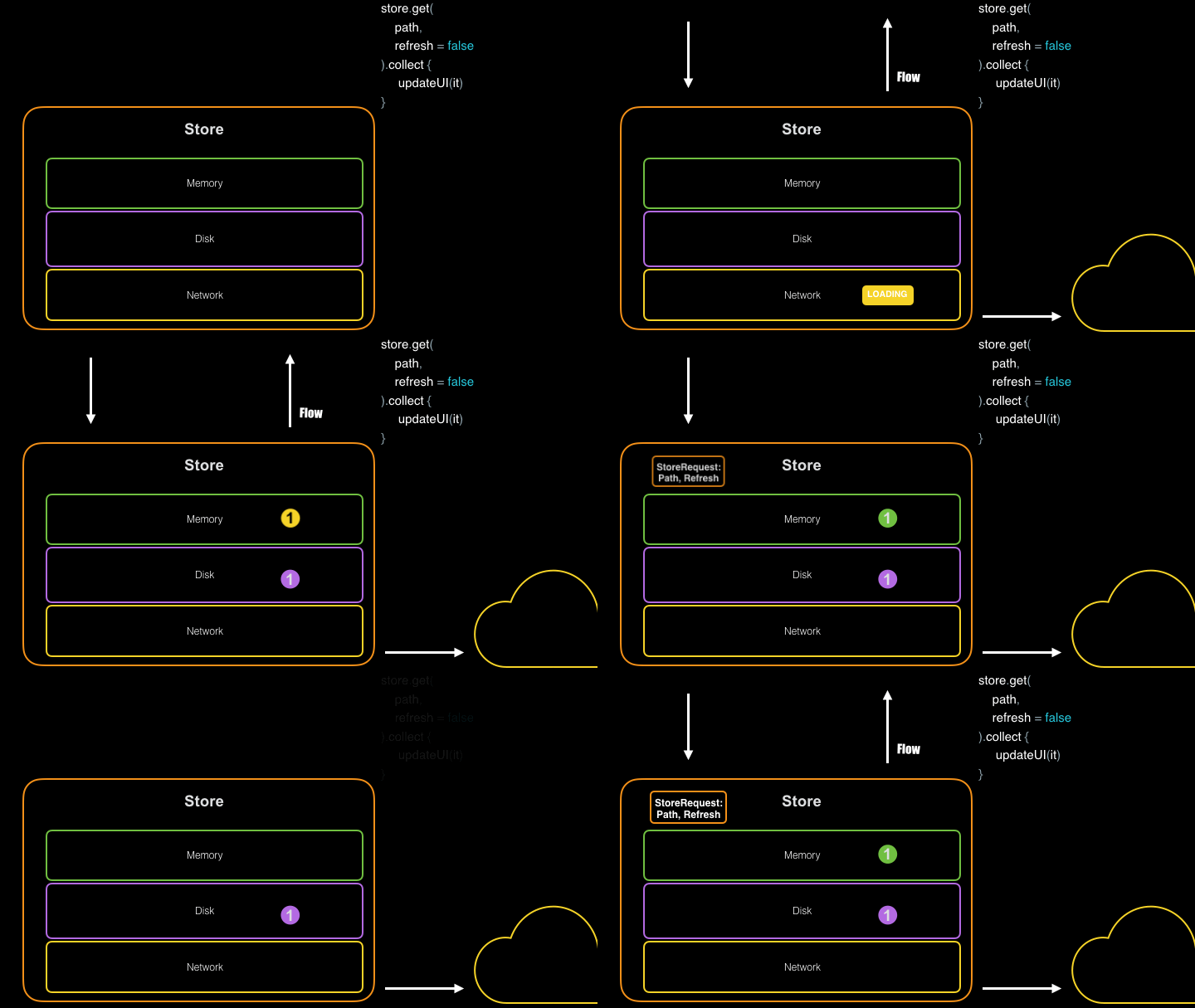
Preventing duplicate requests
Duplicated network calls are suppressed with an internal inflight debouncer. When an identical request is already pending, a second request is fused with the first and consumes the original response. This is applicable during app startup where the same network content gets requested from a dozen different places, and during repeatedly triggered refresh operations.
Disk cache or disk source of truth
Passing a persister into the builder gives you caching: after every successful network request, Store writes the result to disk and then re-reads it so the cached value is what flows out to subscribers. If the persister's read function itself returns a Flow, the Library changes behavior and treats the disk as the authoritative source. Any update to the disk — via database writes from other parts of the application, for example, or by another user on a synced device — pushes a new value to all active streams.
StoreBuilder.fromNonFlow {api.fetchSubreddit(it, "10")}
            .persister(
              reader = db.postDao()::loadPosts,
              writer = db.postDao()::insertPosts,
              delete = db.postDao()::clearFeed)
            .cachePolicy(MemoryPolicy)
            .build()
Since the disk layer remains pluggable, a Store works with object stores or any database. For SQLite-backed apps, the Room persistence library integrates with the disk-as-source-of-truth model.
- In-memory caching configurable by TTL and size policies
- Disk caching with straightforward Room integration
- Response multicasting to identical inflight requests
- Cached reads, forced network reads, and update streams via
StoreRequest - Structured concurrency built on Kotlin coroutines and
Flow


