A Purpose-Built Gateway for Internal Tools
Like most engineering organizations, Figma depends on a collection of internally built web applications to run its day-to-day operations—everything from deployment tooling to support systems. Because these admin backends are attractive targets for attackers seeking user data, the security team set out to build an access layer that could keep them locked down without adding friction for employees. Security Engineer Max Burkhardt walked through how the team assembled the system, what they learned, and how it fits into their wider security strategy.
From the outset, the solution had to meet five tests:
- Smooth user experience. Authentication must be fast, reliable, and effortless so employee productivity isn't hampered.
- Zero-trust principles. A user's network location shouldn't be treated as proof of trustworthiness; authentication must rely on stronger signals than just an IP address.
- Strong, modern authentication. Engineers building internal apps should be able to easily leverage modern security protocols like WebAuthn.
- Centralized authorization. IT and security teams need to efficiently assign, monitor, and adjust employee permissions without the system devolving into chaos from over-distribution.
- Minimal operational toil. The security team is small, so the solution shouldn't demand significant ongoing SRE work.
The architecture they landed on is built from reusable AWS components and tied together by Okta, their existing identity provider. It prioritizes off-the-shelf pieces to reduce maintenance burden, while combining them in ways that enforce strong security practices.
The Core Stack and Standard Configuration
The backbone of the system pairs AWS Application Load Balancers (ALBs) with Okta. While OIDC is a common choice for this type of setup, Figma avoided it because Okta charges extra for that protocol. Instead, they found a workaround that uses SAML in combination with an AWS Cognito user pool, which brought some additional benefits to the table.
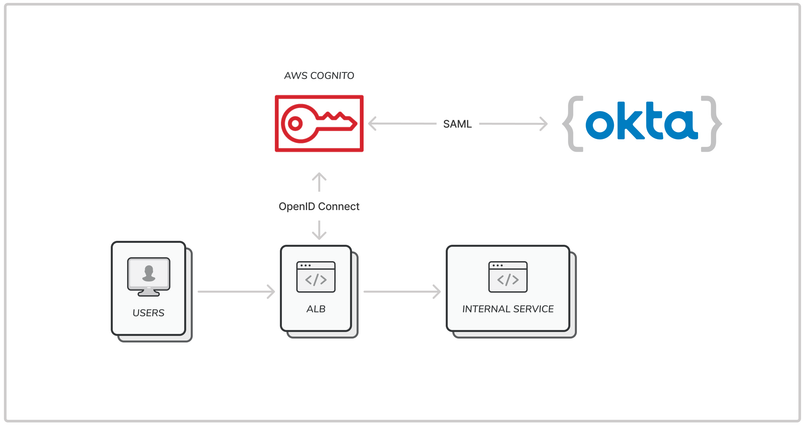
To make the setup repeatable, the team built Terraform modules that let any infrastructure engineer spin up an ALB with the correct authentication configuration automatically. The high-level flow looks like this:
- A Cognito User Pool is created with self-registration disabled. It's linked to a Cognito Identity Provider tied to the SAML Okta application, with mappings for
emailandprofileattributes passed through the SAML assertion. - A Cognito User Pool Client is configured for the ALB, specifying the OAuth2 callback URL, enabling the authorization code flow, and defining which user attributes (
emailandprofile) are set at login. - An ALB is configured to authenticate all HTTPS traffic against that Cognito client before forwarding requests to the backend application, with HTTP redirecting to HTTPS.
Once deployed, users hitting the ALB are automatically redirected to Okta. After successful authentication, they're forwarded to the app, and they won't see another login prompt until their session expires. This approach carries some notable security upsides:
- Since authentication flows through Okta's Sign-On Policy, the system automatically inherits advanced features like WebAuthn and Device Trust. For particularly sensitive applications—such as their deploy manager—Figma can require both a managed device and hardware MFA tokens.
- ALBs come with built-in defensive capabilities, including HTTP desync mitigation support and AWS-managed patching. They can also be paired with AWS Web Application Firewall for an extra layer of defense.
- Traffic is fully parsed by the ALB before reaching the backend, shielding internal servers from certain classes of attacks, like memory corruption exploits targeting the HTTP or TLS stack.
- Session timeouts are configurable per load balancer, so re-authentication requirements can be dialed up for higher-sensitivity apps.
This baseline configuration represents the first of three parts in the deeper look into how Figma secures its internal web apps. The next sections dive into how they extended this groundwork to handle more granular authorization, CLI-based access, and guest scenarios.
Fine-grained authorization with Okta groups
ALB-to-Okta app integration handles the broad strokes of internal access control: Okta application assignments determine which employees can reach which apps. But many of our internal tools serve wide audiences while containing functionality that should remain restricted. The deployment app is a case in point — any engineer should be able to spin up their own development environment, but only the release manager should push to production. Splitting that across two applications would be awkward from both an administrative and user-experience standpoint, so we built a mechanism for passing richer Okta authorization context down to the application layer.
The approach extends the profile attribute journey described earlier. With the right configuration chain, we can carry a user's Okta Group memberships through the SAML assertion into Cognito, then through the ALB, and finally into the application as a signed JWT in an HTTP header. The chain works like this:
- In Okta, configure a group attribute statement named
authorizationthat selects which groups (by prefix or regex) should be sent to the application. This keeps the assertion focused on groups the app actually cares about. - In the Cognito User Pool, map that
authorizationstatement into theprofileattribute. Since the attribute is configured on the User Pool Client, it gets populated on login through the ALB. - The
profileattribute then carries the group list inside the signedx-amzn-oidc-dataheader passed to the backend. AWS documents header parsing here, though the approach may need adjustment depending on your language and how strict its JWT library is.
AWS's sample code is Python-specific. If you're working in another language, this pseudocode covers the safe verification and extraction steps. Note that many JWT libraries will reject these tokens outright because of a known encoding bug in Amazon's JWTs, so you might need to handle decode and verification separately. This is security-sensitive code — test it thoroughly.
- Split the
x-amzn-oidc-dataheader on., then Base64-decode the first segment. - Parse that segment as JSON. The token isn't verified yet — the JWT header has to be decoded first to obtain the Key ID needed to fetch the signing key.
- Pull the
kidvalue from the JSON and theregionvalue from thesignerkey. - Validate that
kidlooks like a UUID andregionis a legitimate AWS region. - Retrieve AWS's public key from
https://public-keys.auth.elb.${region}.amazonaws.com/${kid}. Cache it; you'll be fetching it repeatedly. - Verify the entire JWT with your library's standard verification. If it fails for any reason, throw an authentication error. Confirm the
algheader is an expected algorithm — nevernone. (JavaScript note: theverifymethod from thejwslibrary does not check token expiry for you; validate theexpfield manually.) - Check that the JWT's
issvalue matches the expected Cognito User Pool URL for this application. That guards against someone presenting a validly signed token from an unrelated pool in a different account. - Return the
emailandprofilefields from the payload.
With this flow in place, applications call a Security-team-maintained helper to check a user's Okta Groups and decide what capabilities to grant. Management stays centralized in Okta, and the signed header provides trustworthy per-user logging.
We also gave teams guidance on structuring groups for this pattern. Staffing groups by team or department is tempting, but baking org structure into application logic couples your code to whatever reorg happens next quarter, and makes it hard to see at a glance what permissions a particular team actually holds. Okta's Group Rules solve that. Rules assign users to groups based on predicates written in the Okta Expression Language. We create one group per permission — e.g. #Deploys dev_environments — and let rules populate those groups from the team listed in a user's profile. Applications check for the permission group, not a list of team names. To audit a team's effective permissions, just find the rules mentioning that team.

We manage these associations through the Okta Terraform Provider, keeping all changes version-controlled and logged alongside our other infrastructure code.
One caveat: if an app needs extremely fine-grained permissions, the group list in the JWT can balloon the token to unreasonable size. If you're looking at dozens or hundreds of permissions per app, consider a separate mapping layer between user groups and capabilities instead.
CLI authentication for engineers
Web interfaces aren't the right fit for everything. Our infrastructure team has accumulated a variety of custom command-line tools that need to make HTTP calls against internal services. After getting ALB-based auth working for browsers, we wanted the same reach from the terminal.
That's non-trivial: the ALB-to-Okta flow involves redirects and browser-native features like WebAuthn, and a CLI can't impersonate a browser to reuse an existing session. We borrowed the "browser pop" pattern from the AWS SSO CLI. A library from our Security team lets an internal CLI trigger the user's default browser to open a confirmation page, then forwards the ALB authentication cookies back to the CLI process.
// In the Terraform configuration for our 'gateway_alb' module:
allow_cli_auth = true
// In a Typescript CLI tool:
import { cliAuthenticate } from '../../share/cli-auth';
const authCookies = await cliAuthenticate('https://deploys.figma.com');
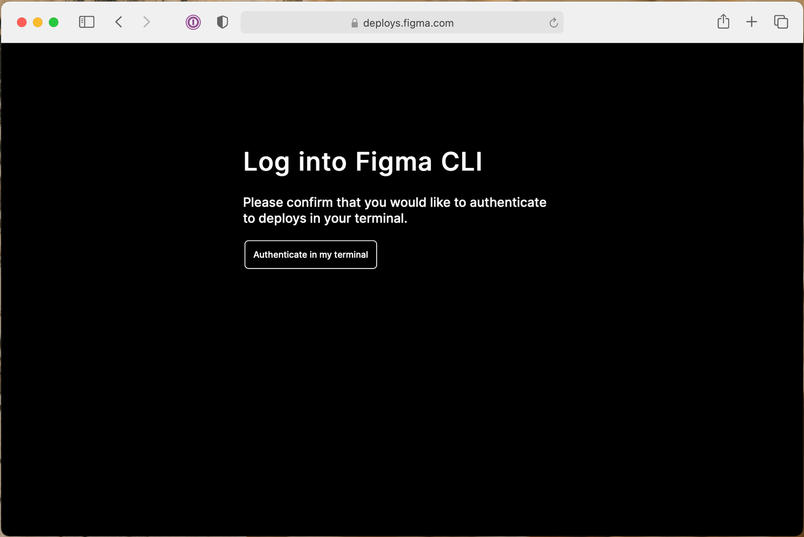
The flow works like this:
- The CLI opens a special route on the target service using macOS's
opencommand. - A high-priority ALB rule sends that route to a Security-team-maintained Lambda, which presents the confirmation page.
- When the user clicks through, the Lambda delivers their ALB authentication cookies to a webserver the CLI started on
127.0.0.1. This sidesteps the phishing exposure in device-code authorization flows. - The CLI saves the cookies in the macOS keychain — never plaintext on disk.
A few details keep the flow safe:
- A random state token generated by the CLI is threaded through the web interaction and required in the local webserver's response. Requests missing the token are rejected.
- The CLI confirms it can bind the intended port on
127.0.0.1before opening the browser page, ensuring the cookie lands with the CLI and not with some other process that grabbed the port first. - The confirmation page is served with a strict Content Security Policy as defense-in-depth against web attacks.
The result: internal tools can perform authenticated API calls — checking deployment state, looking up shared information — with a user click or two and essentially no extra engineering.
Secure guest access
Basing internal ALB auth on Cognito User Pools opens another door: User Pools aren't restricted to SAML users. Occasionally we want to expose an internal app to a trusted outsider — for example, during a private beta. Since the pool is independent of our Okta environment, we can create a standalone user account in the pool and hand those credentials to the partner, no Figma employee provisioning required.
This is purely a configuration matter. Add the COGNITO identity provider alongside your Okta provider in the User Pool Client associated with the ALB, and the login page will begin accepting either Okta/SAML or direct Cognito username-password authentication. That option stays out of our default configuration, so most internal apps remain Okta-only; guest access is an explicit opt-in per User Pool.
Architecture at a glance
Pulling the pieces together, the gateway becomes a managed, largely serverless system. The security team no longer operates any servers. Instead, their operational role is reduced to being code owners for the Terraform configurations, the CLI authentication Lambda, and the associated client libraries. All maintenance burden shifts to the underlying managed services.
Operational responsibilities and code ownership
- The security team maintains infrastructure-as-code definitions for all gateway components.
- They own the Lambda function that handles CLI authentication and the libraries that integrate with it.
- No day-to-day server management, patching, or capacity planning is required from the team.
Next steps
This project has already strengthened internal defenses and opened the door for broader improvements. The team plans to extend the same methodology to other application and infrastructure defenses, including detecting attacks on the corporate network and automatically identifying authorization vulnerabilities in the company's main web application.
The team remains committed to sharing its findings with the community as it continues to experiment in this space.


