
Why allowlists fall short against XSS
Cross-site scripting (XSS) remains one of the most persistent and damaging web vulnerabilities. A Content Security Policy (CSP) sent via the Content-Security-Policy HTTP header is an effective defense, but only when configured correctly. Many sites deploy allowlist-based CSPs such as script-src www.googleapis.com, which require heavy customization and are still vulnerable to known bypasses in most configurations.
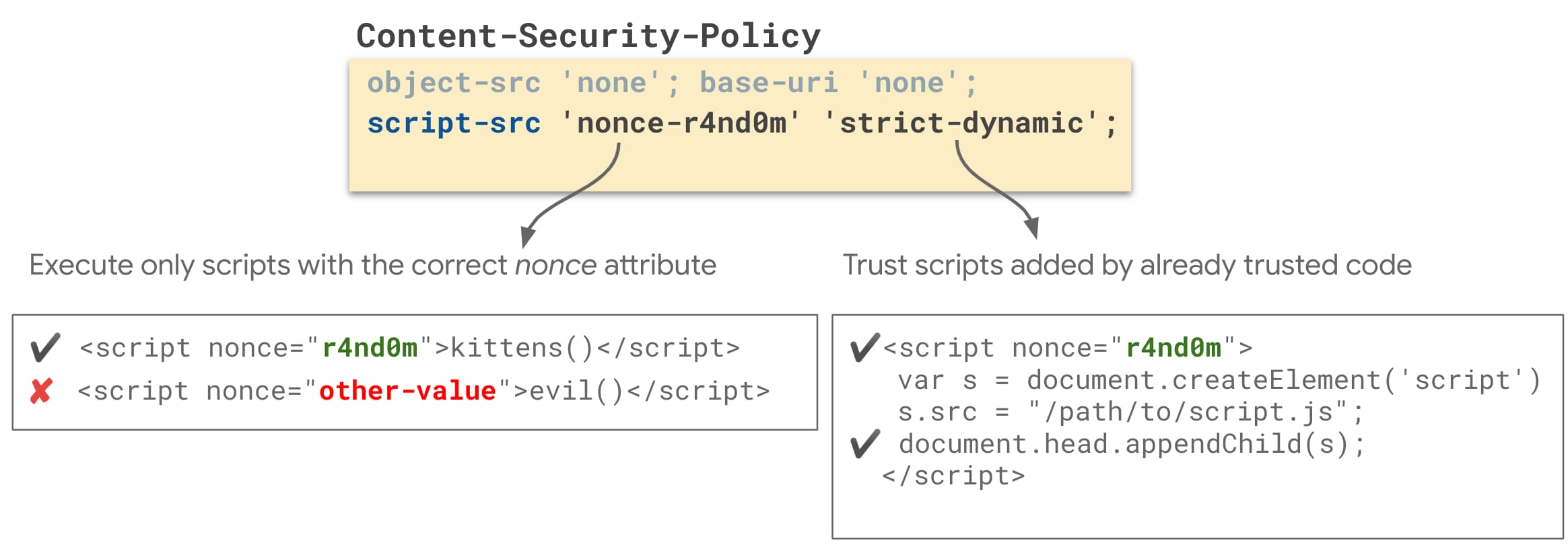
A stricter approach uses cryptographic nonces or hashes to mark trusted scripts. These strict CSPs block attackers who exploit HTML injection flaws, since malicious scripts can only execute if they carry the correct nonce or hash — values the attacker cannot predict or forge for a given response.
Anatomy of a strict CSP
A strict CSP can be delivered as either a nonce-based or hash-based HTTP response header:
Nonce-based strict CSP
Content-Security-Policy:
  script-src 'nonce-{RANDOM}' 'strict-dynamic';
  object-src 'none';
  base-uri 'none';
Hash-based strict CSP
Content-Security-Policy:
  script-src 'sha256-{HASHED_INLINE_SCRIPT}' 'strict-dynamic';
  object-src 'none';
  base-uri 'none';
Several properties make these policies genuinely strict and secure:
- Trust markers: Scripts are trusted either by a one-time random value (
'nonce-{RANDOM}') or by their content hash ('sha256-{HASHED_INLINE_SCRIPT}'). Only script tags carrying these markers execute. 'strict-dynamic': This directive automatically permits scripts created by an already trusted script, simplifying deployment and enabling most third-party JavaScript libraries and widgets without manual allowlisting.- No URL allowlists: Because the policy does not rely on domain allowlists, it avoids well-documented CSP bypass techniques.
- Inline script blocking: Untrusted inline handlers and
javascript:URIs are rejected. - Plugin restriction: Limiting
object-srcdisables dangerous plugins such as Flash. - Base URI locking: Restricting
base-uriprevents injection of<base>tags, which attackers could otherwise use to redirect script loads from relative URLs.
Choosing a nonce- or hash-based policy
Strict CSPs fall into two categories, and choosing between them depends on how your pages are served.
Nonce-based CSP generates a random number at runtime for every response, embeds it in the policy, and applies it via a nonce attribute on each <script> element. An attacker would need to guess that per-response random value to inject and execute malicious code. This approach is a good fit for server-rendered HTML pages where you can mint a fresh nonce on each request.
Hash-based CSP adds the cryptographic hash of every inline script to the policy. Each script carries a distinct hash, so an attacker's injected code would only run if its hash were already listed in the policy. Choose this option for statically served HTML, including single-page applications built with Angular, React, or similar frameworks that don't rely on server-side rendering.
Setting the CSP and preparing scripts
- Run your policy in report-only mode (
Content-Security-Policy-Report-Only) to see violations without breaking your site, or in enforcement mode (Content-Security-Policy) to immediately show blocked resources as visible page breakage. For local testing, both modes surface errors in the browser console, though enforcement mode can more effectively reveal resources your draft policy blocks. - Apply the policy via an HTTP header or an HTML
<meta>tag. A<meta>tag is more convenient for quick local iteration, but headers are the safer and recommended route for production. Also note that CSP meta tags cannot enable report-only mode; that requires a header.
For a nonce-based policy in a server-side framework, set the Content-Security-Policy response header as shown below:
Content-Security-Policy:
  script-src 'nonce-{RANDOM}' 'strict-dynamic';
  object-src 'none';
  base-uri 'none';
The nonce must be a cryptographically strong random value (at least 128 bits), base64 encoded, and regenerated for each response. Example integration for Express in JavaScript:
const app = express();

app.get('/', function(request, response) {
  // Generate a new random nonce value for every response.
  const nonce = crypto.randomBytes(16).toString("base64");

  // Set the strict nonce-based CSP response header
  const csp = `script-src 'nonce-${nonce}' 'strict-dynamic'; object-src 'none'; base-uri 'none';`;
  response.set("Content-Security-Policy", csp);

  // Every <script> tag in your application should set the `nonce` attribute to this value.
  response.render(template, { nonce: nonce });
});
Every <script> element in your markup then needs a nonce attribute matching that header value. All scripts on the page can share the same nonce.
For a hash-based policy, use the same response header structure:
Content-Security-Policy:
  script-src 'sha256-{HASHED_INLINE_SCRIPT}' 'strict-dynamic';
  object-src 'none';
  base-uri 'none';
When a page contains multiple inline scripts, separate their hashes in the policy, like: 'sha256-{HASHED_INLINE_SCRIPT_1}' 'sha256-{HASHED_INLINE_SCRIPT_2}'.
If you rely on third-party scripts loaded by inline code, such as a dynamic loader pattern, that inline script adds elements to the page at runtime:
<script>
  var scripts = [ 'https://example.org/foo.js', 'https://example.org/bar.js'];

  scripts.forEach(function(scriptUrl) {
    var s = document.createElement('script');
    s.src = scriptUrl;
    s.async = false; // to preserve execution order
    document.head.appendChild(s);
  });
</script>
In this pattern, add the calculated hash of the inline loader itself to the policy, replacing the {HASHED_INLINE_SCRIPT} placeholder. To minimize the number of hashes you need to declare, consider consolidating your inline scripts into a single file. Static inline scripts without an integrity attribute pointing to an allowed source will be blocked.
When a dynamically added script uses s.async = false, it ensures scripts execute in order without blocking the parser during loading, but be aware of these caveats:
- Scripts may execute before the document finishes downloading. If the DOM must be ready, wait for the
DOMContentLoadedevent before appending the scripts — or use preload tags earlier in the page if that delays downloads too much. - Setting
defer = truehas no effect here. If you need deferred behavior, invoke the script manually at the point it's needed.
Refactoring templates for CSP compatibility
Inline event handlers such as onclick="…" or onerror="…", along with JavaScript URIs (<a href="javascript:…">), are both blocked by strict CSPs. Refactoring these is required since an XSS vulnerability would otherwise let an attacker use such markup to execute code.
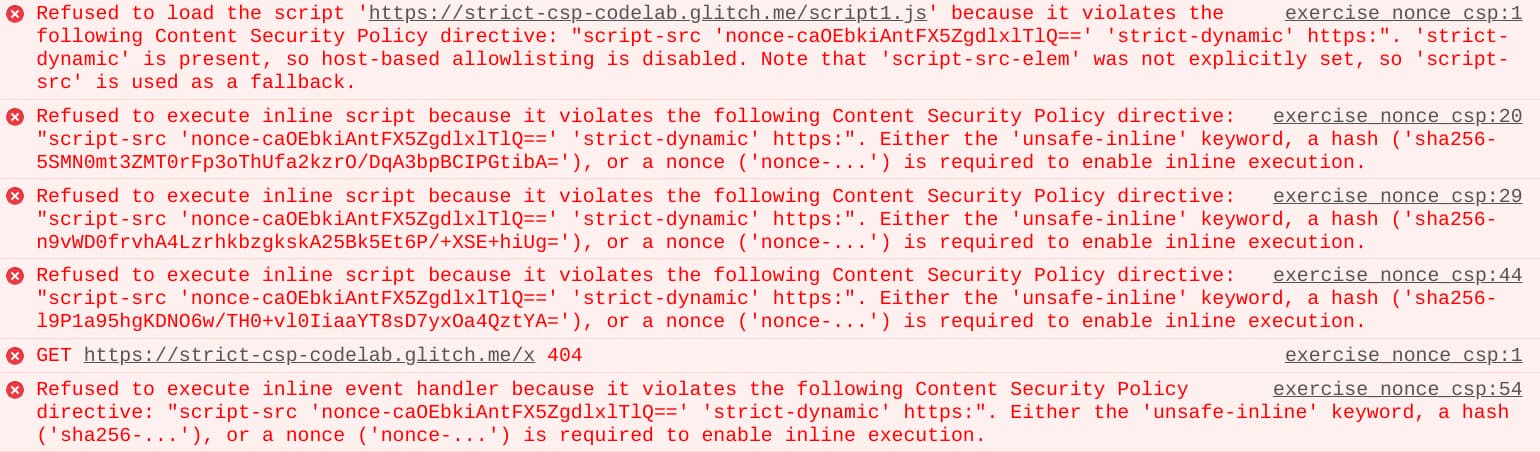
Common fixes are straightforward: replace inline handlers with event listeners registered through JavaScript, which CSP allows:
<span id="things">A thing.</span>
<script nonce="${nonce}">
  document.getElementById('things').addEventListener('click', doThings);
</script>
In contrast, the inline handler version is blocked:
<span onclick="doThings();">A thing.</span>
The same applies to javascript: URIs. The JavaScript-registered version is allowed:
<a id="foo">foo</a>
<script nonce="${nonce}">
  document.getElementById('foo').addEventListener('click', linkClicked);
</script>
While the inline URI variant is forbidden:
<a href="javascript:linkClicked()">foo</a>
If your code uses eval() to parse JSON strings, convert those calls to JSON.parse(), which is also faster. For uses of eval() that you genuinely cannot remove, a strict nonce-based policy will still work, but only if you add the 'unsafe-eval' keyword — a trade-off that weakens the policy slightly.
Compatibility fallbacks for older browsers
Modern browsers support nonces, hashes, and strict-dynamic, but older versions may need fallbacks:
- Using
strict-dynamicon older Safari versions requires adding anhttps:fallback to the policy. Browsers that understandstrict-dynamicignore the fallback, preserving policy strength, while old browsers can only load external scripts from HTTPS origins — less strong than a strict CSP but still blocking common attacks likejavascript:URI injection. - For very old browsers (roughly 4+ years), you can add
unsafe-inlineas a fallback. Any browser that recognizes nonces or hashes silently ignores this keyword.
Content-Security-Policy:
  script-src 'nonce-{random}' 'strict-dynamic' https: 'unsafe-inline';
  object-src 'none';
  base-uri 'none';
Deploying the policy
Once your draft CSP passes local testing against your legitimate scripts, promote it:
- Optionally, deploy first in report-only mode using the
Content-Security-Policy-Report-Onlyheader. The browser will neither block resources nor alter behavior, but it will emit console errors and violation reports for every incompatible pattern, giving you a production-grade preview of potential breakage without user impact. - When you're satisfied that enforcing the policy won't break the site for your users, switch to the
Content-Security-Policyheader. A server-side HTTP header is more secure than a<meta>tag, and at this point the CSP starts actively mitigating XSS.
What a strict CSP does not cover
Even a strict CSP fails to fully mitigate XSS in specific injection patterns. The type of policy (nonce vs. hash, with or without strict-dynamic) affects these residual risks:
- Direct injection into the body or
srcattribute of a script element that already carries a valid nonce. - Injection into locations where scripts are created dynamically (
document.createElement('script')), including through libraries like jQuery's.html()or pre-3.0.get()and.post(), or any API that creates script DOM nodes from its arguments. - Template injections in old AngularJS applications, where template injection can bypass the sandbox to execute arbitrary JavaScript.
- Any policy containing
'unsafe-eval', which leaves injections intoeval(),setTimeout(), and a handful of other rarely used APIs unmitigated.
These remaining cases deserve explicit attention in code reviews and security audits to keep the CSP's protections meaningful.
Where to go from here
This article only scratches the surface of Content Security Policy. The mechanisms that make CSP a powerful defense also create a complex configuration surface. The following resources offer deeper details on policy design, whitelist risks, and modern alternatives:
- Research on whitelist weaknesses: The paper CSP Is Dead, Long Live CSP! On the Insecurity of Whitelists and the Future of Content Security Policy explains why common host-based allowlists fall short and points toward more robust policy patterns.
- Policy auditing tools: Google's CSP Evaluator helps you inspect a policy for common bypasses and unsafe constructs before you deploy it.
- Practical context: The LocoMoco Conference deck, Content Security Policy - A successful mess between hardening and mitigation, outlines real-world trade-offs and pitfalls.
- Platform evolution: The Google I/O talk Securing Web Apps with Modern Platform Features discusses how CSP fits into a broader security strategy for modern web applications.



