
Where rendering happens decides what users wait for
When you build for the web, one of the first architectural decisions is where application logic and rendering should run. The choice between generating HTML on a server, assembling it in a browser, or pre-building it at deploy time changes what the user experiences before they can interact with your page.
The right answer depends on your content and your users. Our work with large sites in Chrome points toward a general guideline: prefer server-side rendering or static rendering over approaches that ship a full application to the client and reconstruct everything there.
To reason clearly about these options, you need a consistent vocabulary and a shared understanding of what each rendering strategy does—and what it costs.
Terms worth fixing first
Kinds of rendering
- Server-side rendering (SSR): An app is rendered on the server, and the response to the client is HTML rather than an application bundle.
- Client-side rendering (CSR): A browser runs JavaScript to mutate the DOM and render the app.
- Prerendering: A client-side application is executed at build time to capture its initial state as static HTML. This is not the same as browser prerendering of future navigations.
- Hydration: Client-side scripts run against server-rendered HTML to add state and interactivity. Hydration assumes the DOM does not change during this process.
- Rehydration: Often used interchangeably with hydration, but implies ongoing DOM updates with the latest state beyond the initial pass.
Performance signals
- Time to First Byte (TTFB): Time between a navigation start and the first byte of the new page's content.
- First Contentful Paint (FCP): When requested content, like an article body, becomes visible.
- Interaction to Next Paint (INP): A metric assessing whether a page responds consistently and quickly to user input.
- Total Blocking Time (TBT): A load-time proxy for INP that measures how long the main thread was blocked.
Server-side rendering: ship text, not JavaScript
Server-side rendering generates a page's complete HTML when a navigation is requested. The server handles data fetching and templating before the browser receives a response, which removes additional round trips on the client.
This typically yields a fast FCP. Since page logic and rendering are not shipped to the client in large quantities of JavaScript, the main thread is less busy during load. That reduces TBT and, in turn, tends to lower INP: with fewer long main-thread blocks, user interactions get a chance to run earlier.

Users are less likely to be blocked waiting for CPU-heavy scripts when you use SSR. Even if you still must load third-party JavaScript, cutting your own first-party script expense with SSR frees more of your performance budget. The trade-off is that dynamically generating each page on the server adds time and raises TTFB.
Whether SSR suits you depends on the experience in question. You can mix approaches per page. Netflix, for example, server-renders its relatively static landing pages while prefetching JavaScript for the interaction-heavy portions of its experience.
Modern frameworks generally allow you to render the same application on both client and server. React has server DOM APIs, with solutions like Next.js built on them; Vue documents server-side rendering and is supported by Nuxt; Angular ships Universal. Note that most of these popular solutions use some form of hydration, so be aware of what your chosen tool does after the HTML arrives.
Static rendering: prepare pages before anyone asks
Static rendering is a build-time process. It produces a separate HTML file for each URL ahead of time, so your FCP is fast and TBT and INP stay low, provided you keep client-side JavaScript in check. TTFB is consistently fast too, because the server isn't generating HTML per request. Static output can be deployed to multiple CDNs and take advantage of edge caching.

There are two camps of tools. Some, like Gatsby, are built so developers feel like they're working with a dynamic application even though generation happens at build time. Others—11ty, Jekyll, Metalsmith—lean into the static nature with a template-driven workflow.
The limitation of static rendering is that you need to know each URL ahead of time, and generate an HTML file for each one. On sites with many unique pages, this becomes impractical.
Static rendering should not be confused with prerendering. A statically rendered page is interactive without much client-side JavaScript. A prerendered page has a better FCP but must still boot on the client to become truly interactive. A simple test distinguishes them: disable JavaScript and load the page. Static renders still provide most of their functionality; prerendered pages are mostly inert, with possibly basic links.
You can also use network throttling in Chrome DevTools to see how much JavaScript must download before the page is interactive. Prerendering generally demands more of it, and that JavaScript tends to be more complex than the progressive enhancement approach typical of static rendering.
SSR is not universally the answer
Server-side rendering has real overhead. Its dynamic nature costs compute, and many implementations delay TTFB by not flushing early or by duplicating data (for instance, inlining state needed by client-side JavaScript). In React, renderToString() is synchronous and single-threaded, which can be slow; the newer React server DOM APIs support streaming, delivering the first part of the HTML while the rest is still being generated.
A robust SSR setup may require component caching schemes, memory management, or memoization techniques. You are often executing your application twice—once on the server, once on the client. Showing content earlier via SSR does not reduce the total work: if the client still has a heavy workload after receiving server HTML, you'll see higher TBT and INP.
SSR generates HTML per request, which is inherently slower than serving prebuilt static files. Adding HTML caching can reduce server render time substantially. The benefit of SSR is its ability to pull live data and respond to a broader set of requests. Personalized pages are a good example where static rendering does not work well.
And if you're building a PWA, SSR introduces another decision: full-page service worker caching versus server-rendering individual content pieces. There is no single right strategy—only the one that fits the performance profile you're willing to accept.
When the browser does all the work
Client-side rendering moves everything—logic, data fetching, templating, and routing—into the browser. The server simply delivers more data to the user's device, and that shift carries its own tradeoffs.
Making client-side rendering fast on mobile is an uphill battle. With a tight JavaScript budget and minimal round-trips, client-side rendering can approach the performance of pure server-side rendering. Delivering critical scripts and data with <link rel=preload> lets the parser get to work sooner, and patterns like PRPL help keep initial and subsequent navigations feeling immediate.

The catch is that JavaScript size tends to grow with the application, which directly impacts INP. New libraries, polyfills, and third-party code compete for processing power, and much of it must run before content can render. Aggressive code-splitting and lazy-loading can keep TBT and INP in check by serving only what the user needs at the moment. For pages with little or no interactivity, server-side rendering often scales better.
Single page applications can lean on the application shell caching technique: identify the core UI shared across most pages, cache it with a service worker, and repeat visits load the shell HTML and dependencies from CacheStorage almost instantly.
Rehydration: running the app twice
Hydration attempts to get the best of both rendering models. The server renders the application to HTML on navigation requests, and the JavaScript plus its data is embedded in the document. The result is a fast FCP like server-side rendering, with the client picking up afterwards for interactivity.
But rehydration has significant drawbacks. While it can improve FCP, it often hurts TBT and INP. A server-rendered page can look fully loaded and interactive—yet it cannot respond to input until client-side scripts execute and event handlers attach. On mobile, that delay can stretch into minutes, leaving users confused and frustrated.
Double the payload
For the client to take over without re-requesting data, most server-side rendering solutions serialize the UI's data dependencies as script tags in the document. The result is a page that ships far more than HTML.

The server sends a description of the UI, the source data used to compose it, and a full copy of the UI's implementation that boots up on the client. The page stays inert until bundle.js finishes loading and executing. Real-world metrics show this is rarely the best option—chiefly because the user experience suffers when a page looks ready but none of its interactive features work.

There is a path forward for server-side rendering with rehydration. Limiting it to highly cacheable content reduces TTFB and resembles prerendering. Incremental, progressive, or partial rehydration may make the technique far more viable.
Streaming and progressive upgrades
Recent developments have pushed server-side rendering forward. Streaming server-side rendering sends HTML in chunks that the browser renders as they arrive, getting markup to users faster and improving FCP. In React, the asynchronous renderToPipeableStream() handles backpressure better than the synchronous renderToString().
Progressive rehydration takes a different angle: instead of booting the entire application at once, individual pieces are initialized over time. React has implemented this, and it can reduce the JavaScript needed for interactivity by deferring upgrades of low-priority parts. That keeps the main thread free so user interactions can happen sooner.
Progressive rehydration also sidesteps a common pitfall of rehydration: the server-rendered DOM tree being destroyed and immediately rebuilt because the initial client-side render depended on data that wasn't ready—often an unresolved Promise.
Partial rehydration and beyond
Partial rehydration extends this idea by analyzing individual parts of the page—components, views, or trees—and identifying those with little or no interactivity. Their JavaScript becomes inert references or decorative features, cutting their client-side footprint to nearly zero. It is difficult to implement, though. Caching gets tricky, and client-side navigation means inert parts of the application cannot always rely on server-rendered HTML being available without a full page load.
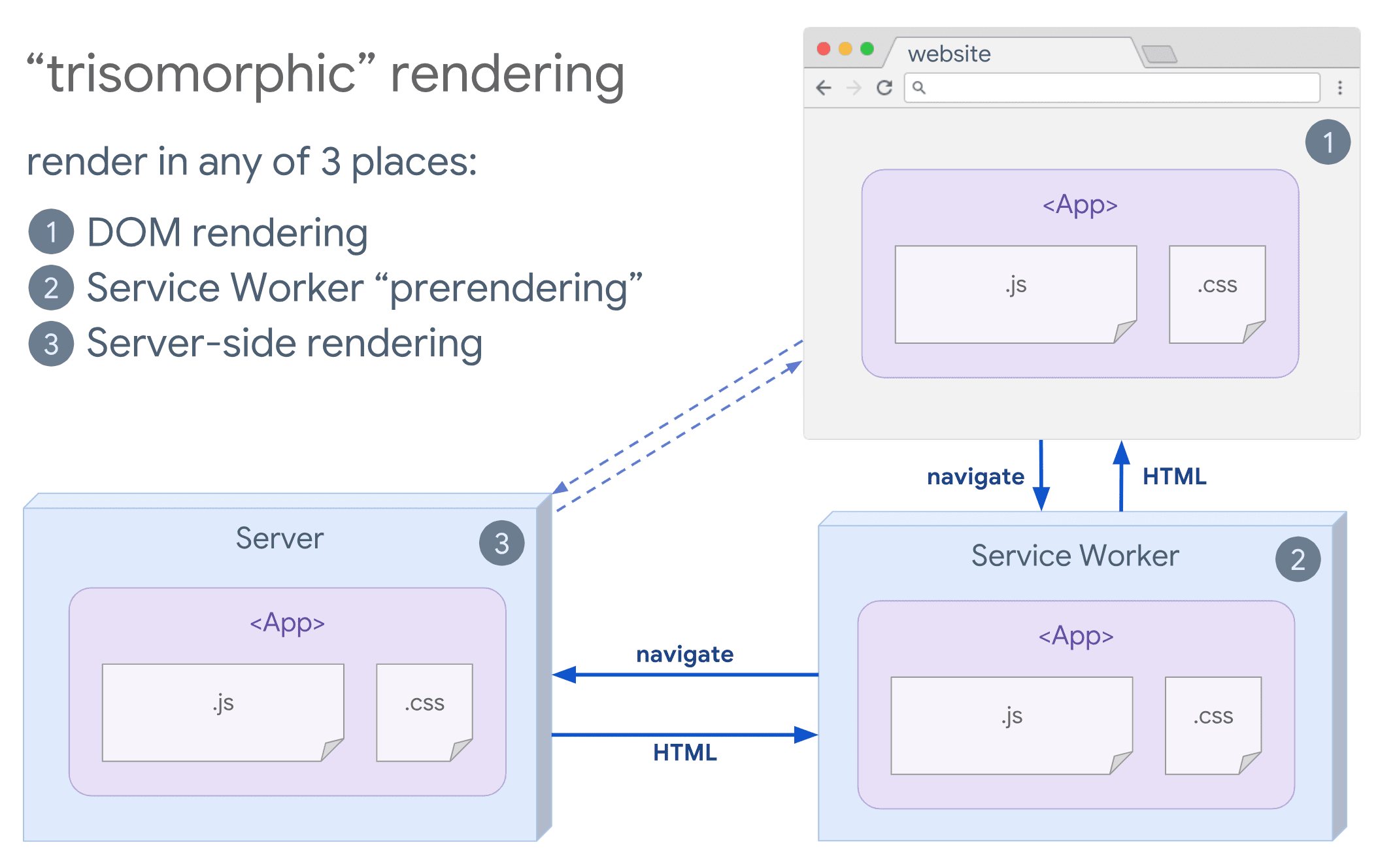
If service workers are viable, consider trisomorphic rendering. Streaming server-side rendering handles initial or non-JavaScript navigations, then the service worker takes over HTML rendering for later navigations. This keeps cached components and templates up to date and enables SPA-style navigation in the same session—provided you can share templating and routing code across the server, client page, and service worker.
What crawlers see
SEO often drives rendering choices. Server-side rendering is popular because it delivers a complete experience that crawlers can interpret directly. Crawlers understand JavaScript, but their rendering has limitations. Client-side rendering can work, but typically requires extra testing and overhead. If your architecture leans heavily on client-side JavaScript, dynamic rendering is another option worth evaluating.
Choosing a strategy
The right rendering approach depends on your bottlenecks—measure first. Static rendering or server-side rendering often gets you most of the way. Shipping mostly HTML with minimal JavaScript is a perfectly valid way to make an experience interactive. The full spectrum of server-to-client options is summarized below.



