
Hydrogen’s Building Blocks for Storefront Development
Hydrogen, Shopify’s React-based framework for custom storefronts, is currently in developer preview. It’s built around streaming server-side rendering, React Server Components, and caching APIs—all aimed at letting developers assemble dynamic commerce experiences without the usual boilerplate. Instead of manually wiring every product query and state handler, Hydrogen ships Shopify-specific commerce components, hooks, and utilities that slot directly into a page.

Updated for compatibility with Hydrogen 0.26.0
Here’s a practical walkthrough of building a product page from scratch using the Hello World template, which already includes routes, components, and the main app component (App.server.jsx) in /src. We’ll use a StackBlitz-generated app and connect it to the Hydrogen Preview store, which comes stocked with snowboard collections, products, and media.
Setting Up Styling
The demo uses Tailwind CSS. To get it running in the Hydrogen app:
- Stop the development server (
CTRL + C). - Install Tailwind and its peer dependencies:
$ npm install -D tailwindcss @tailwindcss/typography postcss autoprefixer - Generate configs with
$ npx tailwindcss init -p. - Add template file paths to
tailwind.config.js. - Add Tailwind directives to
/src/index.css. - Restart with
$ vite.
Once classes are applied, edits to the Index route should reflect immediately.

Routing for Dynamic Product Handles
Hydrogen uses file-based routing, so a concrete URL like /products/snowboard maps to a component file under /src/routes. Since product handles are dynamic, the route needs a parameter. Create /src/routes/products/[handle].server.jsx and export a Product component. Use the useRouterParam hook to read the handle from the URL:
With that in place, a request for /products/the-full-stack renders the route with the-full-stack as the handle.

Pulling Products from the Storefront API
Hydrogen communicates with Shopify through the Storefront API, handling token configuration behind the scenes via shopify.config.js. The useShopQuery hook gives access to that API, so you can query product data directly inside the route. With the dynamic handle, the query can grab a product’s title and description. Adding a prose class from the Tailwind Typography plugin gives the HTML description sensible typographic defaults.

Managing Variant State with Client Components
By default, Hydrogen routes are server components. To introduce interactive state—like tracking the selected variant and options—you need a client component. Create /src/components/ProductDetails.client.jsx and import it into the server route.
Expand the product query to include media, variants, and options, then wrap the details in ProductOptionsProvider. This provider establishes a context for selected variant and option state. Within that context, the useProductOptions hook supplies the option list and manages the selection. For pricing, pass the selected variant ID to ProductPrice, and the displayed price updates in sync with the selection.

Checkout and Media
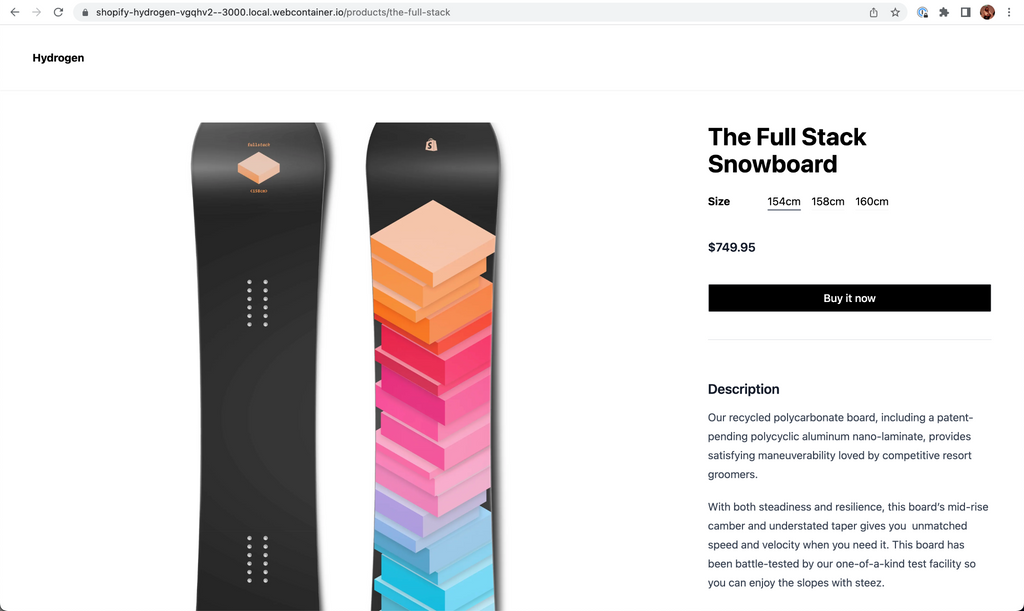
Hydrogen exports a BuyNowButton that sends customers directly to checkout. Wire it up by passing the selected variant ID; if that variant is unavailable, show a message instead. For the gallery, there’s a primitive component for media files as well. Add styling and assemble the page—the complete reference implementation is available on StackBlitz.
What the Components Buy You
The product page exercise shows how Hydrogen’s component library removes the repetitive chores of a custom storefront. The page we built handles routing, data fetching, state management, price switching, out-of-stock messages, and media rendering without a custom application architecture. For developers looking to get further into custom storefronts, Hydrogen’s documentation and tutorial walk through the full build process.


