
Why @font-face is Worth the Effort
CSS3's @font-face lets you embed custom typefaces directly into your pages, giving you the visual control of image-based text with none of the downsides. Unlike Cufon, sIFR, or static images, text rendered with @font-face remains fully searchable with ctrl-F, accessible to screen readers, and translatable by browsers or translation services. It also stays under the control of CSS, so you can apply line-height, letter-spacing, text-shadow, text-align, and pseudo-element selectors like ::first-letter and ::first-line just as you would with system fonts.
The Basics of the Declaration
A minimal @font-face rule declares a new font family and points the browser to its asset:
@font-face {
  font-family: 'Tagesschrift';
  src: url('tagesschrift.ttf');
}
Once declared, you can apply it like any other font:
h1, h2, h3 { font-family: 'Tagesschrift', 'Georgia', serif; }
The font-family name is arbitrary — you can call it anything, regardless of the font's internal name. The src property tells the browser where to fetch the asset. Valid formats vary by browser and include eot, ttf, otf, and svg; you can also embed the entire font as a data URI inline.
| otf & ttf | svg | woff | eot | |
|---|---|---|---|---|
| IE | IE9 | IE9 | IE5+ | |
| Firefox | FF3.5 | FF3.5 | FF3.6 | |
| Chrome | Chrome 4 | Chrome 0.3 | Chrome 5 | |
| Safari | 3.1 | 3.1 | ||
| Opera | Opera 10.00 | Opera 9 | ||
| iOS | iOS 1 | |||
| Android | 2.2 |
That simple declaration works, but it fails to serve EOT files to IE 6–8. A more robust, "bulletproof" syntax accounts for those older browsers:
@font-face {
  font-family: 'Tagesschrift';
  src: url('tagesschrift.eot'); /* IE 5-8 */
  src: local('☺'),             /* sneakily trick IE */
        url('tagesschrift.woff') format('woff'),    /* FF 3.6, Chrome 5, IE9 */
        url('tagesschrift.ttf') format('truetype'), /* Opera, Safari */
        url('tagesschrift.svg#font') format('svg'); /* iOS */
}
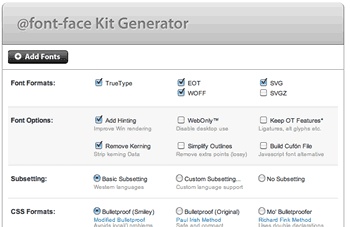
If you want to skip the cross-browser complexity, the Font Squirrel generator will prepare your font files and CSS for you. It's the quickest way to put webfonts into production today.
Mobile Considerations
Mobile Safari has supported SVG webfonts since iOS 3.1, and Android supports otf/ttf since version 2.2. However, you should think twice before serving custom fonts to mobile users. WebKit hides text while it waits for a custom font to finish downloading, so on a slow connection your readers may see no text at all until the roughly 50 KB font payload arrives. The WebKit team is working on a fallback-after-timeout behavior, but until that lands, custom webfonts are a poor trade on mobile.
Webfont Services
Several services package @font-face into a drop-in API: add a CSS or script line, configure, and you're done. Commercial offerings from WebInk, Typekit, and Fontslive typically charge a monthly fee, sometimes with a bandwidth cap — convenient when you don't want to host and serve the fonts yourself.
For free fonts, the Google Font API links directly to a stylesheet, and Google handles both the cross-browser details and delivery. It's the fastest route to a working webfont setup.
Licensing Professional Fonts
A common misconception is that a standard font purchase also covers web embedding. It doesn't. Licenses for @font-face use are typically separate — read the agreement carefully or ask the foundry. Fontspring sells fonts explicitly cleared for @font-face use. FontFont and other foundries sell web licenses directly, though many currently target only WOFF and EOT, which leaves out a significant portion of the browser market. If a foundry doesn't list a web license for a face you want, ask them about it.
Managing the Flash of Unstyled Text
Firefox and Opera exhibit a Flash of Unstyled Text (FOUT): while a custom font downloads, the browser renders the fallback in your font-family stack, then swaps it out. The visual jump is rarely attractive.
The WebFont Loader, which accompanies the Google Font API, provides JavaScript event hooks that give you fine-grained control over the loading sequence. You can use it to mimic WebKit's default behavior of hiding the fallback while the custom font loads:
<script src="//ajax.googleapis.com/ajax/libs/webfont/1/webfont.js"></script>
<script>
WebFont.load({
  custom: {
    families: ['Tagesschrift'],
    urls: ['http://paulirish.com/tagesschrift.css']
  }
});
</script>
/* we want Tagesschrift to apply to all h2's */
.wf-loading h2 {
  visibility: hidden;
}
.wf-active h2, .wf-inactive h2 {
  visibility: visible;
  font-family: 'Tagesschrift', 'Georgia', serif;
}
If JavaScript is disabled, the text stays visible the entire time, and any font error safely degrades to the fallback. Consider this a stopgap: most webfont experts prefer to hide the fallback for 2–5 seconds and then show it. That timeout matters most on low-bandwidth and mobile connections. Mozilla is working on a native solution.
A lighter alternative is the font-size-adjust property, currently supported only in Firefox. It normalizes x-height across a font stack, reducing the visual difference during a FOUT. The Font Squirrel generator now reports the x-height ratio for fonts you upload, making it easy to set an accurate value.
Summary
Webfonts give designers real typographic freedom, and upcoming capabilities like discretionary ligatures and stylistic alternates will extend that further. For now, @font-face is a safe choice — it works across roughly 98% of deployed browsers.


