
Three months with Helix: switching from Vim after 20 years
After two decades of Vim and Neovim, I decided to try Helix this summer. The main motivation was language server support. Getting a reliable “go to definition” setup in Vim or Neovim always felt like too much configuration work. I had tried both building my own config from scratch and using pre-built configuration systems, but I was ready for something that worked out of the box. Helix ships with built-in language server support, and features like “rename this symbol” work across languages without setup.
Search shows context
One of my favorite features is the repository-wide search. When searching for a string across files, Helix lets me scroll through matching files while seeing the full context around each match:
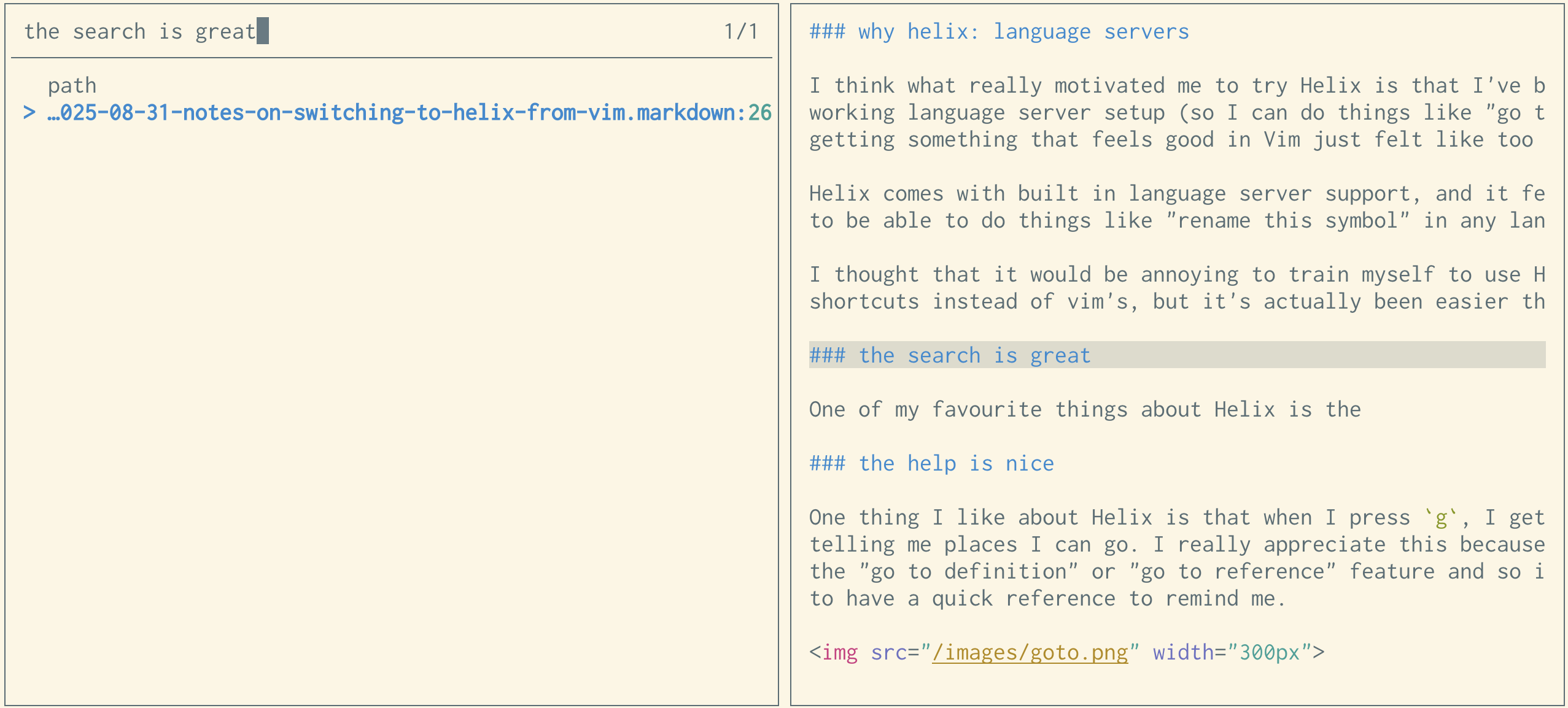
For comparison, here’s what my Vim ripgrep plugin shows me:

There’s no surrounding context for the matched line.
Helpful keybinding hints
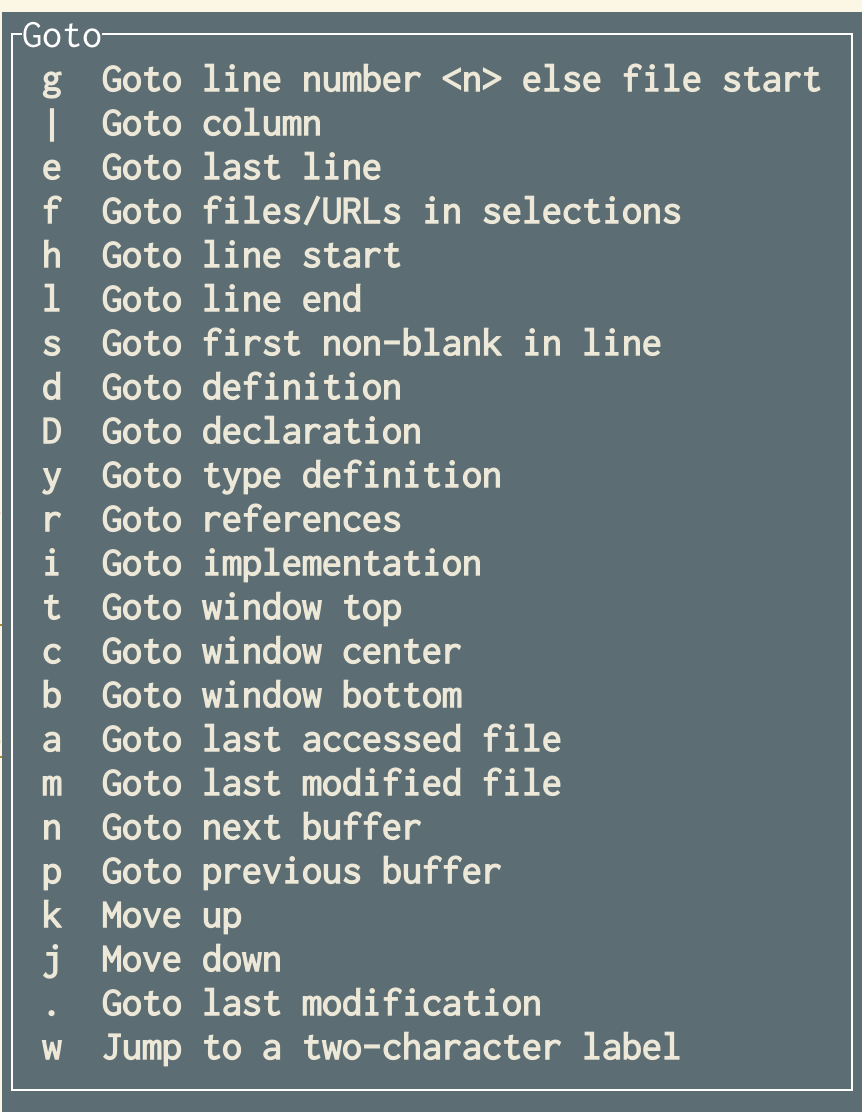
Helix shows a popup when pressing g, listing the navigation options like “go to definition” and “go to reference.” I don’t use these features often and tend to forget the shortcuts, so having inline help is genuinely useful.
Adapting from Vim muscle memory
- Helix has no marks like
maor'a. Instead, I useCtrl+OandCtrl+Ito jump back and forward through cursor locations. - Helix supports macros, but I’ve replaced them entirely with multiple cursors. For batch changes, I press
%to select everything, thenswith a regex to narrow the selection, then edit all matches at once. - Neovim-style tabs don’t exist yet, but the buffer switcher (
<space>b) works well. There’s an open pull request to add tabs. Thebufferline="multiple"setting withgp,gn, and:bc, gives a tab-like workflow.
Nuisances so far
:reflowhandles list reflowing worse than Vim’sgq. There’s an open GitHub issue about it.- Pressing enter at the end of a Markdown list item doesn’t continue the list. A partial workaround exists for bullets, but not for numbered lists.
- Persistent undo is missing. Vim’s undofile allowed undoing changes after quitting; Helix doesn’t have this yet (there’s a pull request in progress).
- No automatic file reload when files change on disk. Running
:reload-all(:ra<tab>) is necessary, though it’s not a big inconvenience. - Occasional panics, roughly weekly. It may be related to this issue.
Crash output looks like this:
thread 'main' panicked at helix-core/src/transaction.rs:499:9:
Positions [(2959, AfterSticky), (2959, AfterSticky)] are out of range for changeset len 2945!
note: run with `RUST_BACKTRACE=1` environment variable to display a backtrace
The Markdown list and reflow issues affect me often since I do a lot of list editing, but they aren’t bad enough to make me stop using Helix.
Easier switch than expected
I worried that learning Helix after 20 years of Vim would be painful. It turned out to be much easier. I started using Helix during a vacation for a side project, and after a week or two it stopped feeling disorienting. Switching back and forth between the two editors might be hard, but I haven’t needed to use Vim recently.
My first attempt at Helix involved forcing Vim-like keybindings, which failed. Learning the Helix way instead was far simpler.
Some differences still trip me up. For instance, w means something different in each editor: Helix includes the trailing space in its word concept, while Vim does not.
Moving to the terminal
Having used GUI Vim and Neovim for years, switching to the terminal as the primary editing environment took some adjustment. My workflow now is:
- Every project gets its own terminal window, with tabs sharing the working directory.
- The Helix tab is the first tab in that window.
This is working well, and I might prefer it over my earlier GUI-based workflow.
Configuration stays minimal
Compared to my hundreds-of-lines Neovim config, Helix requires almost nothing. My configuration is primarily four keybindings:
theme = "solarized_light"
[editor]
# Sync clipboard with system clipboard
default-yank-register = "+"

[keys.normal]
# I didn't like that Ctrl+C was the default "toggle comments" shortcut
"#" = "toggle_comments"

# I didn't feel like learning a different way
# to go to the beginning/end of a line so
# I remapped ^ and $
"^" = "goto_first_nonwhitespace"
"$" = "goto_line_end"

[keys.select]
"^" = "goto_first_nonwhitespace"
"$" = "goto_line_end"

[keys.normal.space]
# I write a lot of text so I need to constantly reflow,
# and missed vim's `gq` shortcut
l = ":reflow"
Language-specific settings go in a separate languages.toml file. For example, here’s my Python setup, which disables autoformatting:
[[language]]
name = "python"
formatter = { command = "black", args = ["--stdin-filename", "%{buffer_name}", "-"] }
language-servers = ["pyright"]
auto-format = false
Still evaluating
Three months isn’t a long time, and I might eventually return to Vim. I previously wrote about switching to Nix, and after about eight months I went back to Homebrew, though I’m still running NixOS on a small server. Only time will tell where Helix lands in that pattern.


