
A closer look at what makes man pages usable
Man pages are often the primary documentation for command-line tools, yet they can be notoriously difficult to navigate when you need a specific piece of information quickly. A common workaround is to rely on external cheat sheets and summaries, but there's a growing question: could a man page itself serve as its own cheat sheet? Several conventions seen across well-regarded man pages offer useful ideas for improving their usability.
An upfront options summary
While the SYNOPSIS section can list flags, it becomes unwieldy once it covers nearly every letter of the alphabet. The rsync man page sidesteps this with a notably different structure: its SYNOPSIS section remains very terse, and it then includes a dedicated "OPTIONS SUMMARY" section that condenses each flag into a single-line description, followed by a more conventional and detailed OPTIONS section for each option.
ls [-@ABCFGHILOPRSTUWabcdefghiklmnopqrstuvwxy1%,]

grep [-abcdDEFGHhIiJLlMmnOopqRSsUVvwXxZz]
The man page then presents its concise SYNOPSIS:
 Local:
     rsync [OPTION...] SRC... [DEST]
Followed by the custom one-line-per-option summary block:
--verbose, -v            increase verbosity
--info=FLAGS             fine-grained informational verbosity
--debug=FLAGS            fine-grained debug verbosity
--stderr=e|a|c           change stderr output mode (default: errors)
--quiet, -q              suppress non-error messages
--no-motd                suppress daemon-mode MOTD
Grouping options by function rather than alphabet
The strace man page arranges its OPTIONS section by category—such as “General,” “Startup,” “Tracing,” “Filtering,” and “Output Format”—instead of the more common alphabetical listing. This grouping can aid recall; for instance, when searching for the -l flag in grep's man page, it's easy to lose time scrolling, and a category-based structure might make such flags easier to locate by purpose.
The cheat-sheet format in a man page
The suite of Perl man pages drew attention for innovative extras, particularly perlcheat, which brings a condensed, 80-character-wide cheat sheet style directly into the man page itself:
 SYNTAX
 foreach (LIST) { }     for (a;b;c) { }
 while   (e) { }        until (e)   { }
 if      (e) { } elsif (e) { } else { }
 unless  (e) { } elsif (e) { } else { }
 given   (e) { when (e) {} default {} }
This format is engaging and raises the possibility of adopting similarly compact ASCII cheat sheets for other tools.
The demand for examples
Examples consistently prove to be one of the most appreciated features in documentation. The OpenBSD man pages, for instance, often include them, and the tail man page closes with examples that cover the two primary use patterns for the command. While EXAMPLES sections are commonly placed at the end of a man page, rsync demonstrates it can be effective to open with them instead. During Git's man page improvements, a short example was also introduced at the beginning of the documentation for commands like git-add and git rebase.
Navigation aids within the page
In a terminal, it's hard to know at a glance what sections a man page contains. For the HTML versions of Git's man pages, a table of contents was added to the sidebar for easier navigation. A further potential improvement involves adding internal hyperlinks between sections, making it possible to jump directly to headings like "INCOMPATIBLE OPTIONS" from elsewhere in the page. Given that Git's man pages are built from AsciiDoc, adding such links is straightforward, and it's a reasonable way to enhance navigation of the HTML rendering without having to sustain a fully separate documentation set.
One persistent pain point is locating information about a single option—for instance, what -a does. Using a paginator to search for a pattern like ^ *-a is an effective trick, though it's easy to forget, leaving users to scan through every occurrence of the flag manually instead of finding the full description in one streamlined pass.
Per-option examples in curl's documentation
The curl man page distinguishes itself with concrete examples for every single option, and the HTML version provides a table of contents for quick jumping. For instance, the example for --cert clarifies that you'll usually also want to pair it with --key:
curl --cert certfile --key keyfile https://example.com
This level of detail is made feasible by a documentation file per option, each containing an "Example" field as a source of the output man page.
Tables for scannability
Man ascii, cited as a favorite by several users, shows how formatting data in a table can make a page infinitely easier to scan:
 Oct   Dec   Hex   Char
 ───────────────────────────────────────────
 000   0     00    NUL '\0' (null character)
 001   1     01    SOH (start of heading)
 002   2     02    STX (start of text)
 003   3     03    ETX (end of text)
 004   4     04    EOT (end of transmission)
 005   5     05    ENQ (enquiry)
 006   6     06    ACK (acknowledge)
 007   7     07    BEL '\a' (bell)
 010   8     08    BS  '\b' (backspace)
 011   9     09    HT  '\t' (horizontal tab)
 012   10    0A    LF  '\n' (new line)
Although the subject matter itself is quite straightforward, the table layout is the standout feature. This invites consideration of where else tabular arrangements of information might make a man page more digestible at a glance.
The GNU documentation approach
A frequent point of discussion is that GNU coreutils man pages lack examples, unlike their OpenBSD counterparts. This stems from the GNU project’s preference for its own "info" documentation system, for which man pages are no longer maintained. The info manuals are available as HTML, via Emacs, or with a standalone info reader, though usage of the latter seems rare. While the tail info manual includes examples and is linked at the bottom of its man page, there was a time when the FSF sold printed copies of those manuals. For particularly complex software, a separate reference manual can be far easier to navigate in HTML format than a man page would be, even if it's not part of a terminal user's daily routine.
Beyond the man page itself
Several related tools and projects are worth noting:
- The fish shell bundles a Python utility that automatically generates tab completion scripts from man pages.
- tldr.sh offers a community-maintained repository of concise examples for common commands, usable as
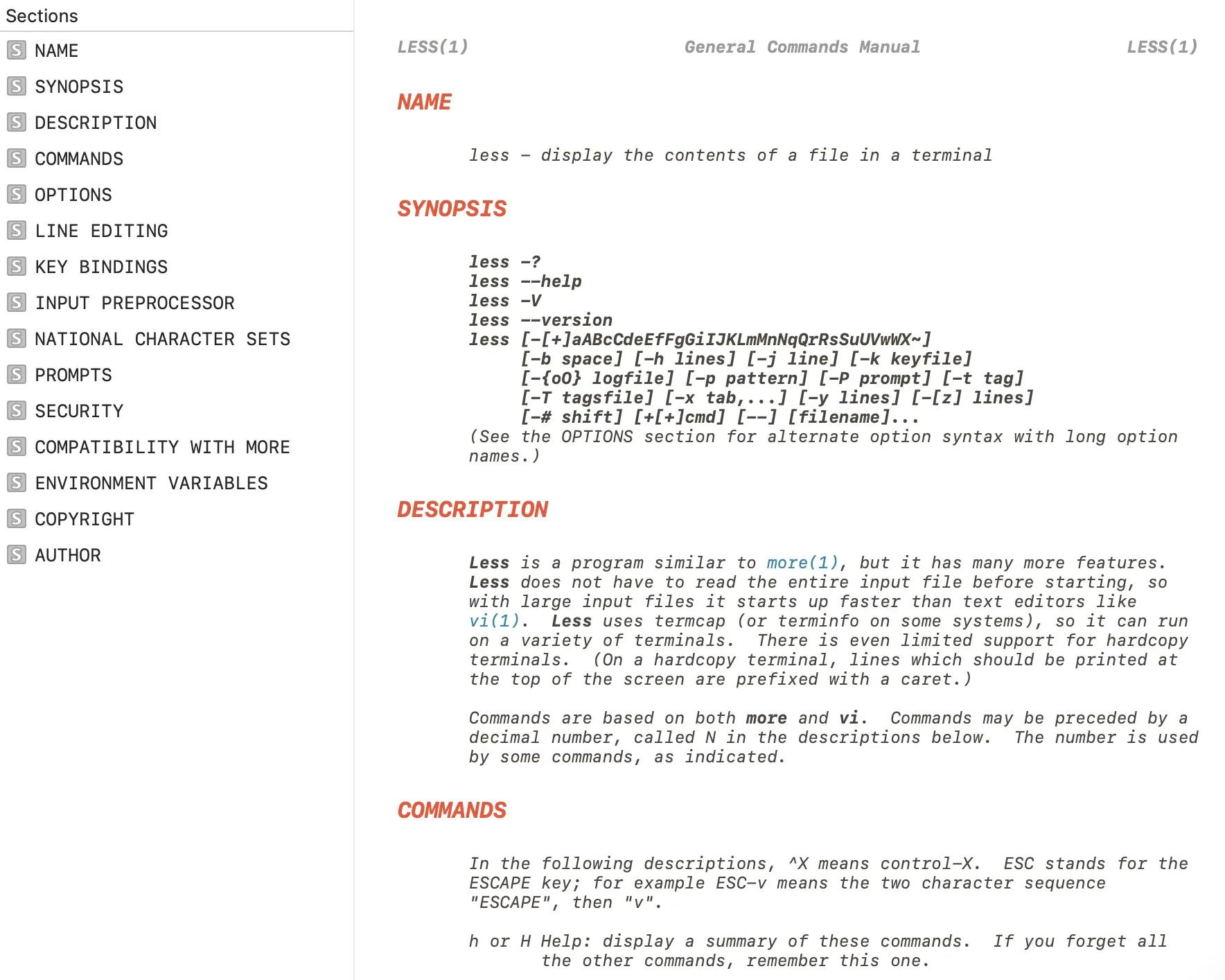
tldr grep, and is frequently recommended as a handy resource. - Dash, a documentation browser for macOS, presents man pages with a table of contents alongside the content in a clean viewer.
A useful exercise in constrained design
Because man pages have such limited formatting options, they force a disciplined approach to documentation. The most effective structures found in the wild—a concise options summary, categorized flags, early examples, and tabular data—reflect deliberate authorial choices. Though the ideal man page will vary by tool and audience, studying what works in other pages is a practical first step toward making the ubiquitous man page a friendlier primary reference.


