
Dropbox Gets a New Embeddable Component
Dropbox has launched a Preview version of its new File and Folder Embedder, a pre-built component that lets developers embed interactive views of Dropbox content directly into their apps. The Embedder joins Dropbox's existing Chooser and Saver components, which let users pull files from or push files to a Dropbox account without leaving a third-party surface.
The Dropbox developer team says the Embedder is meant to save developers from building this kind of functionality on their own from the API. Users of the component can view and interact with their own Dropbox files or folders from within an app.
How the Embedder Works
The File and Folder Embedder is built on shared links. It takes a shared link and, via an anchor tag (<a>) or a JavaScript method (Dropbox.embed()), generates an interactive embed inside an <iframe>. What the embed shows depends on the target of the shared link:
- If the link is to a folder, the embed lists the folder's contents.
- If the link points to a file, the embed is a view-only preview of that file.
Shared links can be obtained through the Dropbox API, through the Dropbox Chooser component, or directly from the Dropbox user interface (web, desktop, or mobile apps).
Embedded Files: Features and Limits
At release, the Embedder can produce view-only previews for multi-page documents (.pdf, .pptx, .docx, .ai) and for images (.jpg, .gif, .png, .psd).
Within an embedded file, a user can:
- See the file's activity feed
- Open the file on Dropbox
Here's what an embedded PDF looks like:
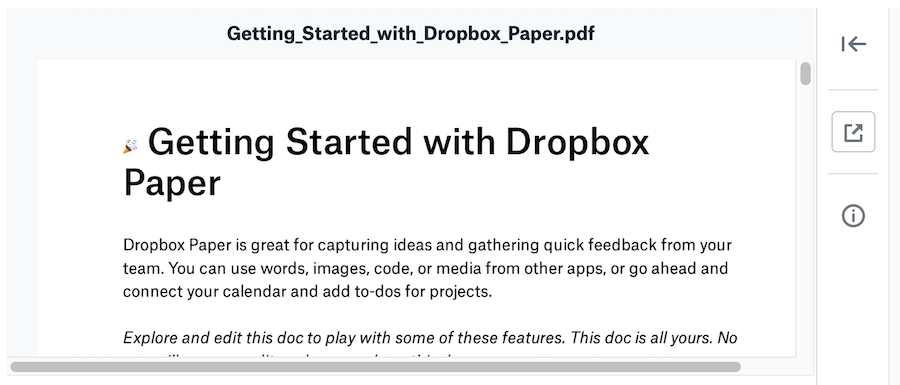
An anchor tag is one way to generate this preview:
<a
  href="https://www.dropbox.com/sh/keptcjl08q3wsid/AABfOq8QCJY-fg2RgpwdsrGLa/Getting_Started_with_Dropbox_Paper.pdf?dl=0"
  class="dropbox-embed"
  data-height="500px"
></a>
You can also use JavaScript, which is useful when content needs to be embedded dynamically:
Dropbox.embed({link:"https://www.dropbox.com/sh/keptcjl08q3wsid/AABfOq8QCJY-fg2RgpwdsrGLa/Getting_Started_with_Dropbox_Paper.pdf?dl=0"}, embedContainer)
Embedded Folders
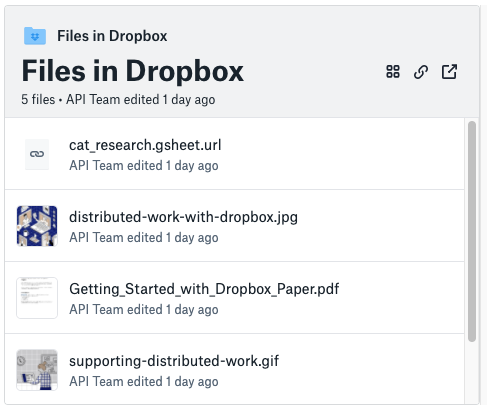
Folder embeds display the contents of the folder. Users can interact with the folder listing in the following ways:
- Switch between grid and list views
- Open files directly in Dropbox
- Copy shared links to the folder or to an individual file
An embedded folder example appears below:
Folder embeds can be created dynamically via the JavaScript method:
Dropbox.embed({link:"https://www.dropbox.com/sh/keptcjl08q3wsid/AACui966iXcXPbagCJ2py2L-a?dl=0"}, embedContainer)
Or with an anchor tag:
<a
  href="https://www.dropbox.com/sh/keptcjl08q3wsid/AACui966iXcXPbagCJ2py2L-a?dl=0"
  class="dropbox-embed"
></a>
Preview Feedback
This component is in Preview, and Dropbox notes that it's actively working on expanding its capabilities and supported file types. Developers can submit feedback via the developer forum post. Documentation for the Embedder is available at dropbox.com/developers/embedder.


