The Bug That Was Not a Bug
A story from Figma's quality work shows how a minor defect can turn out to sit on top of something more consequential. What begins as a seemingly-small bug report often leads to findings that go well beyond the original symptom.
Little Details, Little-Big Ones
The broader theme running through these dispatches is the art of distinguishing the little details from the little-big ones. Not every small fix is merely cosmetic; some carry weight far beyond their apparent scope, and telling the two apart is the core editorial concern.
One Quality Week anecdote shows how a correct fix can still fail. Molly spent a day on a bug where people using the macOS accent menu saw letters repeated or not working at all. The cause wasn't business logic: it was the sequence of key events—key down, key held, key up, character known, character on screen—that the OS and browser handle before Figma can. She wrote under ten lines of clean, documented code that worked with both keyboard and mouse, and the accent menu showed one and only one letter.
But it worked only in Firefox and Safari. Chrome, the browser with the biggest user base, still misbehaved. She wrote up the fix, sent it for internal approval, and filed a report with Chrome's developers. "I've spent all day on this and I'm so frustrated," she wrote to a coworker. The bug was fixed on paper, but not for most of Figma's users.
What counts as a bug
Bugs are meant to be precise: how this is supposed to work and how it currently isn't. Y2K was "computers will think the year 2000 is the year 1900"; the Pentium FDIV bug was "these two numbers divided gives an incorrect result." Where people and machines meet, though, the definition loosens. A thing that works as intended but badly can feel no different from a thing that doesn't work at all. The Mars Climate Orbiter, often cited among famous bugs, wasn't a coding error at all—it was two teams inputting values in two different sets of units. In complex systems, how this is supposed to work may be neither obvious nor attainable with finite time and resources; you may not get back to where you were, only chart a less buggy direction. Some bugs cannot be fixed, some don't deserve to be, and some are not bugs at all—Y2K and FDIV show that knowing what's broken and even how to fix it is hardly enough. For one Y2K-scale bug per millennium, two thousand smaller ones arrive every year.
Figma's counter is the recurring Quality Week: product teams come together to fix bugs that time would otherwise forget, bugs that deserve extra investigation, and bugs that stretch the traditional definition. Community file releases follow each one.
It's a bug if it feels buggy
HEIC support is the canonical case. By the rigid definition, never having written the code means nothing stopped working—it never worked. To users dragging photos from iPhones and iPads, some images worked and some didn't, and the distinction was meaningless. Sawyer, an engineer on the FigJam team, fixed it with 98 lines of clean code and a relatively painless approval from another engineer.
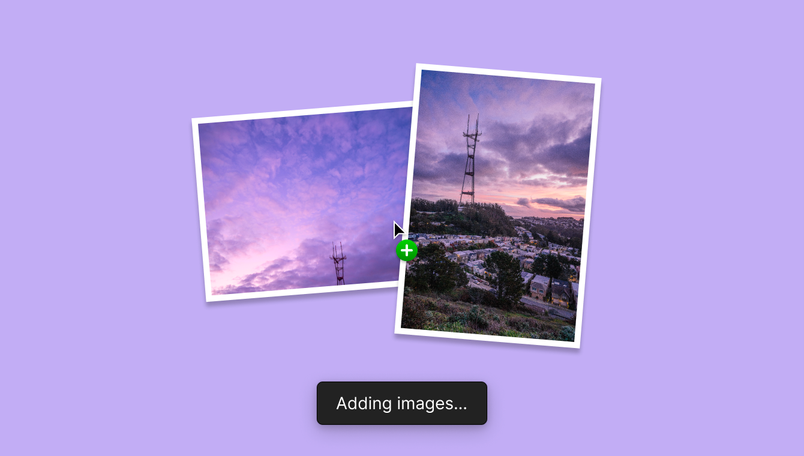
That fix exposed a second problem. HEIC images at 15 megapixels are big and heavy, and processing them takes a long time; dropping one on the canvas appeared to do nothing for many seconds before the image suddenly appeared. A feature that doesn't seem to work feels the same as one that doesn't, so Jackie—the designer on the editor platform team behind Figma's loading animations—flagged it, and a loading state was added.
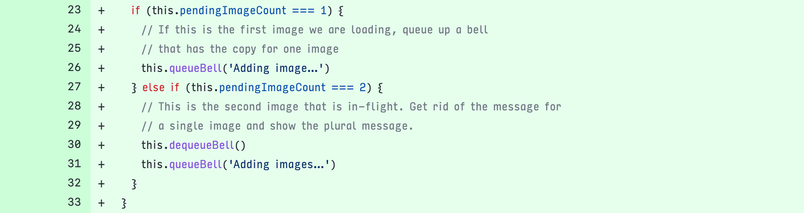
Inside that simple fix hid a psychological quirk: a loading state shown too soon makes things feel slower. The message therefore waits at least a second before appearing, preserving the illusion of real-time response on small images or fast machines.
When the fix looks like a bug
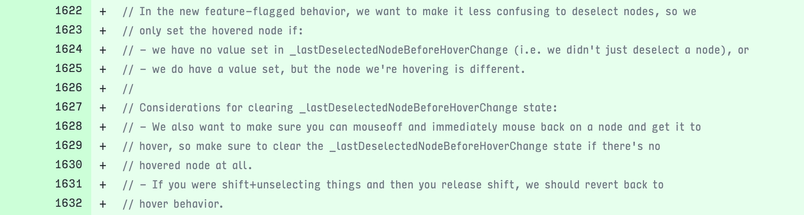
Hover states are a standard way to target objects with non-obvious shapes, but they backfire in complex selections—a central part of Figma work, supported by the undo stack, icons next to Selection Colors, and various Select All With options. Shift+clicking is the common way to build a precise selection. Shift+click to deselect, though, and the object immediately shows a hover state that looks almost exactly like the selected state: did I just click this or not?
Redesigning both states to look more distinct would swap one problem for visual sprawl, so Lauren, an engineer on the core editor team specializing in canvas behaviors and rendering, took a different route: Shift+clicking to deselect breaks the hover state until you mouse over the object again.
The solution tested well, but introducing an exception is uneasy—to someone unaware of the nuance it will look like a bug, and could get "fixed" by accident later. Documenting and contextualizing the change was as much the work as the change itself.
Solving without a repro
Bugs are a look backward, at past behavior and at code written by engineers you've never met. That can be a puzzle worth solving: observe and measure like a scientist, then interview the code like a detective—logri(), console.log(), breakpoints—to learn not what it claims to do but what it actually does. Shirley, a software engineer on the editor experience team, got such a case when a user wrote days before Quality Week: "It confuses me how Figma only supports TrueType fonts, but not OpenType ones." Figma has supported TTF and OTF, the two most popular formats, along with a few lesser known.
Fixing depends on a solid repro—unambiguous steps that reproduce the issue on the engineer's machine, and that later confirm the fix. Here the steps were simple ("I have an OpenType font. I install it. It works elsewhere. It doesn't in Figma") but didn't reproduce on Shirley's computer. The investigation became a collaboration between Shirley, support, and a few users who pitched in, moving from font files to screenshots to logs. Without a repro, every turn took minutes or hours instead of seconds.
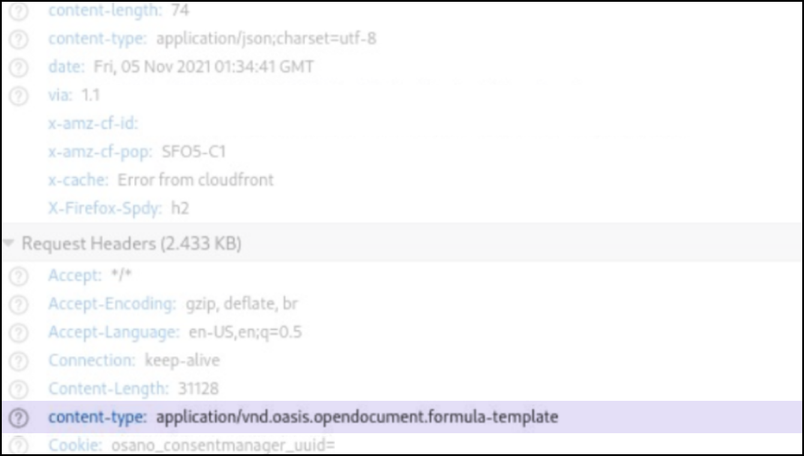
The culprit turned up in a corner of a screenshot taken for an unrelated reason. OTF doesn't only mean OpenType font: install Open Office and it can also mean "Open document formulate template." On machines with both Figma and OpenOffice, some font files were identified as document templates, and Figma didn't know what to do with them—a bug falling between things, a situation common for a complex web tool even when you control everything.
The fix also had to ship without a reproduction, like solving a crime without seeing the scene, and be deployed and tested outside. Left in the wild, such a bug has real consequences: broken OTF fonts start to look like a deliberate design decision, and, like touching a hot stove, one failure teaches people this will never work again. The patch worked on the first try. At seven lines it was trivial—and that made it worse. Moving a pebble is easier than moving a mountain, but in software you can spend a month moving a pebble.
Sorting pebbles
Many pebbles don't matter: bugs of little consequence or ones exotic enough that no one will encounter them. But little little details and little big ones look and feel alike, and unattended, the second kind grows; the collective presence of hundreds of small bugs in important places may be what separates software you want to use from software you merely have to. There is no formula for choosing, only constant rewriting of frameworks, listening to individual users and big companies, picking the brains of designer advocates and support teams, trusting the collective instincts of designers, project managers, and engineers who have thought hard about bugs, and teaming up.
Delong, from the editor team, fixed a bug that slowed typing by up to an astonishing 1000% under some circumstances, with the understanding of how much typing happens daily and that nothing is worse than keys disconnecting from your fingers. Silas, a FigJam engineer, improved linking so more objects have unique URLs, betting on links and sharing as the route to smoother collaboration.
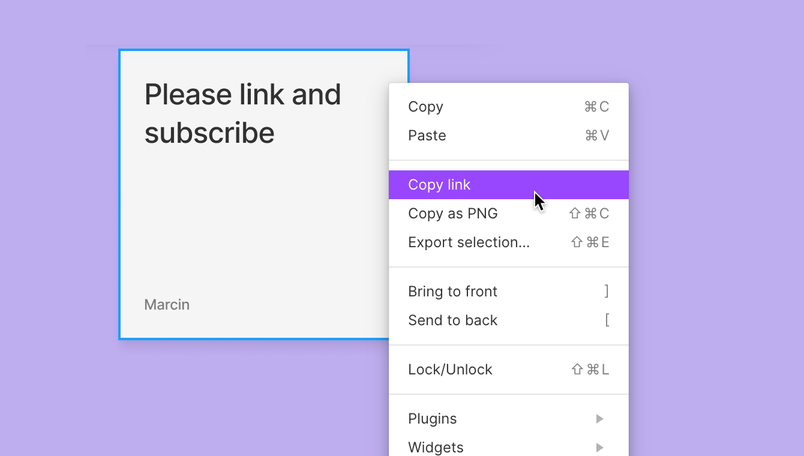
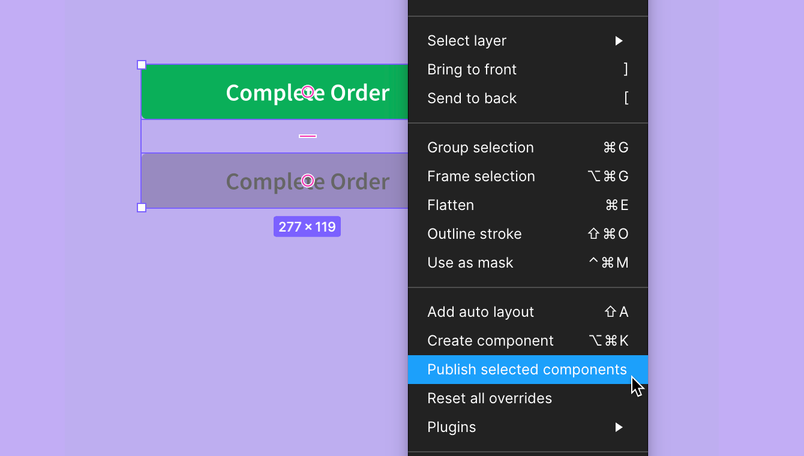
Jenning and Chang, from the design systems team, enabled individual publishing of components from the right click menu, recognizing that design systems are complex and that sometimes you don't want a branch or the regular publishing flow—you just need one component out there.
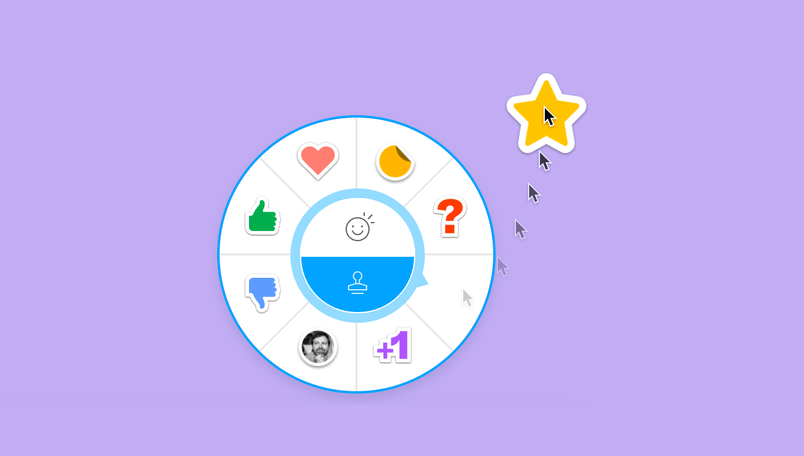
Alex, from the FigJam team, added drag-and-drop creation of stamps, not just clicking, on the belief that mastering a complex tool is a feeling worth building paths to.
Fighting fire with fire
All of those and hundreds of other fixes landed in the November 2021 Quality Week: strings renamed, comments refined, bad code excised, tests added, race conditions solved. In a single day you might meet the ghosts of dozens—dragging an HEIC file in, using it in a complex selection, publishing the component to a library. Most bugs aren't fun and come with no cute anecdote or historical story; they just are. You fix many but never all, and the unfixed ones bother you more than the successes. On a dark day it can feel like software really wants to be bugs. What helps is remembering that fixing bugs isn't a theoretical exercise in cleaner coding but always comes back to people—Sawyer's loading state, Lauren's deliberate inconsistency, Shirley's blind investigation.
Which returns to Molly and Chrome. Leaving the accent menu broken meant ignoring months of reports from people feeling annoyed, frustrated, even disrespected: "I had to copy from another program and paste it into Figma to use." "Would be nice if you could fix it so I don't have to always change keyboard layouts when working with Figma." "Just fix it for every French designer in Qwerty." To users of English, accents can seem a bonus; in many languages they are an everyday necessity, and a bug can feel personal when it prevents you from typing your name. So Molly set out to fix a bug in Chrome too, with limited power over its codebase.
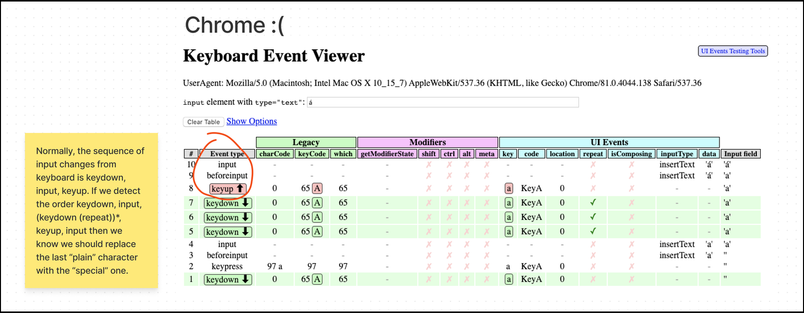
A few hours later she had a solution, with the usual caveat: the only possible fix was a close cousin of a bug, a hack. The Chrome bug appeared only in a specific circumstance—an empty text field—so the fix convinces the browser the text isn't empty when it is.

The patch went to review at 39 lines, half of them precise documentation for anyone who looks at it, or attempts something similar, later. It felt pyrrhic, like putting a matchstick under the house's foundations. The next day it reached the internal version of Figma, and Oscar, a designer in Sweden, replied: "the accent menu!! 😍😍 Need it for my ÅÄÖ 😌." A week later it shipped.
At that moment, though, Molly looked back at the bug list the whole team had curated before Quality Week began. It was Friday morning, and perhaps one more bug could be hers.
Creating and collaborating in Figma
The final group of changes centers on the shared canvas itself — the place where files are created and teams work together. The updates are framed around getting started and collaborating at no cost.

Teams interested in the work can create an account and begin using the tools directly from the product.