
What a language actually is
A programming language is a set of rules for converting strings into machine code output. Those rules only become useful when something reads and acts on them, and that something is a compiler or an interpreter. A compiler translates code into machine code the processor can run, as a C++ compiler does. An interpreter walks the program line by line and executes each command.
That means you can define your own rules and then build an interpreter for them in any existing language. To show how small the idea can get, the walkthrough below builds Magenta, a language whose only job is to print magenta-colored text to the console. Node.js is the host language, though the concept carries over to any other. Start with an index.js file.

class Magenta {
  constructor(codes) {
    this.codes = codes
  }
  run() {
    console.log(this.codes)
  }
}

// For now, we are storing codes in a string variable called `codes`
// Later, we will read codes from a file
const codes =
`print "hello world"
print "hello again"`
const magenta = new Magenta(codes)
magenta.run()
The Magenta class defines an object that logs whatever text it is handed to the console in magenta. For now the codes variable holding that text lives directly in the file, seeded with a couple of “hello” messages.

Turning text into tokens
Consider an English phrase such as “How are you?” Each word has a grammatical role — adverb, verb, pronoun — and the question mark ends it. Splitting text into small units like this is also how a language implementation begins, and the component that does the splitting is the Lexer.
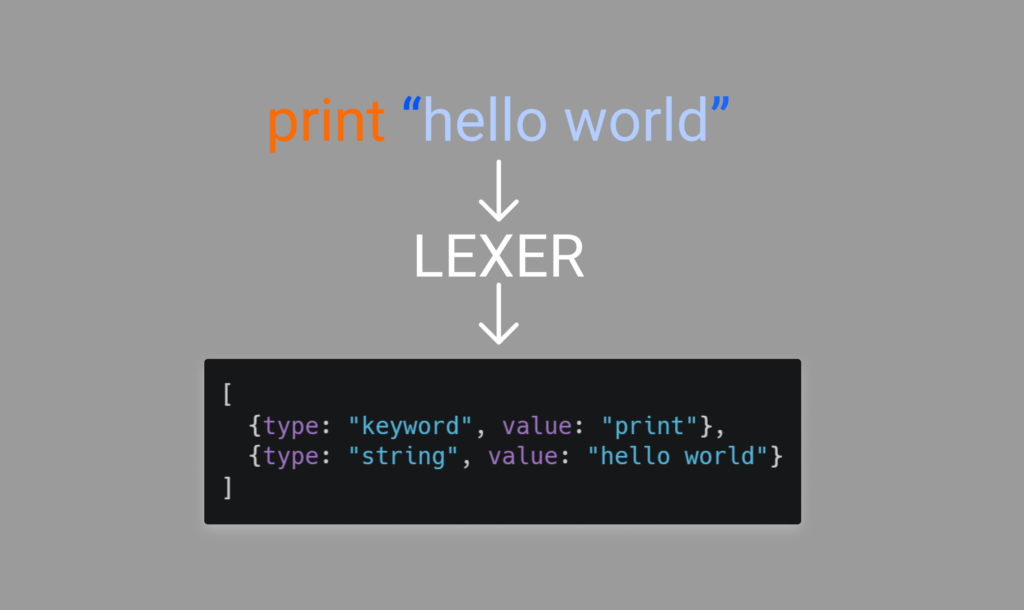
Magenta is so small that it has only two token types, each carrying a value: keyword and string. A regular expression could pull tokens out of the codes string, but it would perform poorly. Looping over each character of the code and grabbing tokens as they form is faster. The tokenize method on the Magenta class serves as that lexer.
class Magenta {
  constructor(codes) {
    this.codes = codes
  }
  tokenize() {
    const length = this.codes.length
    // pos keeps track of current position/index
    let pos = 0
    let tokens = []
    const BUILT_IN_KEYWORDS = ["print"]
    // allowed characters for variable/keyword
    const varChars = 'abcdefghijklmnopqrstuvwxyzABCDEFGHIJKLMNOPQRSTUVWXYZ_'
    while (pos < length) {
      let currentChar = this.codes[pos]
      // if current char is space or newline,  continue
      if (currentChar === " " || currentChar === "\n") {
        pos++
        continue
      } else if (currentChar === '"') {
        // if current char is " then we have a string
        let res = ""
        pos++
        // while next char is not " or \n and we are not at the end of the code
        while (this.codes[pos] !== '"' && this.codes[pos] !== '\n' && pos < length) {
          // adding the char to the string
          res += this.codes[pos]
          pos++
        }
        // if the loop ended because of the end of the code and we didn't find the closing "
        if (this.codes[pos] !== '"') {
          return {
            error: `Unterminated string`
          }
        }
        pos++
        // adding the string to the tokens
        tokens.push({
          type: "string",
          value: res
        })
      } else if (varChars.includes(currentChar)) {
        let res = currentChar
        pos++
        // while the next char is a valid variable/keyword charater
        while (varChars.includes(this.codes[pos]) && pos < length) {
          // adding the char to the string
          res += this.codes[pos]
          pos++
        }
        // if the keyword is not a built in keyword
        if (!BUILT_IN_KEYWORDS.includes(res)) {
          return {
            error: `Unexpected token ${res}`
          }
        }
        // adding the keyword to the tokens
        tokens.push({
          type: "keyword",
          value: res
        })
      } else { // we have a invalid character in our code
        return {
          error: `Unexpected character ${this.codes[pos]}`
        }
      }
    }
    // returning the tokens
    return {
      error: false,
      tokens
    }
  }
  run() {
    const {
      tokens,
      error
    } = this.tokenize()
    if (error) {
      console.log(error)
      return
    }
    console.log(tokens)
  }
}
Running node index.js at this point prints the token list to the terminal.

One syntax rule, then parsing
To validate code you first need rules. Magenta has exactly one syntax: the print keyword followed by a string.
keyword:print stringThe parse method walks the token list, checks whether that shape has been formed, and takes the appropriate action when it has.
class Magenta {
  constructor(codes) {
    this.codes = codes
  }
  tokenize(){
    /* previous codes for tokenizer */
  }
  parse(tokens){
    const len = tokens.length
    let pos = 0
    while(pos < len) {
      const token = tokens[pos]
      // if token is a print keyword
      if(token.type === "keyword" && token.value === "print") {
        // if the next token doesn't exist
        if(!tokens[pos + 1]) {
          return console.log("Unexpected end of line, expected string")
        }
        // check if the next token is a string
        let isString = tokens[pos + 1].type === "string"
        // if the next token is not a string
        if(!isString) {
          return console.log(`Unexpected token ${tokens[pos + 1].type}, expected string`)
        }
        // if we reach this point, we have valid syntax
        // so we can print the string
        console.log('\x1b[35m%s\x1b[0m', tokens[pos + 1].value)
        // we add 2 because we also check the token after print keyword
        pos += 2
      } else{ // if we didn't match any rules
        return console.log(`Unexpected token ${token.type}`)
      }
    }
  }
  run(){
    const {tokens, error} = this.tokenize()
    if(error){
      console.log(error)
      return
    }
    this.parse(tokens)
  }
}
At this stage the language already works.

Keeping source code in its own file
Code buried in a string variable is inconvenient, so move it into a file named code.m, separate from the interpreter logic. The .m extension marks the file as Magenta source. Reading the program then becomes a matter of loading that file:
// importing file system module
const fs = require('fs')
//importing path module for convenient path joining
const path = require('path')
class Magenta{
  constructor(codes){
    this.codes = codes
  }
  tokenize(){
    /* previous codes for tokenizer */
 }
  parse(tokens){
    /* previous codes for parse method */
 }
  run(){
    /* previous codes for run method */
  }
}

// Reading code.m file
// Some text editors use \r\n for new line instead of \n, so we are removing \r
const codes = fs.readFileSync(path.join(__dirname, 'code.m'), 'utf8').toString().replace(/\r/g, "")
const magenta = new Magenta(codes)
magenta.run()
Scope of what was built
A language can be as simple as something that accomplishes one specific thing, and Magenta now does exactly that. It is unlikely to end up inside a popular framework, but it demonstrates the machinery: rules, a lexer, a parser, and a source file. From here the limits are open — a more advanced example of the same approach shows how to add variables.



