
The Road to a Third Widget Iteration
Shopify's iOS widgets have evolved substantially since the platform first appeared in iOS 14. What began as a two-metric glanceable view has grown through multiple design and engineering iterations, shaped by merchant feedback and the realities of building for WidgetKit.
Our widgets are primarily analytics tools. Merchants use them to monitor daily performance metrics like sales and orders without opening the Shopify app. That means data freshness is critical — stale information can lead to missed insights or poor decisions about a business. After three major iterations, we've learned a lot about what it takes to build reliable, efficient widgets on Apple's platform.
Why SwiftUI Instead of React Native
Shopify has increasingly adopted React Native for new app development, so the obvious question was whether to build widgets with the same stack. Our investigation uncovered some significant obstacles:
- App extensions have strict memory limits
- WidgetKit's architecture is tightly optimized for SwiftUI, serializing the view hierarchy to disk
- No official React Native community support for widgets existed at the time
WidgetKit's design simply favors native development. Since Shopify's philosophy is to choose the best tool for the job, we opted for SwiftUI without hesitation.
Handling Data Fetching and Authentication
Widgets can access data locally or fetch it from a server, with the request initiated either by the widget itself or by the host app. Our widgets display metrics that aren't available in the main app's local data, so we chose to fetch directly from the widget.
We did consider moving data fetching to the app itself — that would centralize authentication, state management, and caching in one process. However, this approach introduces complexity around background execution to keep widget data available even when the app isn't running. Our current architecture has the widget fetching data independently while sharing only session management code and authentication tokens with the app.
The business analytics data that powers our visualizations comes from Reportify, an internal service exposing data through schemas that are queried using ShopifyQL. This query language resembles SQL but is designed specifically for commerce data.
Solving Token Refresh Chaos
iOS Widgets are budget-conscious by design to preserve battery life, and our fetching strategy has to respect that same spirit. Our widgets need fresh data, so we update roughly every 15 minutes — the practical threshold before the system starts throttling widget updates. During development of our second iteration, we noticed something unexpected: iOS was calling the widget's update methods more than once per cycle, sometimes triggering two to five redundant network calls for the same data.
Those redundant calls created an unpredictable cascade. Each widget has its own process, but they all share the keychain for authentication. When an app or widget accesses the API, it checks the keychain for a token and refreshes it if it's stale. With multiple widgets each initiating their own update cycle, several token refresh workflows could run concurrently. Eventually, a network call would arrive out of order and save an invalid token to the keychain — blocking all future data access and logging affected merchants out of the app. It was an elusive bug that caused significant frustration.
Our fix was a short-lived local cache that prevents duplicate network activity:
- iOS asks for new widget data
- We check the cache for that widget's content, using a key based on its configuration (since WidgetKit provides no unique identifier) and locale
- If data exists and is less than one minute old, return it without a network request
- Otherwise, fetch fresh data and update the cache with the current timestamp
This eliminated the wasteful network calls, reduced system load, prevented the invalid token scenario, and fixed the intermittent app outages for good.
Decoding Flexible Metric Configurations
Each merchant can configure their widget to show anywhere from two to seven metrics, selected from a pool of 12. The available metrics may grow over time, and future metrics may not share the same structure as today's — which are all time-based with comparable shapes. A metric like "orders to fulfill" wouldn't necessarily map to a historical time range, for example.
Merchants also choose the order of metrics, the shop they're monitoring (if they have more than one), and the date range — today, last 7 days, or last 30 days. We needed a data fetching and decoding mechanism that satisfies three constraints:
- Fetching only the metrics a merchant has selected, avoiding unnecessary requests
- Supporting the current metric set while accommodating future ones with different data shapes
- Working across various date ranges
The solution splits responsibilities cleanly. We define a struct to represent the query sent to the Reportify analytics service. A class represents the decodable response — for now it has a fixed structure of value, comparison, and chart series, but it's implemented so we can swap in different decoding logic via an enum or subclasses later. A response wrapper decodes metrics based on a list of metric types passed to it, since each metric knows which class reads its values. When the widget's timeline provider requests new data, we fetch it for the current metric configuration and decode it using this pipeline.
This staged approach let us handle dynamic merchant configurations cleanly without overengineering for hypothetical future metric shapes that haven't been defined yet.
One View for Every Size
To support small, medium, and large widgets without duplicating UI code, Shopify built a single view that adapts based on layout characteristics rather than the widget family. The core building block is a Metric Cell component with three variations that scale with container size:

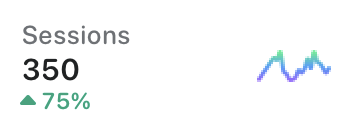

Each variation shows a metric name, value, chart, and comparison, with more data exposed as the widget grows. On the large size, the first selected metric becomes a full-width Primary cell with a clearer bar chart. A simple flag indicates whether a cell is primary; otherwise, the component has no knowledge of the widget family and relies on chart data to decide how to render. This keeps the component decoupled from widget-specific context and works cleanly with SwiftUI.
For arranging cells, the WidgetView is initialized with a WidgetState struct that holds shop information, selected metrics with their data, and a last-updated timestamp. Layout decisions are driven by a LayoutOption OptionSet passed as an array, rather than by hard-coded widget family checks.
This abstraction keeps the views reusable across different contexts. Rendering is handled primarily with a LazyVGrid, which arranges cells based on the current layout options and the number of metrics provided.
Handling Stale Data with Timestamps
Showing how fresh the widget data is became a priority. Since iOS updates widgets on an approximate schedule and network delays can add further lag, the displayed data could be 15 minutes old or more. Without a clear indicator, merchants might assume charts are up-to-the-second, leading to confusion.
The earlier small-widget design had room for a static timestamp like "as of 3:30pm," which could wrap to two lines on smaller devices. The new, denser layouts required a more compact solution. Apple's relative date formatting—using Text("\(now, style: .relative) ago")—updates automatically without triggering widget refreshes, which sounded promising.
However, there was no way to customize the relative style, and the default output didn't fit well within the space constraints of the smallest widget. The team ultimately kept a shortened version of the original absolute timestamp instead of adopting the dynamic relative approach.
Configuration Workarounds
Merchants can fully customize each widget size by selecting a store, a set of metrics, and a date range through the SiriKit Intents API. While straightforward in concept, several limitations in the Intents configuration required creative solutions.

No Metric Deselection
For dynamically provided metric fields, iOS limits the number of options per widget family. But the configuration UI only allows selecting a value, not removing it. Once a merchant picked metrics, they couldn't change their mind about wanting fewer.
The solution was simply adding "None" as an explicit option. Choosing "None" results in an empty state for that position, effectively allowing the merchant to deselect a metric.
No Validation Possible
The Intents API doesn't support validating user selections. It was possible to select all "None" values, resulting in an empty widget, which was acceptable as an empty state. Duplicates were also possible; these were filtered out and replaced with "None" before any network requests were made.
Default Metrics Overflow
Dynamic intent configurations require default values in the IntentHandler. Since the handler can't know which widget family is being configured, it had to return at least as many default metrics as the largest widget needs—seven.
The problem was that even when a widget family allowed fewer metrics, the first getTimeline and getSnapshot calls would populate the entire default list. A small widget would incorrectly receive seven metrics. Cleanup code was added at the start of the Timeline Provider methods to trim the list to the correct count for the widget family in use.
Testing the Widgets Without an Extension Target
Shopify relies heavily on unit and snapshot tests, and the Android widgets already had solid coverage. iOS, however, doesn't allow adding test targets against a widget extension in Xcode, leaving the iOS widgets initially untested.
One possible workaround was adding each file to both the app target and the extension target, enabling tests through the standard iOS testing pipeline. This was rejected because it would require constantly referencing files in two places and bloat the main app unnecessarily.
Instead, the team created a separate framework module called WidgetCore. Nearly all reusable views and business logic moved into it, leaving only WidgetKit-specific code—such as the Timeline Provider, widget bundle, and generated intent definitions—in the extension. This allowed unit and snapshot tests to target WidgetCore directly. Since the Shopify app is UIKit-based, their in-house snapshot framework had to be extended to handle SwiftUI views. The effort paid off with strong test coverage that caught regressions throughout development.
Faster Preview Cycles
Working within the full Shopify app made SwiftUI previews painfully slow, since the widget extension depends on the large app target. To restore the quick iterations SwiftUI promises, the newly created WidgetCore module—independent of the main app—became the home for previewable views.
Because WidgetCore isn't a widget extension, the WidgetPreviewContext API was unavailable to render previews on a device. The team built a custom PreviewLayout extension that replicated all the widget size dimensions from Apple's design guidelines, enabling them to mock previews within WidgetCore. Size-dependent views could then be verified visually in a fraction of the time, though final checks on real widget sizes and light or dark modes still required running the extension.
Capturing Widget Analytics
To measure adoption and retention, we needed analytics events that reflect how merchants configure their widgets over time, including which are added or removed. Existing dashboards already tracked install counts, popular metrics, and sizes, but these new insights required a deeper view of lifecycle events.
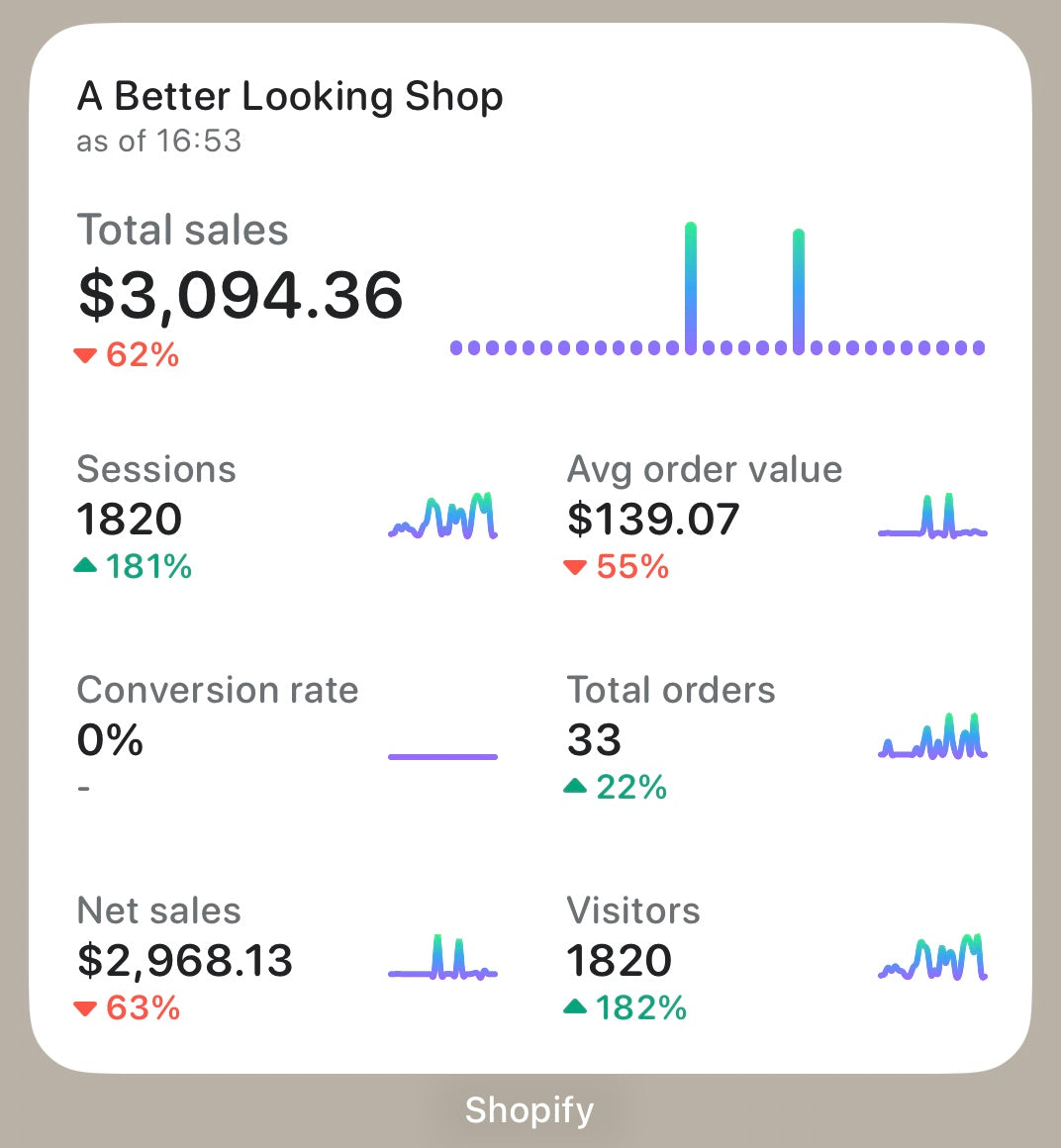
The Identifier Problem
WidgetKit’s WidgetCenter struct and its getCurrentConfigurations method report the widgets currently configured on a device, but the returned WidgetInfo metadata lacks a stable unique identifier. The identifier is effectively the object itself, since it is hashable. Two identical widgets therefore share the same identifier, and changing any part of the intent configuration—say, a date range—makes the widget look like an entirely new one.
We had to adjust how we count unique widgets and how we distinguish between add, remove, and configuration events. A single derived value based on the most important parts of the widget configuration became our best approximation. We are hopeful future iOS versions provide proper unique IDs.
Simulating Lifecycle Events
WidgetKit offers no lifecycle callback for when a widget is added, configured, or removed. The only reliable methods available are getTimeline and getSnapshot. Since getSnapshot fires on state transitions and in the widget gallery, it was unsuitable, leaving getTimeline as the basis for our solution.
Our approach worked like this:
- Each time a timeline provider’s
getTimelineis called, we invokegetCurrentConfigurationsto fetch the current widget list. - We compare that list against a previously persisted snapshot on disk.
- From the diff, we infer which widgets were added or removed.
- We then trigger our own
didAddWidgets()anddidRemoveWidgets()methods.
Because identifiers are not stable, reliably detecting configuration changes was not feasible, so we left that unsupported. Additionally, we observed that getCurrentConfigurations results lag; removing a widget may take a couple of getTimeline calls to appear. Our analytics scheme accounts for this delay.

Embracing iOS 16
Our existing architecture meant supporting iOS 16 required little more than small adjustments. Lock screen complications display the same information as home screen widgets, allowing us to reuse the intent configuration, timeline provider, and most views. The changes were limited to adding the new families—.accessoryInline, .accessoryCircular, and .accessoryRectangular—and drawing those views. Our main view also needed a slight tweak to accommodate the new layouts.
ClockKit Migration Nuances
Apple’s migration warning is stark: once you offer a widget-based complication, the system stops calling ClockKit APIs and requests timeline entries from your CLKComplicationDataSource instead. We had to understand what this meant for merchants on older devices.
Testing revealed that everything continues to function as expected for existing ClockKit apps and complications when you add WidgetKit complications. The key insight was that WidgetKit complication support on watchOS requires a new Watch target. Despite the API similarities, you cannot simply rely on one WidgetKit extension for both platforms.
The real caution is this: users on watchOS 9 or above will lose all ClockKit complications once you implement the new WidgetKit complications. Apple provides a migration API (CLKComplicationWidgetMigrator) to handle this transition, which is called instead of your old complications. If you cannot restrict your target to iOS 16, our testing confirmed that complications continue to work for users on watchOS 8 and below.
Shipping the New Widget Generation
We needed to replace our existing widgets with new ones spanning all three sizes under a single kind, replacing two old kinds (each with its own small widget). Documentation on this migration path was scarce, so we simulated the update scenarios. Merchants faced one of two outcomes after an app update:
- The widget became a blank white square (matching kind IDs).
- The widget disappeared entirely (changed kind ID).
Our preferred outcome—automatically transforming one old widget into the new one and removing the other—was not achievable. Managing this migration also meant dealing with lingering references to old widget names in our intent files.
Our compromise was to deprecate, not delete, the old widgets when launching the new ones. We updated the deprecated widgets’ UI to display a message explaining that the widget is no longer supported and directing merchants to add the new versions. This decision required careful planning, as there is no way to add a widget programmatically or to link from an old widget to the gallery.
To support the transition, we relied on clear communication:
- Updating help center documentation with instructions on using the new widgets.
- Making deprecated widgets deep-link to that documentation.
- Keeping the deprecation notice in place for an extended period.
The outcome was functional, if not ideal. The lesson learned is to think carefully about how you group and split widgets at the outset, since future structural changes can be deceptively difficult.

Looking Forward
Merchant feedback from this new generation of widgets will guide further refinements to the experience across both platforms. Our widget design is intentionally flexible, allowing us to expand the available metrics through customization. This foundation also enables other Shopify teams to build on our work and deliver more merchant-facing widgets.
With iOS 16, the roadmap includes integrating the new WidgetKit experience into watch complications, lock screen complications, and—later this year—live activities.


