
Figma is preparing FigJam's exit from beta with a pricing model, a set of customization features and an expansion of its open platform. As the company describes it, organizations have been asking to bring entire teams into FigJam since the tool's April launch, and 2020's shift away from physical gatherings pushed teams toward online collaboration. The changes below are meant to support both.
Pricing after beta
FigJam remains free while in beta and will exit beta on February 1, 2022. The structure mirrors Figma itself. On the Starter plan, usage stays free with unlimited personal whiteboards and three shared whiteboards that allow unlimited collaborators.
Paid plans apply to organizations that need unlimited shared whiteboards: FigJam Professional costs $3 per editor, and FigJam Organization costs $5 per editor. Across the pricing range, that puts FigJam at $0–5 per editor per month starting February 2022.
Guest access via Open sessions
Also rolling out now is Open sessions, which lets a host invite anyone into a jam for 24 hours without login. Figma frames this as the digital analogue of a research workshop or a one-off planning session, removing sign-in friction for participants who are not regular FigJam users.
Widgets: a community-built platform
Figma opened a beta for FigJam widgets and plugins to a group of external developers in August, and the first results ship now. Widgets target collaboration inside a file and fall into three broad areas:
- Team connection: Donut provides water cooler prompts and drawing games; Rock Paper Scissors (by Alex Einarsson) and Connect Four (by Jackie Chui) offer quick breaks.
- Meeting facilitation: Simple Vote (by Rogie King) tallies votes and feedback after a brainstorm, and Alignment Scale (by Michael Yong, Sawyer Hood, Keeyen Yeo, John Lai and Bersabel Tadesse) checks whether participants are on the same page.
- Productivity: Table (by Gavin McFarland) imports Google Sheets to create tables; Stark for FigJam adds role-specific accessibility checklists and explanations; Org Chart (by Rogie King) maps current departments or planned headcount.
Figma says the widget experience will grow to cover use cases such as kanban boards and timelines, along with in-line text editing and better embedded media support.
Plugins and embedded content
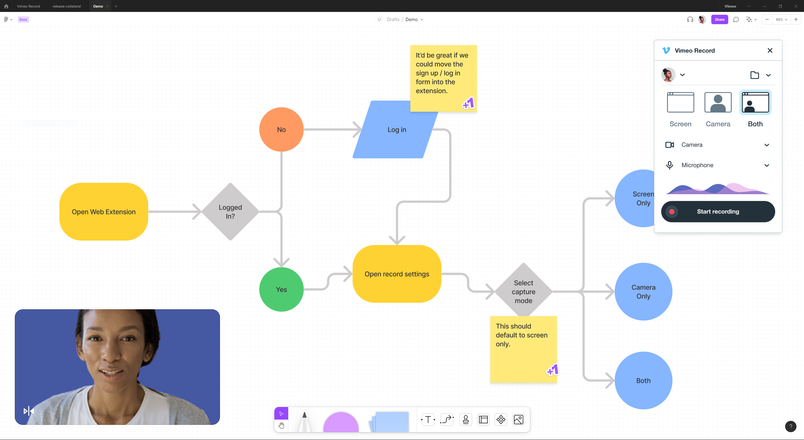
Where widgets are built for collaboration, plugins are aimed at expressing ideas faster. More than 40 plugins are available at launch, including Tour Guide for animated presentations, Create Sticky from Text for converting text into stickies automatically, and Stamp Counter for vote tallies in a single click. Vimeo is working on a Vimeo Record plugin for recording screen captures and commentary directly in a file, intended for sharing context across time zones or narrating product walkthroughs.
Files can also embed content such as videos and docs, and new shapes and code blocks extend what can be drawn.
Developer-oriented additions
Figma is positioning FigJam for engineering teams as well as design work. A new widget from CoderPad lets teams run fully interactive programming interviews inside a FigJam file, switching between code and design so the interview matches how teammates actually collaborate. Code blocks and the new diagramming shapes make architecture diagrams easier to create and maintain in FigJam.
Templates in the toolbar
New templates are accessible directly from the FigJam toolbar, giving teams a starting point without leaving the workspace.
Figma credited the external developers who published plugins and widgets during the beta, including Abstract, Brandfetch, CoderPad, Donut, Iconify, Icons8, Stark, Unsplash, Vimeo, Wondershare PixCut and Writer, alongside individual contributors such as Rogie King, Jackie Chui, Alex Einarsson, Gavin McFarland, Jordan Singer and Michael Yong. Biweekly product demos led by designer advocates are available for organizations that want to see how FigJam fits their workflows.