

The reflow problem and why progressive JPEGs fall short
When a page renders its content before its images arrive, the layout shifts as images come in — content reflow — and the experience suffers. Blocking the UI until images load removes the shift but makes users wait for content. A middle ground: render a preview immediately and let the real image replace it whenever it finishes loading.
Progressive JPEGs initially render full-size and blurry, refining until complete, but they still require some image bytes over the wire before any preview appears, so reflow occurs once the preview's size is known. Re-encoding is easy enough (Sharp plugins handle it), yet there is no event signalling that an initial preview has loaded, and the workarounds for detecting one are not ideal.
Building previews with Jimp and Base64
An image can be inlined in an <img /> as a Base64-encoded src rather than a URL, though full-size strings would bloat a JavaScript bundle. Instead, generate a low-quality, blurry version during image processing, Base64-encode that, and ship the much smaller string with your data.
The example function below uses Jimp — no node-gyp dependency, so it installs cleanly in a Lambda — to resize the image and produce the blurry preview:
function resizeImage(src, maxWidth, quality) {
  return new Promise<ResizeImageResult>(res => {
    Jimp.read(src, async function (err, image) {
      if (image.bitmap.width > maxWidth) {
        image.resize(maxWidth, Jimp.AUTO);
      }
      image.quality(quality);

      const previewImage = image.clone();
      previewImage.quality(25).blur(8);
      const preview = await previewImage.getBase64Async(previewImage.getMIME());

      res({ STATUS: "success", image, preview });
    });
  });
}
On the sample Flickr Commons image:
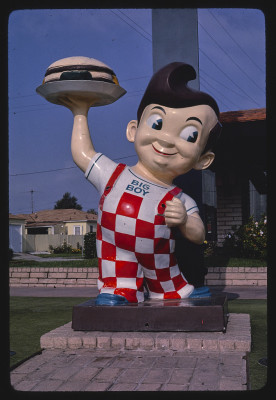
the preview renders as follows:
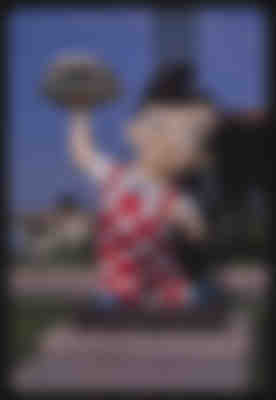
Preview strings scale with source size; profile against your own use case to judge viability. Send the preview down alongside the real image URL, show it immediately, then swap in the real image once loaded:
const Landmark = ({ url, preview = "" }) => {
    const [loaded, setLoaded] = useState(false);
    const imgRef = useRef<HTMLImageElement>(null);

    useEffect(() => {
      // make sure the image src is added after the onload handler
      if (imgRef.current) {
        imgRef.current.src = url;
      }
    }, [url, imgRef, preview]);

    return (
      <>
        <Preview loaded={loaded} preview={preview} />
        <img
          ref={imgRef}
          onLoad={() => setTimeout(() => setLoaded(true), 3000)}
          style={{ display: loaded ? "block" : "none" }}
        />
      </>
    );
  };

  const Preview: FunctionComponent<LandmarkPreviewProps> = ({ preview, loaded }) => {
    if (loaded) {
      return null;
    } else if (typeof preview === "string") {
      return <img key="landmark-preview" alt="Landmark preview" src={preview} style={{ display: "block" }} />;
    } else {
      return <PreviewCanvas preview={preview} loaded={loaded} />;
    }
  };
src is set after onLoad is attached so the handler reliably fires. The PreviewCanvas component and changing-URL handling are ignored for now.
Smaller previews with BlurHash
The Base64 approach may be too large to ship in a bundle, and these strings do not gzip well. For smaller output with more effort, BlurHash produces Base83-encoded previews. The README explains the choice of 83: it is roughly how many low-ASCII characters are safe across JSON, HTML and shells, and 83 × 83 is a little more than 19 × 19 × 19, suiting three AC components in two characters. Signal and Mastodon both use BlurHash.
Generating a hash with Sharp
Generation uses Sharp. Previews are typically produced by a serverless function; the example uses AWS Lambda (any alternative works). Watch size limits: Sharp's binaries add about 9 MB to the function, and bundling should be avoided so all binaries ship — this affects deploy size and, at about 9 MB for Sharp alone, cold-start times. The sample code runs in a Lambda on a periodic, non-interactive schedule.
"install-deps": "npm i && SHARP_IGNORE_GLOBAL_LIBVIPS=1 npm i --arch=x64 --platform=linux sharp"The function reads image dimensions and produces the preview hash:
import { encode, isBlurhashValid } from "blurhash";
const sharp = require("sharp");

export async function getBlurhashPreview(src) {
  const image = sharp(src);
  const dimensions = await image.metadata();

  return new Promise(res => {
    const { width, height } = dimensions;

    image
      .raw()
      .ensureAlpha()
      .toBuffer((err, buffer) => {
        const blurhash = encode(new Uint8ClampedArray(buffer), width, height, 4, 4);
        if (isBlurhashValid(blurhash)) {
          return res({ blurhash, w: width, h: height });
        } else {
          return res(null);
        }
      });
  });
}
The ensureAlpha call gives each pixel 4 bytes — RGB plus Alpha. Jimp lacks this method, which is why Sharp is used here. Both the preview string and the image dimensions are saved.
const blurhash = encode(new Uint8ClampedArray(buffer), width, height, 4, 4);blurhash's encode receives the image and its dimensions; the final two arguments, componentX and componentY, appear to control how many passes BlurHash makes to add detail, with acceptable values from 1 to 9 inclusive. Testing put 4 at the sweet spot. For the sample image the result is:
{
  "blurhash" : "UAA]{ox^0eRiO_bJjdn~9#M_=|oLIUnzxtNG",
  "w" : 276,
  "h" : 400
}
Rendering: decode plus canvas
Using the hash takes more work: call blurhash's decode and draw the preview into a <canvas>. That is what PreviewCanvas did earlier, which is why it rendered whenever the preview was not a string — hash previews are objects carrying both the string and the image dimensions.
const PreviewCanvas: FunctionComponent<CanvasPreviewProps> = ({ preview }) => {
    const canvasRef = useRef<HTMLCanvasElement>(null);

    useLayoutEffect(() => {
      const pixels = decode(preview.blurhash, preview.w, preview.h);
      const ctx = canvasRef.current.getContext("2d");
      const imageData = ctx.createImageData(preview.w, preview.h);
      imageData.data.set(pixels);
      ctx.putImageData(imageData, 0, 0);
    }, [preview]);

    return <canvas ref={canvasRef} width={preview.w} height={preview.h} />;
  };
Compared with the Base64 previews, the hash output is less detailed but smoother and less pixelated, at a tiny fraction of the size. Test both for your case.
Update: an alternative recommendation
The author no longer recommends BlurHash: it needs client-side JavaScript and <canvas> tags to display previews, which is unfriendly to SSR frameworks such as Next and SvelteKit. Recommended instead is plaiceholder, which depends on Sharp (so the Lambda installation notes still apply). Its Base64 option produces extremely tiny previews; you still track the real size, size up the preview, and apply a blur filter for results roughly on par with BlurHash. It is fully SSR-friendly — the preview can sit underneath the real image in CSS, showing until the image arrives and then handing over with only HTML and CSS, no client-side JavaScript.
The Svelte component below runs on the server under SvelteKit, handling preview and replacement before hydration, or with JavaScript disabled:
<script lang="ts">
  import type { PreviewPacket } from "$data/types";

  export let url: string | null = null;
  export let preview: string | PreviewPacket | null;

  $: previewString = preview == null ? "" : typeof preview === "string" ? preview : preview.b64;
  $: sizingStyle = preview != null && typeof preview === "object" ? `width:${preview.w}px;height:${preview.h}px` : "";
</script>

<div>
  <img alt="Book cover preview" src={previewString} style={sizingStyle} class="preview" />
  <img alt="Book cover" src={url} class="image" />
</div>

<style>
  div {
    display: inline-grid;
    grid-template-areas: "content";
    overflow: hidden;
  }
  div > * {
    grid-area: content;
  }

  .preview {
    z-index: 1;
    filter: blur(5px);
  }
  .image {
    z-index: 2;
  }
</style>


