
The Case for a Ruby Language Server
Ruby’s stated goal has long been developer happiness — historically expressed through expressive syntax that lets developers focus on business logic. But as languages like TypeScript and Rust have shown, modern tooling is now a core part of that promise. Editors need more than syntax highlighting to make developers productive at scale.
Shopify’s engineering team has built the Ruby LSP, a language server that brings rich Ruby features to any editor supporting the Language Server Protocol (LSP). The project targets two specific challenges in the Ruby ecosystem: accuracy without static typing, and performance across large codebases like Shopify’s Core monolith, which contains thousands of files that can each run to thousands of lines.
The existing Ruby language servers — Sorbet, Steep, Typeprof, and Solargraph — each have their own tradeoffs. The Ruby LSP distinguishes itself by aiming for precise features that work without type annotations or typechecking. It’s also designed to be opinionated, with Rails-specific features planned to assist day-to-day framework development.
Why the LSP Matters
Before the Language Server Protocol was introduced, language-aware features like Go to Definition or auto-formatting lived entirely inside editor plugins. That approach created a fragmented ecosystem:
- Each editor’s plugin API and internal design differed, so code couldn’t be shared between editors. Supporting Ruby in ten editors meant writing the same features ten times.
- Developer-experience contributions were siloed by editor choice, preventing language communities from pooling effort.
- No specification existed for what features a language plugin should offer, so switching editors meant losing or gaining features without predictability.
The VS Code team at Microsoft proposed the LSP to break this cycle. The protocol defines how a background process — the server — runs on the developer’s machine to provide language features to any editor that implements a client layer. The client communicates with the server through JSON over standard input and output pipes.
When you invoke Go to Definition, the editor sends a JSON request through STDIN naming the location of the cursor. The server parses that request, locates the definition, and returns the file path and position as JSON response. The client translates that response into an editor action, like jumping to the correct file.
Standardizing these JSON message formats decouples editor-specific code from language-specific logic. The client layer handles only conversion between developer interactions and JSON messages; for the client, Go to Definition works identically across all languages. The server implements all language logic — finding definitions, formatting, diagnostics — with no concern for which editor is connected.
How the Ruby LSP Analyzes Code
Language server requests fall into two categories. Positional requests depend on the current cursor location — Go to Definition is the classic example, since it must resolve which constant or method the cursor sits on. Nonpositional requests process the entire file, and the cursor position is irrelevant. Folding Range is a nonpositional request: it computes every place in the file where code can be collapsed or expanded.
The Ruby LSP implements these two request types differently. The implementation strategy for nonpositional features — specifically Folding Range — illustrates the core approach.
Document Synchronization
For any file analysis, the server must know the file’s current contents. The editor sends document synchronization notifications:
textDocument/didOpen— file opened, includes the URI and current contents.textDocument/didChange— file modified, with full contents or a list of changes depending on server configuration.textDocument/didClose— file closed in the editor.
Feature requests themselves pass only the document URI as a parameter — not file content — so it’s the server’s responsibility to maintain an accurate representation of every open document at all times.
Parsing to an AST
Document content arrives as raw text. To analyze it meaningfully, the server must parse the Ruby code into an abstract syntax tree (AST) — an object model of every module, class, method, and variable defined in the file.
The Ruby LSP uses the Syntax Tree gem, which wraps Ripper, Ruby’s built-in parser, in an object-oriented layer. The resulting AST is a linked structure of nodes, each carrying complete information about its corresponding Ruby construct. Analysis then reduces to walking the tree and collecting the relevant node data.
Traversal with Visitors
Walking the AST means traversing every node. The Ruby LSP applies the visitor pattern, also built into Syntax Tree. A visitor separates the traversal mechanics — moving from node to node — from the per-request logic that reacts to specific node types.
Implementing Folding Range starts with a new visitor class that inherits from Syntax Tree’s base visitor. It gets initialized with the AST and an empty array for accumulating results.
Running the request means visiting the entire AST, collecting folding ranges on the way, and returning the array. The LSP specification requires each folding range to include at minimum the start line, end line, and kind.
The visitor defines behaviors for specific node types by overriding methods like visit_class and visit_def. A visit_class override handles what happens whenever a class definition is found:
- The node is added to the results array with its span and kind.
superis invoked last to keep the default traversal behavior alive — failing to call it would halt the walk at the first class node.
This boundary is what makes the pattern valuable. All of the tree-walking complexity lives in the inherited visit method while the request-specific logic — collecting ranges for folding — remains fully contained in the visitor class. For method definitions, the same pattern applies: override visit_def, append the node’s location data, and call super.
With just those two overrides, the visitor can collect every class and method boundary in a file regardless of its shape, giving the editor correct folding anchors for both constructs. This is the Ruby LSP’s recommended strategy for handling nonpositional requests.
The Feature Set at Launch
The most current reference for what the Ruby LSP supports is the project’s documentation. As of this writing, the server implements a solid slice of the LSP specification, including:
- Code actions for applying RuboCop quickfixes and extracting code into a variable.
- Diagnostics that surface RuboCop violations directly in the editor.
- Document highlight to mark every occurrence of the symbol under the cursor.
- Document link support for jumping to gem source code via magic comments.
- Document symbols for populating the editor outline with Ruby structures, including fuzzy search (VS Code:
CMD + SHIFT + O). - Folding ranges so code blocks can be collapsed and expanded.
- Formatting on save with RuboCop, with SyntaxTree as an alternative for projects that don’t use RuboCop.
- Hover documentation for Rails DSL methods.
- Inlay hints that show the default error class when
rescueomits one. - On-type formatting that auto-completes
endtokens, interpolation braces, block argument pipes, and continues comments. - Selection ranges that let you expand or shrink a selection by code structure (VS Code:
CTRL + SHIFT + LEFT/RIGHT ARROW). - Semantic highlighting that reflects Ruby’s actual understanding of the code.
- Completion that suggests valid paths when writing a
requirestatement.
Why Pure Ruby Makes Sense
Language servers are often written in a different language than the one they serve—pylance is TypeScript, Sorbet is C++. The Ruby LSP instead is written entirely in Ruby, which brings notable advantages: it can iterate quickly thanks to Ruby’s ease of use, analyze files with Ruby’s own parser (Ripper) through the Syntax Tree gem, and has full access to the application’s actual Ruby environment. The trade-off is that parsing and analyzing files are expensive, and performance is a constant concern.
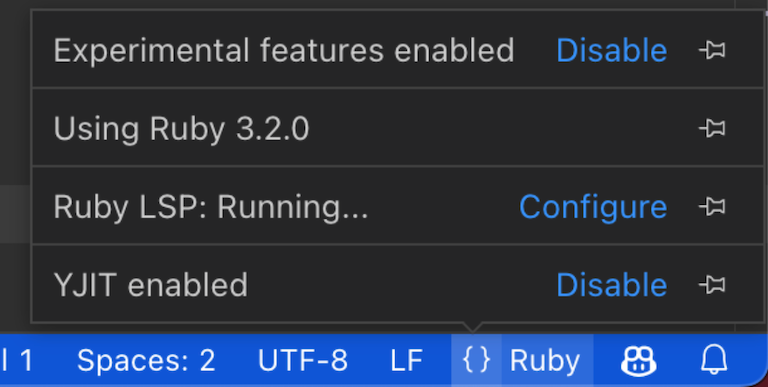
That’s why recent Ruby performance work matters so much to this project. YJIT, object shapes, and variable width allocation all make the Ruby LSP faster. If you use the Ruby LSP VS Code extension with Ruby 3.2 compiled with YJIT, the server uses YJIT by default.
The Ruby LSP is also watching YARP (Yet Another Ruby Parser) closely. Shopify is building YARP to replace the current parser with two capabilities that matter for tooling: portability and error tolerance. A portable parser can be used from other languages, which enables high-performance tooling in whatever language fits. Error tolerance is equally critical: during normal coding, code is repeatedly in an invalid state. An error-tolerant parser lets the LSP keep offering features even while the user has unfinished syntax, while still reporting errors and suggesting fixes.
Getting Started with VS Code
These instructions are VS Code-specific, but the Ruby LSP works with any editor that supports the LSP protocol. For the latest setup details, consult the extension documentation.
- Install the extension from the marketplace or directly within VS Code.
- If you use a Ruby version manager like rbenv, configure the extension to use it.
- Add the ruby-lsp gem to your project’s bundle.
- That’s it. You can check status and configuration in the language status item just before the “Ruby” language mode.
What Comes Next
Delivering responsive interactions on large codebases and adding richer Rails, GraphQL, and tool-specific features requires addressing three areas.
Parallelism
Meeting language server performance requirements without parallelism will be hard. As more features land, the server receives larger batches of requests. If the queue grows faster than the server processes it, the editor lags. Most requests are independent, so running several at once could keep up with the increasing request volume once more of the specification is implemented.
Codebase Indexing
Several LSP features require knowledge of the whole codebase, not just the open file. Go to Definition needs to know where every method and constant is declared. Hover, Signature Help, and Workspace Symbols all benefit from a project-wide index as well.
The Ruby LSP will need to build and maintain such an index, including every constant and method in the project’s files. That means building the initial index, syncing when files change, and possibly caching to avoid a full rebuild each time the LSP activates.
Plugins
Tool- and framework-specific functionality is a natural next step. For Rails, for instance, the Ruby LSP could offer hot reload on save, jumping from a controller action to its route, or showing column information when hovering over a model. But maintaining that kind of specific support for every tool in the main codebase isn’t scalable—it would complicate the repository and bottleneck any tool wanting a custom editor experience.
The answer is a plugin system that lets tools and frameworks export editor features from their own codebases. The Ruby LSP would load these plugins to extend existing features with tool-specific behavior, similar to how Rack middleware layers together. In the Rails example, the plugin would be exported from Rails itself.


