What native WordPress custom fields are
Custom fields attach arbitrary key/value data to posts, pages, and custom post types — metadata stored alongside content. Examples include a subtitle hold a short string, header_color_override storing #e52e05, or property_url storing a link. Together with custom post types, custom fields are what make WordPress a CMS out of the box rather than only a blogging tool. On a real-time site, dozens rely on them: CSS-Tricks uses more than 100. They get reserved for relatively simple things — they’re core, stable and unlikely to create compatibility or technical-debt problems.
The main payoff is templating freedom. For a real estate listing with address, price, bedrooms and bathrooms, you can instead keep each fact as its own chunk of data and echo it wherever your page template needs it — far more flexible than stuffing everything into post content.
The editor UI, and why it may be hidden
Custom fields are edited in the post editor: enter the Key (labelled “Name”) and Value, then click Add Custom Field. Once added, the field can be updated or deleted via the buttons beneath the key. Keys you've used before populate a dropdown for quick reuse.

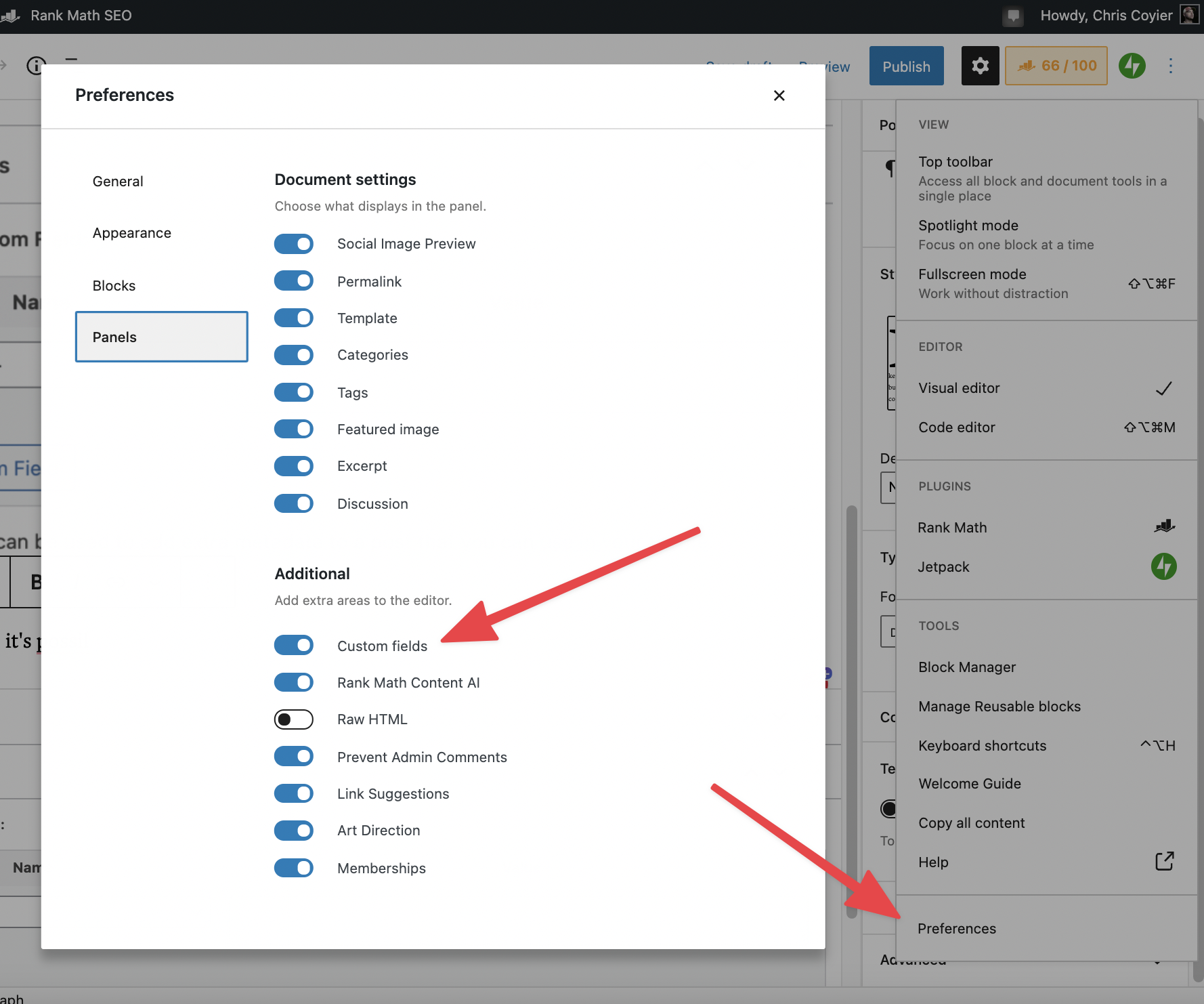
If the panel is missing, Post-options droplist → Preferences has a toggle for the fields. Turn it on. The Advanced Custom Fields plugin also disables the native UI; ACF ships a filter to turn it back on for sites using both (see below).
Two practical limits. The dropdown of existing keys caps around 30 entries; with 100+ keys it will look arbitrarily truncated, though a filter in functions.php or a plugin raises the limit.
function customfield_limit_increase( $limit ) {
  $limit = 150;
  return $limit;
}
add_filter( 'postmeta_form_limit', 'customfield_limit_increase' );
In the Block Editor there isn't a standardised way to display field values inside blocks — a known, unresolved gap. Field meta can also duplicate itself across repeated post saves; an ACF filter helps suppress that.
Reading fields in templates
Use the Custom Fields API. The most common call fetches one value:
<?php echo get_post_meta($post->ID, 'mood', true); ?>The trailing true means “return a single value” — even if several fields share the name. Pass false to get all of them:
<?php $songs = get_post_meta($post->ID, 'songs', false); ?>
<h3>This post inspired by:</h3>
<ul>
  <?php foreach($songs as $song) {
    echo '<li>'.$song.'</li>';
  } ?>
</ul>
For debugging, you can dump every field; note that this skips fields whose names start with an underscore:
<?php the_meta(); ?>Querying works too: WP_Query or get_posts and a meta_query return the posts whose fields match.
<?php
$the_query = new WP_Query(array(
  'meta_key' => 'example_field_name'
  'meta_value' => 'example_field_value' // as a string!
));

if ($the_query->have_posts()) {
  while ($the_query->have_posts()) {
    $the_query->the_post();
    echo '<div>' . get_the_title() . '</div>';
  }
}

wp_reset_postdata();
The snippet limits itself to matching on convention — you can read it as the shape of a meta_query: same field named with where its value is example_field_value. The two conditions can be applied independently, and meta_query supports comparison operators, numeric values, and multiple fields at once.
Five use cases in production
- Supplementary info. A
running_timefield stores a video's duration for display anywhere in the template. - Feature toggles. A
should_toggle_commentsfield set totruemakescomments.phpwrap the comment<ol>in a<details>element so the thread starts collapsed. - Pull quotes. A
category-fancypants.phptemplate for a special category archive pulls amain-pullquotefield from each post — used for the annual end-of-year series. - Custom feeds. Besides the stock WordPress feeds, CSS-Tricks runs separate video and newsletter feeds; the video feed depends on custom fields to emit the podcast data it needs.
- Sponsor bylines. A
showSponsorAuthorfield controls whether the author is visibly shown on sponsored posts, which are otherwise always marked as sponsored.
Native fields versus ACF
The native interface is thin and rough-edged, and feels less than first-class. Advanced Custom Fields keeps the core idea — attach data to content — but lets you model data with types instead of one string-based key/value pair, and builds real UI on top, including Block Editor integration. A podcast site is the classic case: each episode post might need guests, duration, MP3 location, sponsor and time-jump links; with that many fields you're better served by ACF. For sites mixing both, remove ACF's suppression: add a small filter — the one ACF provides in its docs — in functions.php or a functionality plugin:
add_filter('acf/settings/remove_wp_meta_box', '__return_false');A note for plugin developers
Plugins often store post-specific data in the custom fields table, which is acceptable — but name fields with an underscore and a plugin prefix. Underscore-prefixed fields are hidden from the editor UI, so the manual interface stays clear of plugin noise. The exception is data users are meant to control; leave those fields unprefixed. For instance, internal post metadata might be stored as a single prefixed key:
_bobs_plugin_internal_value_1 // Hidden in UI
_bobs_plugin_internal_value_2 // Hidden in UI
bobs_plugin_config  // Shows in UI

_adrians_plugin_internal_value_1  // Hidden in UI
_adrians_plugin_internal_value_2 // Hidden in UI


