
Polyfills: Costs and When They're Worth It
Polyfills have a long history on the web. They are code that checks for a feature's availability in a browser and, when missing, uses JavaScript to supply that functionality. An early example is Matchmedia.js, which provided a shim for the matchMedia method—a technique that is unnecessary today since matchMedia is supported in nearly every browser in use.
At first glance, polyfills seem like an obvious necessity for supporting a broad user base. But deciding whether to use one depends heavily on how widely a feature is actually available. That's where the Baseline framework becomes useful. While Baseline does not explicitly tell you to use or skip polyfills, its clarity on feature support across browsers gives you grounds to be far more selective about adding them.
The reasons for that selectivity become clear when you look at the actual costs polyfills introduce.
The Hidden Costs of Polyfills
Every polyfilled feature carries more overhead than the same feature natively implemented in a browser. Those costs accumulate as you add more polyfills to an application:
- Performance. Polyfills run in JavaScript. Extra script can block rendering and tie up the main thread, and browsers spend additional time parsing and compiling that code. These can show up as long tasks that interfere with key interactions.
- Accessibility. When a polyfill fails to fully follow the specification it's emulating, it can affect the accessibility tree in ways the feature's native implementation would not.
- Fidelity. Polyfills often cannot reproduce all aspects of the feature they shim, which can constrain how much of the feature is usable or, worse, produce surprising and inconsistent user behavior.
The container queries polyfill is a good example. Container queries apply CSS rules based on the size or state of an element, while media queries respond to the viewport. To emulate container queries, the polyfill relies on ResizeObserver and MutationObserver. However, ResizeObserver callbacks run just before the browser paints its next frame, which increases presentation delay—a direct concern when optimizing a page's Interaction to Next Paint (INP).
Not every polyfill leads to broken experiences or incomplete implementations, but the risk grows the more polyfills you layer on top of one another.
How Baseline Reframes the Decision
Historically, determining whether a feature was safe to use was a messy process, even with data sources like browser-compat-data powering tools such as Can I Use. Baseline simplifies that by categorizing features into three statuses:
- Limited availability: Support is missing in at least one major browser.
- Newly available: All major browsers have shipped support within the last 30 months.
- Widely available: Support has been in all major browsers for more than 30 months.
Importantly, Baseline does not factor polyfills into its classification. A feature that could be polyfilled everywhere is still Limited if browsers haven't shipped native support. The classification only reflects genuine browser implementation. That distinction matters because it tells you which features are polyfill-free safe bets and which deserve a closer look.
Define your Baseline threshold. Every feature that crosses the Widely available line can be used directly, without polyfills, which shrinks the consideration set to features that are Newly available.
Choosing Your Baseline Threshold
Newly available does not mean universally used. Even in 2025, browsers update automatically for most users, but it can take a while for every user to receive an update, especially when a device's browser version is tied to its older operating system and users stop making updates to that OS at some point.
Baseline groups features into yearly buckets—Baseline 2025, Baseline 2024, and so on—until enough time passes for a set to be reclassified as Widely available.
To make smart decisions about this, the best source of user and feature-support data is your own site's data. RUMvision and RUM Insights are two services that show the percentage of users supporting a given Baseline feature set by year. RUM Insights indicates that Baseline feature sets within the Widely available window tend to be supported by 98% or more of us on the web, and the earliest such sets achieve near 100% support.
There isn't a one-size-fits-all percentage for when you can adopt a feature without polyfills. But the closer a feature comes to near-universal support, the nearer you are to skipping the shim. As a rough rule of thumb, if about 98% to 99% of your users run a browser that natively supports the feature, you can usually rely on it directly—though you should still decide whether the remaining few percent are acceptable to leave behind. By adopting a set of Baseline thresholds that reflects real user data, you cut down on the number of polyfills you carry, and you cut down on the cost, risk, and complexity that go with them.
Choosing whether to polyfill a missing feature
Deciding whether to use a polyfill is ultimately a judgment call that depends on your specific application's needs. Because polyfills can carry user experience downsides, you should aim to use as few as possible. Your decision should be informed by whether a feature has reached Baseline Newly or Widely available status.
Imagine you want to use a Baseline Newly available feature, but your analytics show that 95% of your users support it. That means 5%—one in twenty users—will be in a browser that doesn't. This doesn't automatically mean you need a polyfill. Whether you need one depends on the feature itself and the impact of it being missing for a user.
It can help to consider the potential negative user experience consequences for users in unsupported browsers, and whether those consequences justify adding a polyfill.
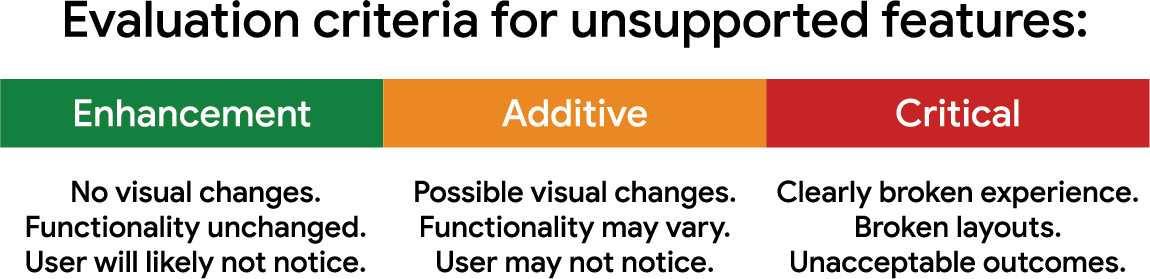
One way to evaluate a feature is to classify it into one of three categories:
- Enhancement: The feature improves the experience without causing visual changes or loss of functionality if unsupported. Users likely won't notice it's missing, so a polyfill is probably unnecessary.
- Additive: The feature adds a benefit that may affect a page's look or behavior, but not in a way that causes serious problems. Users might not notice unless they compare across browsers. If a polyfill exists, lean toward skipping it, especially if you're already polyfilling other features—each additional polyfill adds performance overhead.
- Critical: The feature provides essential functionality. If it's unsupported, users will experience broken layouts, JavaScript errors, or other unacceptable outcomes. In this case, you either polyfill the feature or avoid it and find a workaround.
It can be difficult to sort features into these buckets, but some practical examples help:
- Enhancement features often relate to performance. Things like
fetchpriorityand HTTP/3 can make pages faster, but if a user's browser doesn't support them, they generally won't see adverse effects. Stakeholders may be comfortable with most users benefiting without leaving a small minority with a noticeably worse experience. - Additive features typically improve visual appeal. Color spaces and functions and subgrid are good examples—users may not notice their absence. Brand-conscious stakeholders might have concerns, but they may accept the trade-off if the experience isn't broken.
- Critical features are non-negotiable. The HTML
<datalist>element is one example, since its absence can create a poor experience. Stakeholders typically won't accept adoption of features that break the experience in some browsers.
As a general rule of thumb, here's how Baseline status guides your choice:
- If a feature is Widely available, don't reach for a polyfill—unless your user data explicitly says otherwise.
- If a feature is Newly available, it's likely to have broad support, but you should check user data to determine which threshold minimizes problems. Support will improve to nearly 100% over time.
- If a feature is Limited availability, it's most likely to break experiences for some users. Approach it with caution, even if a polyfill is available.
Should you ever use Limited availability features?
Yes, but with important caveats:
- Limited availability features are never guaranteed to advance to Newly available or beyond. Carefully consider what that means for your users.
- If you adopt Limited availability features with polyfills, you're sending extra bytes to users—unless you conditionally load polyfills only for those who need them. Even then, those users pay a performance cost.
- Polyfills for Limited availability features may not faithfully replicate the native implementation. This can affect functionality and, in some cases, accessibility.
- Features that are only implemented in one browser are subject to spec changes when other browsers begin implementation. Your code and any polyfill can fall out of sync with those changes.
Unless your users are locked to a single browser engine, sticking with Baseline Newly—and especially Widely available—features is the recommended approach. You'll spend less time worrying about feature support and more time using the features, freeing up time to solve other problems.
A framework for deciding
The decision to use polyfills isn't clear-cut. It requires weighing benefits and risks. Here's a rough set of guidelines:
- Recognize that polyfills come with performance and accessibility costs, and they may not perfectly replicate unimplemented web features.
- Set your Baseline threshold based on data from your users when possible. If you don't have that data, Baseline Widely available is a solid starting point. You can also consult RUM insights data for guidance.
- Assess how many users could be impacted if their browser lacks the features you want, and how severe that impact would be.
- Work with stakeholders to determine which features align with your project's goals and business needs.
- If you must use Limited availability features, evaluate your audience and the risks. Unless users are locked to a single browser engine, you can't guarantee compatibility—even with a polyfill.
These considerations are why polyfills aren't part of Baseline itself. Baseline tells you which features are supported across all major browser engines. It's up to you to understand how many of your users can use those features and make decisions based on your audience. Baseline Widely available is a strong default and often provides the broadest support for users.
As the web platform matures, more features are becoming interoperable and broadly supported. That trend means more opportunities to use platform features with fewer polyfills. As those features advance through Baseline, you'll find more room to adopt them with less overhead, solving problems with native functionality instead of shims.


