
The Mechanics of Web Text Editing
Building a text editor for the browser involves more than just placing an input field on a page. The engineers at Readymag, a browser-based design tool, discovered this when developing their text widget—a core feature that allows users to style text with CSS properties without writing code. The challenge lies in the vast number of processes hidden behind what appears to be a simple text-entry box.
There are several standard approaches to implementing text input on the web. Simple input and textarea elements handle basic text entry but lack rich formatting capabilities. For styled editing, the contenteditable attribute makes almost any element editable and enables text styling. Taking this further, document.designMode allows editing of an entire document at once, even within an iframe. Readymag chose contenteditable because it provides the full suite of text-editing features needed to let users apply CSS styling directly to highlighted sections of text.
Leveraging Advanced Typography
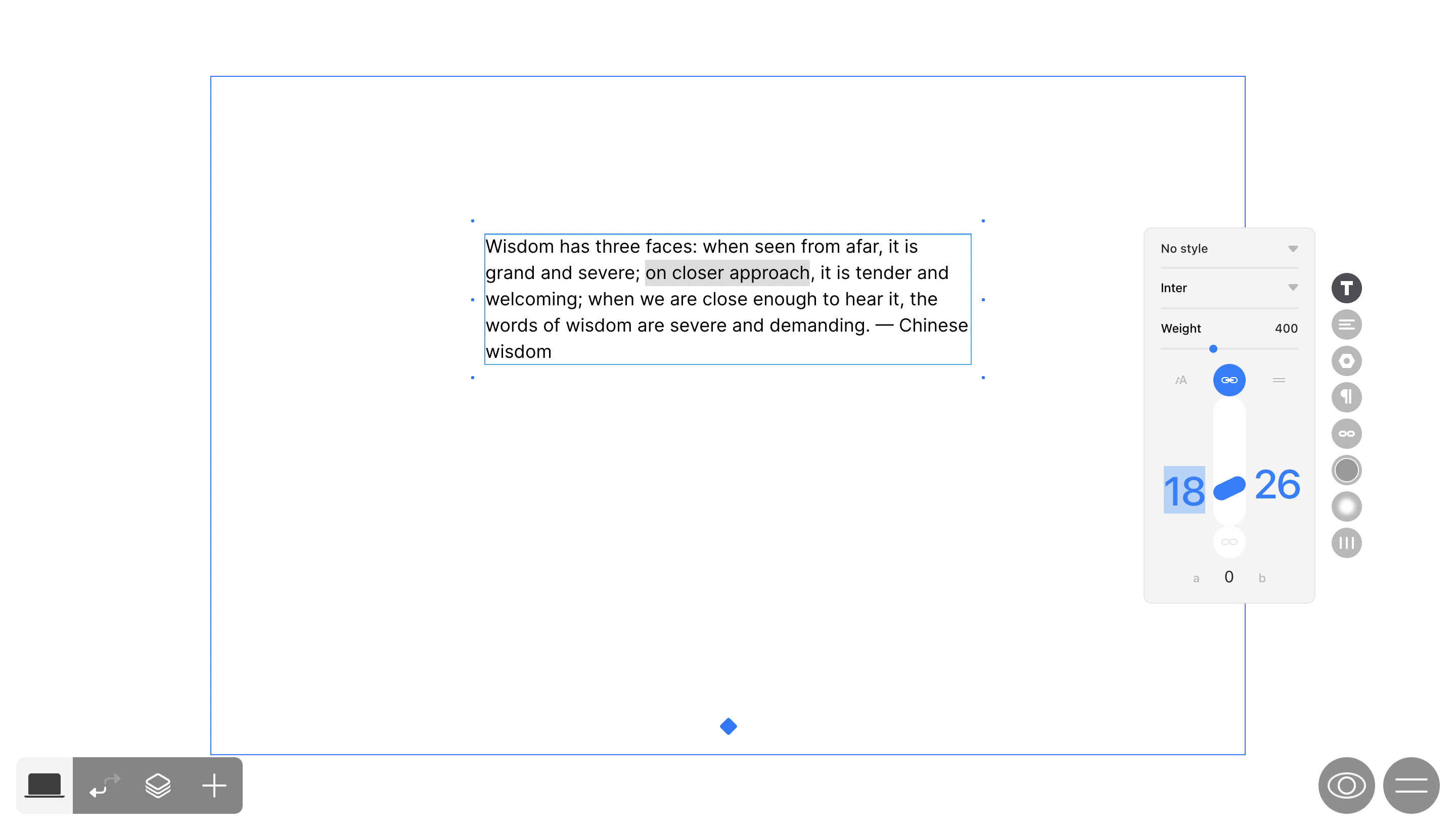
Beyond the standard font, color, and decoration properties, modern text editors can expose OpenType font features, including ligatures, stylistic sets, and fractions. These are controlled through the font-feature-settings CSS property. Variable fonts extend these possibilities via the font-variation-settings property, allowing users to adjust continuous axes like weight (wght) or width (wdth) with any value within a defined range, rather than being limited to discrete fixed values.
To give users access to these advanced features, the editor first needs to know what the font supports. All this data lives within the font file itself, which is organized into tables. Two are particularly relevant:
- Glyph Substitution Table (GSUB): Contains a list of glyph-rendering data. The
tagfield within this table names a specific font feature (like ligatures), confirming it is available for that font. This tag can then be used directly in thefont-feature-settingsproperty. - Font Variations Table (fvar): Represents a font's variable properties. Each object in this table defines an axis (such as weight or width), specifying its minimum, maximum, and default values. This information is used with the
font-variation-settingsproperty.
Collecting data from these two tables allows the editor to populate its styling controls, enabling users to apply these complex typographic properties without ever touching code.
Handling Keyboard Interaction and Cursor Movement
Navigating text with arrow keys presents an unusual challenge when hidden characters are involved. To show formatting marks like non-breaking spaces and line breaks, the widget initially used SVG icons inserted directly into the text. These elements blocked the browser's default cursor movement. The fix was to render these indicators using a span with a :before pseudo-element. The browser then treats the icon as text, preserving smooth arrow-key navigation.
Keyboard shortcuts for pasting are also critical. The standard Cmd/Ctrl + V paste often includes HTML data from sources like Pages or Google Docs, which the editor can parse to retain the text's original formatting. The HTML can be retrieved from the clipboard with:
// https://www.w3.org/TR/clipboard-apis/#reading-from-clipboard
document.addEventListener('paste', (e) => {
  const text = e.clipboardData.getData('text/plain');
  const html = e.clipboardData.getData('text/html');

  handlePaste();
});
Note that the Cmd + Shift + V shortcut must be handled separately to paste plain text, letting the destination's styles take precedence.
Managing Text Selection and Focus
Maintaining a text selection when a user interacts with other parts of the interface can be difficult. For example, if a user selects a word and then clicks a button to change the font size, the focus—and therefore the selection—is lost. Readymag solved this by wrapping the text editor in an iframe. An iframe has its own global window object, so as long as the user's text selection is within that iframe, it persists even when the focus of the parent page moves to a different control.
Optimizing for Performance and Accessibility
Maintaining a high frame rate is vital when users type quickly or adjust font sizes, especially since Readymag syncs text styles between its desktop and mobile viewports. To avoid blocking the main thread with these calculations, the editor relies on two browser APIs. requestAnimationFrame is used for processes that must run on every screen refresh, like animations, while requestIdleCallback handles less urgent, more resource-intensive tasks when the browser has free time.
Building an accessible text editor requires adherence to the Web Content Accessibility Guidelines (WCAG). Because Readymag is itself a tool for building publications, it must also follow the Authoring Tool Accessibility Guidelines (ATAG) to ensure the content it produces is accessible. This process is ongoing, and Readymag has published an accessibility checklist to guide the development of its projects.
Key Takeaways for Editor Development
- Plan your layout architecture in advance, identifying which features you need and how elements will interact.
- Use visual testing in addition to unit tests; automated snapshots can show correct CSS output for a block, but may not visually match the expected result.
- Test in multiple browsers, as support for the same styles can vary significantly.
- Implement feature flags to safely develop and roll out new capabilities.
- Monitor FPS during text entry and defer time-consuming operations off the single thread where possible.
- Don't be afraid to experiment to find the most effective technical solution.
Typography Tooling And Resources
Getting typography right in a web-based text editor requires more than just picking a font. These resources cover everything from OpenType feature control to variable-font support and low-level font parsing:
- “The Complete CSS Demo For OpenType Features” — Sparanoid. A hands-on CSS reference for controlling OpenType features such as ligatures, kerning, and stylistic sets.
- “Introduction To Variable Fonts On The Web” — web.dev. A primer on variable fonts, including how to use their axes for dynamic weight, width, and optical sizing.
- “Awesome Typography” — Joël Galeran. A curated list of typography-related libraries, tools, and resources for developers.
- “Variable Fonts” — Nick Sherman. A showcase of variable-font specimens and technical details.
- Fontkit — a Node.js and browser library for advanced font parsing and layout, useful for editors that need precise glyph metrics or complex text shaping.
- OpenType.js — a JavaScript library for reading and writing OpenType and TrueType fonts, letting you inspect tables and generate font data programmatically.
Related Engineering Reading
Beyond typography, several recent articles touch on adjacent concerns for editor builders, including performance measurement and animation techniques:
- An introduction to CSS scroll-driven animations, covering scroll and view progress timelines, which can help with scroll-linked UI in an editor.
- An analysis of “tight mode” and why browsers can report different performance results, a consideration when benchmarking text-rendering paths.
- A guide to on-device AI for building faster, more private applications—potentially relevant if you plan to add offline analysis or suggestions to your editor.
- A discussion on embracing introversion in UX, which offers perspective on designing for user focus and minimal distraction.



