
Baseline targets, explained
Baseline is the web platform's compatibility framework: when a feature ships in every browser it becomes "Newly available," and after 30 months it graduates to "Widely available." A Baseline target is a defined group of features you choose to support, based on that status. The choice comes down to two kinds of targets:
- Moving targets — such as Baseline Newly available or Baseline Widely available — have a feature set that changes over time as browsers ship new versions. These suit projects where you want supported features to evolve automatically.
- Fixed targets — typically tied to calendar years, e.g. Baseline 2023 — have an immutable feature set. A fixed target never gains features after its year ends, which makes it predictable but also means it can age. If you use one, periodically re-evaluate whether it still fits.
The motivation for picking a target is straightforward. Compatibility worries slow feature adoption on the web, and Baseline answers not just whether browsers support a feature, but when you can safely use it. A chosen target lets you adopt everything within it without checking each feature individually.
Choosing a target with real user data
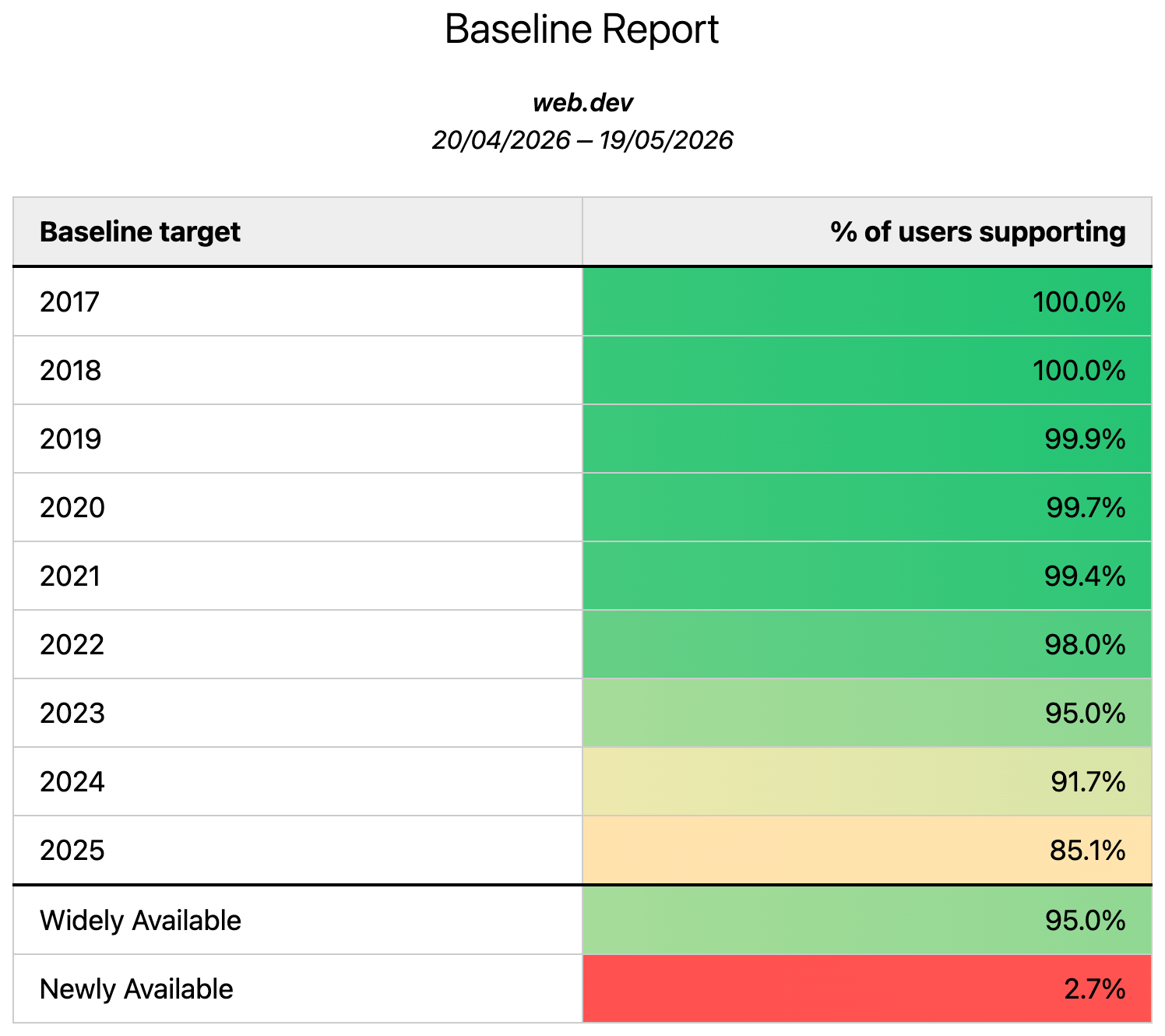
Whenever possible, base the decision on data from your actual audience. Real User Monitoring (RUM) data shows how Baseline targets map to the browsers your visitors use. If you use Google Analytics, the Google Analytics Baseline Checker provides a free way to generate this picture: authenticate with read-only access to your Analytics property, select the property, and the tool returns a breakdown of support for each Baseline target.
Other RUM tools are starting to build Baseline support in directly. RUMvision, for example, includes a dashboard showing what percentage of your audience supports each Baseline year.
If your RUM tool lacks a Baseline report
When your analytics provider doesn't have a Baseline-specific report but does expose browser version data, you can join that data with mappings from the baseline-browser-mapping module on GitHub. The module's getAllVersions() function maps browser names and versions to their Baseline year and Widely-available support status, and accepts input as arrays, keyed objects, or CSV. The Google Analytics Baseline Checker itself uses this module to combine analytics data with Baseline targets.
The same output is published as hosted JSON and CSV files, refreshed daily. The all_versions_with_supports.csv file is a practical resource to match against your analytics' browser version data, with these fields:
browser: the browser name used bybaseline-browser-mappingversion: the browser version, either a major number or major.minor, depending on the browseryear: the Baseline year feature set the version supports; pre-July 2015 versions showpre_baselinesupports:widely,newly, or empty — versions supporting Newly available also support Widely availablerelease_date: the known release date of that browser versionengine: the engine for downstream browsers (currently Blink-based only, others may follow)engine_version: the Chromium version a downstream browser implements, used to determine its Baseline feature set
Because these files change as browsers release and support status shifts, refresh your local copy on a daily basis.
No real user data? General guidance still applies
If you cannot get RUM data for your site, RUM Archive Insights offers a general picture of support for Baseline targets, filterable down to country level. Though not specific to your users, it demonstrates that some assumptions are generally safe:
- Recent targets — the current or previous year — will have the least support, but that support grows over time.
- Older targets, especially Baseline Widely available, will be well supported. If in doubt, Widely available is a strong default since it keeps moving forward.
- Targets well beyond the 30-month window have the broadest support, and matter for strict SLA requirements.
In practice, even a target five years old likely unlocks features you are not currently using — and possibly features you already use, just wrapped in polyfills that may no longer be necessary.
Enforcing your Baseline target in the build
Browserslist is the standard way to declare which browsers your project supports, and tools like Babel and PostCSS rely on it to decide what needs transforming or polyfilling. Baseline queries are now valid Browserslist queries, so you can specify your chosen target directly and let your build toolchain act on it. Use Baseline with Browserslist walks through the setup.
Features outside your target
Your Baseline target defines a floor, not a ceiling. You may well want a feature that falls outside it, and Baseline deliberately doesn't prescribe what to do — that depends on the kind of site. An ecommerce or B2B site might tolerate a lower support threshold and address issues as they surface, while a government site might hold to a much stricter bar.
One useful rule: not all web features fail the same way. It helps to bucket a feature by its failure mode:
- Enhancement — unsupported browsers get a degraded but not broken experience, possibly hardly noticeable. Example:
loading="lazy". - Additive — the feature brings noticeable styling or functionality benefits, but absence isn't obvious unless compared side by side. Example: Subgrid.
- Critical — without it, the user experience is broken or negative. Example: the File System Access API as the core of an app.
You may find that some features outside your target actually have better support than expected. Tools like Can I Use can check individual feature support against your analytics data, and RUMvision offers feature-level drill-down. The point of a Baseline target is to reduce the pool of features requiring that kind of scrutiny: everything inside needs none, and any feature outside worth adopting can be evaluated on its own merits, whether that means polyfilling or progressive enhancement.


