
Why gh pr now works with triangular Git setups
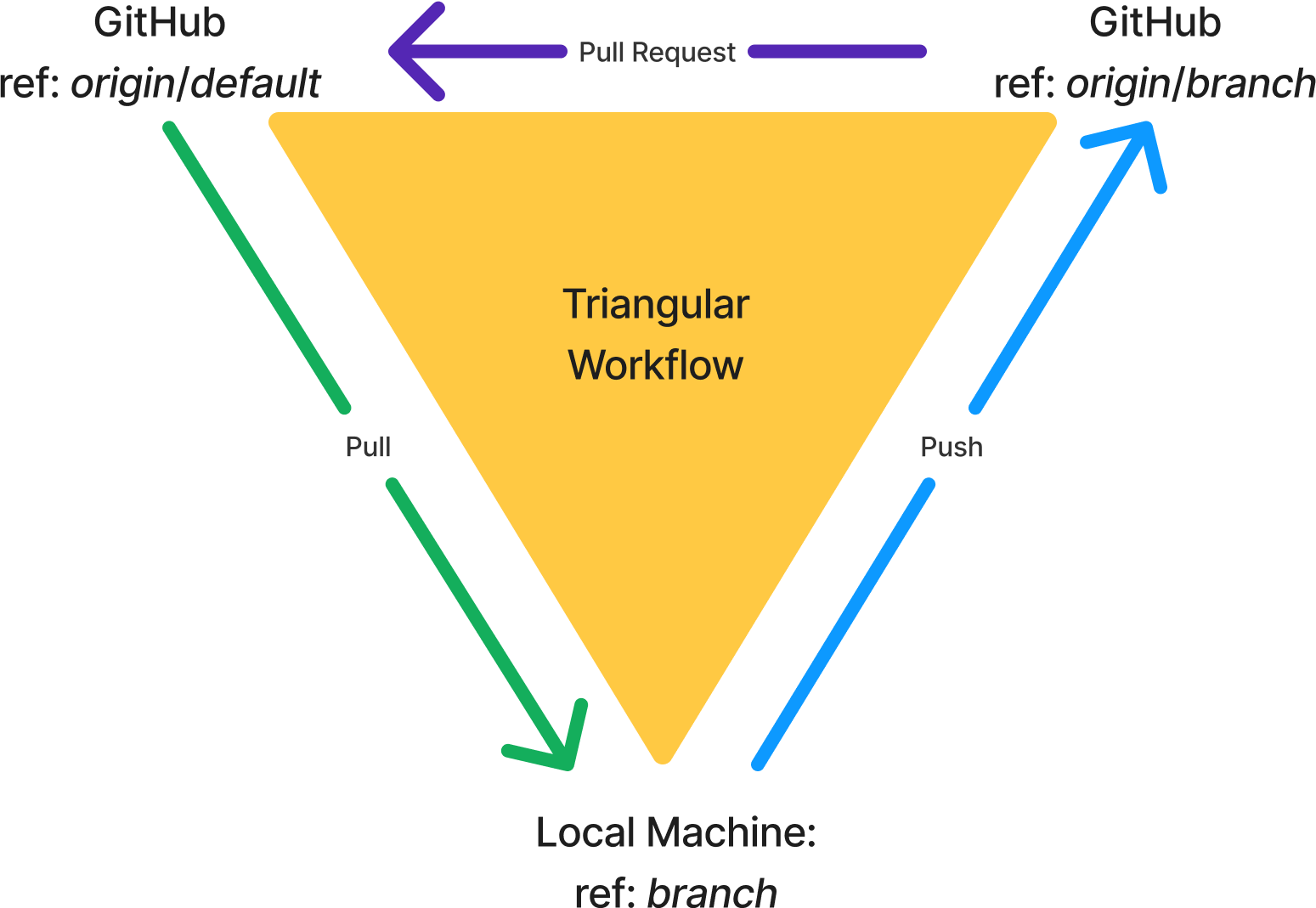
Most developers work in a centralized Git workflow: you branch, commit, and push to the same branch on the shared remote. But there are times when you want to pull updates from one branch while pushing your own changes to another. That is a triangular workflow, and it has been awkward to manage from the GitHub CLI—until recently.
Improvements shipped in GitHub CLI v2.71.2 make gh pr commands respect whatever push and pull configuration Git itself understands. If you are using a fork, or you simply pull from your remote's default branch into a feature branch without rebasing or merging manually, those commands now behave predictably.
This request has been open for roughly four and a half years. Understanding the fix means revisiting how Git models refs, pushes, and pulls—and how that maps onto the way the CLI used to guess the target of an operation.
Git's building blocks: refs, pushes, and pulls
A ref names a repository and branch, for example origin/main for a remote or main for a local branch. Loosely, a dark purple box in Figure 1 represents a GitHub remote ref; a green box represents your local machine.
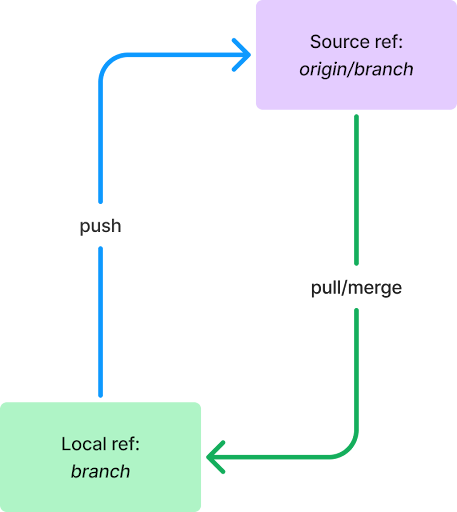
Pushing and pulling are the same action seen from two endpoints. If I push a commit to your repository, you are pulling that same commit from mine. To avoid ambiguity, this article calls the ref that sends changes the headRef and the ref that receives them the baseRef.

For a given branch, its pushRef is the headRef of a push operation, and its pullRef is the baseRef of a pull operation. Git exposes the former via the @{push} revision syntax, which you can inspect with:
git rev-parse --abbrev-ref @{push}That returns something like origin/branch when Git can determine the ref.
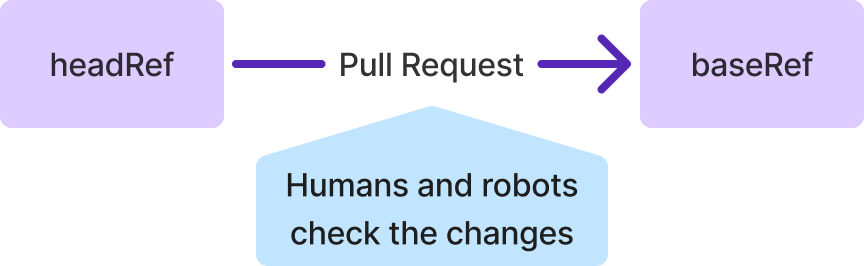
A pull request is simply a pause in that integration: instead of a merge running immediately, you request that one ref pull changes from another, letting humans and CI inspect the code first.
Centralized vs. triangular workflows
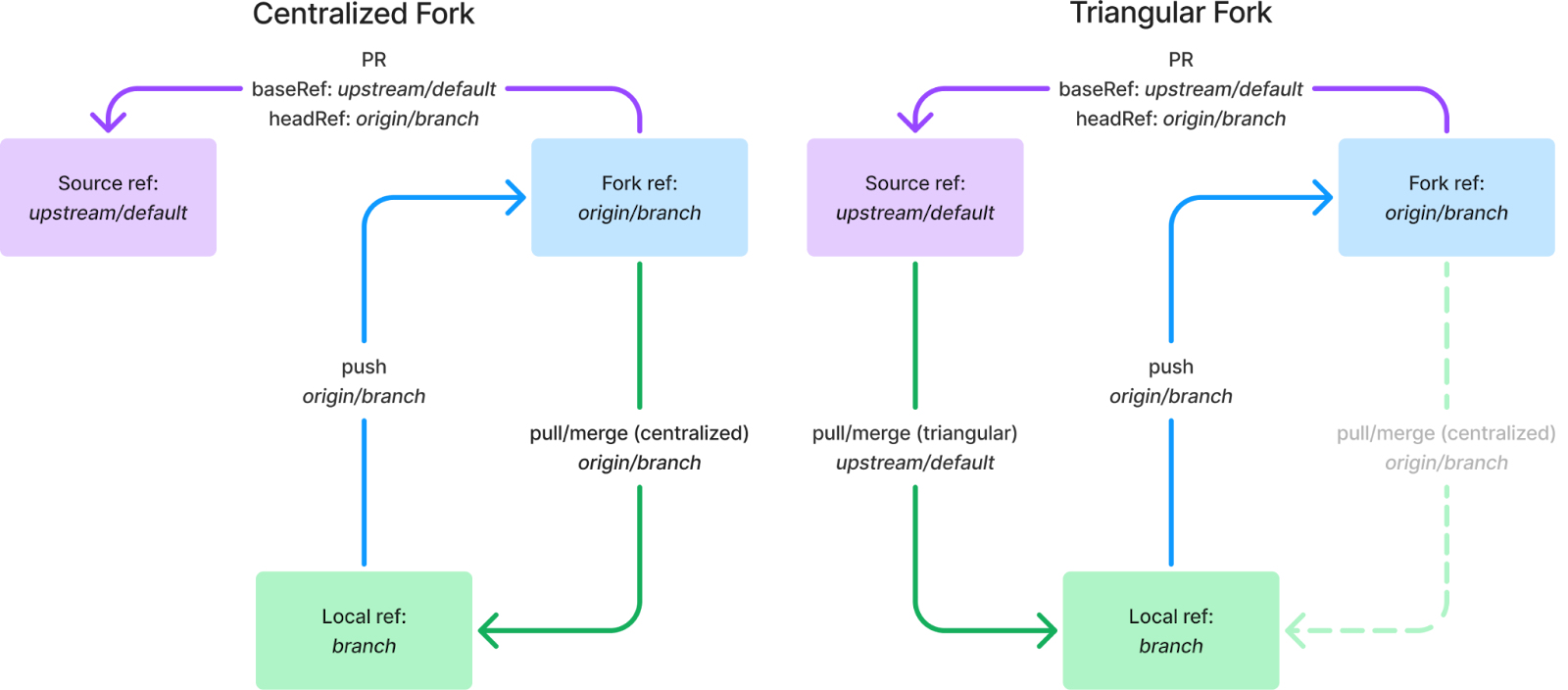
In a centralized workflow, a given branch pushes to and pulls from a remote ref with the same name. In a triangular workflow, the pushRef and pullRef point at different refs. Three common shapes exist.
First, you can pull from the default branch of a repository into your local feature branch, but push your own branch back to the same remote. This avoids manually running git merge origin/main or git rebase origin/main to stay current.
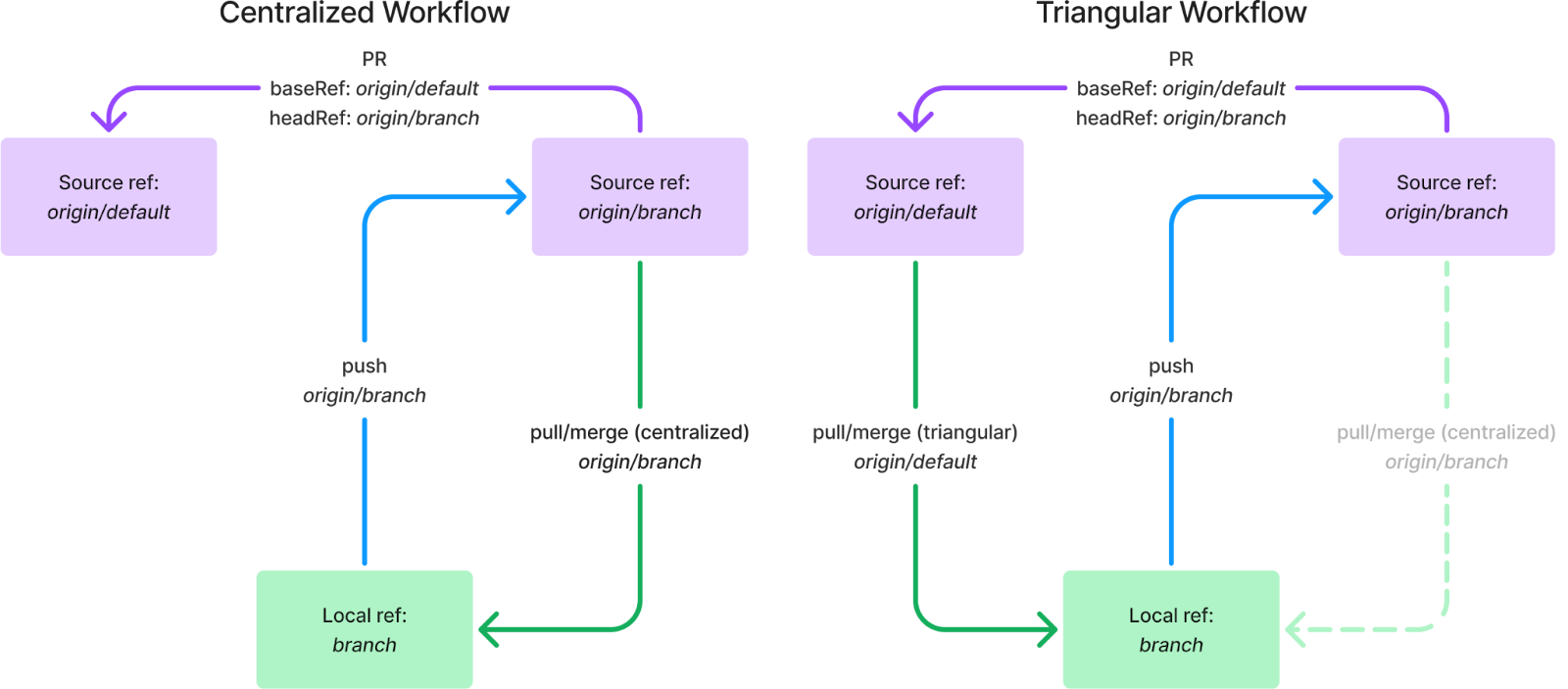
In that configuration, for a pull request the headRef is the pushRef of the local branch, and the baseRef is the pullRef of the local branch.
Second, you can set up the same triangle across two remotes. Fork-based development is the canonical case, where origin points at the fork and upstream points at the source repository.
How your Git config expresses these workflows
Centralized configuration is what most clones produce by default. In the file below, the [remote "origin"] block names a URL, and the [branch] blocks use remote and merge keys to form a branch's pushRef and pullRef.
[remote “origin”]
    url = https://github.com/OWNER/REPO.git
    fetch = +refs/heads/*:refs/remotes/origin/*
[branch “default”]
    remote = origin
    merge = refs/heads/default
[branch “branch”]
    remote = origin
    merge = refs/heads/branch
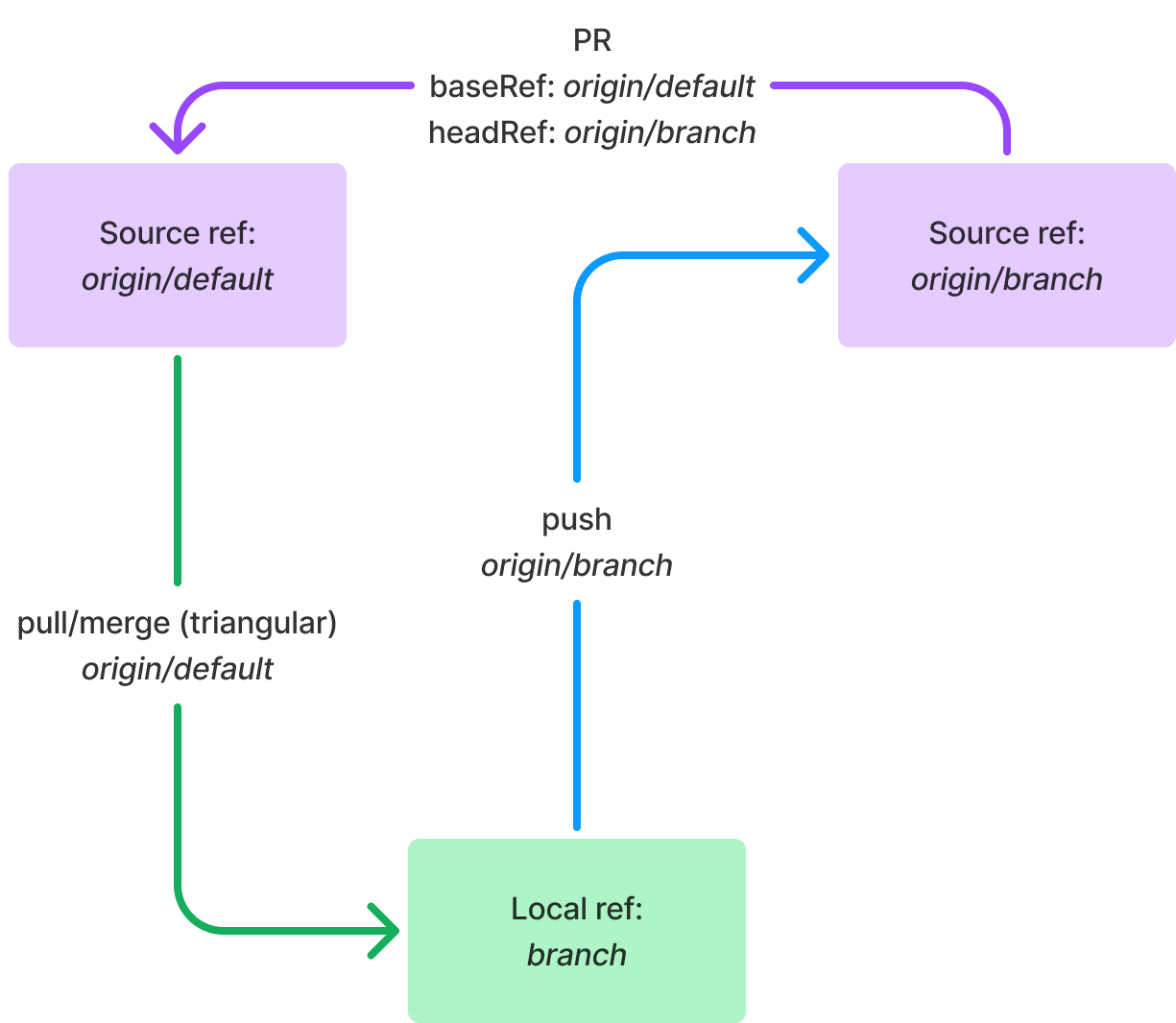
A triangular branch workflow is created by pointing the merge key at a different branch. In the figure below, the pullRef becomes origin/default while the pushRef remains origin/branch.
[branch “branch”]
    remote = origin
    merge = refs/heads/default
Triangular fork configurations
Fork setups involve two remotes, so the configuration typically differs. Simply setting a branch's remote to upstream recreates a centralized workflow. Instead, you have two choices.
Set a branch-specific pushremote key. Combined with remote and merge, this directs pulls to upstream/default while pushes go to origin/branch.
[remote “upstream”]
    url = https://github.com/ORIGINALOWNER/REPO.git
    fetch = +refs/heads/*:refs/remotes/upstream/*
[remote “origin”]
    url = https://github.com/FORKOWNER/REPO.git
    fetch = +refs/heads/*:refs/remotes/origin/*
[branch “branch”]
    remote = upstream
    merge = refs/heads/default
    pushremote = origin
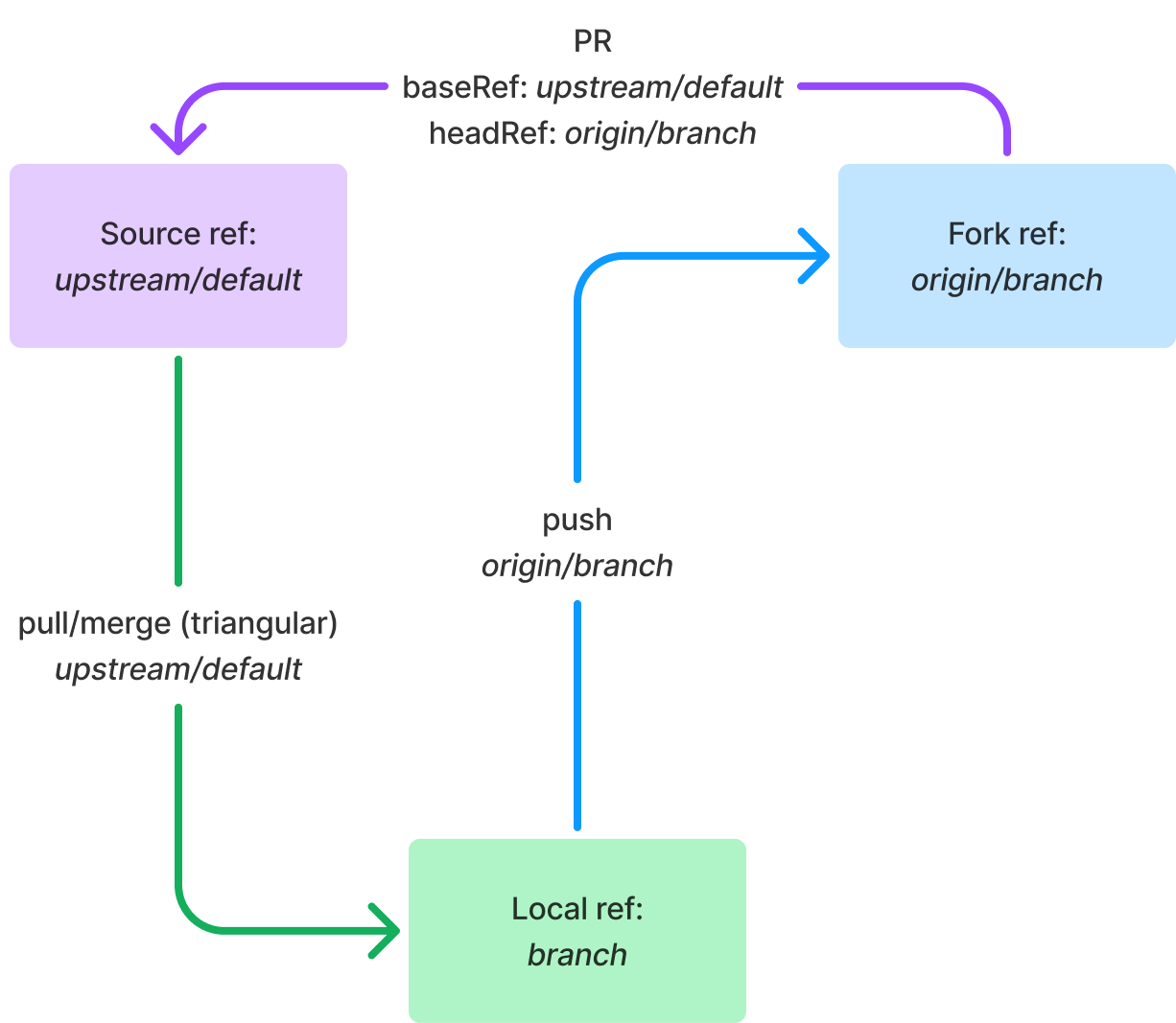
Alternatively, set a repository-wide remote.pushDefault. All branches then assume the same push behavior. If both pushremote and remote.pushDefault are present, the branch setting takes precedence.
[remote]
    pushDefault = origin
[branch “branch”]
    remote = upstream
    merge = refs/heads/default
What the CLI change actually does
Historically, gh pr did not resolve pushRefs and pullRefs the way Git did, a design choice too involved to detail here. The practical change is straightforward:
When determining the pull request for a branch, the CLI now honors@{push}first, then a branch'spushremote, then the repository'sremote.pushDefault.
In effect, if your Git config describes a pull request with your branch's pullRef as the request's baseRef and its pushRef as the headRef, gh pr commands match your git push and git pull behavior.

Triangular workflows land in the GitHub CLI
After four and a half years of requests, the GitHub CLI now natively supports triangular workflows. The feature set landed across recent releases and lets gh pr commands respect the same remote and branch configurations that plain Git does — no more fighting the CLI when your repository is set up to fetch and push through different remotes.
The work spans the gh pr create, gh pr checkout, and related commands. The driving idea is simple: the CLI should behave the way Git behaves. If your repo is configured with something like remote.pushDefault or specific branch-level pushRemote settings, the GitHub CLI now looks at those before falling back to its own opinionated remote resolution.
How remote resolution changes
The previous behavior was deliberately narrow. When you ran a command like gh pr create, the CLI would try to find the "default" remote by looking for names in a fixed order: upstream, then github, then origin, then any other remotes in an unstable sorted order. That heuristic works for many repositories, but it breaks down in triangular setups — famously the model where you fetch from upstream but push to your own fork at origin.
In those configurations, Git itself is already aware of the intended target. A user might have set remote.pushDefault to point at their fork, or configured branch.<name>.pushRemote for finer control. The GitHub CLI was ignoring all of that and guessing based on names alone.
The new logic checks the repository's Git configuration first. If a relevant pushRemote value exists — globally, at the remote level, or on a per-branch basis — the CLI respects it. Only when Git provides no such signal does the CLI fall back to its older named-remote ordering.
There is one nuance worth flagging. Some commands in gh are still opinionated about remote names and will resolve remotes in the order we mentioned earlier (upstream, github, origin, then a stable sort of remaining remotes). If you want to override that entirely, the convenience command is gh repo set-default [<repository>], which makes the CLI preferentially resolve that repository as the default remote for subsequent operations.
Testing and bug fixes along the way
Shipping this required coordinated effort across the team to understand how various Git configurations interact with the CLI's command set. Contributors also played a significant role. The original feature request sat on the GitHub CLI repository since the early days of the project, with valuable discussion about which configurations should be honored.
Several bugs surfaced after the first wave of the feature shipped, and the team patched them in quick succession:
- v2.66.1 fixed a pair of issues reported in the repository, one around how the CLI interpreted certain remote setups.
- v2.71.1 addressed a bug that appeared in a specific multi-remote configuration.
- v2.71.2 handled another edge case that broke command execution under a different Git layout.
If you happen to find a Git configuration that still doesn't behave correctly, the project asks that you open an issue in the OSS repository — the team is treating these reports as part of the ongoing polish of the feature.
The core work is done, but the team considers the behavior an evolving surface. The goal remains one of consistency: the GitHub CLI should not surprise you when your repository follows a legitimate, well-documented Git workflow. As with Git itself, if a configuration is valid and sensible, the CLI should just work with it.


