
Searching images by meaning, not filename
Photos make up a large share of files stored in Dropbox, yet hunting for them by filename is rarely productive. A camera-generated name like 2017-07-04 12.37.54.jpg says nothing about the picnic it captures. The practical path is to browse thumbnails and recognize content by eye — but that doesn't scale when you're digging through years of archives. Dropbox's image search addresses this by letting you describe what you're looking for in words and letting the system match those words to image content automatically.
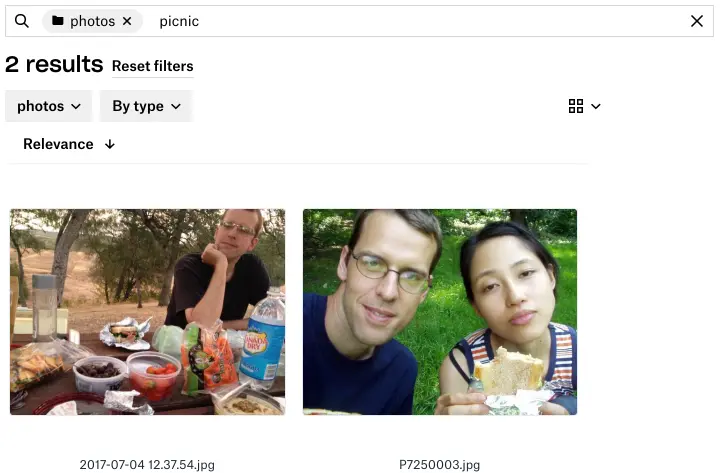
Image content search results for “picnic”
The core challenge is defining a relevance function that takes a text query q and an image j, and returns a score s indicating how well they match. When a user searches, the system evaluates this function across all their images and returns those scoring above a threshold, ranked by score. Building that function relies on two mature machine learning techniques: image classification and word vectors.
From pixels to categories
An image classifier reads an image and outputs a scored list of categories. Categories can cover specific objects like tree or person, scene-level descriptors like outdoors or wedding, or image characteristics such as black-and-white or close-up. Higher scores mean the classifier is more confident the category applies.
Convolutional neural networks have driven rapid progress in this area since Krizhevsky et al's 2012 ImageNet breakthrough. With improved architectures, larger training datasets like Open Images or ImageNet, and accessible libraries like TensorFlow and PyTorch, classifiers today recognize thousands of categories reliably.
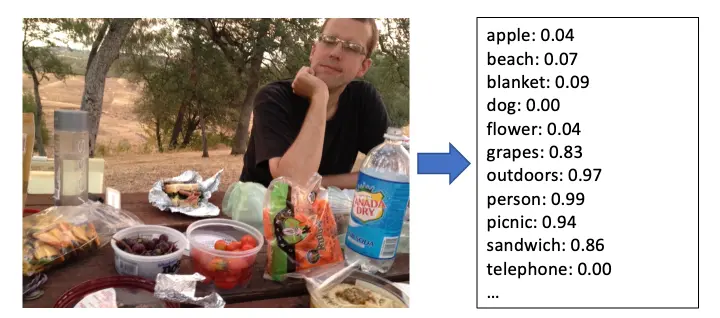
Image classifier outputs for a typical unstaged photo
Classification alone doesn't enable search, however. A user searching for shore probably won't type the classifier's exact category name, beach. Similarly, someone looking for apple might query fruit or granny smith. Building a manual dictionary of synonyms and hypernyms for every category — across multiple languages — quickly becomes unmanageable.
Mapping words into category space
The solution is to treat both queries and images as vectors in a shared space. The classifier's output for an image is itself a vector jc in a C-dimensional category space, where C is the number of recognized categories (several thousand). If we can represent the query in that same space, the distance between the two vectors becomes a natural relevance measure.
Word vectors, introduced in Mikolov et al's 2013 word2vec paper, map words to points in a low-dimensional space such that semantically similar words land close together. A query word's vector exists in this d-dimensional word space, not in category space, but we can project it over using the category names:
- Look up the normalized
d-dimensional word vectorqwfor the query word. - For each category
i, compute the cosine similarity betweenqwand the normalized word vector of the category name,ciw. Clip negative similarities to zero so scores stay in the range used by the classifier outputs. - Collect these per-category scores into a query vector
qcin category space, mirroring the structure of image classifier vectors.
Step 3 is a single vector-matrix multiplication: qc = qwC, where the matrix C holds category word vectors as columns. The final relevance score for an image is then the cosine similarity between qc and that image's category vector jc. Scoring all images in a collection is likewise expressible as s = qcJ, where each column of J is one image's classifier output.
How the pieces fit
To illustrate: imagine a toy setup where word vectors have three dimensions and the classifier recognizes four categories: apple, beach, blanket, and dog. A user queries shore. Because the word vector for "shore" sits near the vector for "beach," the projection into category space lands with a high weight on the beach category.
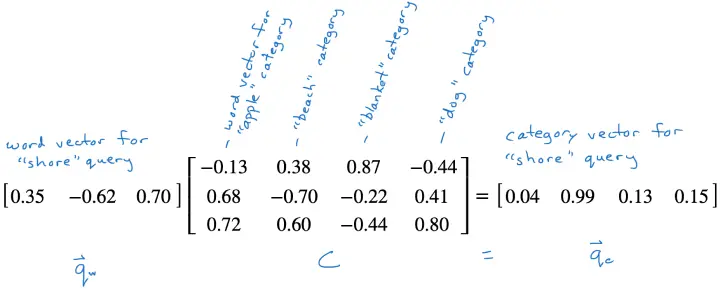
Projecting a query word vector into category space
The production system uses an EfficientNet network trained on the Open Images dataset, producing scores for roughly 8,500 categories. This architecture offers good accuracy at a reasonable computational cost, essential for serving Dropbox's customer base. Training and inference run in TensorFlow.
Word vectors come from ConceptNet Numberbatch, which supports multiple languages: words with equivalent meanings in different languages map to similar vectors. That means a French user searching for chien gets results as good as an English user searching for dog, with no explicit translation layer.
Multi-word queries are parsed as an AND of individual terms. A predefined list of compound terms like beach ball can also be treated as a single unit. When a query contains such a term, the system runs an alternate parse and takes the OR of both interpretations — so beach ball becomes (beach AND ball) OR (beach ball), matching an inflatable sphere on the sand as well as a tennis ball lying nearby.
Serving image search at scale
Materializing a full similarity matrix — where rows are users’ images and columns are classifier output categories — is not practical for search. A user with access to millions of images and a classifier producing thousands of dimensions would need a matrix with billions of entries, updated on every add, delete, or edit. That does not scale affordably for hundreds of millions of users.
Instead, Dropbox approximates the approach on its Nautilus search engine. Nautilus maintains a forward index mapping each file to metadata and full text, plus an inverted index mapping each word to a posting list of files containing that word. A text query for white wine looks up both words in the inverted index, finds documents containing both, then fetches those documents from the forward index for ranking and filtering.
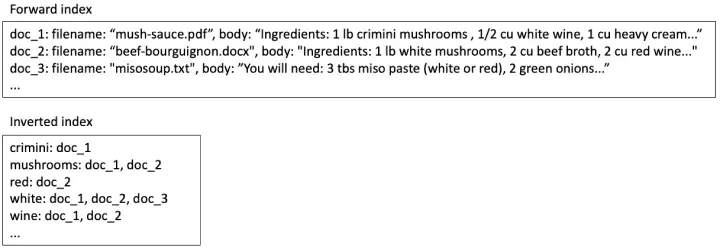
Search index contents for text-based search
Image search reuses that machinery. The forward index stores each image’s category-space vector jc, and the inverted index keeps, for each category, a posting list of images with positive scores in that category.
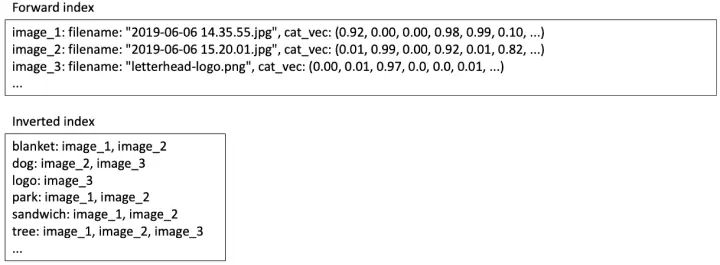
Search index contents for image content search
When a user searches for picnic, the system:
- Looks up the word vector
qwfor picnic and multiplies by the category-space projection matrixC(fixed across all users, so it can live in memory) to getqc. - Fetches the posting list for every category with a nonzero entry in
qc. The union of those lists is the candidate result set. - For each candidate, reads the category vector
jcfrom the forward index and computes the relevance scores = qcjc. Results above a threshold are returned, ranked by score.
Making the index tractable
A dense implementation is expensive on both storage and latency. With 10,000 categories, storing full classifier score vectors per image in the forward index costs 40 KB per image (four-byte floats), and since classifier scores are rarely exactly zero, each image lands in nearly all 10,000 posting lists, adding another 40 KB for four-byte integer IDs. That is roughly 80 KB of index per image — often more than the image file itself.
Query time suffers too. Roughly half of query–category match scores are positive, so the system would read about 5,000 posting lists per query, versus about ten for a text query.
The fix exploits the fact that both qc and jc are mostly near-zero values contributing little to the final score. Zeroing out all but the largest entries yields a large efficiency gain without quality loss: experiments show that keeping the top 10 entries of qc and top 50 entries of jc is sufficient. The savings are substantial:
- Forward index entries become sparse vectors with 50 nonzero entries instead of 10,000-dimensional dense ones. Storing 50 positions as two-byte integers plus 50 values as four-byte floats costs about 300 bytes.
- Inverted index posting lists shrink to 50 per image instead of 10,000, about 200 bytes, bringing total index storage per image to roughly 500 bytes versus 80 KB.
- Query processing only touches 10 posting lists — the top nonzero entries of
qc— matching the work of a typical text query and producing a smaller result set to score.
With these optimizations, indexing and storage costs are reasonable and query latency is comparable to text search, so text and image queries can run in parallel without adding user-visible delay.
Deployment and what is next
Image content search is enabled for all Professional and Business users. It is combined with OCR-based search for document images and full-text search for text files, covering most of those users’ content.
Video search remains a research problem — techniques for locating a single frame within a clip or indexing entire videos by adapting still-image methods are still emerging. But the step from text-only search to image content search is recent; making video search practical follows the same trajectory.


