

Building a Full-Featured Learning Platform
For over half of 2021, I worked on a complete rewrite of kentcdodds.com. You're reading this on the rewrite. But this post isn't about the features — dark mode, user accounts, or the Call Kent Podcast — it's about the technology behind the experience.
If you haven't already, read the higher-level overview of what this site can do for your learning in Introducing the new kentcdodds.com.
I've migrated from Postgres/Redis to SQLite. Read about that in the post I Migrated from a Postgres Cluster to Distributed SQLite with LiteFS.
Scale and Scope
This isn't a simple developer blogfolio. If it were, I'd agree the tech choices below could be labeled over-engineering. But the goal was to build an experience where every user gets content unique to them — that requires thoughtful architecture. What this site does could not be done with WordPress and a CDN.
Beginners looking to build a personal site won't find that guide here. For a simple site, I'd still use Remix.run, running on Netlify serverless functions with markdown content — Remix has built-in support for that, and it would be drastically simpler.
As of October 2021, here are the project stats via cloc:
$ npx cloc ./app ./types ./tests ./styles ./mocks ./cypress ./prisma ./.github
     266 text files.
     257 unique files.
      15 files ignored.

github.com/AlDanial/cloc v 1.90  T=0.16 s (1601.9 files/s, 194240.7 lines/s)
-------------------------------------------------------------------------------
Language                     files          blank        comment           code
-------------------------------------------------------------------------------
TypeScript                     219           2020            583          21582
CSS                             10            198            301           4705
JSON                             7              0              0            609
YAML                             2             43             13            232
SQL                              7             20             25             52
JavaScript                       4              2              3             42
Markdown                         1              0              0              2
TOML                             1              0              2              1
-------------------------------------------------------------------------------
SUM:                           251           2283            927          27225
-------------------------------------------------------------------------------
Content volume, by word count:
$ find ./content -type f | xargs wc -w | tail -1
  280801 total
That exceeds the first three Harry Potter books combined. The four seasons of the Chats with Kent Podcast total ~35 hours of content, plus the ever-growing 3 hours of Call Kent Podcast — also more than the audiobooks, unless you listen at 3x like me.
27k lines of code isn't comparable to a multi-team enterprise project, but it's far beyond a blogfolio. This is a full-stack web app with a database, cache, user accounts, and more — quite possibly the largest Remix application in existence right now.
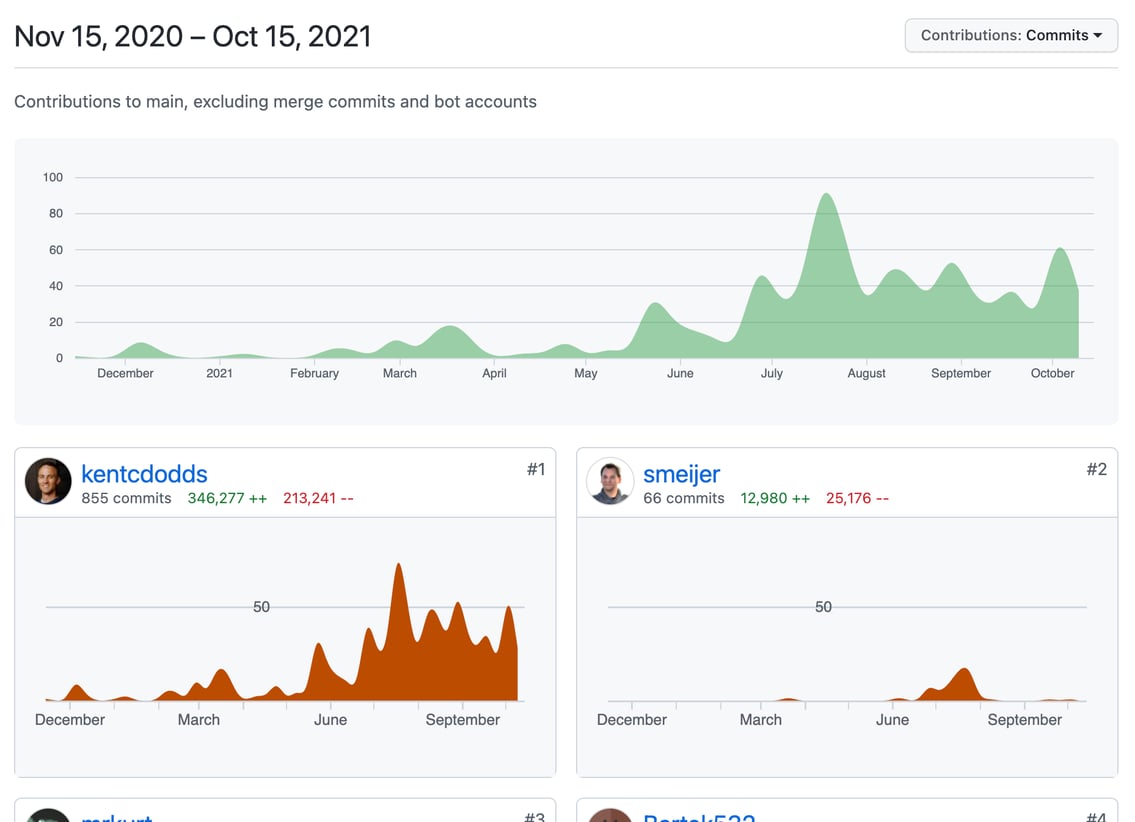
The first commit was in November 2020. Most development happened in the last 4–5 months, totaling ~945 commits. I was the primary contributor and made all architecture decisions, but you can see the credits page for the full contributor list.
Core Technologies and Services
The primary libraries and frameworks, in no particular order:
- React: UI layer
- Remix: Client/server framework and routing
- TypeScript: Typed JavaScript — necessary for maintainable projects
- XState: State machine for complex component state
- Prisma: ORM with strong migrations and TypeScript client
- Express: Node server framework
- Cypress: E2E testing
- Jest: Unit/component testing
- Testing Library: DOM testing utilities
- MSW: HTTP mocking in browser and Node
- Tailwind CSS: Utility-first styling
- Postcss: CSS processing (autoprefixer and Tailwind)
- Reach UI: Accessible UI components
- ESBuild: JavaScript bundler (used by Remix and mdx-bundler)
- mdx-bundler: MDX compilation for blog content
- Octokit: GitHub API integration
- Framer Motion: Animation library
- Unified: Markdown/HTML processing pipeline
- Postgres: Relational database
- Redis: In-memory key/value store
And the infrastructure services powering the site:
- Fly.io: Hosting platform
- GitHub Actions: CI/CD pipeline
- Sentry: Error reporting
- Cloudinary: Image hosting and transformation
- Fathom: Privacy-focused analytics
- Metronome: Remix metrics (deprecated service)
Deployment: Two Actions, No Full Rebuilds
GitHub Actions handles every push to main with two workflows. A Discord webhook keeps a channel updated on each success or failure.
The first action, "🥬 Refresh Content," solves a problem from the previous Gatsby-based version of the site: content edits forced a 10–25 minute full rebuild. With server-side rendering, the server can pull content from GitHub's API, but compiling MDX on every request would be too slow. A Redis cache solves that, and this action handles cache invalidation.
The action compares the current commit against the last refresh (stored in Redis and exposed via a server endpoint). If changed files live under ./content, the action sends an authenticated POST to the server listing those files. The server then fetches them from GitHub, recompiles the MDX, and updates Redis. Fly.io propagates the cache update to other regions automatically, cutting what used to be a 10–25 minute wait down to about 8 seconds.
The second action, "🚀 Deploy," skips work entirely for content-only changes. For deployable changes, it runs five steps in parallel: ESLint, TypeScript type checking, Jest unit tests, Cypress end-to-end tests, and a Docker image build. The Cypress suite is split across three containers. Currently, Cypress failures don't block deployment—the pipeline reports them but proceeds, prioritizing deploy speed over catching a rare broken build.
After linting, type checks, tests, and the build pass, the Fly CLI deploys the Docker container. Fly starts it in the configured regions (Dallas, Santiago, Sydney, Hong Kong, Chennai, and Amsterdam), switches traffic over, and rolls back if any region fails to start. This step also runs Prisma migrations against the Dallas Postgres instance, and Fly propagates schema changes to other regions.
Multi-Region Data Without Multi-Region Writes
Fly.io's appeal is colocating both the Node server and its data (Postgres and Redis) across regions. A user in Berlin hits the Amsterdam server, which reads from Amsterdam's Postgres and Redis—fast reads for the majority of traffic.
But multi-region consistency is a real constraint. All databases contain the same data, but only one region (Dallas) accepts writes. Every server instance makes a read connection to the nearest region and a separate write connection to the primary. When a write commits in Dallas, Fly propagates it quickly to other regions. This design also avoids vendor lock-in; the whole stack runs as Docker containers, so it could move to any Docker-capable host.
Replaying Writes to the Primary Region
The read/write split creates a subtle problem: a user who writes to Dallas and then immediately reads from Amsterdam may fetch stale data before Fly finishes propagating the update. This is most likely with large payloads, like submitting a podcast recording.
One fix is forcing post-write reads to the primary in code, which adds complexity. Fly offers a simpler mechanism: return a fly-replay: REGION=dfw header. Fly intercepts the response, never sends it to the user, and replays the entire request against Dallas, where both read and write connections are local. A small Express middleware replays all non-GET requests this way. It's slower for distant users, but writes are rare, so the trade-off is acceptable.
Offline Development With MSW
Local development depends on Postgres and Redis in Docker plus a long list of third-party services: GitHub, Twitter, Tito, Transistor, S3, Discord, Kit, Simplecast, Mailgun, Cloudinary, Gravatar, MeetChopra, and oEmbed. Working offline with all of those is impossible—unless you mock them.
MSW intercepts HTTP requests at the network level, so application code never changes. All third-party requests happen in Remix loaders on the server, so MSW runs only in the Node process. The server starts normally, and with mocks enabled it just requires the ./mocks directory before booting:
node .With mocks:
node --require ./mocks .Most mocks use faker.js to generate type-conforming random data. The GitHub mock is an exception: since development happens inside the very repository the mock would fetch, it reads the filesystem and returns actual content. This makes local content work straightforward—the app makes ordinary network requests, MSW answers from disk, and a local Redis cache plus Remix's file-change reloading keep the page fresh.
The same mock setup powers the E2E tests. Running them against real APIs is as simple as omitting the --require ./mocks flag.
Redis behind an LRU wrapper
The site leans on Redis for far more than content. Third-party API responses and several Postgres query results are cached there — the blog executes around 30 queries per page, which is fine but not free. Redis turns a 350ms operation into a 5ms one, but invalidation gets complicated when you have dozens of cached values.
Some values don't warrant Redis at all. Short-lived pieces like Postgres query results live in an in-memory LRU cache, using the lru-cache module to keep memory bounded. Rather than juggling two distinct caching layers and all the invalidation logic by hand, a custom abstraction wraps both with a single API and worth examining on its own.
type CacheMetadata = {
	createdTime: number
	maxAge: number | null
}
// it's the value/null/undefined or a promise that resolves to that
type VNUP<Value> = Value | null | undefined | Promise<Value | null | undefined>

async function cachified<
	Value,
	Cache extends {
		name: string
		get: (key: string) => VNUP<{
			metadata: CacheMetadata
			value: Value
		}>
		set: (
			key: string,
			value: {
				metadata: CacheMetadata
				value: Value
			},
		) => unknown | Promise<unknown>
		del: (key: string) => unknown | Promise<unknown>
	},
>(options: {
	key: string
	cache: Cache
	getFreshValue: () => Promise<Value>
	checkValue?: (value: Value) => boolean
	forceFresh?: boolean | string
	request?: Request
	fallbackToCache?: boolean
	timings?: Timings
	timingType?: string
	maxAge?: number
}): Promise<Value> {
	// do the stuff...
}

// here's an example of the cachified credits.yml that powers the /credits page:
async function getPeople({
	request,
	forceFresh,
}: {
	request?: Request
	forceFresh?: boolean | string
}) {
	const allPeople = await cachified({
		cache: redisCache,
		key: 'content:data:credits.yml',
		request,
		forceFresh,
		maxAge: 1000 * 60 * 60 * 24 * 30,
		getFreshValue: async () => {
			const creditsString = await downloadFile('content/data/credits.yml')
			const rawCredits = YAML.parse(creditsString)
			if (!Array.isArray(rawCredits)) {
				console.error('Credits is not an array', rawCredits)
				throw new Error('Credits is not an array.')
			}

			return rawCredits.map(mapPerson).filter(typedBoolean)
		},
		checkValue: (value: unknown) => Array.isArray(value),
	})
	return allPeople
}
The option list is long, but each serves a purpose following the same pattern: check the cache, call getFreshValue on a miss, store the result. The generic types keep things honest — Cache needs only get, set, and del, while CacheMetadata tags along with the value for knowing when to refresh.
keyandcacheselect the value and backing store.getFreshValueruns only on a cache miss and its result is stored underkey.checkValuevalidates anything read from the cache against the current code, avoiding runtime type errors after deployments change the shape of a cached value.forceFreshskips checking the cache whentrue, and when a comma-separated string, it refreshes only matching keys — useful for selectively refreshing caches in nestedcachifiedcalls.requestlets anADMIN-role user pass?freshto force a full refresh; the value of the,-separated list limits that to scope refresh to those keys.fallbackToCacheis for when a forced fresh attempt fails after skipping the cache — the default is to fallback, or throw.timingsandtimingsTypefeed a timing tracker for theServer-Timingheader to spot bottlenecks.maxAgeis the TTL before the cache marks a value stale.
Expiration doesn't slow down the request that discovers it. When a cached value is returned, it's served immediately. Only after the response is sent does a background pass re-check the key and call getFreshValue if the value has aged out. The last user gets a slightly stale value instead of waiting for a refresh — a reasonable trade-off that keeps every request fast.
Image delivery through Cloudinary
All site images live on Cloudinary, which handles resizing and format negotiation at request time, producing only the exact dimensions and encoding the browser needs. The dynamic URL transforms mean no more generating every image variant during the build. On the previous Gatsby setup the full build needed to generate a full set of sizes for each image, requiring a rebuild to fill a persistent cache just to get a deploy through Netlify without timing out.
On this stack, upload a photo and drop the Cloudinary ID in the MDX. The rendered <img> gets srcset and sizes by pointing at the proper transforms.
Beyond in-content images, the social sharing images for posts are rendered by Cloudinary's URL transforms with custom text and fonts loaded server-side. A cheaper transformation is used for lazy posts: the server requests the banner photo at 100px width with a blur transform, converts the result to a base64 string, and stores it with the post's metadata. On the server render, that base64 image is stretched as a placeholder while the full size loads — smoothing the giant upscale with backdrop-filter until the real thing fades in.
Bundling MDX on demand
Moving from Gatsby's build-time MDX compilation to on-demand compilation in Remix needed more than a compiler. MDX posts often import components that need bundle resolution at runtime. The xdm compiler handled the JSX conversion but not imports, so no existing tool worked and mdx-bundler was born. Rollup was tried first, then esbuild, whose speed made the difference for on-the-fly compilation (still cached where practical).
Custom unified plugins handle the boilerplate during compilation: affiliate query parameters for Amazon and egghead links, a full tweet embed instead of the widget script, egghead video embeds, Shiki-based syntax highlighting (adapted from Ryan Florence's work), and inline Cloudinary image optimization.
Postgres via Prisma
Prisma's schema.prisma file does the job of describing the data model. Migrations work through that file; a change means running prisma migrate dev --name <descriptive-name> and letting Prisma write the required SQL. This site ran up to seven migrations while it was under development, including two breaking schema changes, without trouble. Zero-downtime migration planning isn't a Prisma feature, but its approach makes it a lot easier to reason about for someone who hasn't handled raw SQL in years.
Where the abstraction steps up is in the generated query and types. These all connect back to queries written against the same schema:
const users = await prisma.user.findMany({
	select: {
		id: true,
		email: true,
		firstName: true,
	},
})
// This is users type. To be clear, I don't have to write this myself,
// the call above returns this type automatically:
const users: Array<{
	id: string
	email: string
	firstName: string
}>
const users = await prisma.user.findMany({
	select: {
		id: true,
		email: true,
		firstName: true,
		team: true, // <-- just add the field I want
	},
})
TypeScript knows the resulting array shape as well — add team to your include and the users' types grow to match. Nested relations follow without resolver gymnastics:
const users: Array<{
	id: string
	email: string
	firstName: string
	team: Team
}>
const users = await prisma.user.findMany({
	select: {
		id: true,
		email: true,
		firstName: true,
		team: true,
		postReads: {
			select: {
				postSlug: true,
			},
		},
	},
})
const users: Array<{
	firstName: string
	email: string
	id: string
	team: Team
	postReads: Array<{
		postSlug: string
	}>
}>
The last piece that makes this case: type checking travels from Prisma directly into the Remix loader. Changing what a query selects means TypeScript points out any component that expects a field you removed. No ambiguity about what the database returns versus what the page needs. Prisma's generated types turn the database around front end up — a domain now approachable with the same confidence as a React component.
Hand-Rolled Auth Without the Pain
It's tempting to offload authentication to a managed provider, but for this site that would have undercut a core design goal: keeping Node servers and databases geographically close to every user. An auth service would force each request to round-trip to wherever that provider happens to run its region, reintroducing exactly the latency the architecture was built to avoid.
The alternative — building auth myself — turned out to be far less daunting than I expected. Ryan Florence's live streams on implementing authentication in Remix made it clear this wasn't a weeks-long project, and with his outline in hand I had the bulk of it working in a day.
The key decision was using magic links instead of passwords. That eliminates password storage, resets, and change flows entirely. And while some users worry about losing access without a password, your password manager will happily store an account that's just an email address. Magic links are also what most apps lean on implicitly whenever you reset a forgotten password — except here there's no password to lose in the first place, which makes it strictly more secure.
The authentication flow itself is refreshingly simple:
- No database interaction happens until a user actually signs up.
- The sign-up and login paths are identical.
When a user hits an authenticated page, the session check is equally straightforward: read the session ID from the cookie, resolve it to a user ID, fetch the user, and extend the expiration so active visitors rarely re-authenticate. Any failure triggers cleanup and a redirect. Remix's cookie session abstraction handles the mechanics, making the whole thing simpler than the hand-rolled auth I'd written years ago on other projects.
Remix Changes the Calculus
Among every tool in this build, Remix had the biggest effect on both my productivity and the site's performance. A few capabilities stand out:
- Server-client communication is trivial. Because I can filter data in server code before it ever reaches the client, over-fetching disappears — no GraphQL backend or client library needed to solve that problem (though Remix doesn't prevent you from using it).
- Web platform defaults deliver automatic performance. This comes from leaning on the browser's native behavior rather than reinventing it.
- Route-scoped CSS. Styles for one route can't collide with any other route, which made CSS-in-JS unnecessary.
- Server caching becomes a non-problem. Remix handles cache invalidation, including after mutations. Components always assume data is ready, error handling is declarative, and the browser cache is leveraged so even reloads or new tabs are fast.
- No layout component overhead. The routing model removes a whole class of data-loading complications common in other frameworks.
Several of those benefits may sound like they require deep expertise to exploit, but that's exactly the point: they don't. They're inherent to how Remix works. My time goes to building features rather than fighting my framework's limitations.
Conclusion
Building this site was one of the most instructive projects I've taken on. The real payoff is ahead: I'm turning what I learned into detailed posts and workshops so others can apply the same techniques to their own builds.


