
Git Branches: What They Are vs. What You Think They Are
Git branches are a constant source of confusion. A lot of that confusion comes from a mismatch between the mental model most people carry around and the way git actually works under the hood. Let’s unpack the difference.
The “Offshoot” Mental Model
Many people picture a branch the way they’d picture a branch on a tree: an offshoot that grows out from a main trunk. In that picture, a branch like mybranch consists of just the commits that were added after it split off from main.
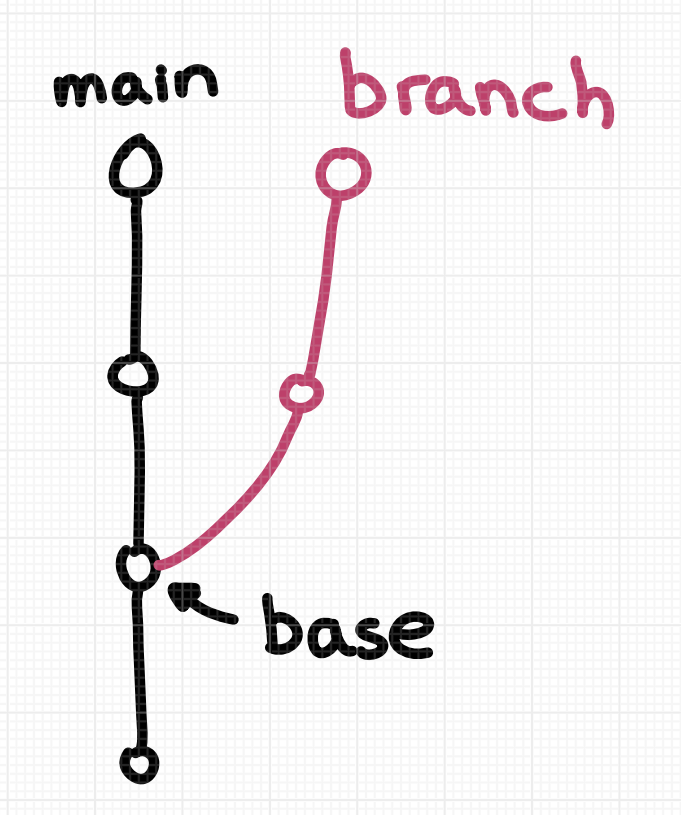
That mental model has two key components:
- The branch contains only its own “new” commits.
- The branch has a parent — the branch it grew out of.
This feels natural, but it doesn’t match git’s actual definition. Git has no concept of a branch’s “parent,” and it doesn’t track which branch a branch was created from.
In Git, a Branch Is the Entire History
When git says a branch has commits on it, it means every commit reachable by walking backward from the branch’s tip. A branch isn’t just the commits “added on top” of another branch — it’s the full chain of history, including all commits shared with other branches.
Take an example repository set up exactly like the diagram above. main has four commits:
$ git log --oneline main
70f727a d
f654888 c
3997a46 b
a74606f a
And mybranch also has four commits. The bottom two are shared between both branches:
$ git log --oneline mybranch
13cb960 y
9554dab x
3997a46 b
a74606f a
So mybranch doesn’t just contain the two commits that distinguish it from main. It contains all four commits in its lineage. You can see this for yourself by asking git to draw the full history:
$ git log --all --oneline --graph
* 70f727a (HEAD -> main, origin/main) d
* f654888 c
| * 13cb960 (origin/mybranch, mybranch) y
| * 9554dab x
|/
* 3997a46 b
* a74606f a
What Git Actually Stores
Internally, a branch is stored as a tiny text file containing a single commit ID — the latest commit on that branch.
$ cat .git/refs/heads/main
70f727acbe9ea3e3ed3092605721d2eda8ebb3f4
$ cat .git/refs/heads/mybranch
13cb960ad86c78bfa2a85de21cd54818105692bc
This works because every commit contains a pointer to its parent commit, so git can walk the chain from that one ID back through the entire history. What’s missing is any linkage between branches. There is no stored information saying mybranch is an offshoot of main.
When the Intuitive Model Is Right
Before dismissing that intuitive “offshoot” picture as wrong, it’s worth noting it aligns perfectly with how several everyday workflows operate.
Rebases Use the Intuitive Notion
When you rebase mybranch onto main, git takes exactly the commits you’d expect — the ones in the “offshoot” portion of the diagram — and replays them onto the tip of main:
$ git switch mybranch
$ git rebase main
$ git log --oneline mybranch
952fa64 (HEAD -> mybranch) y
7d50681 x
70f727a (origin/main, main) d
f654888 c
3997a46 b
a74606f a
The operation creates new commits whose content comes from the original offshoot commits. Your intuition about which commits get copied is exactly right. But because git doesn’t know mybranch is an offshoot of main, you have to tell it explicitly with something like git rebase main.
Merges Need a Base, Too
Merging doesn’t copy commits, but it does need to find a common ancestor — a base commit where the two branches diverged. Git determines this with git merge-base:
$ git switch mybranch
$ git reset --hard 13cb960  # undo the rebase
$ git merge-base main mybranch
3997a466c50d2618f10d435d36ef12d5c6f62f57
The result is precisely the commit where your intuitive diagram would put the fork in the road.
Pull Requests Follow the Same Pattern
When you open a GitHub pull request to merge mybranch into main, it shows you exactly the offshoot commits — x and y — matching your mental model:
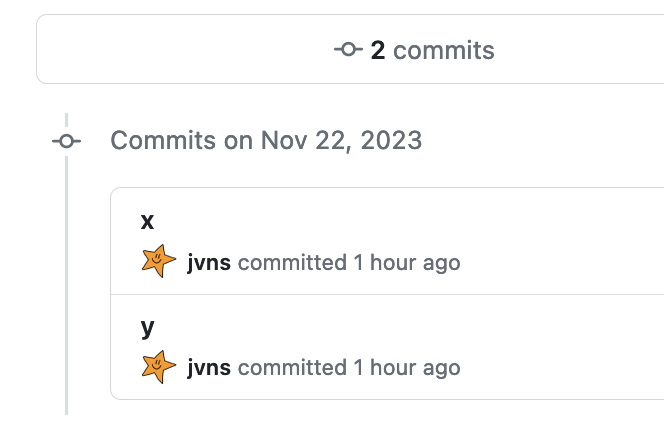
The same is true on other platforms like GitLab for merge requests.
Where the Model Breaks Down
The intuitive model works fine for answering “which commits are new here?” But it falls apart when you expect git to treat branches with hierarchy — because it doesn’t.
No Distinction Between Trunk and Offshoot
To a human, main and a short-lived feature branch are fundamentally different things. You’d rebase mybranch onto main, but never the other way around. You’d rewrite history on a feature branch freely, but you’d be far more cautious on a shared trunk branch.
Git doesn’t know any of this. The concept of a “trunk” versus an “offshoot” branch exists only in your head. As far as git is concerned, branches are peers.
Git Lets You Rebase “Backwards”
Because git stores no hierarchy, it will happily allow either direction:
$ git checkout main
$ git rebase mybranch
or
$ git checkout mybranch
$ git rebase main
Even though rebasing mybranch onto main is standard and rebasing main onto mybranch is almost always a mistake, git offers no guidance. Both commands are equally valid to it.
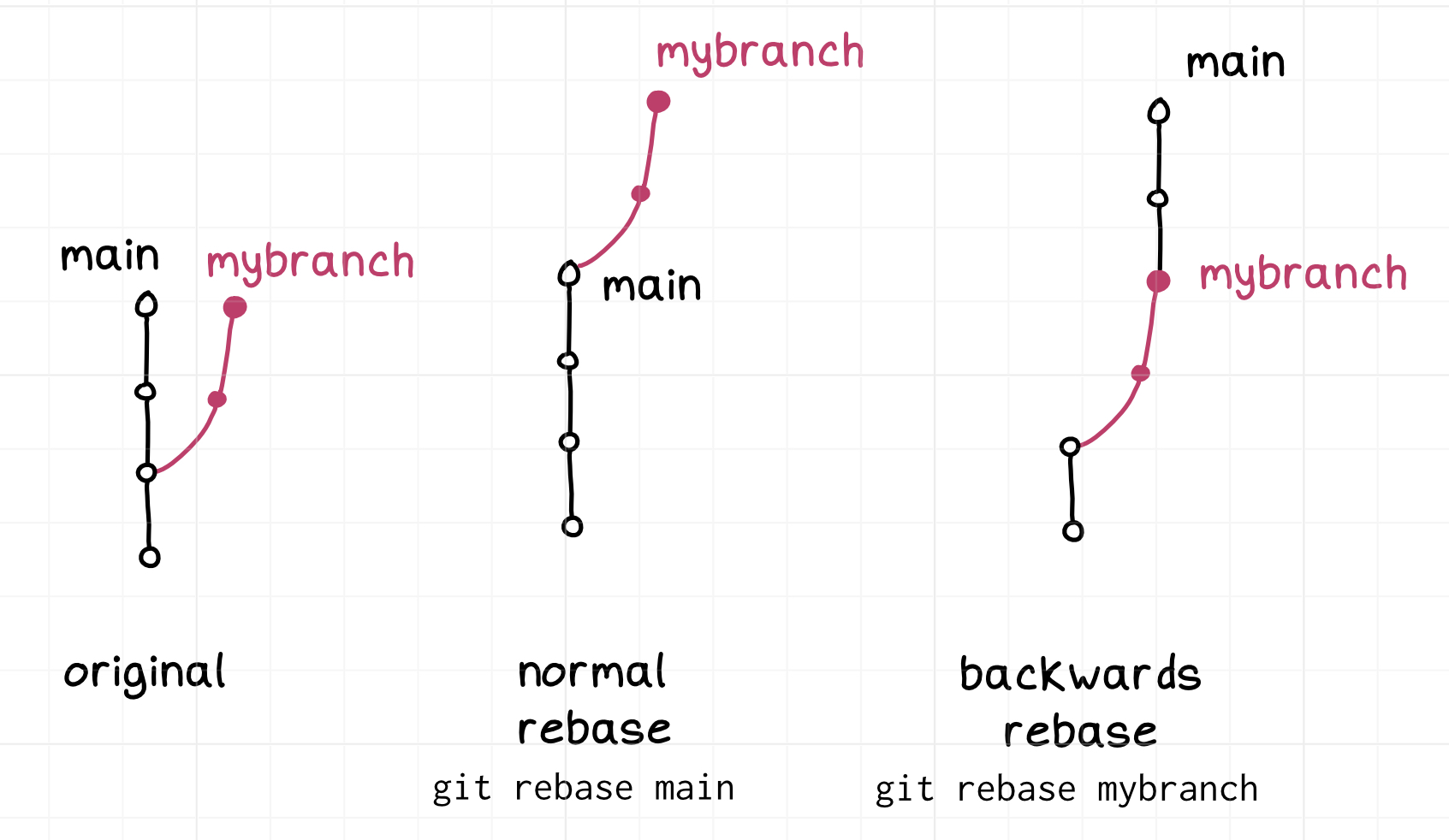
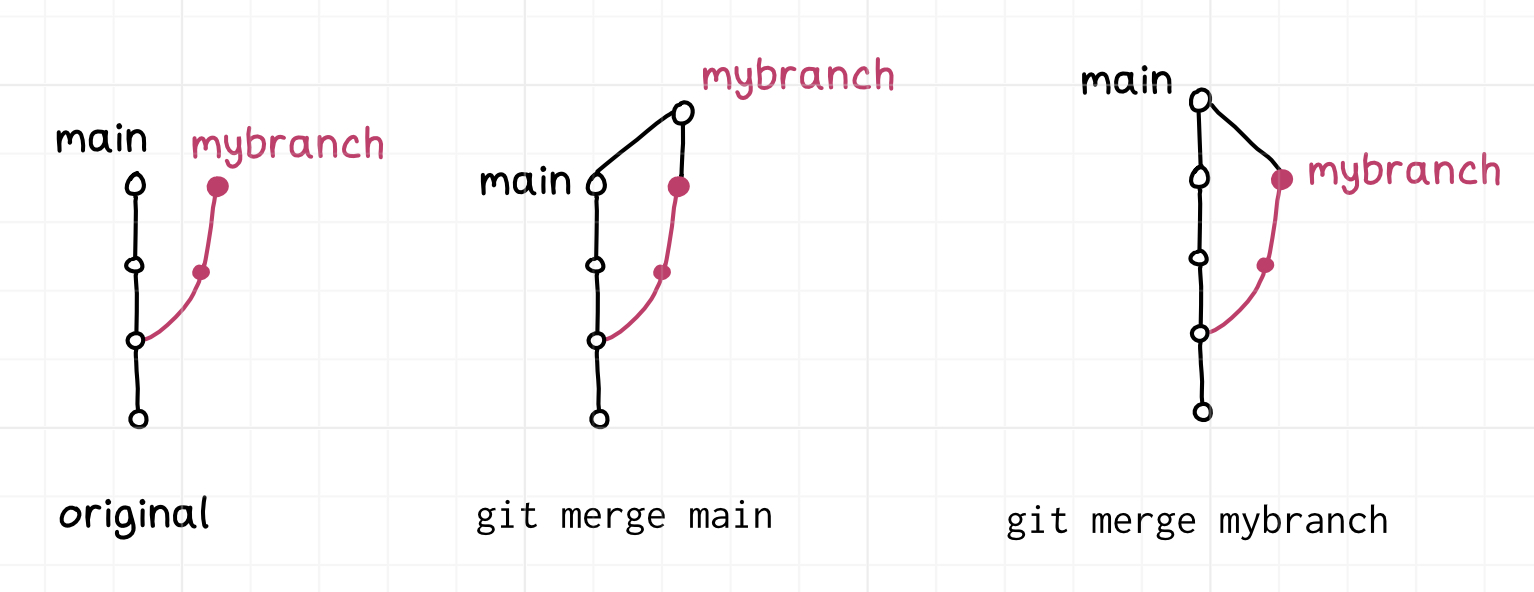
Things are a bit more forgiving with merges. Merging mybranch into main versus main into mybranch are both useful operations — they just produce different results in different places:
Why “Main Is Not Special” Confuses People
You’ll often hear the claim that the main branch is “not special.” In practice, main is usually very special — it’s the trunk that everyone treats as canonical. What people mean when they say it’s not special is that git itself has no notion that main differs from any other branch. Any hierarchy between branches must be re-established each time you run a command like git merge or git rebase. If you get the direction wrong, git won’t warn you — it will just do what you asked.
Confusing Syntax for a Simple Question
What if you want to see just the “offshoot” commits — the ones unique to your branch? Git offers syntax for that, but it’s easy to mix up. To view the two offshoot commits with git log, you use two dots:
$ git switch mybranch
$ git log main..mybranch --oneline
13cb960 (HEAD -> mybranch, origin/mybranch) y
9554dab x
But to see the combined diff of those same commits, you need three dots:
$ git diff main...mybranch
The difference: two dots (..) shows commits reachable from one branch but not the other, while three dots (...) computes the diff from the merge base to the branch tip. It’s a subtle distinction that’s easy to forget.
Where a Branch Is Actually Special
GitHub does give one branch special status: the repository’s default branch, which is what HEAD points to. That branch is special in concrete ways:
- It’s what gets checked out when you clone the repository.
- It’s the default destination for pull requests.
- GitHub encourages protecting it from force-pushes.
These roles are product features, not git concepts — but they reinforce the idea that branches live in a hierarchy, even if git doesn’t model one.


